
Sportiq
БесплатноНе проверенMCP tools for FIFA World Cup 2026 football, Formula 1, and IPL cricket — sims, strategy, fantasy.

Описание
MCP tools for FIFA World Cup 2026 football, Formula 1, and IPL cricket — sims, strategy, fantasy.
README
CI PyPI Python License: MIT MCP Registry
MCP server that turns any AI assistant into a sports analyst across FIFA World Cup 2026 football, Formula 1, and IPL cricket — 44 AI-callable tools.
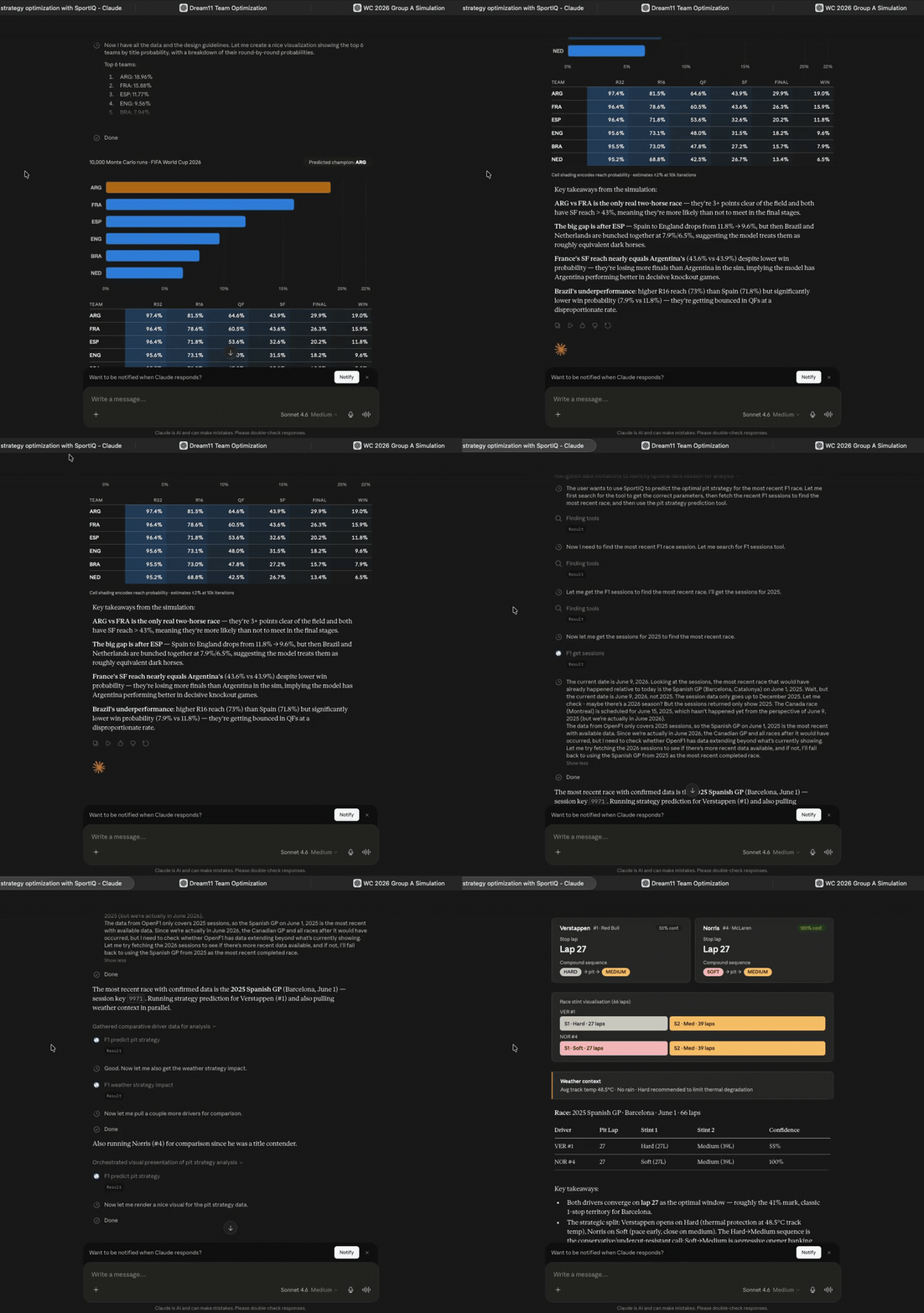
SportIQ running live in Claude — Monte Carlo World Cup bracket, F1 pit strategy, and Dream11 optimisation, each a visible MCP tool call. (1-min demo)


Every tool is free to use — the three flagships and everything in the INTEL columns below have no SportIQ paywall or account requirement. Live/provider-backed data still depends on the keys and quota available to the host or local operator. If SportIQ is useful to you, sponsor the project to support ongoing development.
What it does
Raw-data tools are table stakes; the intelligence layer is the product. Three flagships:
football_simulate_bracket— Monte Carlo with Poisson xG over the 48-team WC 2026 format → per-team round + title probabilities.f1_predict_pit_strategy— tyre-degradation model on OpenF1 telemetry → optimal stop laps + compound sequence.cricket_build_dream11_team— PuLP constraint solver → a valid fantasy XI under credit/role/team caps.
Tools (44 total)
| Sport | RAW data | INTEL |
|---|---|---|
| Football (WC 2026) | groups, fixtures, standings, squad, match stats, top scorers, odds | xg_model, match_predictor, simulate_group, simulate_bracket, knockout_path, form_trends, find_value_bets, build_accumulator |
| F1 | sessions, drivers, lap_times, standings, race_results, weather | tyre_degradation, undercut_window, head_to_head_pace, weather_strategy_impact, qualifying_analysis, race_pace_compare, predict_pit_strategy |
| Cricket (IPL) | live_matches, scorecard, points_table, schedule, squad, live_odds | build_dream11_team, captain_recommendation, differential_picks, player_form_index, pitch_report, head_to_head, player_matchup, find_value_bets |
| Cross-sport | — | build_accumulator |
Plus sportiq_health (cache backend + per-adapter status and remaining API quota).
Data sources (per chain, with keyless fallbacks): football → API-Football → football-data.org → bundled wc2026.json. F1 → OpenF1 → Jolpica → fastf1. Cricket → CricAPI + static seeds (NDTV/Cricbuzz scrapers opt-in).
Where it works
Anywhere that speaks MCP — Claude (Desktop + web), ChatGPT, Cursor, and any MCP client. Two ways to run it:
- Hosted (no install): add a custom connector — works in claude.ai web & ChatGPT.
- Local (
uvx/Desktop config/IDEs): install from PyPI.
How it works
Hosted — no install
A public instance runs on Google Cloud Run. Add this as a custom connector with No authentication:
https://sportiq-mcp-329580761892.us-central1.run.app/mcp
- claude.ai (web): Settings → Connectors → Add custom connector → paste URL → Save.
- ChatGPT: Settings → Apps & Connectors → enable Developer mode → Create app (MCP) → paste URL → No authentication → Connect.
All 44 tools register on the plain URL. Whether a live/provider-backed call can return current data depends on the credentials, quota, and fallbacks available to the hosted operator; the repository does not claim the public instance's current key inventory.
| Mode | What is available |
|---|---|
| Hosted | All tools register; live/provider-backed results depend on the host's current keys, quota, and fallbacks. |
| Local, keyless | All tools register; bundled seeds and keyless sources work where supported, while credential-only live sources are skipped. |
| Local, BYO keys | The same tools can use the configured providers for fresher/live data, subject to provider quota. |
The hosted HTTP boundary rejects request bodies over 1 MiB, limits traffic to 60 requests per client and 300 total requests per minute, and permits at most two concurrent expensive model/solver calls. These counters are per process, so the documented Cloud Run configuration requires one maximum instance.
First request after idle takes ~5–10s (the server scales to zero, so it wakes up); fast after that.
Local install
uvx sportiq-mcp                       # from PyPI
# or from source:
git clone https://github.com/Ninjabeam20/SportIQ-MCP && cd sportiq-mcp
uv sync --extra dev --extra analytics && uv run python -m sportiq.server
Claude Desktop config:
{
  "mcpServers": {
    "sportiq": {
      "command": "uvx",
      "args": ["sportiq-mcp"],
      "env": {
        "CRICAPI_KEY": "your_cricapi_key",
        "APIFOOTBALL_KEY": "your_apifootball_key",
        "THEODDS_KEY": "your_theodds_key"
      }
    }
  }
}
The server boots and registers every tool without keys. Seed/keyless fallbacks and the intelligence layer work where their required inputs are available; provider keys add fresher/live sources and quota rather than unlocking a separate paid tool tier.
| Var | Unlocks | Free tier |
|---|---|---|
APIFOOTBALL_KEY |
Live football fixtures / standings / squads / scorers | 100 req/day |
THEODDS_KEY |
Market odds (football + cricket probability tools) | 500 req/month |
FOOTBALLDATA_KEY |
football-data.org fallback (token optional) | 10 req/min |
CRICAPI_KEY |
Live cricket scores / scorecards / schedules / squads | 100 req/day |
RAPIDAPI_KEY |
Paid Cricbuzz fallback (player career stats) | plan-dependent |
SPORTIQ_ENABLE_NDTV / SPORTIQ_ENABLE_CRICBUZZ |
Opt-in cricket scrapers (off by default — ToS) | — |
REDIS_URL |
Shared cache backend (defaults to local diskcache) | — |
SPORTIQ_TRANSPORT |
stdio (default, local) or http (remote/Cloud Run) |
— |
macOS arm64: the Dream11 solver needs CBC —
brew install cbc(the binary bundled with PuLP is x86-only).
Self-host
Set SPORTIQ_TRANSPORT=http and the server serves the MCP endpoint at /mcp (binds 0.0.0.0:$PORT). A ready-to-build Dockerfile is included; see cloud.md for a Google Cloud Run deploy (free tier). With your own keys set, the live-score and odds tools come online too.
Support SportIQ
Every tool is free and open source — the raw-data tools, sportiq_health, and the full intelligence layer (the three flagships + everything in the INTEL columns). SportIQ has no paid feature gate; provider-backed data can still require operator credentials and quota.
If SportIQ saves you time, sponsor the project at github.com/sponsors/Ninjabeam20 to help fund hosting and ongoing development. It's a voluntary donation — you get the same fully-unlocked server either way.
Is it safe?
- Open source, MIT licensed, published on PyPI with signed build attestations — read the code before you connect it.
- Read-only. Tools only fetch and analyse public sports data — no write, delete, payment, email, or file-system tools.
- Limited operational telemetry. HTTP mode logs client software name/version, User-Agent, tool name, outcome, latency, selected source, and staleness; Cloud Run may also retain platform network/request metadata. Local stdio emits local logs but sends no SportIQ-host telemetry.
- Hosted abuse controls. HTTP POST bodies are capped at 1 MiB; requests are limited to 60/client/minute and 300/process/minute; the five expensive simulation/strategy/solver tools share a concurrency limit of two.
- Credential-aware. A hosted operator may configure provider credentials; the repository does not claim the public instance's current key inventory. Keys are redacted from application logs and envelopes.
- Historical automated AI code-review results are documented in SECURITY.md; they are not a current third-party certification.
Every response carries a meta.is_stale flag + data age, so the AI tells you how fresh each answer is. Live scores refresh ~30s, F1 telemetry ~10s, standings ~10min, fixtures ~6h.
Develop
uv sync --extra dev --extra analytics   # always both extras: dev = pytest/ruff, analytics = the dashboard's GCP libs
uv run pytest
uv run ruff check .
npx @modelcontextprotocol/inspector uv run python -m sportiq.server
Analytics dashboard (read-only local usage view — Cloud Run / PyPI / GitHub). Same setup as above, then just run it:
uv run python scripts/dashboard.py # writes dashboard.html and opens it; GITHUB_TOKEN optional (Sponsors panel)
Note: the dashboard's HTML template (
scripts/dashboard_template.html) is currently local-only maintainer tooling, so a fresh clone can't render it yet.
Repository layout: src/ is the MCP server (published to PyPI, deployed to Cloud Run); website/ is the Next.js marketing site deployed to Vercel. The two ship independently — website/ is excluded from the Python package and the backend container.
See CLAUDE.md for collaboration rules and docs/index.md for the wiki entry point.
Data sources & credits
SportIQ derives some model constants offline from open datasets. Raw datasets are never shipped or fetched at runtime — only small derived seeds (circuits.json, venues.json, elo_seed.json) are committed.
- F1DB (CC BY 4.0) — per-circuit stop counts + lap lengths; pit loss measured offline from OpenF1 laps.
- Cricsheet — ball-by-ball IPL data → derived venue scoring priors (
venues.json). - martj42 international football results (CC0) — Elo backtesting.
- OpenF1 — keyless live F1 telemetry (runtime source).
- football-data.org — free football data (runtime source).
License & author
Created and maintained by Utkarsh Gupta (@Ninjabeam20). Licensed under the MIT License — © 2026 Utkarsh Gupta. Canonical package: sportiq-mcp on PyPI / io.github.Ninjabeam20/sportiq-mcp in the official MCP registry.
Установить Sportiq в Claude Desktop, Claude Code, Cursor
unyly install sportiq-mcpСтавит в Claude Desktop, Claude Code, Cursor и VS Code — сам разбирается с npx, uvx и сборкой из исходников.
Впервые? Поставь CLI: curl -fsSL https://unyly.org/install | sh
Или настроить вручную
Выполни в терминале:
claude mcp add sportiq-mcp -- uvx sportiq-mcpFAQ
Sportiq MCP бесплатный?
Да, Sportiq MCP бесплатный — установка в пару кликов через Unyly без оплаты.
Нужен ли API-ключ для Sportiq?
Нет, Sportiq работает без API-ключей и переменных окружения.
Sportiq — hosted или self-hosted?
Self-hosted: сервер запускается локально на твоей машине командой из раздела установки.
Как установить Sportiq в Claude Desktop, Claude Code или Cursor?
Открой Sportiq на unyly.org, выбери вкладку своего клиента (Claude Desktop, Claude Code, Cursor) и нажми Install — конфиг сгенерируется автоматически, без правки JSON.
Похожие MCP
GitHub
PRs, issues, code search, CI status
 автор: GitHub
Filesystem
Secure file operations with configurable access controls.
Memory
Knowledge graph-based persistent memory system.
Template MCP Server
A CLI tool to create a new Model Context Protocol server project with TypeScript support, dual transport options, and an extensible structure
 автор: mcpdotdirect
Compare Sportiq with
Не уверен что выбрать?
Найди свой стек за 60 секунд
Автор?
Embed-бейдж для README
Похожее
Все в категории development