
SQL Generative
БесплатноНе проверенEnables natural language querying of PostgreSQL databases under read-only mode, returning results as structured XML.

Описание
Enables natural language querying of PostgreSQL databases under read-only mode, returning results as structured XML.
README
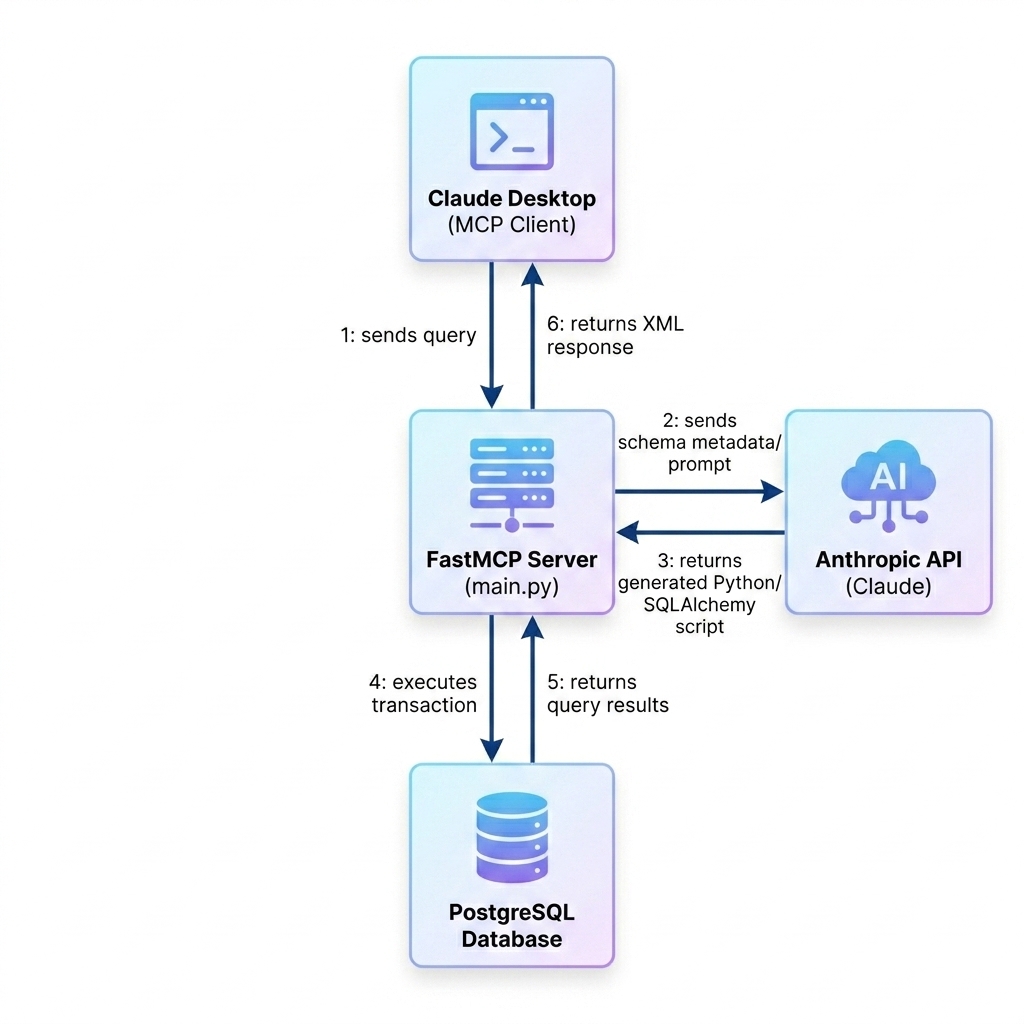
An interactive Model Context Protocol (MCP) server that translates plain English queries into SQLAlchemy operations, queries a PostgreSQL database under strict read-only execution modes, and returns the query results formatted as structured XML.
🌟 Key Features
- Natural Language DB Querying: Translate user queries in plain English to corresponding database results dynamically.
- SQLAlchemy Table Reflection: Reflects database schemas dynamically across multiple namespaces using standard ORM capabilities (no direct
pg_dumpclient tools needed). - Enforced Read-Only Transactions: Database URL connections are injected with query options (
?options=-c%20default_transaction_read_only%3Don) to natively block any modifications (CREATE,UPDATE,DELETE,DROP) at the database engine level. - Dynamic XML Response Formatting: Converts database records into a clean, well-formed XML structure automatically compiled by Claude.
- FastMCP Protocol Integration: Built on top of the standard
fastmcpSDK to run as a local stdio MCP server.
🏗️ Architecture
🛠️ Setup & Installation
Prerequisites
- Python 3.13+
- uv (fast Python package installer and resolver)
- PostgreSQL Server with an active database
1. Project Initialization & Dependencies
Initialize the project environment and install dependencies:
uv sync
2. Environment Configuration
Create a .env file in the root directory and configure the database URL along with your Anthropic API key:
# Database connection for local development (enforced read-only mode via query options)
DATABASE_URL=postgresql://postgres:admin@localhost:5432/expence_db?options=-c%20default_transaction_read_only%3Don

# Anthropic API Key
ANTHROPIC_API_KEY="your-anthropic-api-key-here"
🚀 Running the Server
Start the stdio-based MCP server locally:
uv run python main.py
🔌 Integration with Claude Desktop
To configure Claude Desktop to use this database query tool on Windows, configure your claude_desktop_config.json file.
- Press
Win + R, type%APPDATA%\Claudeand press Enter. - Open
claude_desktop_config.jsonand insert the following server config:
{
  "mcpServers": {
    "db-query-server": {
      "command": "uv",
      "args": [
        "--directory",
        "c:/Projects/generative-tool",
        "run",
        "python",
        "main.py"
      ]
    }
  }
}
- Restart Claude Desktop. You will see the tools icon 🔌 in the chat input area.
📈 Usage Examples
Once connected, you can ask Claude queries like:
- "Show a list of all tables in the database"
- "How many expense entries are recorded for AWS?"
- "Show a list of all rows in table exp_expence_core_t"
The server returns results formatted as well-formed XML:
<data>
  <item>
    <exp_expence_core_id>26</exp_expence_core_id>
    <title>AWS Bill</title>
    <amount>100.00</amount>
  </item>
</data>
Установка SQL Generative
У этого сервера нет опубликованного пакета — он собирается из исходников. Открой репозиторий и следуй инструкции в README.
▸ github.com/Denuwanhh/sql-generative-mcpFAQ
SQL Generative MCP бесплатный?
Да, SQL Generative MCP бесплатный — установка в пару кликов через Unyly без оплаты.
Нужен ли API-ключ для SQL Generative?
Нет, SQL Generative работает без API-ключей и переменных окружения.
SQL Generative — hosted или self-hosted?
Self-hosted: сервер запускается локально на твоей машине командой из раздела установки.
Как установить SQL Generative в Claude Desktop, Claude Code или Cursor?
Открой SQL Generative на unyly.org, выбери вкладку своего клиента (Claude Desktop, Claude Code, Cursor) и нажми Install — конфиг сгенерируется автоматически, без правки JSON.
Похожие MCP
wenb1n-dev/SmartDB_MCP
A universal database MCP server supporting simultaneous connections to multiple databases. It provides tools for database operations, health analysis, SQL optim
 автор: wenb1n-dev
Postgres Server
This server enables interaction with PostgreSQL databases through the Model Context Protocol, optimized for the AWS Bedrock AgentCore Runtime. It provides tools
 автор: madhurprash
Postgres
Query your database in natural language
 автор: Anthropic
PostgreSQL
Read-only database access with schema inspection.
автор: modelcontextprotocolCompare SQL Generative with
Не уверен что выбрать?
Найди свой стек за 60 секунд
Автор?
Embed-бейдж для README
Похожее
Все в категории data