
SSI Stock (Vietnamese Market Data)
БесплатноНе проверенProvides a bridge to the SSI Financial Connector Data API for accessing Vietnamese stock market data, including securities listings, stock information, index co

Описание
Provides a bridge to the SSI Financial Connector Data API for accessing Vietnamese stock market data, including securities listings, stock information, index components, OHLC data, price movements, and foreign trading activities.
README
MseeP.ai Security Assessment Badge
SSI Stock Data MCP


Table of Contents
1. Introduction
SSI Stock Data MCP is a Model Context Protocol (MCP) server for get VietNam stock intraday data. It enables AI assistants and tools to query intraday data using SSI FastConnect API programmatically and securely.
2. Features
- List of stock codes by exchange
- Retrieve detailed information of a stock code
- Retrieve the list of stock codes in an index basket
- Retrieve the list of index codes
- Retrieve the open, high, low, close, volume, and value information of a stock code by each tick data
- Retrieve the open, high, low, close, volume, and value information of a stock code by day
- Retrieve the daily trading results of the composite index
- Retrieve the daily trading information of a stock code
- Docker containerization support
- Support get realtime data via streaming adapter (planning)
- Support order management and trading via MCP (future consideration)
3. Quickstart
3.1. Prerequisites
- Python 3.12+
- uv (for fast dependency management).
- Docker (optional, for containerized deployment).
- Ensure you register for SSI FastConnect service before running this MCP server. You can register at SSI FastConnect to get your consumer ID and secret.
Installing via Smithery
To install SSI Stock MCP Server for Claude Desktop automatically via Smithery:
npx -y @smithery/cli install @archiephan78/ssi-stock-mcp-server --client claude
3.2. Local Run
- Clone the repository:
# Clone the repository
$ git clone https://github.com/archiephan78/ssi-stock-mcp-server.git
- Configure the environment variables
# Set environment variables (see .env.sample)
FC_DATA_URL=https://fc-data.ssi.com.vn/ #optional
FC_DATA_AUTH_TYPE=Bearer #optional
FC_DATA_CONSUMER_ID=your_consumer_id
FC_DATA_CONSUMER_SECRET=your_consumer_secret
- Add the server configuration to your client configuration file. For example, for Claude Desktop:
{
  "mcpServers": {
    "SSIStockMCPServer": {
      "command": "uv",
      "args": ["--directory", "full-path", "run", "ssi-stock-mcp-server"],
      "env": {
        "FC_DATA_CONSUMER_ID": "id",
        "FC_DATA_CONSUMER_SECRET": "id",
        "FC_DATA_URL": "https://fc-data.ssi.com.vn/",
        "FC_DATA_AUTH_TYPE": "Bearer"
      }
    }
  }
}
- Restart Claude Desktop to load new configuration.
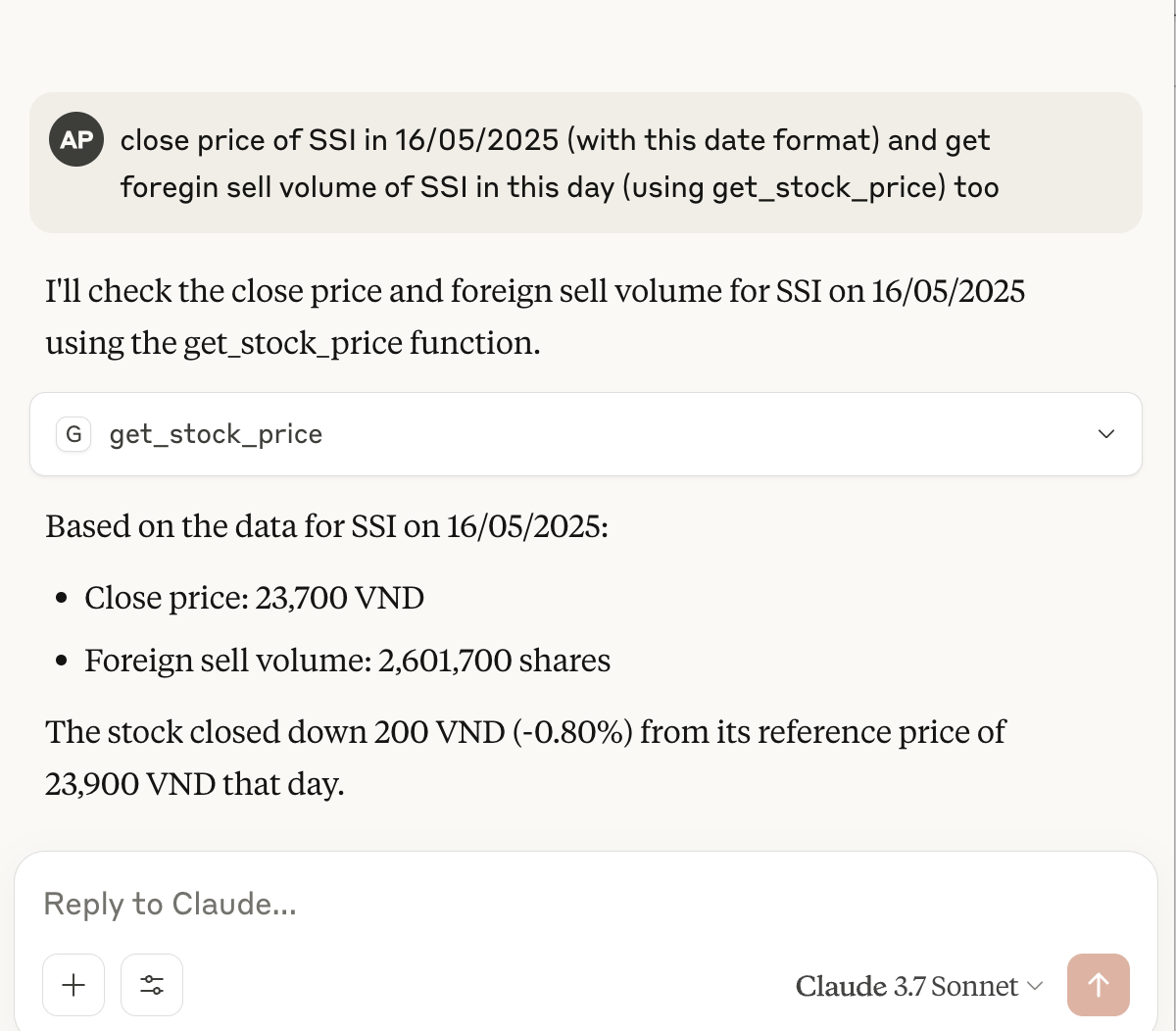
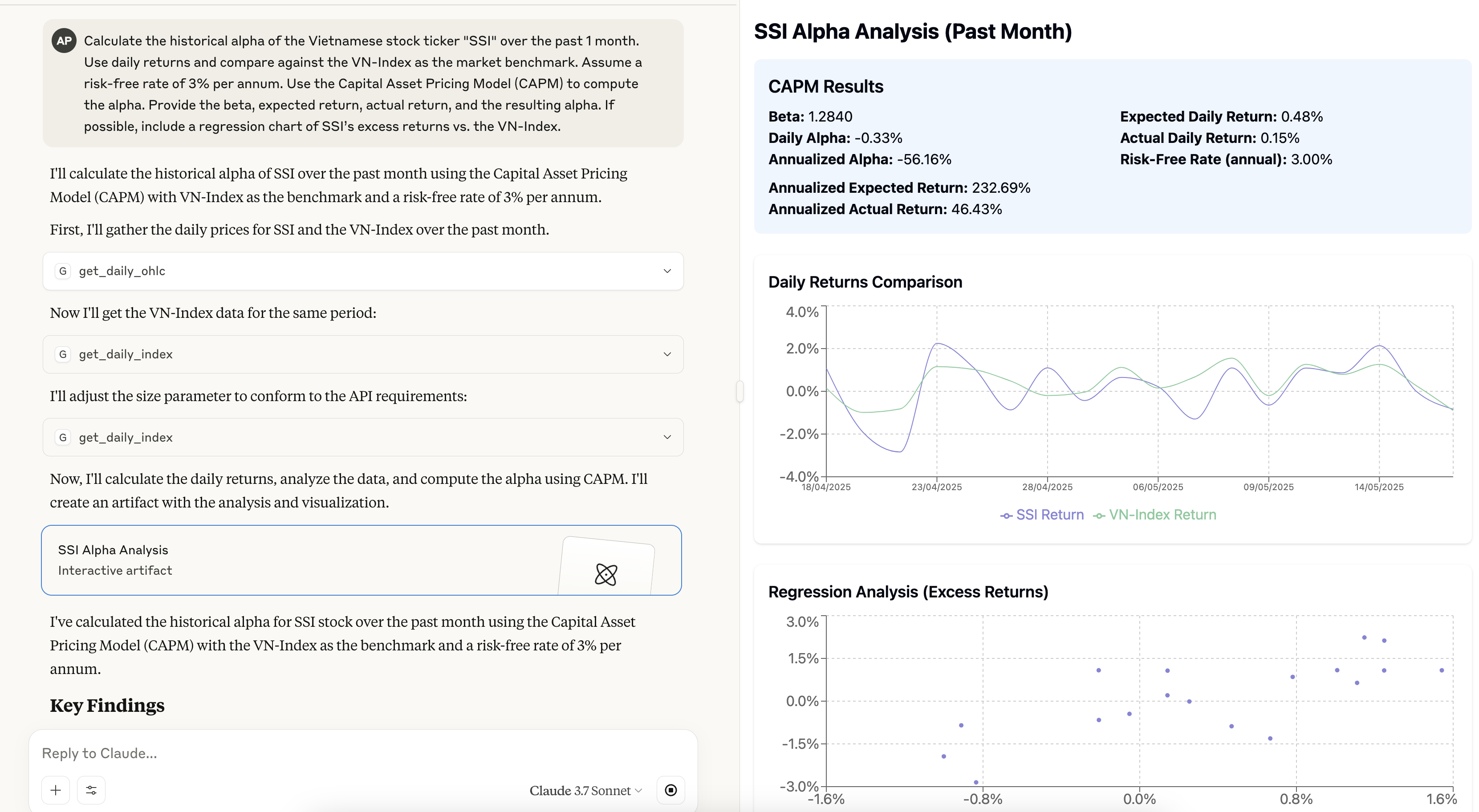
- You can now ask Claude to interact with data using natual language:
- "chỉ số VN30 hôm nay có gì hot không"
- "get volume room ngoại đã bán của SSI hôm nay"
- "so sánh vol của SSI với VND trong ngày hôm nay"
- "total matchvol của SSI trong 1 tuần trở lại đây"
3.3. Docker Run
- Run it with pre-built image (or you can build it yourself):
$ docker run -p 8000:8000
             -e FC_DATA_CONSUMER_ID=id
             -e FC_DATA_CONSUMER_SECRET=id ghcr.io/archiephan78/ssi-stock-mcp-server
- Running with Docker in Claude Desktop:
{
  "mcpServers": {
    "SSIStockMCPServer": {
      "command": "docker",
      "args": [
        "run",
        "--rm",
        "-i",
        "-e", "FC_DATA_CONSUMER_ID",
        "-e", "FC_DATA_CONSUMER_SECRET",
        "ghcr.io/archiephan78/ssi-stock-mcp-server:latest"
      ],
      "env": {
        "FC_DATA_CONSUMER_ID": "your_username",
        "FC_DATA_CONSUMER_SECRET": "your_password"
      }
    }
  }
}
This configuration passes the environment variables from Claude Desktop to the Docker container by using the -e flag with just the variable name, and providing the actual values in the env object.
4. Tools
The MCP server exposes tools:
- Get securities list:
get_securities_list() - Get securities detail:
get_securities_details() - Get index:
get_index_components() - Get list index:
get_index_list() - Get daily open,high,low,close:
get_daily_ohlc() - Get intraday open,high,low,close:
get_intraday_ohlc() - Get daily index:
get_daily_index() - Get stock price:
get_stock_price()
See src/ssi_stock_mcp_server/server.py for full API details.
5. Development
Contributions are welcome! Please open an issue or submit a pull request if you have any suggestions or improvements.
This project uses uv to manage dependencies. Install uv following the instructions for your platform.
# Clone the repository
$ git clone https://github.com/archiephan78/ssi-stock-mcp-server.git
$ uv venv
$ source .venv/bin/activate  # On Unix/macOS
$ .venv\Scripts\activate     # On Windows
$ uv pip install -e .
# run test
$ pytest
6. License
Contact / Support
- Please open an issue on GitHub if you encounter any problems or need support.
- Email: n/a
Установить SSI Stock (Vietnamese Market Data) в Claude Desktop, Claude Code, Cursor
unyly install ssi-stock-vietnamese-market-dataСтавит в Claude Desktop, Claude Code, Cursor и VS Code — сам разбирается с npx, uvx и сборкой из исходников.
Впервые? Поставь CLI: curl -fsSL https://unyly.org/install | sh
Или настроить вручную
Выполни в терминале:
claude mcp add ssi-stock-vietnamese-market-data -- uvx --from git+https://github.com/archiephan78/ssi-stock-mcp-server ssi_stock_mcp_serverПошаговые гайды: как установить SSI Stock (Vietnamese Market Data)
FAQ
SSI Stock (Vietnamese Market Data) MCP бесплатный?
Да, SSI Stock (Vietnamese Market Data) MCP бесплатный — установка в пару кликов через Unyly без оплаты.
Нужен ли API-ключ для SSI Stock (Vietnamese Market Data)?
Нет, SSI Stock (Vietnamese Market Data) работает без API-ключей и переменных окружения.
SSI Stock (Vietnamese Market Data) — hosted или self-hosted?
Self-hosted: сервер запускается локально на твоей машине командой из раздела установки.
Как установить SSI Stock (Vietnamese Market Data) в Claude Desktop, Claude Code или Cursor?
Открой SSI Stock (Vietnamese Market Data) на unyly.org, выбери вкладку своего клиента (Claude Desktop, Claude Code, Cursor) и нажми Install — конфиг сгенерируется автоматически, без правки JSON.
Похожие MCP
GitHub
PRs, issues, code search, CI status
 автор: GitHub
Filesystem
Secure file operations with configurable access controls.
Memory
Knowledge graph-based persistent memory system.
Template MCP Server
A CLI tool to create a new Model Context Protocol server project with TypeScript support, dual transport options, and an extensible structure
 автор: mcpdotdirect
Compare SSI Stock (Vietnamese Market Data) with
Не уверен что выбрать?
Найди свой стек за 60 секунд
Автор?
Embed-бейдж для README
Похожее
Все в категории development