
Stitch Mcp
БесплатноДавно не обновлялся (261д)Universal MCP server for Google Stitch - AI-powered UI/UX design tool. Works with Claude, Cursor, Antigravity, and any MCP-compatible AI.

Описание
Universal MCP server for Google Stitch - AI-powered UI/UX design tool. Works with Claude, Cursor, Antigravity, and any MCP-compatible AI.
README
Universal MCP Server for Google Stitch
Build amazing UI/UX designs instantly with AI. Works seamlessly with Cursor, Claude, Antigravity, and any MCP-compatible editor.
Created by Aakash Kargathara.
🚀 How It Works
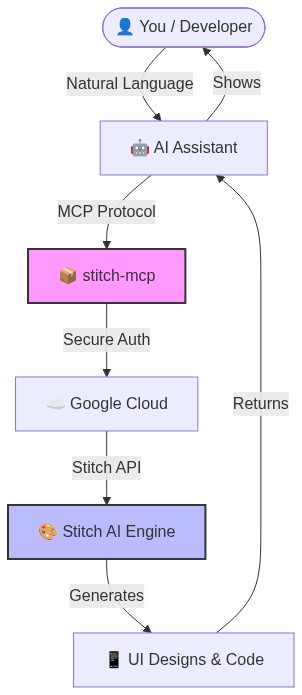
✨ Why this is cool
- Zero Config: Just login once and it works everywhere.
- Universal: Works on Windows, Mac, and Linux.
- Free: Google Stitch API is free to use.
�️ Quick Setup (2 Minutes)
1. Prerequisite: Google Cloud
You need a Google Cloud project with the Stitch API enabled.
# Login to your Google Cloud
gcloud auth login

# Set your project (replace with your actual project ID)
gcloud config set project YOUR_PROJECT_ID
gcloud auth application-default set-quota-project YOUR_PROJECT_ID

# Enable the magic
gcloud beta services mcp enable stitch.googleapis.com
2. Install the Credentials
This gives stitch-mcp permission to talk to Google on your behalf.
gcloud auth application-default login
3. Add to Your AI Editor
Copy and paste this into your MCP config file:
For Claude Desktop:
~/Library/Application Support/Claude/claude_desktop_config.json
For Cursor: Settings > MCP > Add New Server
{
  "mcpServers": {
    "stitch": {
      "command": "npx",
      "args": ["-y", "stitch-mcp"],
      "env": {
         "GOOGLE_CLOUD_PROJECT": "YOUR_PROJECT_ID"
      }
    }
  }
}
🛠️ Available Tools
| Tool Name | What it does |
|---|---|
extract_design_context |
🧠 Scans a screen to extract "Design DNA" (Fonts, Colors, Layouts). Use this to keep style consistent. |
fetch_screen_code |
💾 Downloads the raw HTML/Frontend code of a screen. |
fetch_screen_image |
🖼️ Downloads the high-res screenshot of a screen. |
generate_screen_from_text |
✨ Generates a NEW screen based on your prompt (and context). |
create_project |
📁 Creates a new workspace/project folder. |
list_projects |
📋 Lists all your available Stitch projects. |
list_screens |
📱 Lists all screens within a specific project. |
get_project |
🔍 Retrieves details of a specific project. |
get_screen |
ℹ️ Gets metadata for a specific screen. |
💡 Pro Tip: The "Designer Flow"
To generate consistent UI, use this 2-step flow:
- Extract: "Get design context from the Home Screen..."
- Generate: "Using that context, generate a Chat Screen..."
This ensures your new screen matches your existing design system perfectly.
📄 License
Apache 2.0 - Open source and free to use.
Star History
Built with ❤️ by Aakash Kargathara
Установить Stitch Mcp в Claude Desktop, Claude Code, Cursor
unyly install stitch-mcpСтавит в Claude Desktop, Claude Code, Cursor и VS Code — сам разбирается с npx, uvx и сборкой из исходников.
Впервые? Поставь CLI: curl -fsSL https://unyly.org/install | sh
Или настроить вручную
Выполни в терминале:
claude mcp add stitch-mcp --env GOOGLE_CLOUD_PROJECT="" -- npx -y stitch-mcpПошаговые гайды: как установить Stitch Mcp
FAQ
Stitch Mcp MCP бесплатный?
Да, Stitch Mcp MCP бесплатный — установка в пару кликов через Unyly без оплаты.
Нужен ли API-ключ для Stitch Mcp?
Да, требуются переменные окружения: GOOGLE_CLOUD_PROJECT. Unyly подставит их в конфиг при установке.
Stitch Mcp — hosted или self-hosted?
Self-hosted: сервер запускается локально на твоей машине командой из раздела установки.
Как установить Stitch Mcp в Claude Desktop, Claude Code или Cursor?
Открой Stitch Mcp на unyly.org, выбери вкладку своего клиента (Claude Desktop, Claude Code, Cursor) и нажми Install — конфиг сгенерируется автоматически, без правки JSON.
Изменения
Версии и запрашиваемые доступы со временем.
- Новая версия опубликована
- Новая версия опубликована
- Новая версия опубликована
- Новая версия опубликована
- Новая версия опубликована
- Новая версия опубликована
- Новая версия опубликована
- Новая версия опубликована
Похожие MCP
LibreOffice Tools
Enables AI agents to read, write, and edit Office documents via LibreOffice with token-efficient design. Supports multiple formats including DOCX, XLSX, PPTX, a
 автор: passerbyflutter
Figma
Extract design specs and assets
 автор: Figma
dannote/figma-use
Figma control: create shapes, text and components, and set styles, auto-layout, variables and exports.
 автор: dannote
Logo.dev
Search and retrieve company logos by brand or domain. Customize size, format, and theme to match your design needs. Accelerate design, prototyping, and content
 автор: NOVA-3951
Design Inspiration Server
Searches top design platforms like Dribbble and Behance to provide UI inspiration, color palettes, and layout patterns via the Serper API. It allows users to re
 автор: YonasValentin
PIX4Dmatic
Enables GUI automation for controlling PIX4Dmatic on Windows through MCP. Supports launching, focusing, capturing screenshots, sending hotkeys, clicking UI elem
 автор: jangjo123
mcp-dockmaster
An Open-Sourced UI to install and manage MCP servers for Windows, Linux and macOS.
ariekogan/ateam-mcp
Build, validate and deploy multi-agent AI solutions on the ADAS platform: design skills with tools and manage the solution lifecycle.
 автор: ariekogan
thinkchainai/mcpbundles
Create custom tool bundles, connect providers with OAuth or API keys, and use one MCP server across many integrations, with a UI for bundles and credentials.
 автор: thinkchainai
jau123/MeiGen-AI-Design-MCP
Image generation and editing with a curated prompt library, prompt enhancement and routing across local ComfyUI, MeiGen Cloud and OpenAI-compatible APIs.
 автор: jau123
Compare Stitch Mcp with
Не уверен что выбрать?
Найди свой стек за 60 секунд
Автор?
Embed-бейдж для README
Похожее
Все в категории design