
Storymapper
БесплатноНе проверенA User Story Map and Kanban board that a human and an AI coding agent plan together in real time via MCP, with live bidirectional sync and governance enforcemen

Описание
A User Story Map and Kanban board that a human and an AI coding agent plan together in real time via MCP, with live bidirectional sync and governance enforcement.
README
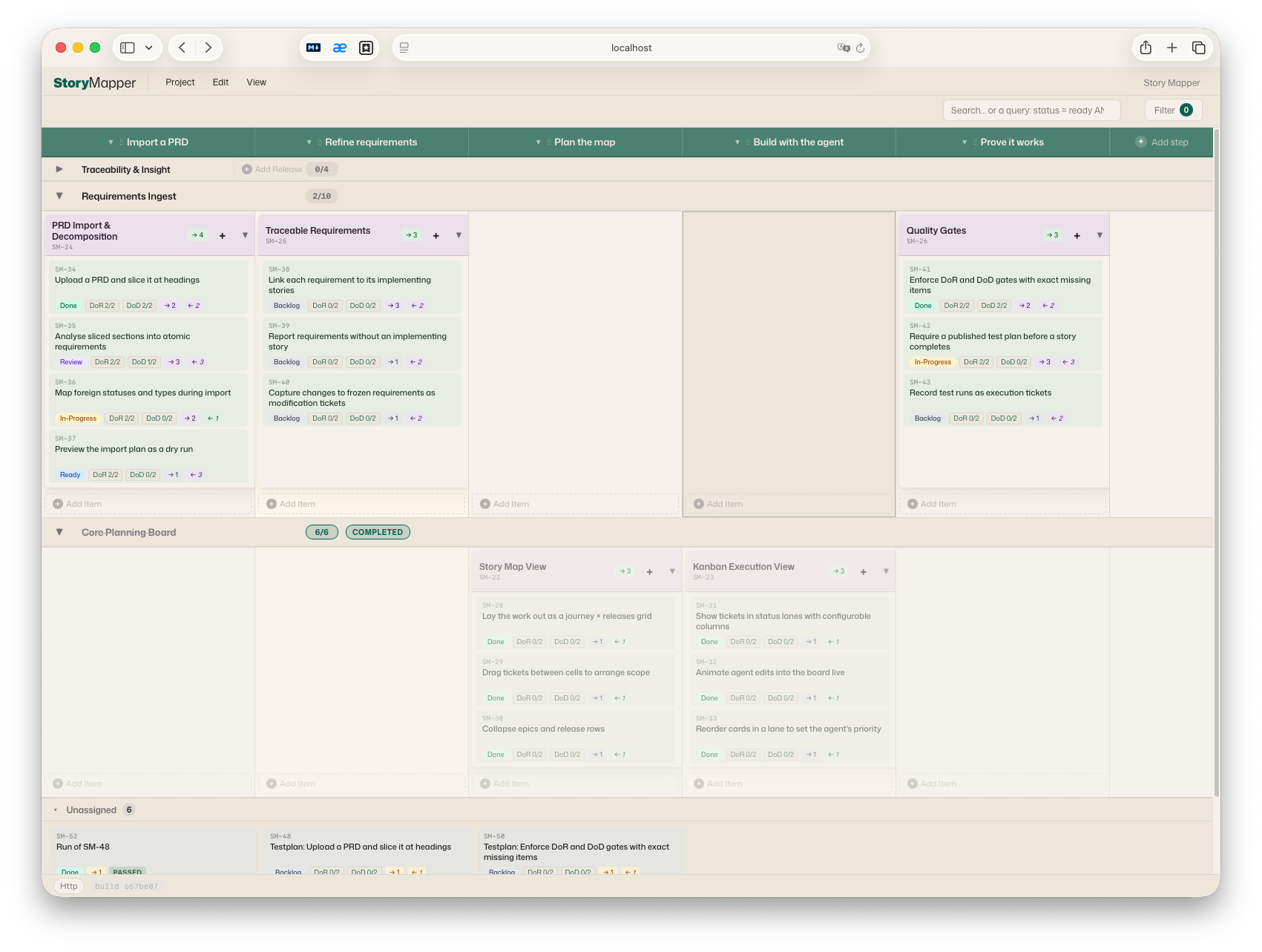
A User Story Map + Kanban board that a human and an AI coding agent plan together — the same backlog, live, from a browser and from an MCP client.
Storymapper is one Node.js package that ships three things:
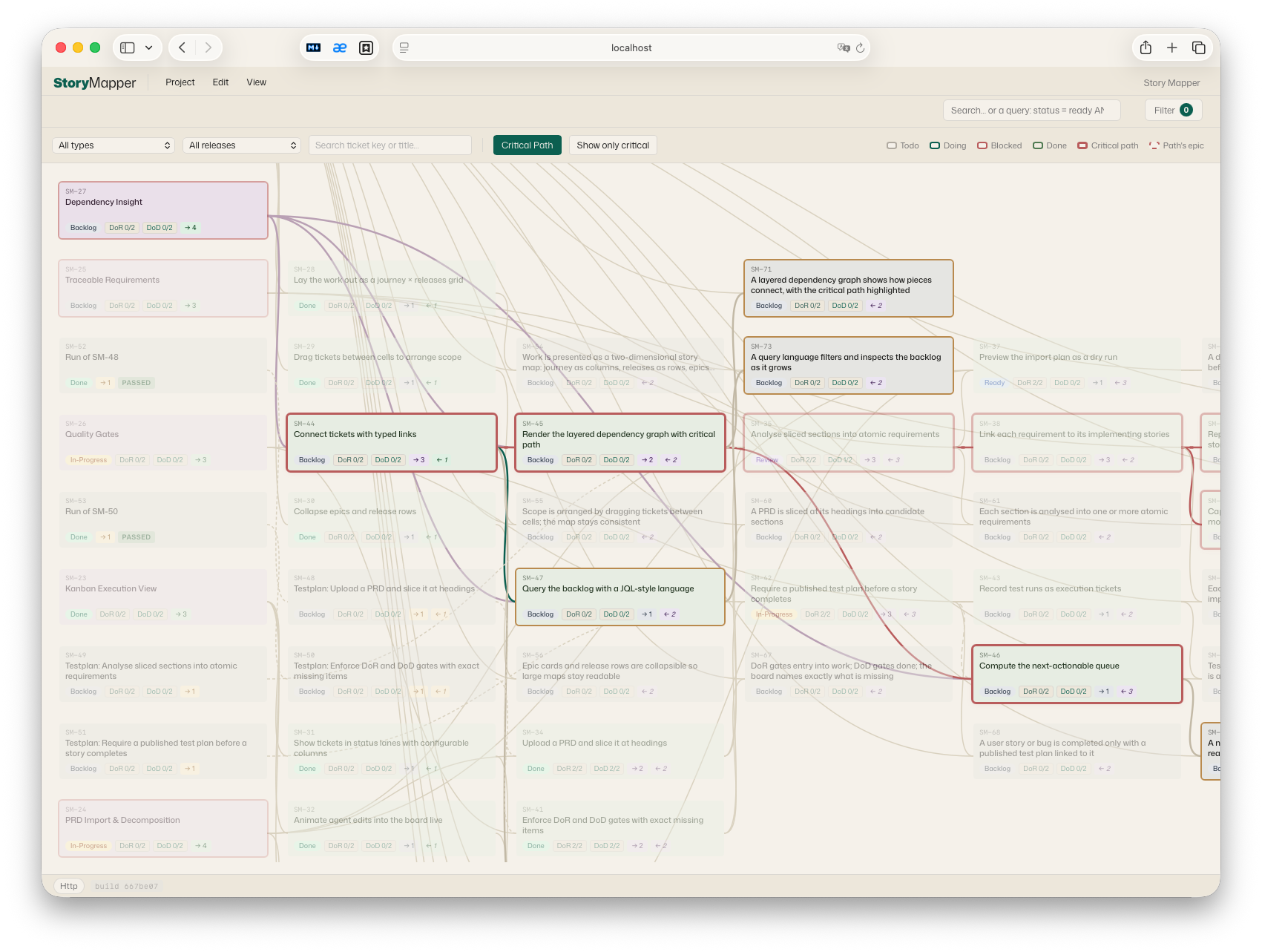
- A browser UI — a User Story Map (process steps × releases, with epics and stories in the cells), a Kanban board, plus table, dependency-graph, requirements and settings views. Plain HTML + modular JavaScript, no build step.
- An HTTP + WebSocket server — persists every project in SQLite with a full per-project revision history, and pushes changes to connected browsers within ~100 ms.
- An MCP server (stdio) — exposes ~70 tools so Claude Desktop / Claude Code can read and edit the very same data. Anything the agent does appears live in the human's browser with a highlight-and-move animation; anything the human edits flows back to the agent on its next read.
The result is a shared planning surface: the agent isn't writing to a database the human can't see — the two work the same board in real time.
Why it exists
Planning AI-assisted development breaks down when the plan lives in one place and the work in another. Storymapper makes the plan a live, bidirectional artifact:
- The agent proposes a structure — epics, stories, releases, dependencies — and you watch it appear and rearrange it by hand.
- Definition of Ready / Definition of Done are first-class and enforced. Each
project defines DoR/DoD checklists (global items + per-ticket-type overrides).
An agent cannot move a ticket to
donewhile a required DoD item is unchecked — the tool returns a structured error listing exactly what's missing. - A configurable workflow engine (Jira-style statuses, categories, named transitions with source restrictions and gates) and a Kanban board mapping (N statuses → 1 column) let you model your own process, not a fixed one.
- Every change is a revision you can inspect and restore.
Design principles
- Zero build. No bundler, no transpiler, no TypeScript. The browser loads
classical
<script src>modules; the server runs the same files under Node via a UMD wrapper. Clone and run. - One source of truth for pure logic. All domain logic (normalization,
operations, the workflow/governance engines, graph algorithms) lives in
shared/core.jsand is symlinked into the frontend and re-exported by the server — the same code runs in the browser, the HTTP server and the MCP server, with no mirror step to drift. - Raw HTTP, no framework.
http.createServer+ manual routing. Small, readable, dependency-light. - Synchronous SQLite via
better-sqlite3, atomic per-save transactions, a per-project mutex, and count-bounded revision retention. - Single-user, local-first. One person plus their agent on one machine. See the security model below.
For the full picture — layering, data model, live-sync mechanism, testing approach and deliberate non-goals — see ARCHITECTURE.md.
Requirements
- Node.js ≥ 20 (developed and tested on 20 and 22; Node 18 is end-of-life).
better-sqlite3is a native module. Prebuilt binaries cover mainstream platforms (macOS / Linux / Windows on x64 + arm64 for supported Node versions), sonpm installusually just works. On an unsupported platform/Node combination it compiles from source and needs a C/C++ toolchain (Xcode Command Line Tools,build-essential, or the Windows build tools).
Install
git clone <your-fork-url> storymapper
cd storymapper
npm install
Run the browser UI
npm start
# → http://localhost:8770/   (data in ./.storymap-data)
# → Ctrl-C to stop
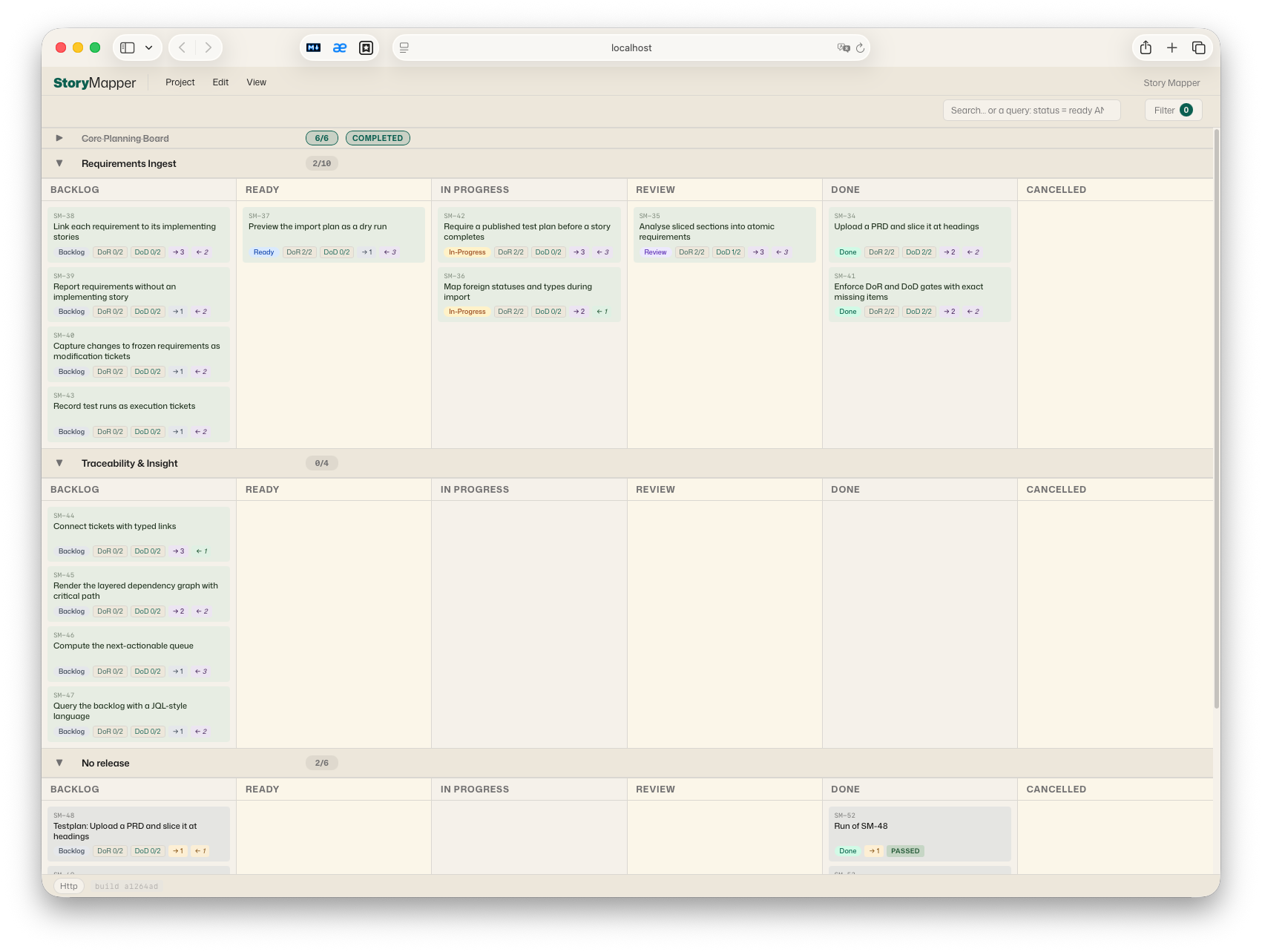
Open http://localhost:8770/. The page probes /api/health on its own origin
and uses the HTTP backend automatically — no URL parameter needed. If it is
served from somewhere else it falls back to localStorage; you can pin a
specific server with ?api=<url>. The page must be served from a loopback origin
(localhost / 127.0.0.1) — file:// is not supported (see the security model).
Connect it to your Claude (one command per surface)
Storymapper reaches an agent through two parts: the MCP server (the tools) and the companion skill (the working method — the DoR/DoD contract, the workflow, when to pull vs. push). Installing one does not install the other, so the setup commands below always install both:
| Surface | Command | What remains |
|---|---|---|
| Claude Code (CLI) | npm run install-code |
restart your Claude Code session |
| Claude Desktop | npm run install-desktop |
upload dist/storymap-skill.zip under Settings → Capabilities → Skills, then fully restart the app — and use a Chat (see below) |
| claude.ai in the browser | — | works with remote connectors only; it cannot reach a local server. Use Claude Code or Claude Desktop. |
npm run install-code copies the skill to ~/.claude/skills/storymap and
registers the MCP server via claude mcp add (user scope). If the claude
CLI is unavailable it prints the ready-made command instead.
npm run install-desktop writes the server entry into the platform's
claude_desktop_config.json (existing entries survive, a .bak backup is
kept) and builds the skill zip. The skill store in Claude Desktop is managed
by the app, so the one upload in the UI is the single step no script can do
for you.
Chat, not Cowork. Claude Desktop reaches local MCP servers from Chat conversations only — in Cowork mode the Storymapper tools are not available. If Cowork is your default surface, switch to a Chat; when the tools don't show up, this is the first thing to check.
Both commands are idempotent — re-run them after pulling a new Storymapper
version. --data-dir=DIR overrides the data directory (default:
<repo>/.storymap-data).
Manual setup (other MCP clients, other harnesses)
Any stdio MCP client can run the server with this shape:
{
  "mcpServers": {
    "storymapper": {
      "command": "node",
      "args": [
        "/absolute/path/to/storymapper/server/index.js", "mcp",
        "--data-dir=/absolute/path/to/storymapper/.storymap-data"
      ]
    }
  }
}
The skill package (npm run package-skill → dist/storymap-skill.zip) is
plain Markdown — storymap/SKILL.md plus its reference/ files. For
harnesses like Codex, unpack it wherever instructions live and point the
harness at it, e.g. from an AGENTS.md:
Before planning work on the Storymapper board, read storymap/SKILL.md
(and the reference/ files it names) and follow that working method.
Point --data-dir at the same directory the HTTP server uses. Both processes
can run concurrently against one SQLite file (WAL mode + a busy-timeout);
the HTTP server relays every MCP write to connected browsers over WebSocket.
Only one
storymapper servermay run per data directory (a PID lock refuses a second;--forcetakes over a stale lock after a crash). The MCP process is exempt and may always share the data dir.
Security model (single-user, local)
Storymapper is a local single-user tool — one human plus their agent on one machine. There is deliberately no authentication layer:
- The server binds to
localhostby default. Do not expose it on a non-loopback interface (--host=0.0.0.0, a reverse proxy, a Docker port map) without putting your own authentication in front — anyone who can reach the port can read and write every project. - CORS is locked to loopback origins: cross-origin browser requests get no
Access-Control-Allow-Originand mutating methods are rejected — this stops a random website you visit from driving your local API. WebSocket upgrades are origin-checked the same way. - Served HTML carries a Content-Security-Policy; all responses send
X-Content-Type-Options: nosniff. X-Actor-*headers are attribution, not authentication — they label who did what in the revision history and are not verified.- Verified identity, remote-binding token gates and RBAC are a deliberate later
stage; the authorization seam (
server/identity.js) is already in place.
Testing
npm test # ≈1800 assertions, plain Node scripts, no test framework
The suite is a homegrown runner (tests/run.js) over tests/test-*.js: pure
unit tests, storage/mutex/revision tests, in-process and stdio MCP round-trips,
JSDOM renderer tests, and a real-server end-to-end test. CI runs it on Node 20
and 22. Tests only ever touch temporary directories — running them never
touches your data.
License
Licensed under the Apache License 2.0 — see LICENSE and NOTICE.
Установка Storymapper
У этого сервера нет опубликованного пакета — он собирается из исходников. Открой репозиторий и следуй инструкции в README.
▸ github.com/TomAtAP/storymapperFAQ
Storymapper MCP бесплатный?
Да, Storymapper MCP бесплатный — установка в пару кликов через Unyly без оплаты.
Нужен ли API-ключ для Storymapper?
Нет, Storymapper работает без API-ключей и переменных окружения.
Storymapper — hosted или self-hosted?
Self-hosted: сервер запускается локально на твоей машине командой из раздела установки.
Как установить Storymapper в Claude Desktop, Claude Code или Cursor?
Открой Storymapper на unyly.org, выбери вкладку своего клиента (Claude Desktop, Claude Code, Cursor) и нажми Install — конфиг сгенерируется автоматически, без правки JSON.
Похожие MCP
Fetch
Web content fetching and conversion for efficient LLM usage.
AWS KB Retrieval
Retrieval from AWS Knowledge Base using Bedrock Agent Runtime.
 автор: modelcontextprotocol
Spring AI MCP Server
Provides auto-configuration for setting up an MCP server in Spring Boot applications.
llm-analysis-assistant
A very streamlined mcp client that supports calling and monitoring stdio/sse/streamableHttp, and can also view request responses through the /logs page. It also
 автор: xuzexin-hz
Compare Storymapper with
Не уверен что выбрать?
Найди свой стек за 60 секунд
Автор?
Embed-бейдж для README
Похожее
Все в категории ai