
Subagent Mcp
БесплатноНе проверенMCP server that launches Claude Code/Codex sub-agents and routes tasks to Claude Messages or OpenAI-compatible API providers.

Описание
MCP server that launches Claude Code/Codex sub-agents and routes tasks to Claude Messages or OpenAI-compatible API providers.
README
Core Premise
subagent-mcp is an MCP stdio server that turns an AI coding assistant (Claude
Code, Codex, Gemini CLI) into a manager of local Claude and Codex sub-agents on
macOS, Linux, and Windows. It orchestrates the locally authenticated claude
and codex CLIs you already signed into, and can route tasks to direct API
providers (Claude Messages API and OpenAI-compatible) configured in
providers.jsonc. Provider credentials stay out of config: providers.jsonc
names env vars, and key values live in the adjacent gitignored .env. API HTTP
is confined to src/providers/provider-client.ts.
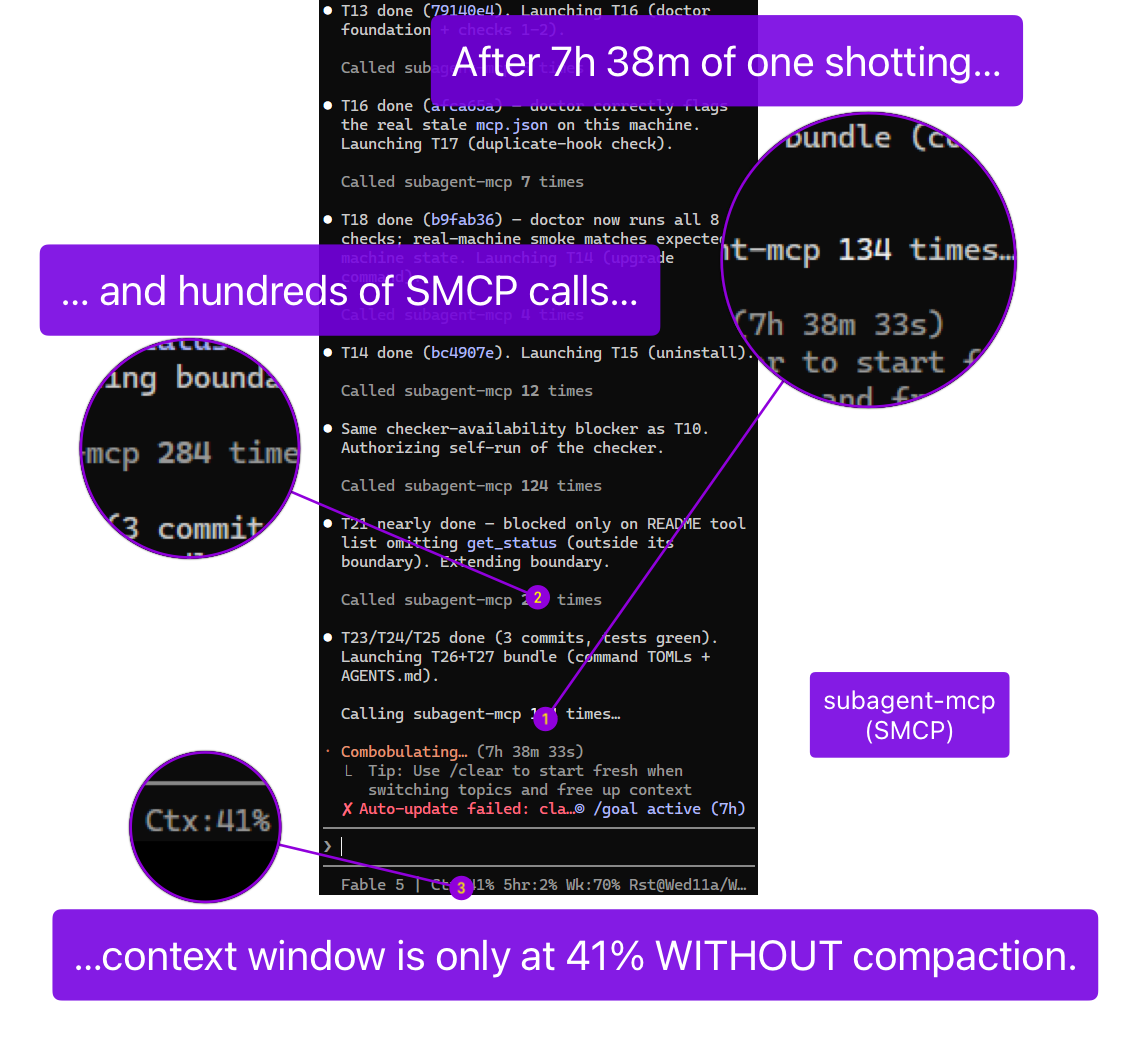
7 h 38 min one-shot coding session, several hundred tool calls, Fable 5, July 15 2026 - 41% context used, no auto-compaction, orchestrated via subagent-mcp.
The orchestrator monitors but does not read or write project files itself. Work is delegated to fresh sub-agents, so the orchestrator keeps summaries instead of raw file context. The main invariants are:
- one machine-global, provider-agnostic concurrency cap (default 20, minimum 10)
- fail-safe orchestration ON on hookless hosts
- state authority only from harness-verified
<subagent-mcp state="...">tags - sub-agents gated by default with permission ceiling
auto - automatic model, provider, and effort routing per task category
Install
What You Need First
- Node.js 20 or newer (
node --version) claudeCLI, installed and signed in (claude --version)codexCLI, installed and signed in (codex --version; optional if you only use Claude)
Building from source needs extra developer tools. See CONTRIBUTING.md.
Install The Package
Marketplace plugin for Claude Code:
claude plugin marketplace add Heretyc/subagent-mcp
claude plugin install subagent-mcp@subagent-mcp
Marketplace plugin for Codex:
codex plugin marketplace add Heretyc/subagent-mcp
codex plugin add subagent-mcp@subagent-mcp
Or Codex MCP registration:
codex mcp add subagent-mcp -- node /abs/path/to/subagent-mcp/dist/index.js
Or install the npm package globally:
npm install -g @heretyc/subagent-mcp
Organizations pinning the package through GitHub Packages should see docs/registration/prerequisites-and-install.md.
Wire It Into Your Assistant
subagent-mcp setup
Installing the package only ships the program. It does not connect anything on
its own. subagent-mcp setup finds your Claude Code or Codex install and
registers both the server and the per-turn orchestration hooks. For Claude Code
it also registers or wraps statusLine so the hook can read Claude's
authoritative context percentage without replacing your custom statusline, and
deploys the handoff-resume Agent Skill to your Claude user scope.
Preview first with subagent-mcp setup --dry-run.
For provider config, run subagent-mcp config init, edit the generated .env
keys under your subagent-mcp config home, then run
subagent-mcp config validate. See skills/smcp-help/SKILL.md
for details.
Restart, Then Turn On The Invariant
Restart your Claude Code or Codex session so it picks up the new tools. On
Codex, run /hooks and trust the new hook. Then, recommended:
subagent-mcp init --global
This writes a managed "always delegate" rule block into your global assistant
config once. For one project only, use
subagent-mcp init --root /path/to/project. Full per-platform wiring (Gemini
CLI, Claude Desktop, manual setup) is in
docs/registration.md.
How To Operate It
Orchestration Mode
- ON: your assistant acts as a pure manager. It delegates every step to sub-agents. Best for big, long-running jobs.
- OFF: your assistant works normally, with no delegation rules.
Flip it with the orchestration-mode tool. Desktop apps can toggle the mode but
do not receive per-turn hook reminders.
Tools
The server exposes launch_agent, poll_agent, kill_agent, send_message,
list_agents, wait, respond_permission, orchestration-mode, and
model-selection-mode; get_status returns providers_loaded, agent_count,
session_start_time, and last_routing_decisions. See docs/tools.md
for the full parameter and return reference.
You do not have to choose a model. Give launch_agent a prompt and a task
category such as coding, debugging, or security_review; the server picks
the provider, model, and effort.
Concurrency
There is one machine-wide limit on concurrent sub-agents. The default is 20.
When the limit is reached, launch_agent is rejected immediately and does not
queue. Change the value in global-subagent-mcp-config.jsonc in the install
folder. The file is re-read on every launch.
The config file was renamed from global-concurrency.jsonc in 2.12.5. The old
name is still read, with a one-time deprecation notice, when the new file is
absent.
The same settings file includes checkForUpdates (default true). Disable it
with checkForUpdates: false or SUBAGENT_UPDATE_CHECK=0.
Configuration
Machine-wide defaults live in global-subagent-mcp-config.jsonc, installed
beside the compiled server and re-read on every launch_agent. It controls the
global concurrency cap, update checks, permission ceiling, escalation behavior,
strict read-parity logging, and Codex sandbox networking.
User and repo permission files can only tighten or add scoped permissions on top of the global ceiling. See README/configuration.md for the full key table, precedence rules, and mode summary.
Permissions
Launched sub-agents run gated by default. Set permissionsCeiling in
global-subagent-mcp-config.jsonc:
| Mode | What a sub-agent can do |
|---|---|
auto |
Default. Safe reads auto-allow, dangerous actions auto-deny, everything else parks for your decision. |
manual |
Same, but every non-denied action parks for a decision. |
yolo |
No gating at all. |
When a sub-agent's action parks, its status becomes permission_requested and
it appears in poll_agent, list_agents, and wait. Answer it with:
respond_permission(agent_id="...", decision="allow" | "deny", reason="...")
One-time only. Omit request_id to answer the oldest pending request.
Unanswered requests auto-deny after 5 minutes. Full spec:
docs/spec/permissions.md.
Basic Debugging
- An agent looks stuck. A quiet agent is usually still alive. After about 10
minutes with no output an agent is marked
stalled. Preferwaitor anotherpoll_agentover killing it. - Cap reached. Use
list_agentsto see what is running andkill_agenton work you no longer need. RaisingglobalConcurrentSubagentsalso works. - Logs. Agent output is available through
poll_agent. Server diagnostics go to the host MCP server log on stderr. - Install or config looks wrong. Run
subagent-mcp doctorfor the 9-check diagnostic; it prompts before any fix.subagent-mcp rollbackrestores the most recent config backup. See skills/smcp-doctor/SKILL.md.
Documentation
| Document | Contents |
|---|---|
| docs/spec/arch-rationale.md | Design rationale |
| docs/registration.md | Per-platform setup |
| docs/install/_INDEX.md | Install guide map |
| docs/tools.md | Tool reference |
| docs/usage.md | Model and effort matrix |
| docs/SPEC.md | Technical specification |
| README/configuration.md | Configuration keys and precedence |
| docs/spec/permissions.md | Permission system |
| docs/reference/status-lifecycle.md | Agent status meanings |
| CONTRIBUTING.md | Developer guide |
License
Apache-2.0. Copyright 2026 Lexi Blackburn (https://github.com/Heretyc/).
See LICENSE.
Установить Subagent Mcp в Claude Desktop, Claude Code, Cursor
unyly install subagent-mcpСтавит в Claude Desktop, Claude Code, Cursor и VS Code — сам разбирается с npx, uvx и сборкой из исходников.
Впервые? Поставь CLI: curl -fsSL https://unyly.org/install | sh
Или настроить вручную
Выполни в терминале:
claude mcp add subagent-mcp -- npx -y @heretyc/subagent-mcpFAQ
Subagent Mcp MCP бесплатный?
Да, Subagent Mcp MCP бесплатный — установка в пару кликов через Unyly без оплаты.
Нужен ли API-ключ для Subagent Mcp?
Нет, Subagent Mcp работает без API-ключей и переменных окружения.
Subagent Mcp — hosted или self-hosted?
Self-hosted: сервер запускается локально на твоей машине командой из раздела установки.
Как установить Subagent Mcp в Claude Desktop, Claude Code или Cursor?
Открой Subagent Mcp на unyly.org, выбери вкладку своего клиента (Claude Desktop, Claude Code, Cursor) и нажми Install — конфиг сгенерируется автоматически, без правки JSON.
Похожие MCP
GitHub
PRs, issues, code search, CI status
 автор: GitHub
Filesystem
Secure file operations with configurable access controls.
Memory
Knowledge graph-based persistent memory system.
Template MCP Server
A CLI tool to create a new Model Context Protocol server project with TypeScript support, dual transport options, and an extensible structure
 автор: mcpdotdirect
Compare Subagent Mcp with
Не уверен что выбрать?
Найди свой стек за 60 секунд
Автор?
Embed-бейдж для README
Похожее
Все в категории development