
Supabase Model Context Protocol Server
БесплатноНе проверенMCP server for exploring and querying Supabase databases with interactive React widgets for schema browsing, table viewing, and SQL execution.

Описание
MCP server for exploring and querying Supabase databases with interactive React widgets for schema browsing, table viewing, and SQL execution.
README
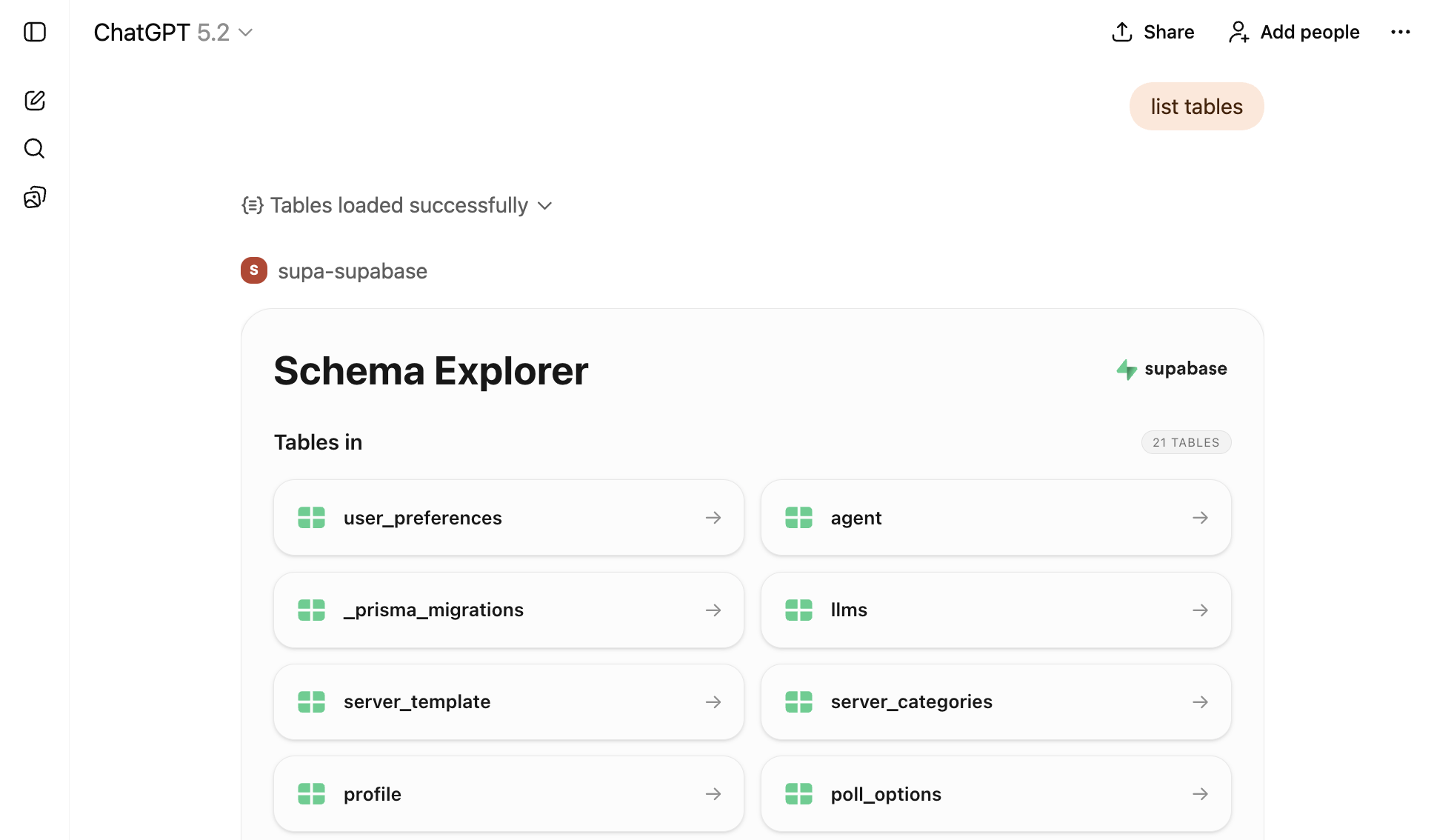
A powerful Model Context Protocol (MCP) server for Supabase, built with mcp-use. This server provides interactive tools and beautiful React widgets for exploring and querying your Supabase database.
🚀 Built with mcp-use
This MCP server is powered by mcp-use, a modern framework for building MCP servers with:
- Type-safe server creation - Build MCP servers with full TypeScript support
- React widget support - Create interactive UI components using the OpenAI Apps SDK
- Simplified client connections - Easily connect to other MCP servers without LangChain
- Built-in development tools - Hot reload, build, and deploy commands
- Zero boilerplate - Focus on your tools, not infrastructure
Features
- 🔍 Database Schema Explorer - Browse all tables in your Supabase database with an interactive UI
- 📊 Table Viewer - Display and explore table data with a beautiful data table widget
- 🔎 SQL Query Executor - Run read-only SQL queries and view results in an interactive widget
- 🎨 React Widgets - Rich, interactive UI components built with React and Tailwind CSS
- 🔐 Secure Authentication - Uses Supabase Personal Access Tokens for secure access
Prerequisites
- Node.js 18+ and yarn
- A Supabase project
- A Supabase Personal Access Token (generate one here)
Installation
# Install dependencies
yarn install
Configuration
Set the following required environment variables:
# Required: Your Supabase Personal Access Token
export ACCESS_TOKEN="your-access-token"

# Required: Content Security Policy URLs for widget loading => required by ChatGPT
export CSP_URLS="https://supabase.com,https://mcp.supabase.com,https://*.mcp-use.com,https://*.supabase.co"
Development
mcp-use provides convenient development commands:
# Start development server with hot reload
yarn dev

# Build for production
yarn build

# Start production server
yarn start

# Deploy the server
yarn deploy
Available Tools
list-tables
List all tables in your Supabase database. Opens an interactive schema explorer widget.
Parameters:
schemas(optional): Array of schema names to include (default:["public"])
Widget: schema-explorer - Interactive table browser with schema information
show-table
Display data from a specific table. Opens a data table viewer widget.
Parameters:
tableName(required): Name of the table to displayschema(optional): Schema name (default:"public")limit(optional): Maximum number of rows to fetch (default:100)
Widget: table-viewer - Interactive data table with sorting and filtering
execute-sql
Execute read-only SQL queries on your Supabase database. Opens a query results widget.
Parameters:
query(required): SQL query to execute
Widget: query-results - Interactive query results viewer with syntax highlighting
Available Resources
supabase://project-url
Get the API URL for your Supabase project.
UI Widgets
This server includes three custom React widgets built with mcp-use:
- Schema Explorer (
schema-explorer) - Browse database tables and schemas - Table Viewer (
table-viewer) - View and explore table data - Query Results (
query-results) - Display SQL query results
All widgets are built with:
- React 19
- Tailwind CSS
- Radix UI components
- Lucide React icons
Architecture
This server demonstrates the power of mcp-use:
- Server-side: Uses mcp-use/server to create tools, resources, and widgets
- Client-side: Uses mcp-use/client to connect to Supabase's official MCP server
- No LangChain: Direct MCP client connections without external dependencies
- Type-safe: Full TypeScript support with Zod schemas
Project Structure
.
├── index.ts                 # Main server file using [mcp-use](https://github.com/mcp-use/mcp-use)
├── resources/               # React widget components
│   ├── components/         # Reusable UI components
│   ├── schema-explorer/    # Schema explorer widget
│   ├── table-viewer/       # Table viewer widget
│   ├── supabase-status/    # Display Supabase status for a certain time window
│   └── query-results/      # Query results widget
└── package.json            # Dependencies including [mcp-use](https://github.com/mcp-use/mcp-use)
License
MIT
from github.com/andrewkorot/supabase-model-context-protocol-server
Установка Supabase Model Context Protocol Server
У этого сервера нет опубликованного пакета — он собирается из исходников. Открой репозиторий и следуй инструкции в README.
▸ github.com/andrewkorot/supabase-model-context-protocol-serverFAQ
Supabase Model Context Protocol Server MCP бесплатный?
Да, Supabase Model Context Protocol Server MCP бесплатный — установка в пару кликов через Unyly без оплаты.
Нужен ли API-ключ для Supabase Model Context Protocol Server?
Нет, Supabase Model Context Protocol Server работает без API-ключей и переменных окружения.
Supabase Model Context Protocol Server — hosted или self-hosted?
Доступен hosted-вариант: Unyly запускает сервер в облаке, локальная установка не обязательна.
Как установить Supabase Model Context Protocol Server в Claude Desktop, Claude Code или Cursor?
Открой Supabase Model Context Protocol Server на unyly.org, выбери вкладку своего клиента (Claude Desktop, Claude Code, Cursor) и нажми Install — конфиг сгенерируется автоматически, без правки JSON.
Похожие MCP
wenb1n-dev/SmartDB_MCP
A universal database MCP server supporting simultaneous connections to multiple databases. It provides tools for database operations, health analysis, SQL optim
 автор: wenb1n-dev
Postgres Server
This server enables interaction with PostgreSQL databases through the Model Context Protocol, optimized for the AWS Bedrock AgentCore Runtime. It provides tools
 автор: madhurprash
Postgres
Query your database in natural language
 автор: Anthropic
PostgreSQL
Read-only database access with schema inspection.
автор: modelcontextprotocolRedis
Interact with Redis key-value stores.
автор: modelcontextprotocolSQLite
Database interaction and business intelligence capabilities.
автор: modelcontextprotocolmxcp
Open-source framework for building enterprise-grade MCP servers using just YAML, SQL, and Python, with built-in auth, monitoring, ETL and policy enforcement.
 автор: raw-labs
tadas-github/a2asearch-mcp
MCP server to search 4,800+ MCP servers, AI agents, CLI tools and agent skills. Install: npx -y a2asearch-mcp. Ask Claude: "Find MCP servers for database access
 автор: tadas-github
julien040/anyquery
Query more than 40 apps with one binary using SQL. It can also connect to your PostgreSQL, MySQL, or SQLite compatible database. Local-first and private by desi
 автор: julien040
drakonkat/wizzy-mcp-tmdb
A MCP server for The Movie Database API that enables AI assistants to search and retrieve movie, TV show, and person information.
 автор: drakonkat
Compare Supabase Model Context Protocol Server with
Не уверен что выбрать?
Найди свой стек за 60 секунд
Автор?
Embed-бейдж для README
Похожее
Все в категории data