
Swiss Academic Libraries
БесплатноНе проверенEnables AI models to search and retrieve bibliographic and digitized records from Swiss academic libraries (swisscovery, e-rara, e-periodica, e-manuscripta) via

Описание
Enables AI models to search and retrieve bibliographic and digitized records from Swiss academic libraries (swisscovery, e-rara, e-periodica, e-manuscripta) via open protocols without requiring API keys.
README
🇨🇭 Part of the Swiss Public Data MCP Portfolio
📚 swiss-academic-libraries-mcp
PyPI version
License: MIT
Python 3.11+
MCP
No Auth Required

MCP server providing access to Swiss academic libraries — swisscovery, e-rara, e-periodica, e-manuscripta. No API key required.
Demo
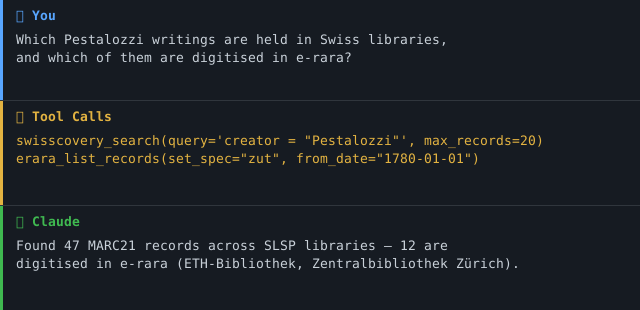
Overview
swiss-academic-libraries-mcp connects AI models to the full Swiss academic library infrastructure via standardised, open protocols. It covers the swisscovery union catalogue (500+ libraries, 10M+ records) and three digitalisation platforms: historical prints (e-rara), periodicals (e-periodica) and manuscripts (e-manuscripta).
All data sources use open, authentication-free protocols (SRU/MARC21, OAI-PMH/Dublin Core). The server supports both local use via Claude Desktop (stdio transport) and cloud deployment (Streamable HTTP).
Beyond the catalogue, the server also covers Swiss open-access legal literature — freely readable legal scholarship from sui generis, ex/ante and Repositorium.ch — as metadata (title, authorship, year, licence, DOI, link), never full text.
It also adds the international metadata layer: DOI resolution and international research literature via Crossref, and preprints via arXiv. This lets one conversation answer both "is this held in Switzerland?" (national layer) and "what is this, and where else does it live?" (international layer). Every resolved DOI returns title, ISSN, ISBN and authors as clean top-level fields, so you can pivot straight into swisscovery.
Anchor demo query (national ↔ international): "Find the original publication for this DOI, check whether a preprint version exists, and show whether a Swiss library holds it." → resolve_doi → search_preprints → swisscovery_search(query="<ISSN from resolve_doi>").
Anchor demo query (catalogue): "Which Swiss university dissertations on primary school pedagogy are held in Swiss libraries, and are any of them digitised in e-rara?"
Anchor demo query (OA legal literature): "Which freely accessible legal-scholarship articles exist on data protection in education? Give me title, authorship, year, licence and DOI." → oa_law_search(query="Datenschutz im Bildungsbereich") — results are ranked by relevance: articles matching all terms rank first, articles matching only the core term (Datenschutz) follow, so the query returns the real privacy-law corpus rather than an empty set.
Features
- 16 tools across 4 catalogue sources + 3 open-access legal-literature sources + 2 international metadata sources — all read-only, no API key required
- swisscovery search with full CQL syntax: full-text, title, author, subject, ISBN/ISSN
- OAI-PMH harvesting with date range and collection filters plus pagination via resumption tokens
- MARC21 parser extracting 20+ fields (title, creator, publication info, subjects, abstract, URLs)
- Dublin Core parser for all three digitalisation portals
- Dual transport: stdio for Claude Desktop · Streamable HTTP for cloud/self-hosted deployments
- OA legal-literature search across sui generis, ex/ante and Repositorium.ch with a declarative source registry (new sources = one config entry), best-effort Crossref licence enrichment, and graceful per-source degradation
- International metadata layer: DOI resolution and bibliographic search via Crossref (polite pool via
CROSSREF_MAILTO), preprint search via arXiv with automatic phrase quoting and request throttling — clean title/ISSN/ISBN/author fields for pivoting into swisscovery - 3 built-in prompts:
research-workflow,education-researchanddoi-to-swiss-shelf - Markdown and JSON output for all tools
- 97 unit/mocked tests (no network) + 30 live smoke tests
Data Sources
| Source | Protocol | Content | Records |
|---|---|---|---|
| swisscovery (SLSP) | SRU / MARC21 | 500+ Swiss libraries | 10M+ |
| e-rara | OAI-PMH / Dublin Core | Digitised historical prints | 250k+ |
| e-periodica | OAI-PMH / Dublin Core | Digitised periodicals (1750–today) | 1M+ articles |
| e-manuscripta | OAI-PMH / Dublin Core | Manuscripts & archival material | 100k+ |
Open-Access legal literature (metadata only)
| Source | Protocol | Content | DOI coverage |
|---|---|---|---|
| sui generis | OAI-PMH / Dublin Core | OA legal journal & non-profit publisher | ~100 % (10.21257/…) |
| ex/ante | OAI-PMH / Dublin Core | Peer-reviewed journal for (young) legal scholarship, multilingual | none (persistent URL) |
| Repositorium.ch | Supabase / PostgREST (JSON) | Subject repository for Swiss law | partial |
International metadata layer (metadata only)
| Source | Protocol | Content | Licence |
|---|---|---|---|
| Crossref | REST / JSON | DOI resolution + international research literature | Metadata CC0 1.0 (public domain) |
| arXiv | Atom / XML | Preprints (CS, physics, maths, stats, …) | Metadata CC0 1.0; preprints per author licence |
Tools
| Tool | Source | Function |
|---|---|---|
library_info |
— | Entry point: overview of all sources and tools |
swisscovery_search |
swisscovery | Full-text / CQL search across the union catalogue |
swisscovery_get_record |
swisscovery | Single record by MMS-ID |
erara_list_records |
e-rara | Prints filtered by date / collection |
erara_get_record |
e-rara | Single item by OAI identifier |
erara_list_collections |
e-rara | All participating libraries |
eperiodica_list_records |
e-periodica | Articles filtered by date |
eperiodica_get_record |
e-periodica | Single article by OAI identifier |
emanuscripta_list_records |
e-manuscripta | Manuscripts filtered by date / collection |
emanuscripta_get_record |
e-manuscripta | Single object by OAI identifier |
emanuscripta_list_collections |
e-manuscripta | All archives / collections |
oa_law_search |
OA legal (all 3) | Search OA legal scholarship (title/abstract/author) with source, language, year and peer-review filters |
oa_law_get |
OA legal (all 3) | Single OA legal article by DOI or resolvable URL |
resolve_doi |
Crossref | Resolve a DOI to full metadata (title/ISSN/ISBN/authors → pivot into swisscovery) |
search_publications |
Crossref | Search international research literature; every hit carries a DOI |
search_preprints |
arXiv | Search preprints with automatic phrase quoting; linked journal DOIs bridge to resolve_doi |
Example Use Cases
| Query | Tool |
|---|---|
| "Which books about Swiss primary schools are held in Swiss libraries?" | swisscovery_search |
| "Show digitised historical works from ETH Library" | erara_list_records |
| "Which Swiss periodicals were digitised in 2023?" | eperiodica_list_records |
| "What manuscript collections does e-manuscripta hold?" | emanuscripta_list_collections |
| "Which OA legal articles exist on facial recognition?" | oa_law_search |
| "Resolve DOI 10.1038/nature14539 and give me its ISSN" | resolve_doi |
| "Find recent preprints on model context protocol" | search_preprints |
| "Find this paper's DOI, check for a preprint, and see if a Swiss library holds it" | resolve_doi → search_preprints → swisscovery_search |
Architecture
Three independent paths share one HTTP client (retry with exponential backoff, shared connection pool, project User-Agent):
                    ┌──────────────────────────────────────────────────────┐
                    │            swiss-academic-libraries-mcp               │
                    │            (FastMCP · stdio / HTTP)                   │
                    └────────┬───────────────┬────────────────┬────────────┘
                             │               │                │
          ┌── CATALOGUE ─────┘   ┌── OA-LEGAL ┘     ┌── INTERNATIONAL ──┐
          │   (api_client.py)    │   (oa_legal.py)  │  (intl_metadata.py)│
          │                      │                  │                    │
 ┌────────┴────────┐   ┌─────────┴──────────┐   ┌───┴──────────────────┐ │
 │ swisscovery SRU │   │ source registry     │   │ Crossref  REST/JSON  │ │
 │ e-rara      OAI │   │  ├ sui generis  OAI │   │  ├ resolve_doi        │ │
 │ e-periodica OAI │   │  ├ ex/ante      OAI │   │  └ search_publications│ │
 │ e-manuscripta   │   │  └ Repositorium REST│   │ arXiv     Atom/XML   │ │
 └────────┬────────┘   │ harvest→cache→filter│   │  └ search_preprints   │ │
          │            │ Crossref licence ⟳  │   │ (phrase-quote+throttle)│ │
 MARC21 / Dublin Core  └─────────┬──────────┘   └───┬──────────────────┘ │
 → catalogue records   OaLegalPublication         CrossrefWork / Preprint │
                       (metadata, no full text)   (metadata, no full text) │
- Catalogue path returns bibliographic records (books, digitised prints, periodicals, manuscripts).
- OA-legal path harvests OA legal-scholarship metadata once, caches it in memory (small corpus), and filters locally — because OAI-PMH has no keyword search of its own. Adding a fourth OA source is a single registry entry, not new code.
- International path resolves DOIs and searches Crossref/arXiv live (Architecture A — the endpoints are small, stable and public, so no dump/cache is needed). Each response carries its own source attribution (Crossref CC0 · arXiv acknowledgement), never a pooled one, and returns clean top-level title/ISSN/ISBN/author fields so the model can pivot into the catalogue path. A code-layer egress allow-list restricts outbound calls to
api.crossref.organdexport.arxiv.org.
Licensing & Scope
This server is deliberately conservative about what it emits — a portfolio that treats governance as a feature cannot be careless here.
- Metadata, not full text. For OA legal literature the server returns title, authorship, year, licence, DOI/link and — where the source provides it as a metadatum — the abstract. It never ingests, stores, or outputs the article body. The full-text PDF path exposed by Repositorium.ch is intentionally not carried into any field.
licenceis always set. Open Access means free to read, not free to reuse. Licences range from CC0 and CC BY to CC BY-NC-ND, and some articles are simply "free to read" with no open licence at all. When no machine-readable licence is available, the field is"unknown"— never guessed, never omitted. The native OAI metadata of all three sources carries only copyright statements, so"unknown"is the default; a best-effort Crossref lookup upgrades it to the real CC licence where a DOI resolves (e.g. sui generis →CC BY-SA 4.0). Disable withOA_LAW_CROSSREF_ENRICH=0.- Citation integrity. Every result carries a resolvable reference — a DOI where present, otherwise a persistent URL. No result is emitted without one. A fabricated citation in legal literature is worse than no citation, so the server prefers one hit fewer over one hit invented.
- Language is carried, never silently filtered. ex/ante and Repositorium.ch are multilingual (DE/FR/IT/EN). The
languagefield is always populated, but results are only filtered by language when you explicitly ask — otherwise half the Romandie would vanish from the results. - Attribution per source, not pooled. Crossref, arXiv and the OA-legal sources have different licence and citation conditions, so each response carries the attribution of the source it actually came from. Crossref bibliographic metadata is distributed under CC0 1.0 (facts are free); arXiv metadata is CC0 1.0 with the requested acknowledgement "Thank you to arXiv for use of its open access interoperability"; preprint and article full texts remain under their own per-work licences (never emitted here).
- Scope boundary. OA legal literature belongs here because it is the same capability already in this server — authentication-free bibliographic-metadata harvesting of Swiss scholarly sources over standard protocols — with the same output contract (metadata, not full text). It is institution-independent and subject-focused, which is why it does not overlap eth-library-mcp (ETH-institution Discovery & Persons) — the catalogue finds the book, the OA-legal path finds the freely readable article with its licence and DOI.
Known Limitations
- Small, focused corpus. The three OA sources together hold on the order of a few hundred articles. Results are ranked by relevance — articles matching all query terms first, then partial matches — so a topical query like "Datenschutz im Bildungsbereich" returns the privacy-law corpus (ranked) rather than nothing; if no article covers the full topic intersection, the closest real matches are returned, never a fabricated one. A query that matches no term at all still returns an honest empty result.
- No full-text search. Matching runs over metadata (title, abstract, authorship) only — never the article body.
- Uneven DOI coverage. sui generis ≈ 100 %, Repositorium.ch partial, ex/ante has no DOIs (persistent URLs only). Aggregators (Crossref/OpenAlex) therefore cover sui generis well but miss ex/ante entirely and do not index Repositorium.ch as a source — which is why the server harvests each source natively rather than relying on an aggregator.
- Licence gaps. The native metadata rarely carries a machine-readable licence;
"unknown"is common and only lifted where a DOI resolves in Crossref. - Not a substitute for a paid legal database. This surfaces freely accessible Swiss legal scholarship only — it is not Swisslex/Weblaw and does not cover commercial or paywalled legal publishing.
Known findings — international layer (live probe 2026-07-20)
| Finding | Detail | Consequence |
|---|---|---|
| Crossref is weak for German-language CH education literature | query.bibliographic=Lehrplan 21 returns a book chapter from 1881 as the top hit; other CH-education queries surface millions of irrelevant results with off-topic/old top hits. Crossref is strong for DOI resolution and international research, not for CH education publishing. |
search_publications documents this and points to swisscovery_search / oa_law_search for CH education topics. |
| arXiv treats spaces as OR, not phrase | all:model context protocol → ~1,296,686 hits (OR); all:"model context protocol" → 462 hits (phrase). |
search_preprints quotes the query automatically; users need no arXiv syntax. Field syntax (ti:, au:) and explicit quotes are respected. |
arXiv returns Atom XML, throttles, and 301-redirects http→https |
Response is Atom, not JSON; arXiv asks for ~3 s between requests; the plain http:// endpoint 301-redirects. |
Parser reuses defusedxml (already a dependency — no new one); a module-level throttle (ARXIV_MIN_INTERVAL_SECONDS, default 3 s) enforces spacing; the client calls the https:// endpoint directly. |
| SHARE (share.osf.io) — evaluated, not built | The _search endpoint responds (≈58.9 M records, Elasticsearch-style), but SHARE wound down harvesting in 2020, archived its database in CurateND, and carries no API-maintenance commitment ("shutting down / new phase", now the "trove" search-api). For a portfolio positioned on reliability, an index without a support guarantee is a poor dependency. |
Not implemented. |
| Open Library — evaluated, gate failed | A 10-ISBN probe of real Swiss/German-language Lehrmittel (Lehrmittelverlag Zürich, Klett und Balmer; ISBNs harvested from swisscovery) returned 0/10 = 0 % (threshold 60 %). Controls confirm Open Library works (English + mainstream German trade books resolve), so it is a genuine coverage gap, not a connectivity artefact. | Not implemented. swisscovery already covers CH Lehrmittel; for the book trade, GVI or a publisher directory is the fitting route. |
Prerequisites
- Python 3.11 or higher
- uv / uvx (recommended) or pip
- Internet access (all APIs are publicly available)
Installation
Claude Desktop (recommended)
Add to claude_desktop_config.json:
macOS: ~/Library/Application Support/Claude/claude_desktop_config.json
Windows: %APPDATA%\Claude\claude_desktop_config.json
{
  "mcpServers": {
    "swiss-academic-libraries": {
      "command": "uvx",
      "args": ["swiss-academic-libraries-mcp"]
    }
  }
}
Restart Claude Desktop — the server starts automatically on first use.
Cloud / Self-hosted (Streamable HTTP)
uvx swiss-academic-libraries-mcp --http --port 8000 [--host 127.0.0.1]
Security & Deployment Notes
- Default binding is
127.0.0.1(loopback only). The server has no built-in authentication. - Use
--host 0.0.0.0only when running behind a reverse proxy that provides authentication and per-IP rate limits (e.g. nginx withlimit_req+ OAuth2-Proxy). Non-loopback bindings emit a WARN log. - Logs go to stderr; set verbosity with
MCP_LOG_LEVEL=DEBUG|INFO|WARNING.
Development
git clone https://github.com/malkreide/swiss-academic-libraries-mcp
cd swiss-academic-libraries-mcp
pip install -e .
Quickstart
Start by calling library_info for a full overview. Then:
"Which books about Swiss primary schools are held in Swiss libraries?"
→ swisscovery_search(query='subject = "Volksschule"', max_records=20)

"Show digitised historical works from ETH Library"
→ erara_list_records(set_spec="zut")

"Which Swiss periodicals were digitised in 2023?"
→ eperiodica_list_records(from_date="2023-01-01", until_date="2023-12-31")

"What manuscript collections does e-manuscripta hold?"
→ emanuscripta_list_collections()

→ [More use cases by audience](EXAMPLES.md) →
💡 "No API key — just install and query."
CQL Search Syntax (swisscovery)
Full text:     Volksschule Zürich
Title:         title = "education reform"
Author:        creator = "Pestalozzi"
Subject:       subject = "pedagogy"
ISBN:          isbn = "978-3-05-006234-0"
Combined:      title = "school" AND creator = "Pestalozzi"
Pagination:    start_record = 11
Configuration
No API keys required. All environment variables are optional.
| Parameter | Default | Description |
|---|---|---|
--http |
off | Enable Streamable HTTP transport |
--port |
8000 | Port for HTTP transport |
MCP_LOG_LEVEL |
INFO |
Log verbosity (DEBUG/INFO/WARNING) |
OA_LAW_CROSSREF_ENRICH |
1 |
OA legal: DOI→licence enrichment via Crossref; set 0 to disable |
OA_LAW_REPOSITORIUM_ANON_KEY |
(public key) | OA legal: override for Repositorium.ch's public read-only Supabase anon key (allows rotation without a code change) |
CROSSREF_MAILTO |
(unset) | International: contact e-mail for Crossref's "polite pool" (better throughput). If unset, requests use the anonymous pool — functional, just slower. |
ARXIV_MIN_INTERVAL_SECONDS |
3.0 |
International: minimum spacing between arXiv requests (arXiv asks for restraint). |
Project Structure
swiss-academic-libraries-mcp/
├── src/
│   └── swiss_academic_libraries_mcp/
│       ├── __init__.py       # Package init
│       ├── server.py         # FastMCP server, 16 tools, 3 prompts, 3 resources
│       ├── api_client.py     # HTTP client (+ retry), MARC21 + OAI-PMH/DC parsers
│       ├── oa_legal.py       # OA legal-literature registry, adapters, model
│       └── intl_metadata.py  # International layer: Crossref + arXiv adapters, models
├── tests/
│   ├── test_server.py        # catalogue unit tests + live smoke tests
│   ├── test_20_scenarios.py  # end-to-end catalogue scenarios
│   ├── test_oa_legal.py      # OA legal-literature tests (mocked + live)
│   └── test_intl_metadata.py # International-layer tests (mocked + live)
├── pyproject.toml
├── CHANGELOG.md
├── CONTRIBUTING.md            # Contributing guide (English)
├── CONTRIBUTING.de.md         # Contributing guide (German)
├── SECURITY.md               # Security policy (English)
├── SECURITY.de.md            # Security policy (German)
├── LICENSE
├── README.md                 # This file (English)
└── README.de.md              # German version
MCP Protocol Version
This server speaks two protocol eras over the same endpoint. The client's first request on a connection decides which one applies; a later claim from the other era is refused.
| Era | Revision | Who reaches it |
|---|---|---|
initialize handshake |
2024-11-05 … 2025-11-25 |
What today's clients speak. The server answers with the revision asked for, or with the 2025-11-25 ceiling when the request asks for something newer. |
| Per-request envelope | 2026-07-28 |
A request carrying the 2026-07-28 _meta envelope opens a modern connection. |
Both revisions are pinned in
tests/test_protocol_version.py and asserted
against the installed SDK, so a Dependabot bump of mcp cannot move either one
silently. Note that the SDK's LATEST_PROTOCOL_VERSION is an alias for the
modern era, not for the handshake era — pinning against it alone would
leave the era that current clients actually negotiate free to drift.
Measured, not just pinned. The same gate opens both eras in-process against
the very MCPServer object main() serves, and reads the answers off the wire:
the modern connection negotiates 2026-07-28, the legacy one caps at
2025-11-25, and every one of the six spec methods this server answers
(tools/list, resources/list, prompts/list, resources/read,
prompts/get, tools/call) carries the modern envelope. An earlier version of
this section claimed a measured test was impossible here because the repo builds
no ASGI app. It never needed one.
Server identity on a modern connection. 2026-07-28 has no initialize in
which serverInfo would be stated once — the SDK stamps it into the _meta of
every result (spec #3002). This server therefore fills that block from its
own package metadata: version, description and websiteUrl are read via
importlib.metadata, never from literals, so they cannot drift away from
pyproject.toml. The SDK substitutes nothing of its own — before this was
wired, the stamp read {"name": "…", "version": ""} on every single response
while both version pins above stayed green. That is the gap a constant pin
cannot see, and why the gate now measures.
Update policy. When the gate fails, do not edit the constant blindly: read
the spec changelog between the two revisions, verify the server still behaves,
then move the constant, this section, README.de.md and
CHANGELOG.md together.
Testing
# Unit tests (no network required)
PYTHONPATH=src pytest tests/ -m "not live"

# Live smoke tests (internet required)
PYTHONPATH=src pytest tests/ -m "live"
Where the test data comes from
The fixtures under tests/fixtures/ are recorded from the live sources, with
the same request parameters the production code sends, and dated. Source,
retrieval date, selection rule and SHA-256 for every file:
tests/fixtures/PROVENANCE.md.
python scripts/record_fixtures.py # re-record
This matters because a hand-written mock encodes its author's assumption and can
therefore never refute it — production code and fixture come from the same
reading of the docs. The invented ListSets response carried no
resumptionToken, so no test could notice that nobody followed one: e-rara
serves 105 collections in pages of 10, and the tool reported 10.
Where a fixture is trimmed, the count fields (numberOfRecords,
completeListSize, total-results) and the resumptionToken keep their real
values — they say how much is not in the file.
tests/fixtures/oai_ex_ante_listrecords.xml is deliberately not well-formed
XML: ex/ante emits a raw control character inside a dc:description, and
recording it verbatim is what proves strip_invalid_xml_chars is load-bearing.
Safety & Limits
- Read-only: All tools perform HTTP GET requests against public SRU and OAI-PMH endpoints — no data is written, modified, or deleted.
- No personal data: The APIs return bibliographic metadata (titles, authors, publication info, subject headings) and public digitisation records. No personally identifiable information (PII) about library users is processed or stored.
- Rate limits: swisscovery SRU and the OAI-PMH endpoints are public and have no documented hard limits, but OAI-PMH harvesting is paginated via resumption tokens — use
from_date/until_dateand keepmax_recordsreasonable. The server enforces a 30s timeout per request. - Data freshness: Results reflect the upstream catalogues at query time. No caching is performed by this server; indexing latency is controlled by SLSP and the digitisation platforms.
- Terms of service: Data is subject to the ToS and licences of each source — swisscovery / SLSP, e-rara, e-periodica, e-manuscripta. Most digitised material is in the public domain or under Creative Commons licences; always check the rights statement on the individual record before redistribution.
- No guarantees: This is a community project, not affiliated with SLSP, ETH Library, or any of the participating institutions. Availability depends on the upstream APIs.
Contributing
Contributions are welcome! Please read CONTRIBUTING.md for guidelines on:
- Reporting bugs and requesting features
- Setting up the development environment
- Code style and test requirements
- Submitting pull requests
This project follows the conventions of the Swiss Public Data MCP Portfolio.
Security
To report a vulnerability, please follow the responsible disclosure process in SECURITY.md. The server is read-only and requires no API key; see the Safety & Limits section above for the security model.
Changelog
See CHANGELOG.md
Deployment for Swiss Public Administration
If you self-host this server for a Swiss school authority, archive, or municipal use case:
- Data residency: prefer on-premise or a CH-based cloud provider. The query patterns themselves (which library searches a civil servant runs) may reveal ongoing research and are best kept on Swiss infrastructure.
- Upstream calls go exclusively to CH-hosted services: SLSP / swisscovery, ETH-Bibliothek (e-rara, e-periodica, e-manuscripta). No data leaves Switzerland.
- Logging: logs are written to stderr; configure your IT
retention policy accordingly (e.g. systemd-journal
MaxRetentionSec). - HTTP transport must run behind a reverse proxy with authentication and per-IP rate limits (see Security & Deployment Notes above).
License
MIT License — see LICENSE
Author
Hayal Oezkan · github.com/malkreide
Credits & Related Projects
- Data (catalogue): swisscovery / SLSP · e-rara · e-periodica · e-manuscripta
- Data (OA legal literature): sui generis · ex/ante · Repositorium.ch — licence enrichment via Crossref. Each source's metadata is used under its own terms; open-access status does not imply an open reuse licence.
- Protocol: Model Context Protocol — Anthropic / Linux Foundation
- Related: eth-library-mcp — ETH Library Discovery & Persons API
- Portfolio: Swiss Public Data MCP Portfolio
| Server | Description |
|---|---|
| zurich-opendata-mcp | City of Zurich Open Data |
| eth-library-mcp | ETH Library Discovery & Persons API |
| swiss-statistics-mcp | Swiss Federal Statistics (BFS) |
| fedlex-mcp | Swiss Federal Law via Fedlex SPARQL |
| swiss-transport-mcp | OJP journey planning, SIRI-SX disruptions |
Installation
Run via uv's uvx — no clone or manual install needed. Add to your MCP client config (mcpServers for Claude Desktop, Cursor and Windsurf; use a top-level servers key for VS Code in .vscode/mcp.json):
{
  "mcpServers": {
    "swiss-academic-libraries-mcp": {
      "command": "uvx",
      "args": [
        "swiss-academic-libraries-mcp"
      ]
    }
  }
}
Установить Swiss Academic Libraries в Claude Desktop, Claude Code, Cursor
unyly install swiss-academic-libraries-mcpСтавит в Claude Desktop, Claude Code, Cursor и VS Code — сам разбирается с npx, uvx и сборкой из исходников.
Впервые? Поставь CLI: curl -fsSL https://unyly.org/install | sh
Или настроить вручную
Выполни в терминале:
claude mcp add swiss-academic-libraries-mcp -- uvx swiss-academic-libraries-mcpПошаговые гайды: как установить Swiss Academic Libraries
FAQ
Swiss Academic Libraries MCP бесплатный?
Да, Swiss Academic Libraries MCP бесплатный — установка в пару кликов через Unyly без оплаты.
Нужен ли API-ключ для Swiss Academic Libraries?
Нет, Swiss Academic Libraries работает без API-ключей и переменных окружения.
Swiss Academic Libraries — hosted или self-hosted?
Self-hosted: сервер запускается локально на твоей машине командой из раздела установки.
Как установить Swiss Academic Libraries в Claude Desktop, Claude Code или Cursor?
Открой Swiss Academic Libraries на unyly.org, выбери вкладку своего клиента (Claude Desktop, Claude Code, Cursor) и нажми Install — конфиг сгенерируется автоматически, без правки JSON.
Похожие MCP
Opencode Omniroute Plugin
OpenCode plugin for the OmniRoute AI Gateway. Drives dynamic model discovery, /connect auth flow, and multi-instance OmniRoute providers via the official @openc
 автор: GitHub Actions
Roblox Studio
Enables AI coding tools to control Roblox Studio for workspace exploration, instance manipulation, and script management. It provides tools for playtesting, sce
 автор: paralov
Antigravity Drawio
MCP server that enables AI assistants to create, parse, render, and validate Draw.io diagrams programmatically.
 автор: S-SUJAN-S
Fetch
Web content fetching and conversion for efficient LLM usage.
AWS KB Retrieval
Retrieval from AWS Knowledge Base using Bedrock Agent Runtime.
 автор: modelcontextprotocol
Spring AI MCP Server
Provides auto-configuration for setting up an MCP server in Spring Boot applications.
llm-analysis-assistant
A very streamlined mcp client that supports calling and monitoring stdio/sse/streamableHttp, and can also view request responses through the /logs page. It also
 автор: xuzexin-hz
MCP-Agent
A simple, composable framework to build agents using Model Context Protocol by [LastMile AI](https://www.lastmileai.dev)
 автор: lastmile-ai
Spring AI MCP Client
Provides auto-configuration for MCP client functionality in Spring Boot applications.
mcp.natoma.ai
A Hosted MCP Platform to discover, install, manage and deploy MCP servers by [Natoma Labs](https://www.natoma.ai)
Compare Swiss Academic Libraries with
Не уверен что выбрать?
Найди свой стек за 60 секунд
Автор?
Embed-бейдж для README
Похожее
Все в категории ai