
TalkAPI
БесплатноНе проверенEnables conversational API testing via MCP, allowing users to make HTTP requests, decode JWT tokens, and validate JSON schemas through natural language.

Описание
Enables conversational API testing via MCP, allowing users to make HTTP requests, decode JWT tokens, and validate JSON schemas through natural language.
README
Conversational API Testing via Model Context Protocol (MCP)



TalkAPI - Conversational API Testing
Built by RAJ
TalkAPI is an MCP (Model Context Protocol) server that revolutionizes API testing by replacing traditional tools like Postman with intelligent, conversational workflows. Instead of manually crafting requests, switching between applications, and managing authentication tokens, TalkAPI enables you to test your APIs through natural language conversations directly within Claude Desktop.
The server intelligently handles complex scenarios like authentication flows, token extraction, request chaining, and response validation—all through simple conversational prompts. Whether you're testing local development APIs, debugging authentication issues, or validating API contracts, TalkAPI transforms the tedious process of API testing into a seamless, conversational experience. The LLM automatically extracts tokens from login responses, adds them to subsequent requests, analyzes error messages to suggest fixes, and validates responses against JSON schemas—all without you having to write a single line of configuration code.
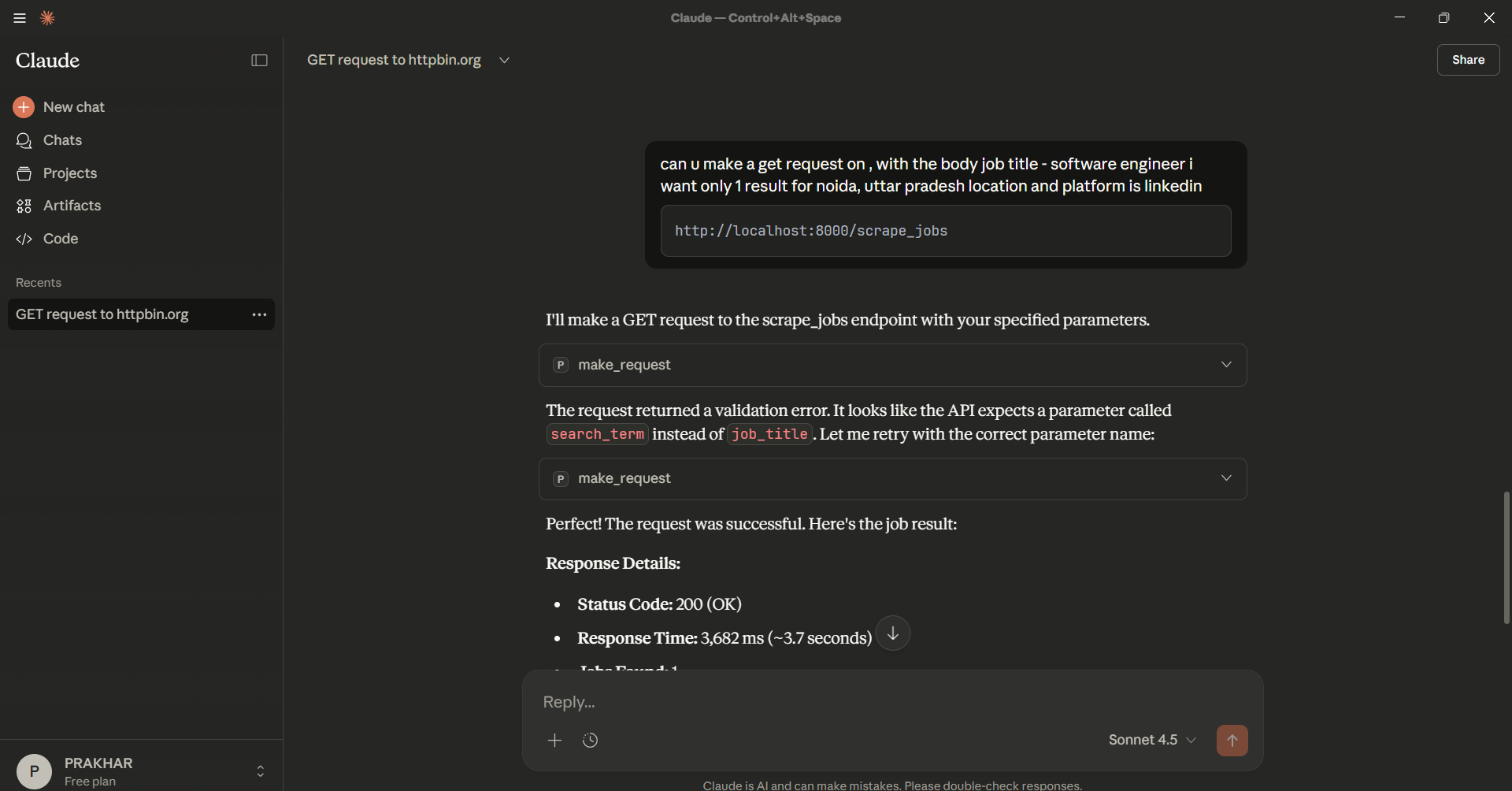
Example: Making API requests through Claude Desktop with automatic error correction
Features
make_request- HTTP request handler (GET, POST, PUT, PATCH, DELETE)decode_jwt- JWT token decoder with expiration checkingvalidate_json_schema- JSON schema validator for API responses
The LLM automatically handles token extraction, header management, and response analysis.
Installation
- Install dependencies globally:
pip install -r requirements.txt
- Test the server:
python server.py
The server should start and wait for connections. Press Ctrl+C to stop.
Setup Claude Desktop
Open Claude Desktop config file:
- Windows:
%APPDATA%\Claude\claude_desktop_config.json - macOS:
~/Library/Application Support/Claude/claude_desktop_config.json - Linux:
~/.config/Claude/claude_desktop_config.json
- Windows:
Add this configuration (replace the path with your project location):
{
  "mcpServers": {
    "talk-api": {
      "command": "python",
      "args": ["C:\\Projects2\\TalkAPI\\server.py"],
      "cwd": "C:\\Projects2\\TalkAPI"
    }
  }
}
Important: Use absolute paths. On Windows, use double backslashes \\ or forward slashes /.
Restart Claude Desktop completely.
Verify connection: In Claude Desktop, go to Settings → Developer. You should see "talk-api" listed and connected.
Making Requests
Simply describe what you want in Claude Desktop chat. The LLM will use the tools automatically.
Examples
Simple GET request:
Make a GET request to https://httpbin.org/json
Test local API:
Get all users from http://localhost:8000/api/users
Login flow:
Login to http://localhost:8000/api/login with username 'admin' and password 'secret', then get my dashboard
Decode JWT:
Decode this JWT token: eyJhbGciOiJIUzI1NiIsInR5cCI6IkpXVCJ9...
Validate response:
Check if the response from /api/users matches a schema where each user has an id (integer) and name (string)
Response Format
All responses include:
status_code- HTTP status coderesponse_time_ms- Response time in millisecondsheaders- Response headersbody- Response body (parsed JSON or text)analysis_hint- Debugging suggestions for errors
Troubleshooting
Server not connecting:
- Verify Python path:
python --version - Check file paths are absolute in config
- Ensure dependencies are installed:
pip install -r requirements.txt - Restart Claude Desktop after config changes
Module not found:
pip install -r requirements.txt
Server disconnects:
- Check Claude Desktop logs (Settings → Developer → Open Logs Folder)
- Verify server starts manually:
python server.py - Ensure all imports work:
python -c "import tools; import utils"
Project Structure
TalkAPI/
├── server.py              # Main MCP server
├── tools/                 # Tool implementations
│   ├── make_request.py
│   ├── decode_jwt.py
│   └── validate_json_schema.py
├── utils.py               # Utility functions
└── requirements.txt       # Dependencies
Author
RAJ - Built with ❤️ for the developer community
License
MIT
Установка TalkAPI
У этого сервера нет опубликованного пакета — он собирается из исходников. Открой репозиторий и следуй инструкции в README.
▸ github.com/prakhar7824/TalkAPIFAQ
TalkAPI MCP бесплатный?
Да, TalkAPI MCP бесплатный — установка в пару кликов через Unyly без оплаты.
Нужен ли API-ключ для TalkAPI?
Нет, TalkAPI работает без API-ключей и переменных окружения.
TalkAPI — hosted или self-hosted?
Доступен hosted-вариант: Unyly запускает сервер в облаке, локальная установка не обязательна.
Как установить TalkAPI в Claude Desktop, Claude Code или Cursor?
Открой TalkAPI на unyly.org, выбери вкладку своего клиента (Claude Desktop, Claude Code, Cursor) и нажми Install — конфиг сгенерируется автоматически, без правки JSON.
Похожие MCP
GitHub
PRs, issues, code search, CI status
 автор: GitHub
Filesystem
Secure file operations with configurable access controls.
Memory
Knowledge graph-based persistent memory system.
Template MCP Server
A CLI tool to create a new Model Context Protocol server project with TypeScript support, dual transport options, and an extensible structure
 автор: mcpdotdirect
Compare TalkAPI with
Не уверен что выбрать?
Найди свой стек за 60 секунд
Автор?
Embed-бейдж для README
Похожее
Все в категории development