
Tbro
БесплатноНе проверенAn MCP server that provides web_search and web_fetch tools returning plain text via the tbro terminal browser to reduce token usage, with the trade-off of no Ja

Описание
An MCP server that provides web_search and web_fetch tools returning plain text via the tbro terminal browser to reduce token usage, with the trade-off of no JavaScript support.
README
English · Русский
An MCP server that gives Claude two web tools — web_search and web_fetch —
that return plain text instead of HTML. Pages are rendered through the
glyph terminal browser. The point is to
spend fewer tokens on web lookups.
Claude already has web tools, so why this one? Two reasons. glyph reduces a page to just its readable text — no markup, scripts, navigation, or ads — and the result is plain enough that you can grep or trim it before it reaches the model. For a search that works out to roughly 8x fewer tokens.
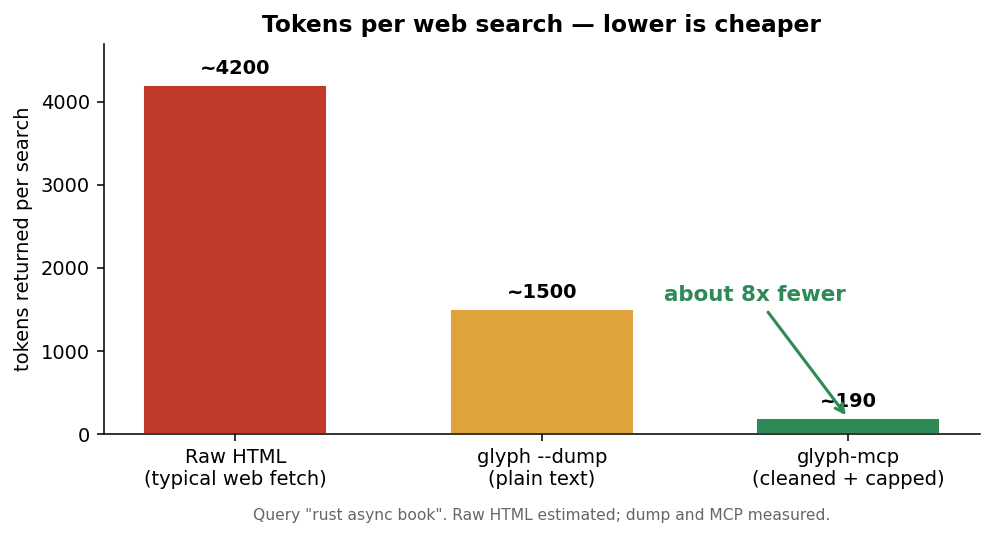
The trade-off is JavaScript: there isn't any. Single-page apps and dynamic dashboards come back mostly empty, so the tool descriptions tell Claude to fall back to its built-in fetch for those. Static pages, docs, articles, and plain searches are where this earns its keep.
Requirements
glyphon your PATH (or its path inGLYPH_BIN). Install it from the glyph repo withcargo install --locked --path crates/app— it lands in~/.cargo/bin.- Node 18 or newer.
Add it to Claude Code
Published on npm as @k1y0mi/glyph-mcp,
so no build step is needed — npx runs it:
claude mcp add glyph -e GLYPH_BIN=$HOME/.cargo/bin/glyph -- npx -y @k1y0mi/glyph-mcp
Restart Claude Code and the two tools appear. To wire it up by hand instead, add
this to .mcp.json (project) or ~/.claude.json:
{
  "mcpServers": {
    "glyph": {
      "command": "npx",
      "args": ["-y", "@k1y0mi/glyph-mcp"],
      "env": { "GLYPH_BIN": "/Users/you/.cargo/bin/glyph" }
    }
  }
}
Build from source
If you'd rather run it from a checkout instead of npm:
npm install
npm run build
claude mcp add glyph -e GLYPH_BIN=$HOME/.cargo/bin/glyph -- node /absolute/path/to/glyph-mcp/build/index.js
Tools
web_search(query, max_chars?)— run a search, get the results as text.web_fetch(url, max_chars?)— pull a single page as text.
max_chars caps the reply (default 8000). GLYPH_BIN points at the binary if
it isn't on your PATH.
Notes
Arguments are passed to glyph via execFile, not a shell, so there's nothing to
inject. Each call times out at 30 seconds. test/smoke.mjs starts the server
over stdio and calls both tools — run it with node test/smoke.mjs after a
build.
License
MIT.
Установка Tbro
У этого сервера нет опубликованного пакета — он собирается из исходников. Открой репозиторий и следуй инструкции в README.
▸ github.com/k1y0miiii/glyph-mcpFAQ
Tbro MCP бесплатный?
Да, Tbro MCP бесплатный — установка в пару кликов через Unyly без оплаты.
Нужен ли API-ключ для Tbro?
Нет, Tbro работает без API-ключей и переменных окружения.
Tbro — hosted или self-hosted?
Self-hosted: сервер запускается локально на твоей машине командой из раздела установки.
Как установить Tbro в Claude Desktop, Claude Code или Cursor?
Открой Tbro на unyly.org, выбери вкладку своего клиента (Claude Desktop, Claude Code, Cursor) и нажми Install — конфиг сгенерируется автоматически, без правки JSON.
Похожие MCP
Playwright
Browser automation, scraping, screenshots
 автор: Microsoft
Puppeteer
Browser automation and web scraping.
 автор: modelcontextprotocol
opentabs-dev/opentabs
Plugin-based MCP server + Chrome extension that gives AI agents access to web applications through the user's authenticated browser session. 100+ plugins with a
 автор: opentabs-dev
robhunter/agentdeals
1,500+ developer infrastructure deals, free tiers, and startup programs across 54 categories. Search deals, compare vendors, plan stacks, and track pricing chan
 автор: robhunter
Compare Tbro with
Не уверен что выбрать?
Найди свой стек за 60 секунд
Автор?
Embed-бейдж для README
Похожее
Все в категории browse