
Template Nodejs Server
БесплатноНе проверенA Node.js template for building stateful MCP servers with streamable HTTP transport, featuring modular tools and resources for easy extension and integration.

Описание
A Node.js template for building stateful MCP servers with streamable HTTP transport, featuring modular tools and resources for easy extension and integration.
README
Overview
Spin up your own custom MCP Server in less than 5 mintues!!!🚀🚀🚀
Most tutorials on MCP (Model Context Protocol) Servers are using stdio protocols (i.e. not for remote connections) and are Stateless and very limited in functionaties (e.g. in terms of how to build Tools/Resources)...thus I decided to build and share this robust and easy-to-extend template Stateful MCP Server with the Streamable-http transport.
This is perhaps the easiest to use fully-functioning template for you to build your own Node.js STATEFUL MCP Server using the Streamable-http transport, with a modular folder structure for Tools, Resources and server and an in-memory database (i.e.Node-Cache) for managing stateful transport objects which further boosts server performance.
It is designed for easy extension and integration, allowing you to add your own tools and resources for custom workflows.
Nevertheless I have also built some out-of-the-box Tools and Resources for you as helpful examples:
For Tools:
By default, two simple yet realistic tools, i.e. a Database tool and an API tool, are loaded for you and you can directly extend the template with your own tools:
listMongoDatabasesAndCollections: which allows you to List all databases and collections in a MongoDB Atlas clusterfetch-pokemon: which allows you to fetch a certain Pokemon of your liking
For Resources:
By default, both ways of loading Resources are provided in the template for you. Namely, loading a Dynamic resource with parameters and loading a Static resource without parameters
Quick Start guide
git clone and install dependencies:
git clone https://github.com/HarveyYifanLi/Template-Nodejs-MCP-Server.git

cd Template-Nodejs-MCP-Server

npm install

(Note that depending on your directory permission setting, you might need to do:
`sudo npm install` instead)
Start the server: (Requires Node.js 18+ for native fetch and ESM support).
node app.jsThe server will listen on port
3001by default.Baaaaaammm, you are now done!! Your custom MCP Server is now up and ready to 🚀🚀🚀
You can now directly connect to this MCP Server at
http://localhost:3001/mcpfrom any MCP Host that runs a MCP Client. See the sectionMCP Client Connection guidefor examples.
Using Tools and Resources
- The server loads and registers all tools and resources from
tools/andresources/viaserver/index.js. - You can call tools and resources via the MCP protocol endpoints (
/mcp). - See
app.jsandserver/index.jsfor the registration and request handling logic.
Extending the App
Adding Custom Tools
Create a new tool module in
tools/:// tools/myCustomTool.js export function createMyCustomTool() { return { name: 'my-custom-tool', title: 'My Custom Tool', description: 'Describe what your tool does', inputSchema: { /* zod schema */ }, async execute(args) { // Your tool logic here return { content: [{ type: 'text', text: 'Result!' }] }; }, }; }Export your tool in
tools/index.js:import { createMyCustomTool } from './myCustomTool.js'; export { createListMongoTool, createFetchPokemonTool, createMyCustomTool };Register your tool in
server/index.js:import { createMyCustomTool } from '../tools/index.js'; server.registerTool( createMyCustomTool().name, { ...createMyCustomTool() }, createMyCustomTool().execute );
Adding Custom Resources
Create a new resource module in
resources/:// resources/myResource.js export function createMyResource() { return { name: 'my-resource', resourceUri: 'myresource://example', title: 'My Resource', description: 'Describe your resource', async execute(uri, params) { return { contents: [{ uri: uri.href, text: 'Resource data!' }] }; }, }; }Export your resource in
resources/index.js:import { createMyResource } from './myResource.js'; export { createAppConfigResource, createUserProfileResource, createMyResource, };Register your resource in
server/index.js:import { createMyResource } from '../resources/index.js'; server.registerResource( createMyResource().name, createMyResource().resourceUri, { title: createMyResource().title, description: createMyResource().description, }, createMyResource().execute );
MCP Client Connection guide:
Connecting from GitHub Copilot
- (I've ALREADY included the folowing directory and file to this repo but in case you are curious about how, see the below two steps)
- within the root of
/Template-Nodejs-MCP-Servercreate a .vscode directory with a file namedmcp.json - copy and paste the following content to
mcp.jsonto allow connection to this local MCP Server:
{
"servers": {
    "my-mcp-server": {
    "url": "http://localhost:3001/mcp",
    "type": "http"
    }
},
"inputs": []
}
(I assume you already enabled GitHub Copilot to VSCode...if not plz do so) In VSCode, open
View/Command Paletteand under the dropdown, select the option calledMCP: Add Server...(See picture) Choose the HTTP option for connection.

(See picture) Enter this local MCP Server URL
http://localhost:3001/mcpinto the input box and press 'Enter' to Continue. Then Choose "Workspace" and press 'Enter' to Continue.
Then you should be able to see the listed MCP Tools available to use from this MCP server
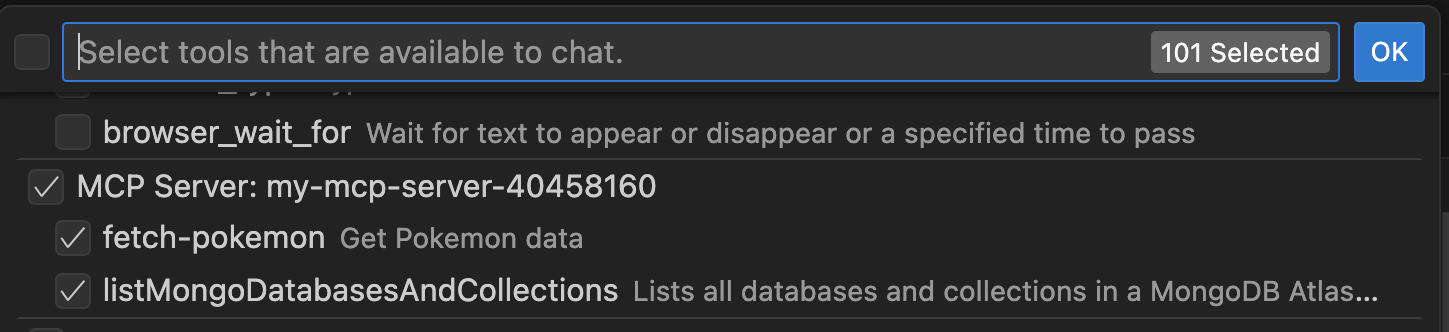
Now you can directly interact with GitHub Copilot Agent to call/use these tools via natural language:
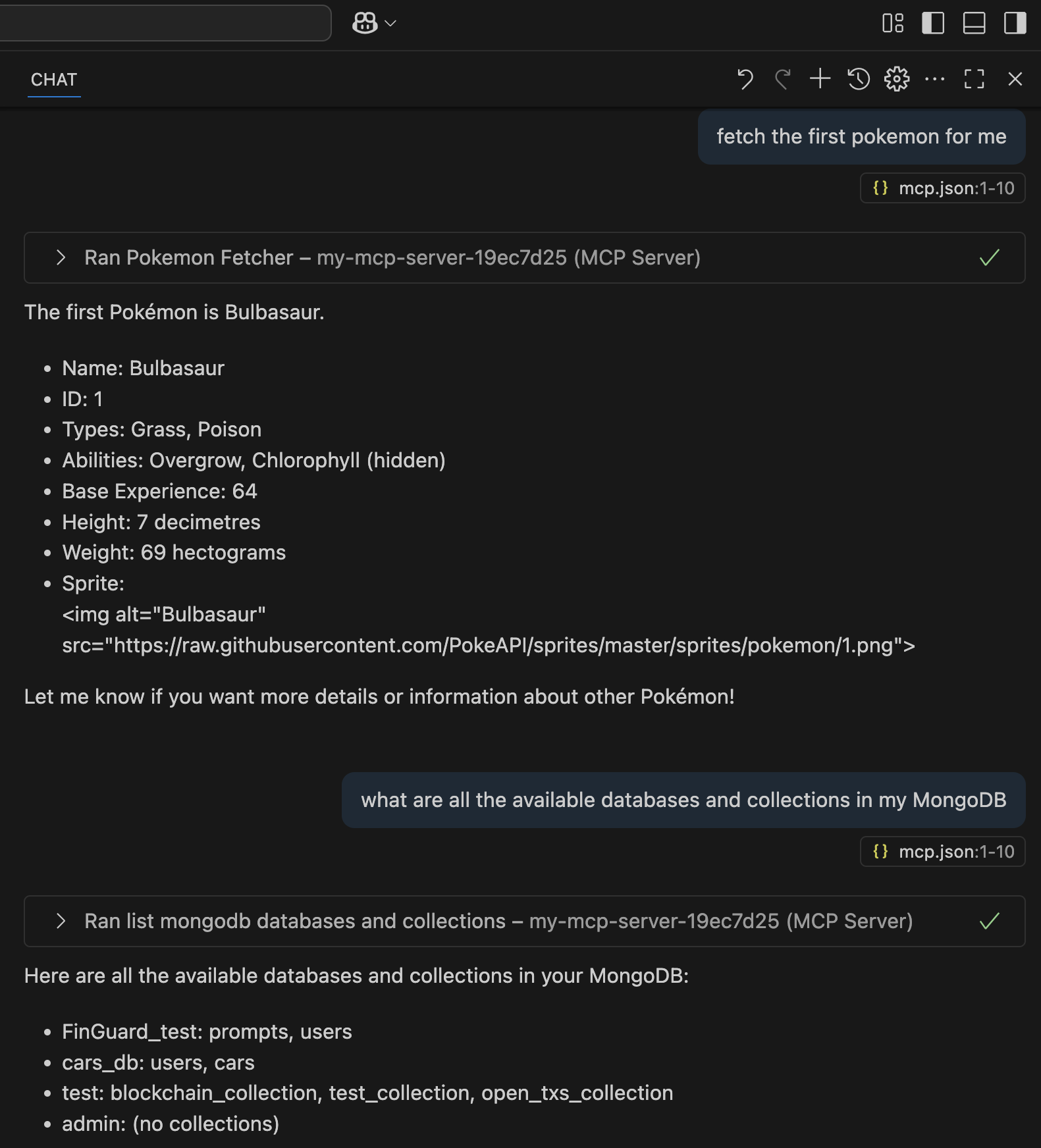
Extra Configuration Note
- Environment Variables:
- Copy
.env.exampleto.env(or create.envmanually). - Required variables (IF you decided to extend and use the
listMongoDatabasesAndCollectionstool):MONGODB_URI
- Copy
Установка Template Nodejs Server
У этого сервера нет опубликованного пакета — он собирается из исходников. Открой репозиторий и следуй инструкции в README.
▸ github.com/HarveyYifanLi/Template-Nodejs-MCP-ServerFAQ
Template Nodejs Server MCP бесплатный?
Да, Template Nodejs Server MCP бесплатный — установка в пару кликов через Unyly без оплаты.
Нужен ли API-ключ для Template Nodejs Server?
Нет, Template Nodejs Server работает без API-ключей и переменных окружения.
Template Nodejs Server — hosted или self-hosted?
Доступен hosted-вариант: Unyly запускает сервер в облаке, локальная установка не обязательна.
Как установить Template Nodejs Server в Claude Desktop, Claude Code или Cursor?
Открой Template Nodejs Server на unyly.org, выбери вкладку своего клиента (Claude Desktop, Claude Code, Cursor) и нажми Install — конфиг сгенерируется автоматически, без правки JSON.
Похожие MCP
GitHub
PRs, issues, code search, CI status
 автор: GitHub
Filesystem
Secure file operations with configurable access controls.
Memory
Knowledge graph-based persistent memory system.
Template MCP Server
A CLI tool to create a new Model Context Protocol server project with TypeScript support, dual transport options, and an extensible structure
 автор: mcpdotdirect
Compare Template Nodejs Server with
Не уверен что выбрать?
Найди свой стек за 60 секунд
Автор?
Embed-бейдж для README
Похожее
Все в категории development