
Terry Form
БесплатноНе проверенA secure, containerized MCP server that enables AI assistants to manage Terraform infrastructure using integrated Language Server Protocol (LSP) tools. It facil

Описание
A secure, containerized MCP server that enables AI assistants to manage Terraform infrastructure using integrated Language Server Protocol (LSP) tools. It facilitates safe operations like initialization, validation, and planning while providing context-aware code completion and documentation.
README
AI-powered Terraform execution through the Model Context Protocol.
Release License: MIT Docker Python
Terry-Form MCP is a containerized Model Context Protocol server that gives AI assistants like Claude safe, structured access to Terraform. It exposes 25 MCP tools spanning Terraform execution, LSP intelligence, GitHub integration, and Terraform Cloud connectivity — all running inside Docker with destructive operations blocked by design.
Dashboard
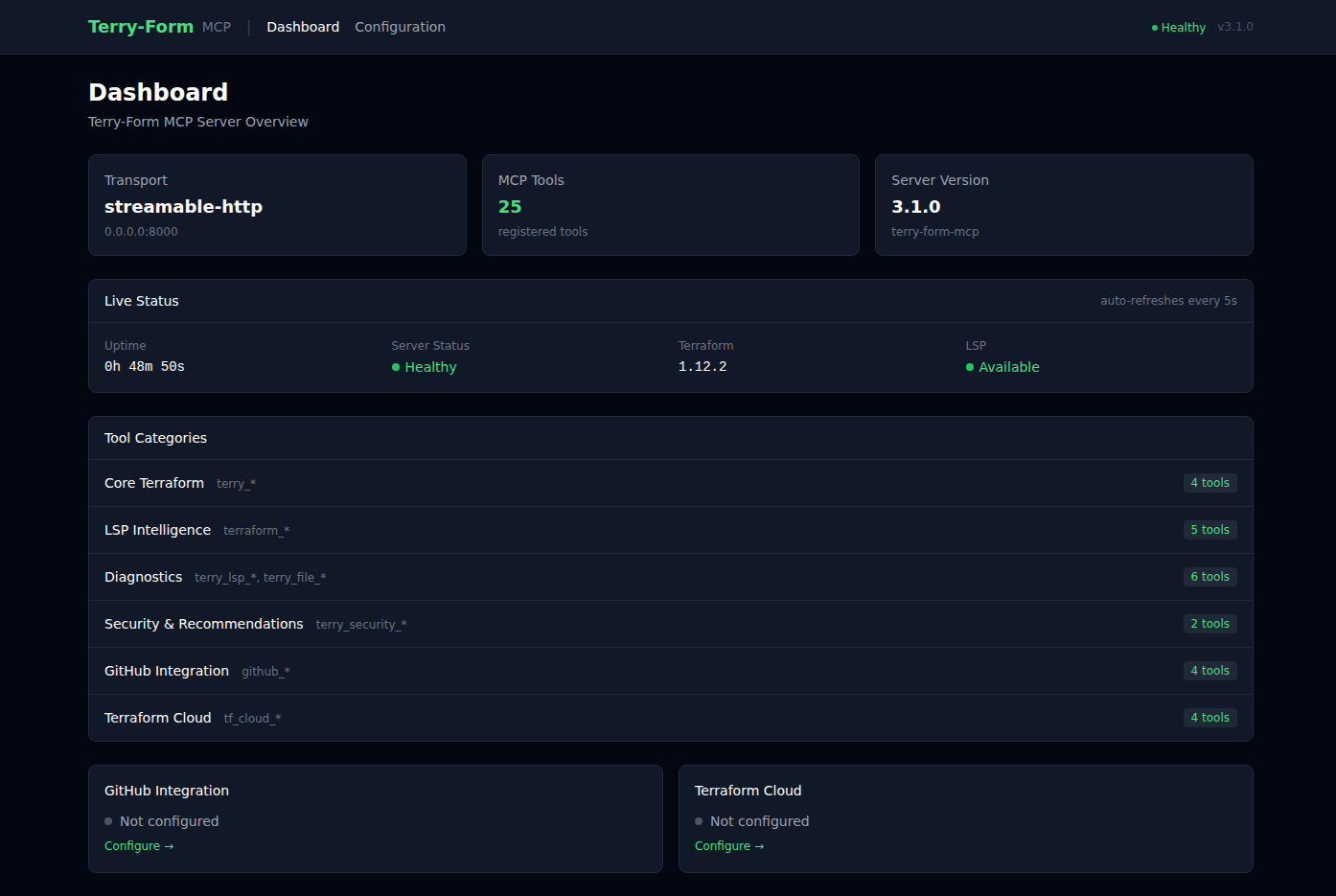
The built-in web dashboard provides real-time server health monitoring, tool category overview, and integration status at a glance. Live status auto-refreshes every 5 seconds.
Configuration UI
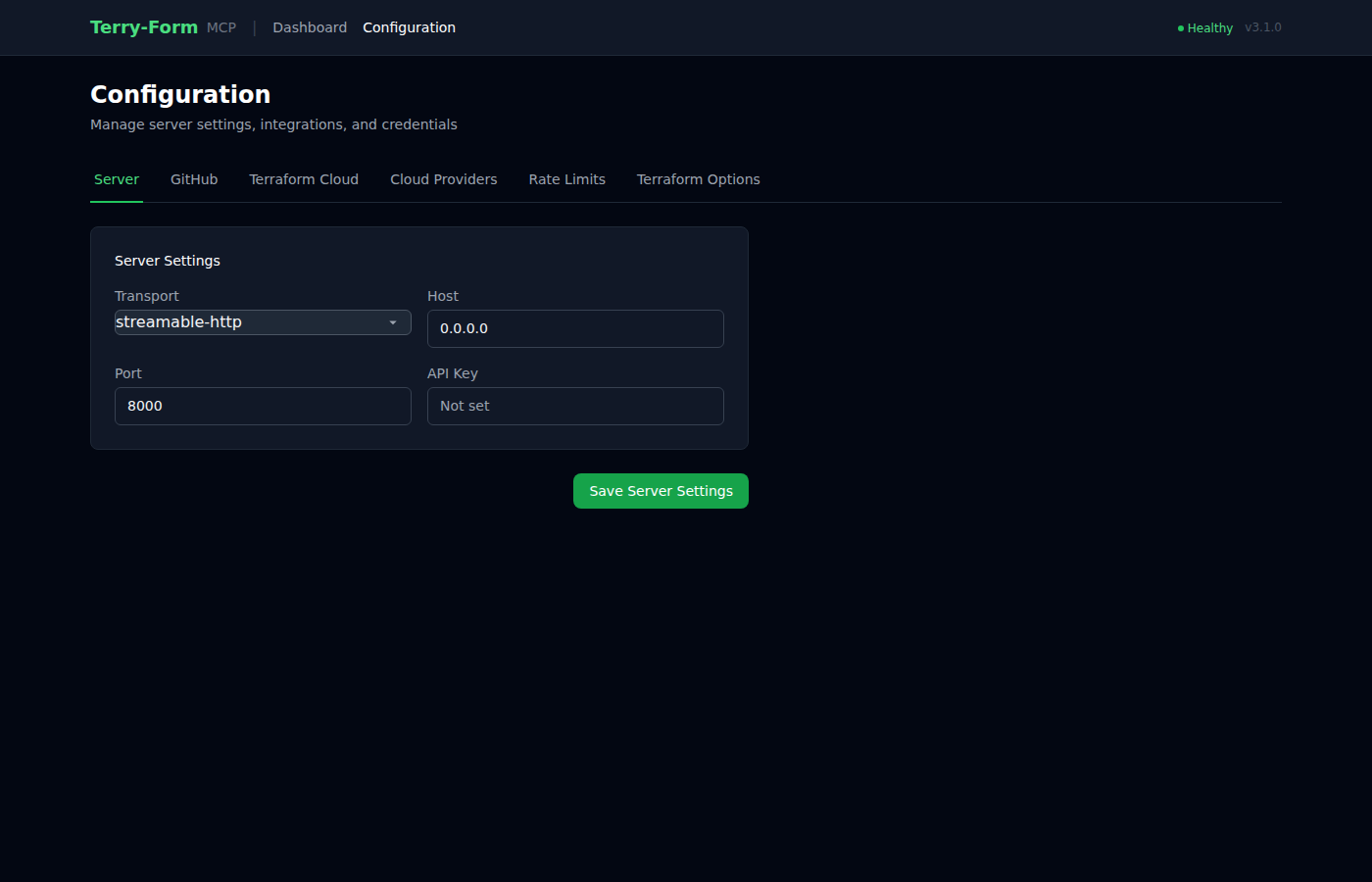
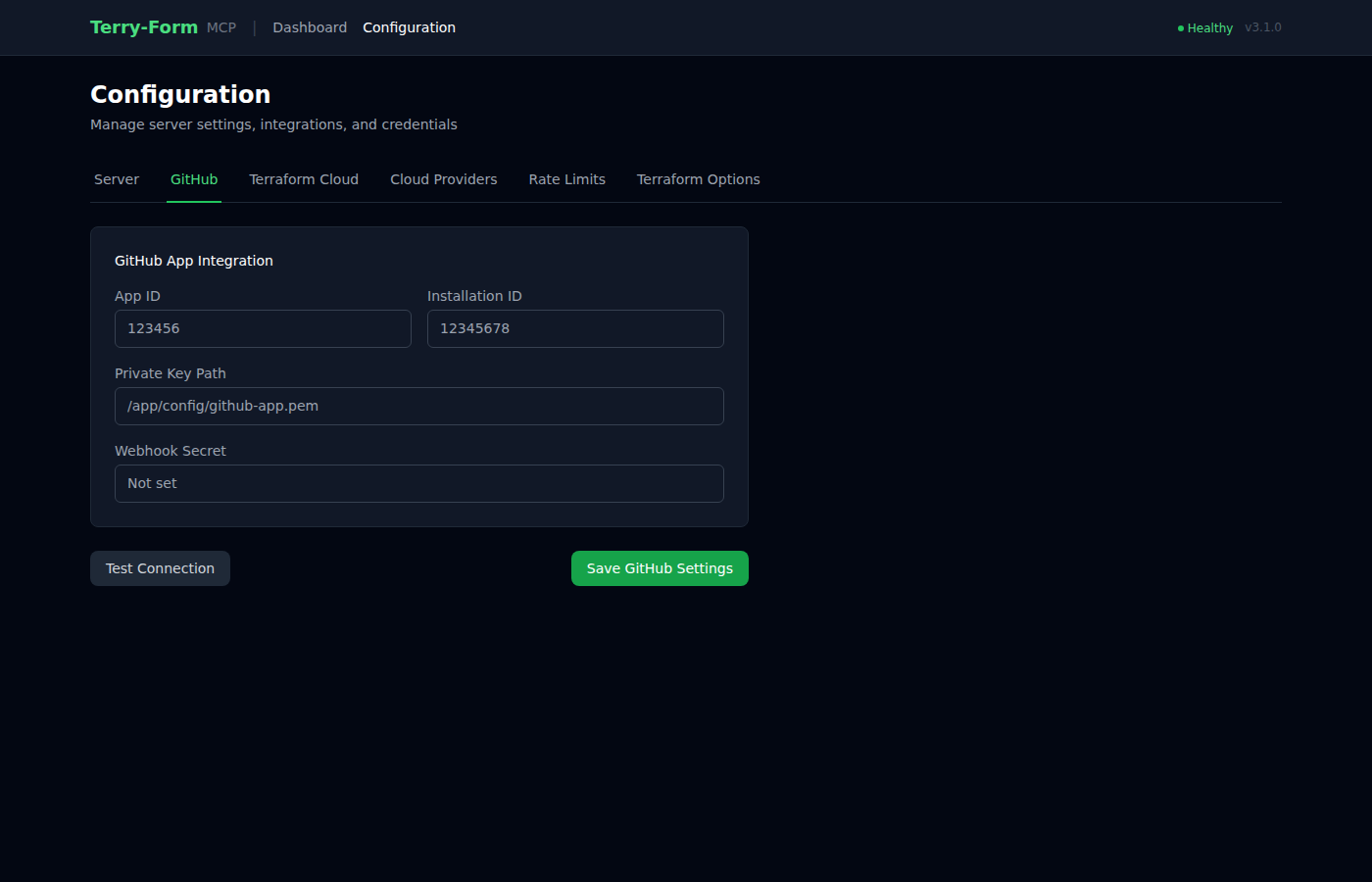
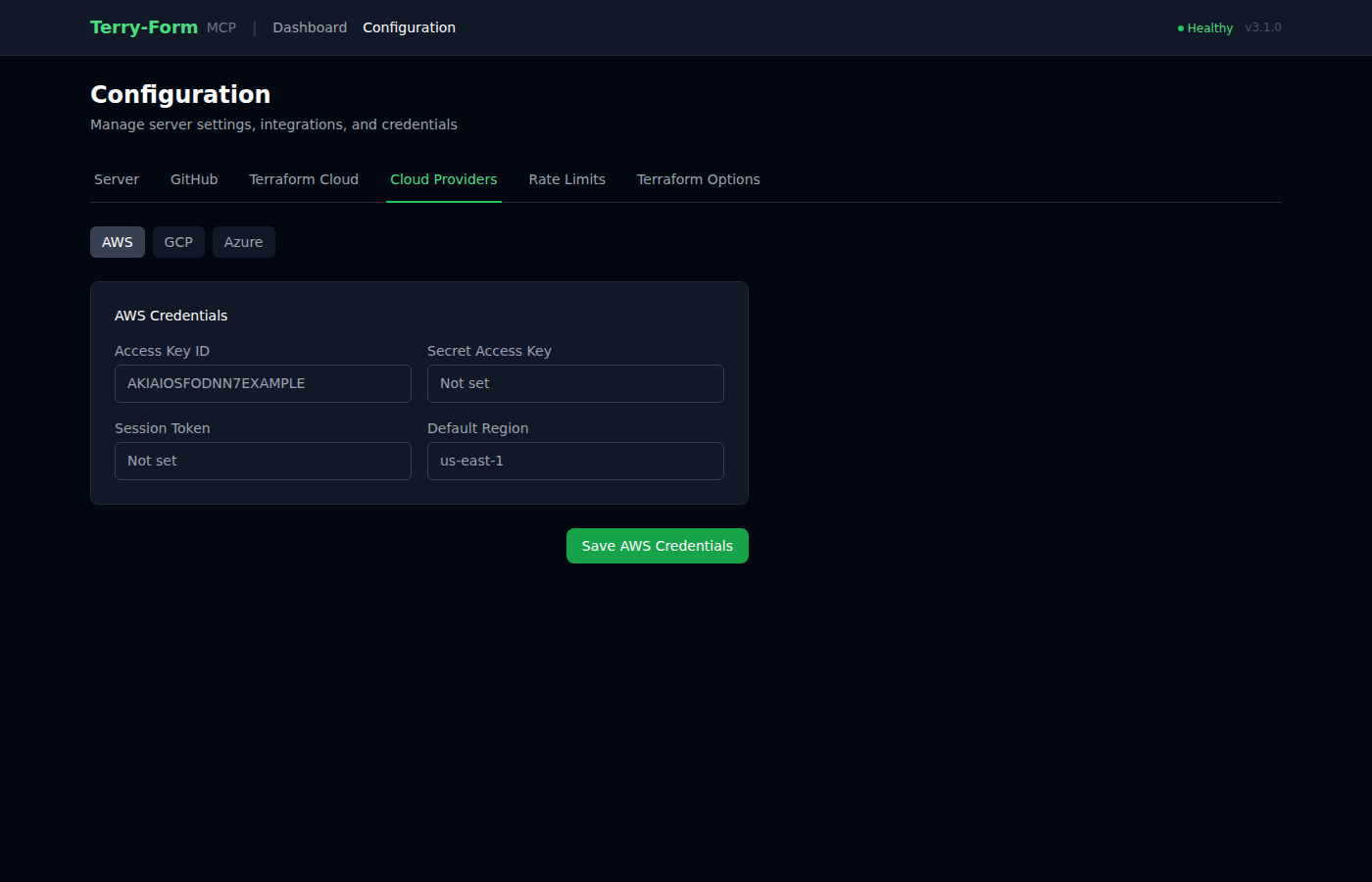
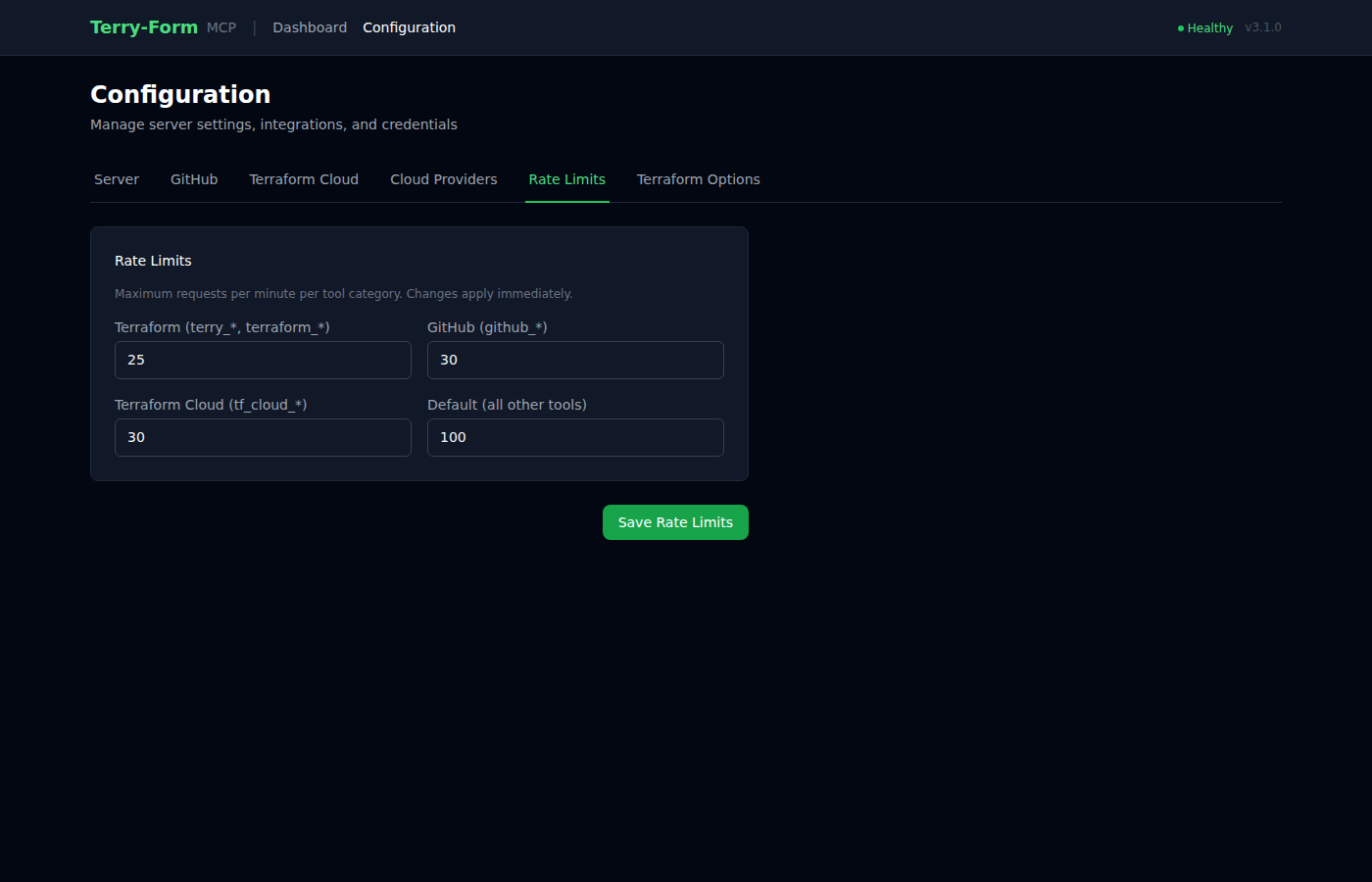
A tabbed configuration interface lets you manage server settings, integrations, cloud provider credentials, and rate limits — all without touching config files. Built with the HAT stack (HTMX + Alpine.js + Tailwind CSS).
| GitHub Integration | Cloud Providers | Rate Limits |
|---|---|---|
 |
 |
 |
Tool Catalog
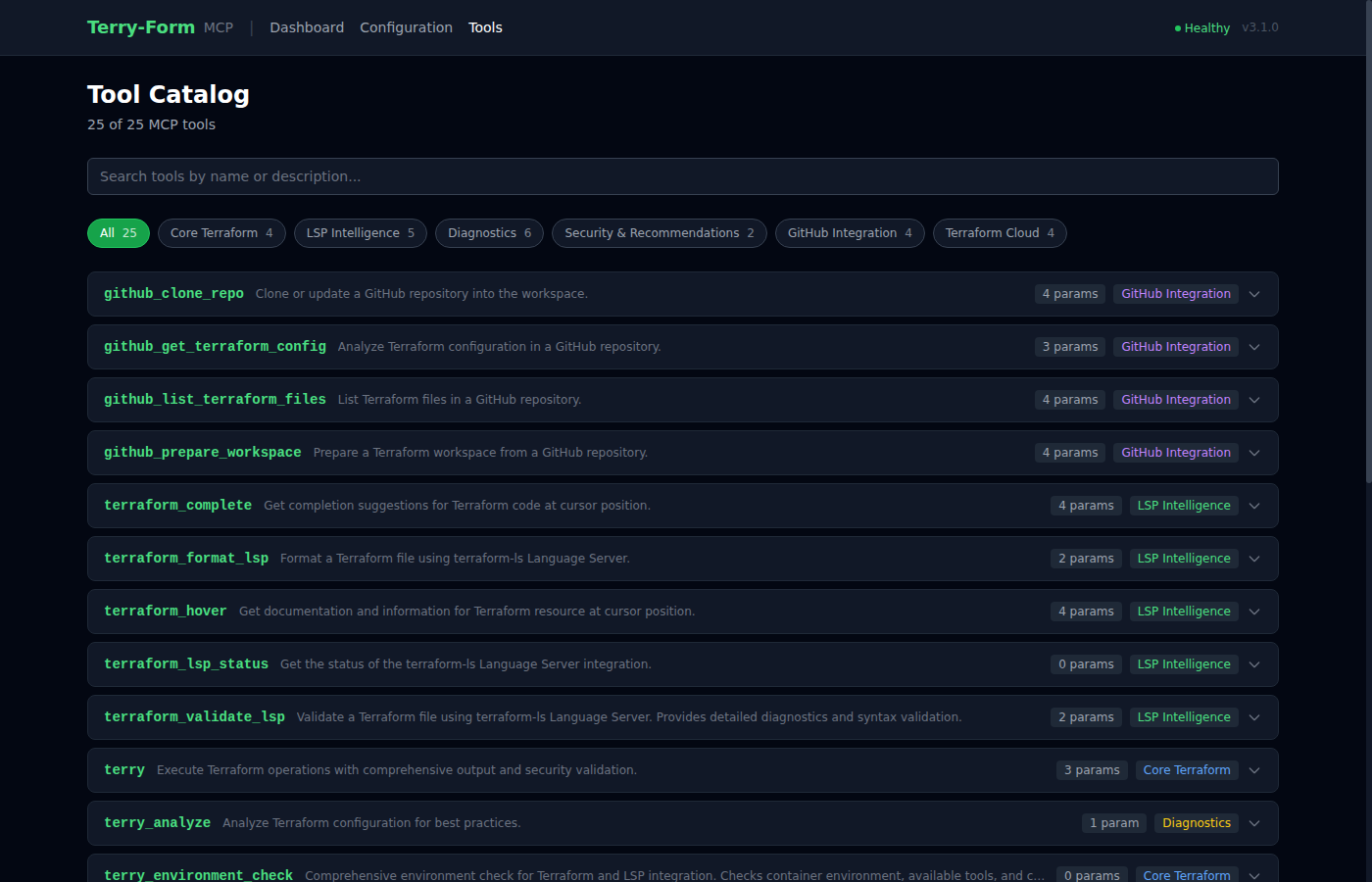
The interactive tool catalog at /tools lists all 25 MCP tools with search, category filtering, and expandable parameter details. Also available as a raw JSON endpoint at /api/tools and as a static tools.json file.
Quick Start
Prerequisites
- Docker installed and running
- Python >= 3.10 (for local development)
1. Build
scripts/build.sh      # Linux/macOS
scripts\build.bat     # Windows
# or directly:
docker build -t terry-form-mcp .
2. Run as MCP Server
docker run -it --rm \
  -v "$(pwd)":/mnt/workspace \
  terry-form-mcp
3. Verify the Image
scripts/verify.sh # Runs 8 checks: Docker, image size, Terraform, terraform-ls, Python, files, tools, startup
Environment Variables
All configuration is through environment variables. No config file is required for basic use.
Server Configuration
| Variable | Description | Default | Required |
|---|---|---|---|
MCP_TRANSPORT |
Transport protocol: stdio, sse, or streamable-http |
stdio |
No |
TERRY_HOST |
Server bind address (fallback: HOST) |
0.0.0.0 |
No |
TERRY_PORT |
Server port (fallback: PORT) |
8000 |
No |
TERRY_FORM_API_KEY |
API key for frontend auth; if unset, auth is disabled | None | No |
TERRY_CSRF_SECRET |
CSRF token secret; regenerated on restart if unset | Random | Recommended |
TERRY_WORKSPACE_ROOT |
Terraform workspace root directory | /mnt/workspace |
No |
TERRY_CONFIG_PATH |
Config file path | /app/config/terry-config.json |
No |
Terraform
| Variable | Description | Default | Required |
|---|---|---|---|
MAX_OPERATION_TIMEOUT |
Terraform command timeout in seconds (10–3600) | 300 |
No |
LSP
| Variable | Description | Default | Required |
|---|---|---|---|
TERRY_TERRAFORM_LS_PATH |
Path to terraform-ls binary |
terraform-ls |
No |
TERRY_LSP_TIMEOUT |
LSP request timeout in seconds | 30 |
No |
TERRY_LSP_MAX_RESPONSE_BYTES |
Maximum LSP response size in bytes | 10485760 |
No |
GitHub Integration
| Variable | Description | Default | Required |
|---|---|---|---|
GITHUB_APP_ID |
GitHub App ID | None | For GitHub features |
GITHUB_APP_PRIVATE_KEY_PATH |
Path to GitHub App private key file | None | For GitHub features |
GITHUB_APP_PRIVATE_KEY |
GitHub App private key (inline PEM) | None | Alt to path |
GITHUB_APP_INSTALLATION_ID |
GitHub App installation ID | None | No |
GITHUB_APP_WEBHOOK_SECRET |
Webhook signature verification secret | None | No |
Terraform Cloud
| Variable | Description | Default | Required |
|---|---|---|---|
TF_API_TOKEN |
Terraform Cloud API token | None | For TF Cloud features |
Rate Limits
| Variable | Description | Default | Required |
|---|---|---|---|
TERRY_RATE_LIMIT_TERRAFORM |
Terraform operations per minute | 20 |
No |
TERRY_RATE_LIMIT_GITHUB |
GitHub operations per minute | 30 |
No |
TERRY_RATE_LIMIT_TF_CLOUD |
Terraform Cloud operations per minute | 30 |
No |
TERRY_RATE_LIMIT_DEFAULT |
Default rate limit per minute | 100 |
No |
Cloud Provider Passthrough
These variables are forwarded directly to the Terraform subprocess. Set them to authenticate with your cloud provider.
AWS: AWS_ACCESS_KEY_ID, AWS_SECRET_ACCESS_KEY, AWS_SESSION_TOKEN, AWS_DEFAULT_REGION, AWS_REGION, AWS_PROFILE
GCP: GOOGLE_CREDENTIALS, GOOGLE_APPLICATION_CREDENTIALS, GOOGLE_PROJECT, GOOGLE_REGION, GOOGLE_ZONE
Azure: ARM_CLIENT_ID, ARM_CLIENT_SECRET, ARM_SUBSCRIPTION_ID, ARM_TENANT_ID
MCP Client Configuration
Add Terry-Form to any MCP-compatible client:
{
  "mcpServers": {
    "terry": {
      "command": "docker",
      "args": [
        "run", "-i", "--rm",
        "-v", "/path/to/your/workspace:/mnt/workspace",
        "terry-form-mcp"
      ]
    }
  }
}
Platform-specific examples
Claude Desktop (Windows)
{
  "mcpServers": {
    "terry": {
      "command": "docker",
      "args": [
        "run", "-i", "--rm",
        "-v", "C:\\Users\\YourUsername\\terraform-projects:/mnt/workspace",
        "terry-form-mcp"
      ]
    }
  }
}
Claude Desktop (macOS)
{
  "mcpServers": {
    "terry": {
      "command": "docker",
      "args": [
        "run", "-i", "--rm",
        "-v", "/Users/YourUsername/terraform-projects:/mnt/workspace",
        "terry-form-mcp"
      ]
    }
  }
}
VSCode (uses workspace variable)
{
  "mcp.servers": {
    "terry": {
      "command": "docker",
      "args": [
        "run", "-i", "--rm",
        "-v", "${workspaceFolder}:/mnt/workspace",
        "terry-form-mcp"
      ]
    }
  }
}
Tools (25)
| Category | Tools | Count |
|---|---|---|
| Core Terraform | terry, terry_version, terry_environment_check, terry_workspace_list |
4 |
| LSP Intelligence | terraform_validate_lsp, terraform_hover, terraform_complete, terraform_format_lsp, terraform_lsp_status |
5 |
| Diagnostics | terry_lsp_debug, terry_workspace_info, terry_lsp_init, terry_file_check, terry_workspace_setup, terry_analyze |
6 |
| Security | terry_security_scan, terry_recommendations |
2 |
| GitHub | github_clone_repo, github_list_terraform_files, github_get_terraform_config, github_prepare_workspace |
4 |
| Terraform Cloud | tf_cloud_list_workspaces, tf_cloud_get_workspace, tf_cloud_list_runs, tf_cloud_get_state_outputs |
4 |
Core Terraform
# Initialize and validate a project
terry(path="infrastructure/aws", actions=["init", "validate"])

# Plan with variables
terry(path="environments/prod", actions=["plan"], vars={"instance_count": "3", "region": "us-east-1"})
Only init, validate, fmt, and plan are permitted. apply and destroy are blocked.
LSP Intelligence
# Code completions
terraform_complete(file_path="main.tf", line=10, character=0)

# Hover documentation
terraform_hover(file_path="main.tf", line=15, character=12)

# Detailed validation with error locations
terraform_validate_lsp(file_path="main.tf")

# Format a file
terraform_format_lsp(file_path="main.tf")
Powered by terraform-ls v0.38.5 — provides context-aware completions, inline documentation, and diagnostics with precise source locations.
GitHub Integration
# Clone a repo and prepare it for Terraform operations
github_clone_repo(owner="myorg", repo="infrastructure")
github_prepare_workspace(owner="myorg", repo="infrastructure", config_path="environments/prod")
Security Scanning
# Scan for hardcoded credentials, missing encryption, overly permissive policies
terry_security_scan(path="my-project")

# Get actionable improvement recommendations
terry_recommendations(path="my-project")
Architecture
┌─────────────┐     MCP Protocol     ┌──────────────────────────────────────┐
│ AI Assistant │ ◄──────────────────► │  Terry-Form MCP Server               │
│ (Claude)     │                      │                                      │
└─────────────┘                      │  ┌─────────────┐  ┌──────────────┐  │
                                     │  │ Terraform    │  │ terraform-ls │  │
                                     │  │ CLI 1.12     │  │ LSP 0.38.5   │  │
                                     │  └──────┬───────┘  └──────┬───────┘  │
                                     │         │                 │          │
                                     │         ▼                 ▼          │
                                     │  ┌──────────────────────────────┐   │
                                     │  │   /mnt/workspace (isolated)   │   │
                                     │  └──────────────────────────────┘   │
                                     └──────────────────────────────────────┘
                                              Docker Container
Key Components
| File | Purpose |
|---|---|
src/server_enhanced_with_lsp.py |
Main FastMCP server — registers all 25 tools |
src/terry-form-mcp.py |
Core Terraform subprocess execution |
src/terraform_lsp_client.py |
Async LSP client wrapping terraform-ls |
src/mcp_request_validator.py |
Input sanitization, path traversal prevention, rate limiting |
src/github_repo_handler.py |
Clone repos and extract Terraform files |
src/github_app_auth.py |
GitHub App JWT/OAuth authentication |
src/frontend/ |
HAT stack web UI (dashboard + configuration) |
Frontend Stack
The built-in web UI uses the HAT stack:
- HTMX 2.0 — partial page updates without full reloads
- Alpine.js 3.14 — lightweight client-side reactivity for tabs and toasts
- Tailwind CSS — dark-mode-first utility styling
Accessible at the server root when running with streamable-http or sse transport.
Security Model
Terry-Form implements defense-in-depth with four layers:
| Layer | Protection |
|---|---|
| Container Isolation | All execution in ephemeral Docker containers. No host access. |
| Operation Allowlist | Only init, validate, fmt, plan. No apply/destroy. |
| Workspace Isolation | All file operations restricted to /mnt/workspace. Path traversal blocked. |
| Input Validation | JSON schema enforcement, variable sanitization, rate limiting per category. |
Forced environment variables: TF_IN_AUTOMATION=true, TF_INPUT=false, CHECKPOINT_DISABLE=true.
Running with the Web UI
To use the dashboard and configuration UI, run with HTTP transport:
# Local
MCP_TRANSPORT=streamable-http HOST=0.0.0.0 PORT=8000 python3 src/server_enhanced_with_lsp.py

# Docker
docker run -it --rm \
  -p 8000:8000 \
  -v "$(pwd)":/mnt/workspace \
  -e MCP_TRANSPORT=streamable-http \
  terry-form-mcp
Then open http://localhost:8000 in your browser.
Configuration Tabs
| Tab | What it configures |
|---|---|
| Server | Transport mode, host, port, API key |
| GitHub | App ID, installation ID, private key path, webhook secret |
| Terraform Cloud | API token |
| Cloud Providers | AWS, GCP, and Azure credentials |
| Rate Limits | Per-category request limits (applied immediately) |
| Terraform Options | Log level, operation timeout |
Container Details
Built on hashicorp/terraform:1.12 (Alpine-based, ~150MB). Includes:
- Terraform CLI 1.12
terraform-lsv0.38.5 for LSP support- Python 3.12 with FastMCP 3.0+
- Runs as non-root user
terraform(UID 1001)
Development
# Install dependencies
pip install -r requirements.txt

# Run locally
python3 src/server_enhanced_with_lsp.py

# Code quality
black .       # Format (88-char line limit)
flake8 .      # Lint
mypy src/*.py # Type check
Limitations
- No state modification —
applyanddestroyare intentionally blocked - String variables only — complex variable types not supported via CLI passthrough
- LSP cold start — first LSP operation takes 1-2 seconds for initialization
- Local execution — designed for development workflows, not production CI/CD
License
Установка Terry Form
У этого сервера нет опубликованного пакета — он собирается из исходников. Открой репозиторий и следуй инструкции в README.
▸ github.com/aj-geddes/terry-form-mcpFAQ
Terry Form MCP бесплатный?
Да, Terry Form MCP бесплатный — установка в пару кликов через Unyly без оплаты.
Нужен ли API-ключ для Terry Form?
Нет, Terry Form работает без API-ключей и переменных окружения.
Terry Form — hosted или self-hosted?
Self-hosted: сервер запускается локально на твоей машине командой из раздела установки.
Как установить Terry Form в Claude Desktop, Claude Code или Cursor?
Открой Terry Form на unyly.org, выбери вкладку своего клиента (Claude Desktop, Claude Code, Cursor) и нажми Install — конфиг сгенерируется автоматически, без правки JSON.
Похожие MCP
GitHub
PRs, issues, code search, CI status
 автор: GitHub
Filesystem
Secure file operations with configurable access controls.
Memory
Knowledge graph-based persistent memory system.
Template MCP Server
A CLI tool to create a new Model Context Protocol server project with TypeScript support, dual transport options, and an extensible structure
 автор: mcpdotdirect
Amap Maps Mcp Server
MCP server for using the AMap Maps API
 автор: duxiaohui
Supabase
Database, auth and storage
 автор: Supabase
Everything
Reference / test server with prompts, resources, and tools.
Git
Tools to read, search, and manipulate Git repositories.
Sequential Thinking
Dynamic and reflective problem-solving through thought sequences.
Time
Time and timezone conversion capabilities.
Compare Terry Form with
Не уверен что выбрать?
Найди свой стек за 60 секунд
Автор?
Embed-бейдж для README
Похожее
Все в категории development