
Testforge Mcp
БесплатноПоддерживаетсяTestForge MCP Server — AI-powered testing in your IDE. Analyzes code for security, unit tests, load, accessibility, vision alignment, scope coverage, and stack

Описание
TestForge MCP Server — AI-powered testing in your IDE. Analyzes code for security, unit tests, load, accessibility, vision alignment, scope coverage, and stack quality.
README
22-dimension AI-powered testing. Drop any repo URL. Get a full report in under 2 seconds.
🚀 Try It
Web (managed): https://testforge.run — drop any public GitHub repo URL, get a 22-dimension report.
Local (MCP) — one command, no cloud, no sign-up:
npx -y @whitenoisenpm/testforge-mcp@latest
open http://localhost:33221
Dashboard accepts a local project path or a GitHub URL. The npm package ships better-sqlite3 prebuilt for macOS/Linux/Windows, so the SQLite engine that backs ~/.testforge/history.db installs with zero native-build steps. Your source code never leaves the machine.
🎬 30-second walkthrough — fully offline
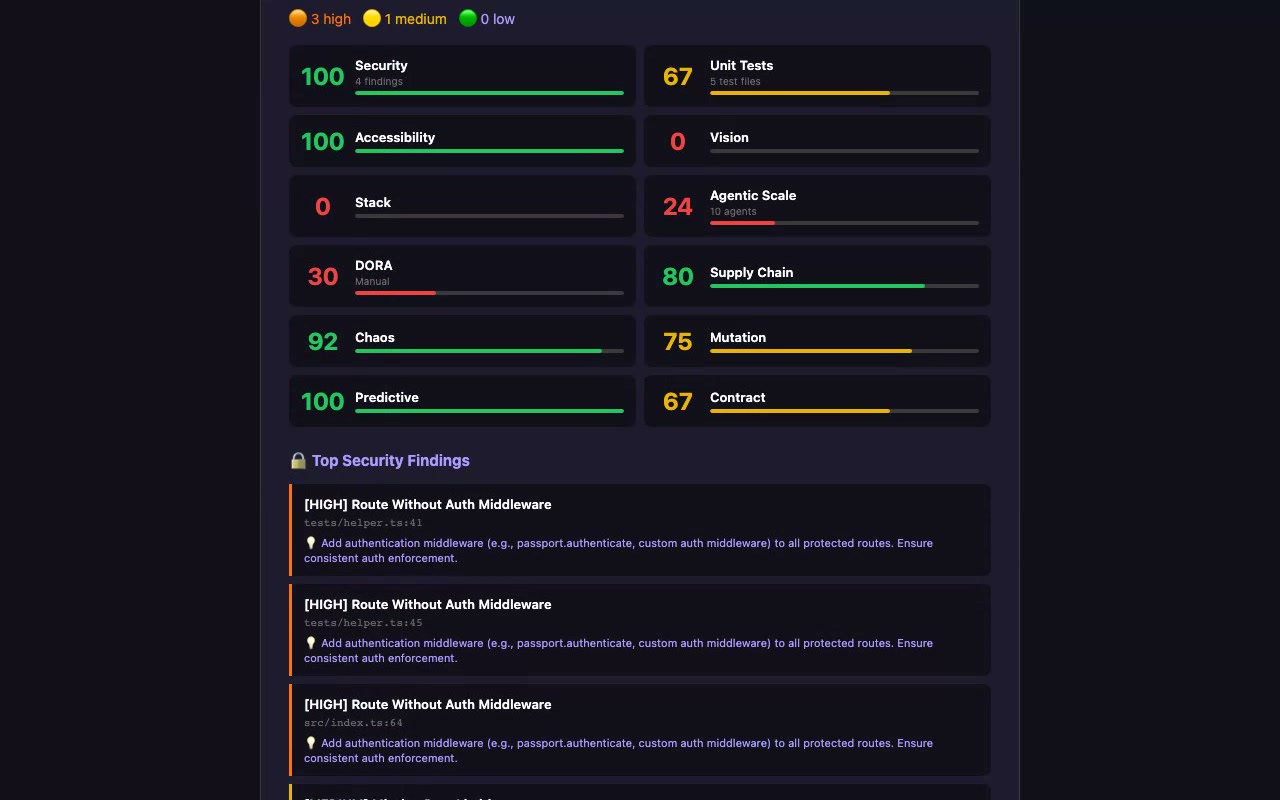
One npx command installs the package + bundled SQLite engine. Paste a local path or GitHub URL, click Run Full Analysis, get a 22-dimension report. Every byte stays on your machine — results persist to ~/.testforge/history.db.
📊 What We Analyze (22 dimensions)
| Category | Dimensions | Detection method |
|---|---|---|
| Code Quality | Security (SAST), Unit Tests, Load/Perf, Accessibility | Babel AST + taint tracking |
| Infrastructure | Kubernetes (manifests + Helm: securityContext, RBAC, probes, limits, NetworkPolicy) | js-yaml + Helm-template stubbing |
| API | Contract testing (OpenAPI cross-ref), Visual regression | AST + YAML parsing |
| Advanced | Edge cases, Property-based, Chaos, Mutation, Predictive | AST + cross-signal aggregation |
| Strategic | Vision & goals, Scope coverage, Stack analysis | Strict dep-name sets + tsconfig parse |
| Enterprise | Agentic-scale, DORA, Supply chain (live OSV), N+1 queries, Dead code, License (SPDX), OWASP | AST + lockfile→OSV.dev + node_modules walk |
Tier-1 analyzers are deterministic — same input always produces the same output. No LLM calls, no Math.random(). Every dimension shipped substantive AST-based depth in v0.6.0 → v0.24.0 (16 deepening passes; see the mcp-server changelog). Tier 2 (v0.25.0) layers LLM-generated Vitest tests + sandbox execution on top — separate path, optional, BYOK on self-host. v0.26.0 closes the polyglot blind spot: Python (FastAPI / Flask / Django / pytest) is now native alongside JS/TS, and the dashboard surfaces a languageCoverage banner instead of pretending "0 endpoints" means "no endpoints" on repos written in languages we don't parse yet. Tier-2 now grounds generated tests in your real source (and imports & executes your real code where it safely can). Simulate (POST /simulate) boots the app and exercises the running system across opt-in lanes — load, chaos, agent, wired (real-code unit tests inside the booted image), and e2e (a Playwright crawl + LLM-authored user journeys). See the mcp-server README.
🆕 Recent work
The dated, authoritative history is the changelog
(src/data/changelog.ts). The narrative — the arcs and the why — lives in the
knowledge graph (docs/knowledge/, open as
an Obsidian vault). Recent arcs (0.30 → 0.36.x):
- Real simulation engine (
0.30) — load / agent / chaos actually run against the booted app (autocannon + docker faults), not static guesses. See docs/knowledge/Simulation-Engine.md. - Kubernetes dimension (
0.31) — the 22nd dimension: parses manifests + Helm and checks securityContext / RBAC / probes / limits / NetworkPolicy. Reports become grouped-by-dimension with per-dimension method + coverage + N/A. - No cry-wolf scoring (
0.32 → 0.33) — diminishing-returns scoring replaces linear cliffs;0/100andnullare gone, generated/vendored files and polyglot deps no longer trigger false flags. See docs/knowledge/Scoring.md. - Self-host UX (
0.34 → 0.35) — setup wizard, local-AI (point Tier-2 at Ollama/LM Studio), in-dashboard Settings panel, Docker preflight, always-@latestinstall. - Managed BYOK + Tier-2 sandbox fixes (
0.36.x) — hosted Tier-2 with your own (encrypted) OpenRouter key; the0/0 ERROREDsandbox bug fixed; multi-arch + version-pinned runner images + build-locally fallback; full-detail Markdown report download. See docs/knowledge/Tier2-Sandbox.md.
🏗️ Architecture
┌──────────────────────────────────────────────────────────┐
│  Vercel — Frontend + 22 API routes (testforge.run)      │
│  React 19 + Vite + Tailwind + shadcn/ui                  │
│                                                          │
│  Auth:  GitHub OAuth → tf_session JWT cookie (httpOnly)  │
│  Edge:  CORS allowlist, X-Request-Id, Upstash rate-limit │
│  Data:  Neon Postgres via Drizzle ORM                    │
└────────────────────────────┬─────────────────────────────┘
                             │
                             │  /api/analyze passes through
                             ▼
┌──────────────────────────────────────────────────────────┐
│  Managed MCP — mcp.testforge.run (a VPS, behind nginx)   │
│  Fastify + TypeScript. Same analyzers as the npm package.│
│  Tier-2 sandbox via a locked-down docker socket-proxy.   │
│  /api/* proxies inject the run-secret + forward BYOK keys.│
└──────────────────────────────────────────────────────────┘

┌──────────────────────────────────────────────────────────┐
│  Local MCP (npm package, default port 33221)             │
│  npx -y @whitenoisenpm/testforge-mcp@latest              │
│  SQLite at ~/.testforge/history.db                       │
│  🔒 No outbound calls except git clone + your AI provider│
└──────────────────────────────────────────────────────────┘
See docs/knowledge/Architecture.md for the full picture (endpoints, request flow, the shared analyzer core).
🔐 Security model
- Auth: GitHub OAuth only. The callback mints a 30-day HS256 JWT and sets it as an
httpOnly,secure,sameSite=Laxcookie namedtf_session. Frontend never sees the token. Anonymous requests to user-scoped routes return401, not seed data. - CORS: Allowlist enforced via
Vary: Origin+ origin reflection. Allowed:https://testforge.run,*.vercel.apppreview deployments, andlocalhostdev ports. Anything else gets403 "Origin not allowed". - Rate limit: Sliding window via Upstash Redis (
@upstash/ratelimit). Default 60 req/min/IP. Falls back to in-memory with a console warning when Upstash isn't configured. - Request id: Every API response carries
X-Request-Id(echoes Vercel's id when present). Logged with every line via the structured JSON logger — search Vercel logs byrid:for correlation. - Stripe webhook: Signature verified against the raw request body (
bodyParser: false). Idempotent — duplicate event IDs return200 {duplicate:true}via astripe_eventsPK conflict. - Secrets posture: all credentials live in Vercel project env.
.gitignorecovers.env,.env*,.vercel,.secure/.
📦 Quick Start
Use the managed service
open https://testforge.run
Sign in with GitHub. Click "Managed", paste a repo URL.
Run the MCP locally (self-host)
# Start the server — dashboard at http://localhost:33221
npx -y @whitenoisenpm/testforge-mcp@latest

# Configure the AI provider for Tier-2 (OpenRouter or local Ollama/LM Studio)
npx -y @whitenoisenpm/testforge-mcp@latest setup

# Full env-var reference
npx -y @whitenoisenpm/testforge-mcp@latest --help
Tier-1 (22 dimensions) needs no config; Tier-2 needs an AI provider + Docker.
No database to install — history auto-stores in SQLite at ~/.testforge/history.db.
For IDE integration (Cursor / Claude / VS Code), add it as an MCP server — see
docs/knowledge/Self-Host-and-BYOK.md.
🛠️ Local Development
git clone https://github.com/t4tarzan/testforge && cd testforge
npm install
npm run dev     # frontend + api on http://localhost:9999

# In another terminal:
cd mcp-server && npm install && npm run dev   # analyzer on :33221
Environment variables: copy .env.example to .env. The required ones to run anything authenticated are DATABASE_URL, SESSION_SECRET, GITHUB_CLIENT_ID, GITHUB_CLIENT_SECRET. See RUNBOOK.md for the full launch checklist.
💰 Pricing
| Plan | Price | Tests/Month | Repos | Key Features |
|---|---|---|---|---|
| Free | $0 | 5 | 1 | All 22 dimensions, public repos |
| Pro | $29/mo | 100 | 10 | Private repos, CI/CD webhooks, Slack/Discord |
| Enterprise | $199/mo | Unlimited | Unlimited | SSO, SLA, dedicated support, custom integrations |
🔌 API Reference
Full API docs at testforge.run/#/docs. Quick reference:
| Method | Endpoint | Auth | Notes |
|---|---|---|---|
| GET | /api/health |
none | DB ping + version |
| GET | /api/status |
none | All-services rollup (parallel checks) |
| GET | /api/badge?score=N |
none | SVG badge for README embedding |
| GET | /api/auth/callback |
none | OAuth start + callback; sets tf_session cookie |
| GET | /api/auth/me |
cookie | Current user; 401 if not signed in |
| POST | /api/auth/logout |
cookie | Clears tf_session |
| POST | /api/analyze |
none | Proxies to Fly.io MCP; 502/504 on upstream failure (no fake fallback) |
| GET | /api/projects |
cookie | User's projects |
| GET | /api/history |
cookie | User's test runs |
| GET | /api/reports/:id |
cookie | One report; 404 (not seed) when missing |
| POST | /api/save-results |
cookie | Persist an analysis run |
| GET/POST/DELETE | /api/keys |
cookie | API key CRUD |
| GET/POST | /api/gate |
cookie | Plan quota — usage from real test_runs counts |
| GET/POST | /api/stripe |
cookie (POST) | Checkout session |
| POST | /api/stripe-webhook |
Stripe signature | Idempotent via stripe_events table |
| POST | /api/webhook |
none | GitHub CI/CD webhook (notify/Slack/Discord) |
All responses include X-Request-Id and rate-limit headers (X-RateLimit-Remaining, X-RateLimit-Reset).
🧪 Tests & CI
# Frontend + API E2E (Playwright)
npx playwright test
# Set BASE_URL=https://<preview>.vercel.app to run against a preview.

# Analyzer integration tests (vitest, against fixture projects)
cd mcp-server && npm test
CI runs on every PR via .github/workflows/ci.yml:
- Lint + build — blocking.
tsc -b && vite build. - Analyzer tests — blocking.
vitest runagainstmcp-server/tests/fixtures/{vulnerable,clean}-app. - Playwright (preview URL) — blocking. Pulls the PR's Vercel preview URL, sends requests with the
x-vercel-protection-bypassheader so Vercel's SSO doesn't gate the run.
The bypass requires VERCEL_AUTOMATION_BYPASS_SECRET set as a GitHub Actions secret (mirroring Vercel's project-level "Protection Bypass for Automation"). See .github/workflows/ci.yml for the full setup steps.
📁 Project Structure
testforge/
├── api/                    # Vercel serverless functions
│   ├── _security.js        # withSecurity wrapper: CORS allowlist, rate limit, security headers, request-id, error catch
│   ├── _session.js         # jose-based HS256 JWT cookie, requireSession helper
│   ├── _env.js             # requireEnv() — typed env contract with clear missing-var errors
│   ├── _log.js             # JSON-line structured logger with per-request rid
│   ├── auth/               # callback, me, logout
│   ├── reports/[id].js     # single report; 404 (not seed) when missing
│   └── ...                 # analyze, projects, history, keys, gate, stripe, …
├── mcp-server/             # Fly.io / npm-published MCP server
│   ├── src/
│   │   ├── analyzers/      # 8 modules covering 22 dimensions
│   │   ├── local-db.ts     # SQLite via better-sqlite3
│   │   ├── mcp-server.ts   # /test, /quick-scan with SQLite persistence
│   │   └── index.ts        # Fastify app, port 33221
│   └── tests/
│       ├── analyzers.test.ts   # vitest against real fixtures
│       └── fixtures/{vulnerable,clean}-app/
├── src/                    # React 19 frontend (Vite)
│   ├── pages/              # 15 page components (HashRouter)
│   ├── context/AuthContext.tsx  # Hydrates from /api/auth/me cookie
│   └── db/schema.ts        # Drizzle ORM (8 tables, FK cascade)
├── drizzle/                # Generated migration baseline
├── scripts/
│   ├── migrate-to-v1.sql   # Idempotent one-shot to bring an existing Neon DB up to v1
│   ├── wrap-handlers.js    # Codemod that wraps every api/*.js with withSecurity
│   └── smoke.sh            # 10-assertion post-deploy smoke test
├── e2e/                    # Playwright E2E suite
├── RUNBOOK.md              # Pre-launch checklist + incident playbooks
└── LOG.md                  # Original build log
🏆 Built With
React 19 · TypeScript · Vite · Tailwind · shadcn/ui · Fastify · Neon Postgres · Drizzle ORM · Fly.io · Vercel · Stripe · Upstash Redis · jose · Playwright · Vitest · GSAP · Recharts · Framer Motion · better-sqlite3
📄 License
BUSL-1.1 — Free for non-production use and self-hosting. Commercial managed service requires a paid plan at testforge.run.
Установить Testforge Mcp в Claude Desktop, Claude Code, Cursor
unyly install testforge-mcpСтавит в Claude Desktop, Claude Code, Cursor и VS Code — сам разбирается с npx, uvx и сборкой из исходников.
Впервые? Поставь CLI: curl -fsSL https://unyly.org/install | sh
Или настроить вручную
Выполни в терминале:
claude mcp add testforge-mcp --env API_KEY="" --env OPENROUTER_API_KEY="" --env TESTFORGE_MCP_PORT="" -- npx -y @whitenoisenpm/testforge-mcpFAQ
Testforge Mcp MCP бесплатный?
Да, Testforge Mcp MCP бесплатный — установка в пару кликов через Unyly без оплаты.
Нужен ли API-ключ для Testforge Mcp?
Да, требуются переменные окружения: API_KEY, OPENROUTER_API_KEY, TESTFORGE_MCP_PORT. Unyly подставит их в конфиг при установке.
Testforge Mcp — hosted или self-hosted?
Self-hosted: сервер запускается локально на твоей машине командой из раздела установки.
Как установить Testforge Mcp в Claude Desktop, Claude Code или Cursor?
Открой Testforge Mcp на unyly.org, выбери вкладку своего клиента (Claude Desktop, Claude Code, Cursor) и нажми Install — конфиг сгенерируется автоматически, без правки JSON.
Похожие MCP
GitHub
PRs, issues, code search, CI status
 автор: GitHub
Filesystem
Secure file operations with configurable access controls.
Memory
Knowledge graph-based persistent memory system.
Template MCP Server
A CLI tool to create a new Model Context Protocol server project with TypeScript support, dual transport options, and an extensible structure
 автор: mcpdotdirect
Compare Testforge Mcp with
Не уверен что выбрать?
Найди свой стек за 60 секунд
Автор?
Embed-бейдж для README
Похожее
Все в категории development