
ThinChain
БесплатноНе проверенMCP server that sanitizes bad broker data and compresses 500-row options chains to strategy-specific slices for AI trading agents. 95% token reduction. Handles

Описание
MCP server that sanitizes bad broker data and compresses 500-row options chains to strategy-specific slices for AI trading agents. 95% token reduction. Handles ghost quotes, inverted spreads, and impossible greeks automatically.
README
ThinChain
The catalytic converter between raw broker data and your AI trading agent.
Battle-tested. Sanitization logic extracted from a production options trading app. Handles every bad tick Tradier has thrown at us in production.
☁️ Moving to production?
The open-source server runs locally with your own API keys. For hosted infrastructure with multi-broker failover, SLA guarantees, and webhook alerts — join the managed cloud waitlist.
The Problem
Tradier's MCP dumps 500-row JSON chains. One bad print can corrupt an agent's reasoning. ThinChain sanitizes, compresses, and circuit-breaks that data before it reaches your model.
Installation
git clone https://github.com/snipmcp/thinchain.git
cd thinchain
pip install -e ".[dev]"
cp .env.example .env
Or with Docker:
docker-compose up --build
Configuration
TRADIER_API_KEY=your_key_here
TRADIER_BASE_URL=https://api.tradier.com/v1
POLYGON_API_KEY=your_key_here
POLYGON_BASE_URL=https://api.polygon.io
DEFAULT_BROKER=tradier
CACHE_TTL_SECONDS=30
LOG_LEVEL=INFO
Usage
Three example prompts to send to Claude (or any MCP-compatible agent):
Use get_compressed_chain to get an iron condor setup on SPY expiring 2026-06-19Check if SPY options data is trustworthy before I place my tradeGet me the ATM straddle strikes for AAPL expiring 2026-06-19
Run it in two terminals
# Tab 1 — start the MCP server
python -m thinchain.server
# Tab 2 — call a tool from a Python shell or your MCP client
# Tool signatures:
#   get_compressed_chain(symbol, expiration, strategy="raw",
#                        delta_range=None, broker="tradier")
#   get_sanitized_quote(symbol, broker="tradier")
#   get_circuit_status(symbol, expiration, broker="tradier")
How it works
Three layers between raw broker output and your model:
Broker API → [Sanitize] → [Compress] → [Circuit Break] → MCP Tool → AI Agent
              hygiene     strategy      anomaly gate
              rules       slicing       + cache
- Sanitize: Drops ghost quotes (0.0/0.0), inverted spreads, NaN/empty/dash values, clamps deltas to [-1, 1], normalizes positive theta on long options, flags illiquid strikes.
- Compress: Slices the chain to only the strikes relevant to your strategy (iron condor, straddle, etc.) — typically 95%+ token reduction.
- Circuit Break: Four-tier data quality (
clean/noisy/degraded/circuit_breaker_active). When >65% of rows are anomalous, refuses to serve stale data and falls back to last known-good cache.
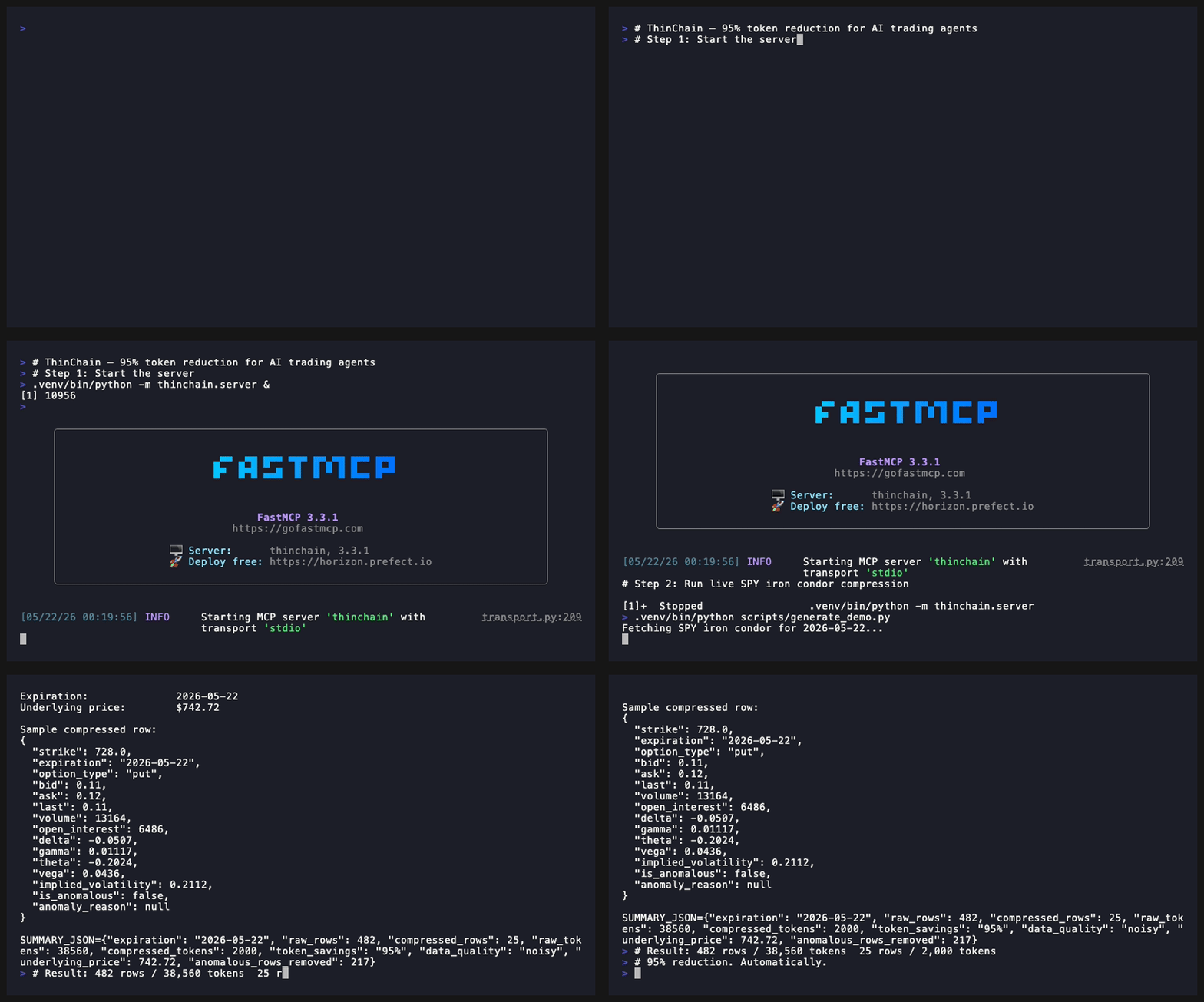
Real numbers from a live SPY iron condor (2026-06-19 expiration)
RAW TRADIER PAYLOAD          THINCHAIN OUTPUT
─────────────────────────────────────────────
Rows:        482             Rows:        25
Est tokens:  38,560          Est tokens:  2,000
Token savings:               95%
Anomalous rows removed:      217
Data quality:                noisy → still safely served
ThinChain compresses 482 rows / 38,560 tokens down to 25 rows / 2,000 tokens — and flags 217 anomalous strikes (illiquid, ghost quotes, wide spreads) that would have polluted the agent's context.
Roadmap
- Managed cloud tier (hosted, multi-tenant, webhook alerts)
- Polygon connector hardening (live SIP feed)
- Webhook alerts for circuit breaker trips
Contributing
PRs welcome. Run pytest before submitting.
Установить ThinChain в Claude Desktop, Claude Code, Cursor
unyly install thinchainСтавит в Claude Desktop, Claude Code, Cursor и VS Code — сам разбирается с npx, uvx и сборкой из исходников.
Впервые? Поставь CLI: curl -fsSL https://unyly.org/install | sh
Или настроить вручную
Выполни в терминале:
claude mcp add thinchain -- uvx thinchainFAQ
ThinChain MCP бесплатный?
Да, ThinChain MCP бесплатный — установка в пару кликов через Unyly без оплаты.
Нужен ли API-ключ для ThinChain?
Нет, ThinChain работает без API-ключей и переменных окружения.
ThinChain — hosted или self-hosted?
Доступен hosted-вариант: Unyly запускает сервер в облаке, локальная установка не обязательна.
Как установить ThinChain в Claude Desktop, Claude Code или Cursor?
Открой ThinChain на unyly.org, выбери вкладку своего клиента (Claude Desktop, Claude Code, Cursor) и нажми Install — конфиг сгенерируется автоматически, без правки JSON.
Похожие MCP
Fetch
Web content fetching and conversion for efficient LLM usage.
AWS KB Retrieval
Retrieval from AWS Knowledge Base using Bedrock Agent Runtime.
 автор: modelcontextprotocol
Spring AI MCP Server
Provides auto-configuration for setting up an MCP server in Spring Boot applications.
llm-analysis-assistant
A very streamlined mcp client that supports calling and monitoring stdio/sse/streamableHttp, and can also view request responses through the /logs page. It also
 автор: xuzexin-hz
Compare ThinChain with
Не уверен что выбрать?
Найди свой стек за 60 секунд
Автор?
Embed-бейдж для README
Похожее
Все в категории ai