
Thread Contract Server
БесплатноНе проверенThread Contract is a local runtime contract layer for AI coding-agent threads. It lets users pin explicit, thread-scoped rules without turning them into project

Описание
Thread Contract is a local runtime contract layer for AI coding-agent threads. It lets users pin explicit, thread-scoped rules without turning them into project policy or long-term memory.
README
Thread-scoped runtime contracts for AI coding agents.
What Is Thread Contract?
Thread Contract is a local runtime contract layer for AI coding-agent threads. It lets users pin explicit, thread-scoped rules such as "do not commit unless I ask" or "read PLAN.md before editing" without turning those rules into project policy or long-term memory.
It stores rules in local SQLite, exposes management tools through MCP, provides
a small local Web UI, and can inject active rules before every Codex or Claude
Code user turn through a UserPromptSubmit hook.
Use it when an instruction should survive a long coding-agent conversation, but should not become a permanent repository rule or hidden memory.
How It Differs From Rules, Memory, And Skills
Thread Contract is not another memory system or prompt template. It is a runtime contract for the current thread: explicit temporary rules that stay visible and enforceable without becoming repository policy or global memory.
| Approach | Best For | Not For |
|---|---|---|
AGENTS.md / CLAUDE.md |
Long-term project norms and fixed development rules | Temporary task requirements; frequent edits pollute the repository |
| Long-term memory | User preferences and cross-conversation information | Short-term constraints inside the current task |
| Skill / prompt templates | Reusable capabilities and fixed workflows | Manual triggering; not suited for stable every-turn enforcement |
| Thread Contract | Temporary rule contracts for the current thread | Global long-term memory or project-wide policy changes |
Usage Screenshots
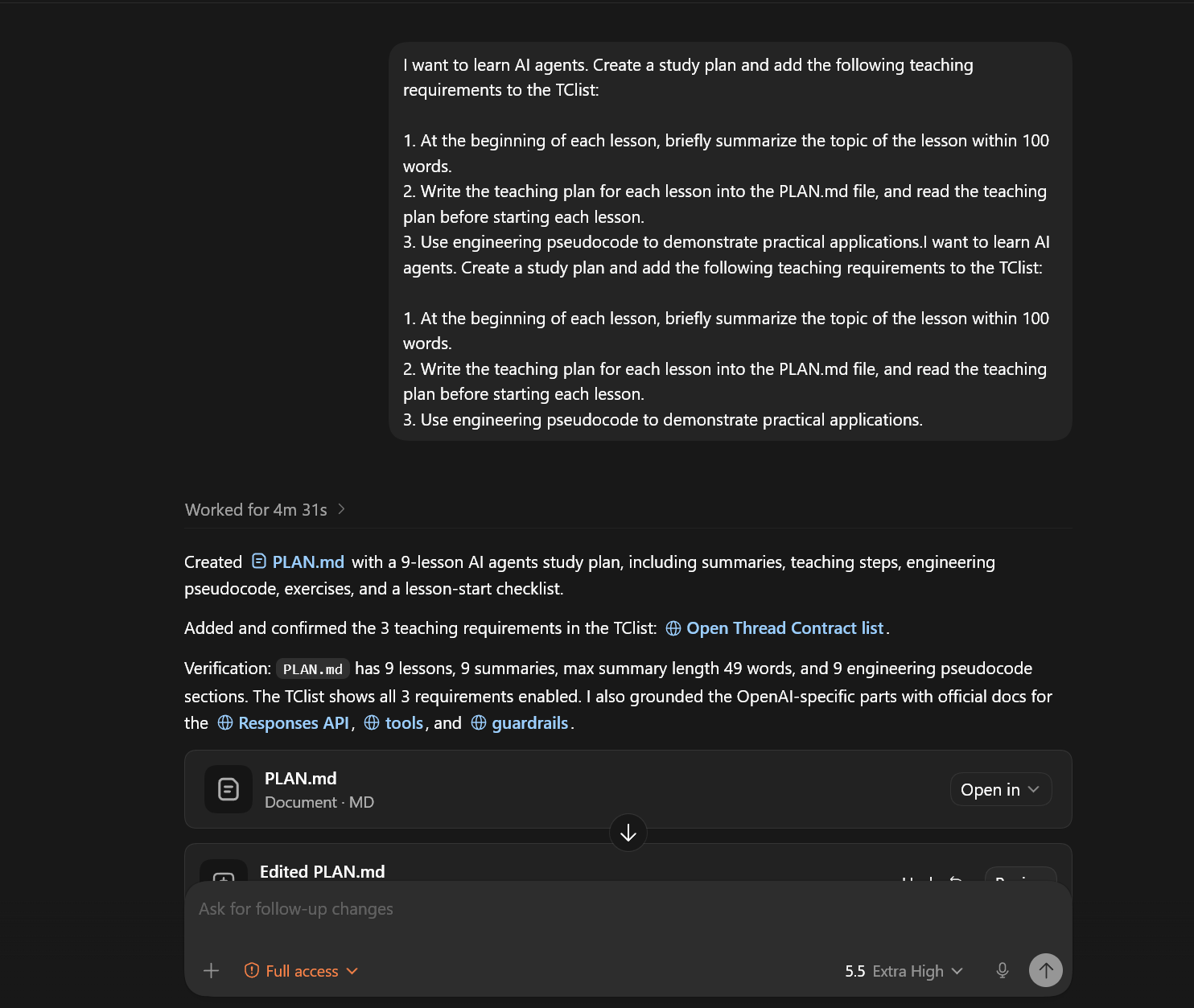
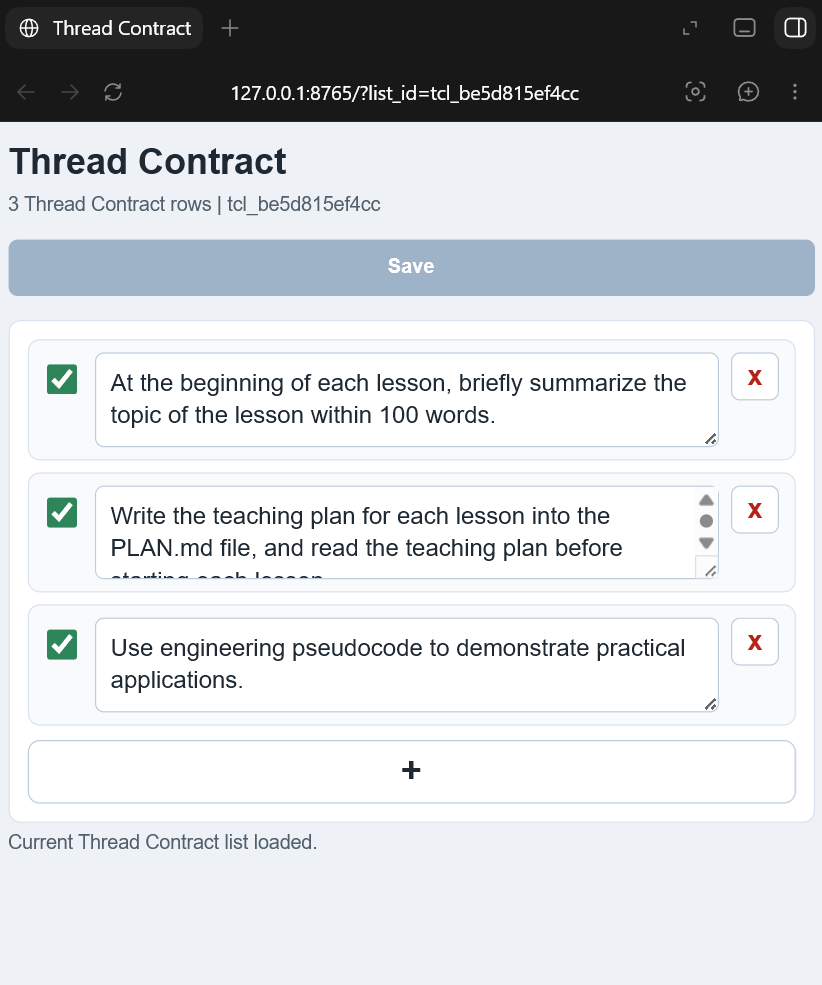
These images show the core workflow: adding thread-scoped rules from an agent thread and editing the same list in the local Web UI.
Thread Contract rules can be added and confirmed from a coding-agent thread:
The same list can be edited in the local Web UI:
Install
Version 0.1.0 is source-install first. PyPI publishing, MCP Registry
publishing, Docker images, and hosted sync are intentionally out of scope for
this release.
Requirements:
- Python 3.10 or newer.
- Codex or Claude Code for host integration.
- Optional:
mcpPython package only if you want the alternate SDK-backed MCP server entrypoint.
Clone and install:
git clone https://github.com/ch998244353/Thread-Contract-mcp.git threadcontract-mcp
cd threadcontract-mcp
python -m pip install -e .
Run the handwritten stdio MCP server:
threadcontract-mcp
Run the local Web UI:
threadcontract-web --port 8765
Open:
http://127.0.0.1:8765/
By default, Thread Contract stores SQLite data at:
~/.codex/threadcontract.sqlite3
Override it with THREADCONTRACT_DB:
$env:THREADCONTRACT_DB = "$HOME\.codex\threadcontract-dev.sqlite3"
Use With Codex
For source/plugin development, this repository includes:
.codex-plugin/plugin.json
.codex-mcp.json
hooks/codex_hooks.json
hooks/user_prompt_submit.py
Use the helper script to add this checkout as a local Codex plugin marketplace:
.\scripts\install-codex-plugin.ps1
Then restart Codex, install or enable the Thread Contract plugin from the
local marketplace, open /hooks, review the bundled hook, and trust it. Codex
does not run non-managed plugin hooks until the current hook definition is
trusted.
For MCP-only setup, add this to ~/.codex/config.toml after installing the
package:
[mcp_servers.threadcontract]
command = "threadcontract-mcp"
enabled = true
startup_timeout_sec = 10
tool_timeout_sec = 30
enabled_tools = [
  "threadcontract_open_turn",
  "threadcontract_commit_turn_list",
  "threadcontract_list_turn",
  "show_threadcontract_list",
  "threadcontract_add_turn_item",
  "threadcontract_update_turn_item",
  "threadcontract_copy_list_text",
  "threadcontract_get_list_web_url",
  "threadcontract_delete_thread_list",
]
See docs/codex-adapter.md and docs/mcp-config.md.
Use With Claude Code
The Claude Code plugin files live at the repository root:
.claude-plugin/plugin.json
.mcp.json
hooks/claude_hooks.json
hooks/claude_user_prompt_submit.py
Validate locally:
claude plugin validate . --strict
Run a development session:
claude --plugin-dir .
Use As Python SDK
The importable SDK is for local agent runtimes that want Thread Contract without MCP:
from threadcontract_sdk import ThreadContractClient

client = ThreadContractClient(db_path="threadcontract.sqlite3")
thread = client.open_thread(
    thread_id="thread-a",
    workspace="/path/to/repo",
    user_message="start",
)
client.add_item(thread=thread, content="Answer with the conclusion first.")
client.commit_items(thread=thread)

context = client.build_context(thread=thread, user_message="next request")
print(context)
The stable public SDK exports only:
ThreadContractClientThreadContractThread
What It Provides
- Stdio MCP server with Thread Contract management tools.
- Codex plugin manifest, bundled MCP config, and
UserPromptSubmithook. - Claude Code plugin manifest, bundled MCP config, and hook adapter.
- Local Web UI for viewing and editing a Thread Contract list.
- Importable Python SDK for custom local agent runtimes.
- SQLite storage with cleanup for stale lists and capped local data size.
The server exposes these MCP tools:
threadcontract_open_turnthreadcontract_commit_turn_listthreadcontract_list_turnshow_threadcontract_listthreadcontract_add_turn_itemthreadcontract_update_turn_itemthreadcontract_copy_list_textthreadcontract_get_list_web_urlthreadcontract_delete_thread_list
Alternate MCP SDK Server
The default plugin config uses src/server.py, a small handwritten stdio MCP
server with no runtime dependency outside the standard library.
An alternate server using the MCP Python SDK is available:
python -m pip install -e ".[sdk-server]"
threadcontract-mcp-sdk-server
Repository Layout
threadcontract-mcp/
  .codex-plugin/plugin.json      # Codex plugin manifest
  .claude-plugin/plugin.json     # Claude Code plugin manifest
  .codex-mcp.json                # Codex bundled MCP server config
  .mcp.json                      # Claude Code bundled MCP server config
  hooks/                         # Codex and Claude Code hook adapters
  src/                           # MCP server, service layer, Web API, SDK
  web/                           # Source Web UI assets for plugin/source runs
  docs/                          # Installation, architecture, security docs
  examples/                      # MCP, Codex, Claude Code, and SDK examples
  scripts/                       # Local install helpers
  tests/                         # Unit, hook, stdio, Web UI, and acceptance tests
Tests
Run the unit suite and acceptance smoke:
python -m unittest discover -s tests -v
python tests/acceptance.py
Build verification:
python -m pip install -e ".[dev]"
python -m build
Security And Privacy
Thread Contract is local-first. It stores explicit user-created rules and audit events in SQLite. It does not capture conversation history automatically and it does not create cross-thread long-term memory.
Hooks can inject extra context before a prompt is sent to the model. Review and trust hook code before enabling it. See SECURITY.md and docs/security.md.
Documentation
- docs/install.md
- docs/quickstart.md
- docs/mcp-config.md
- docs/codex-adapter.md
- docs/architecture.md
- docs/security.md
License
MIT. See LICENSE.
Установка Thread Contract Server
У этого сервера нет опубликованного пакета — он собирается из исходников. Открой репозиторий и следуй инструкции в README.
▸ github.com/ch998244353/Thread-Contract-mcpFAQ
Thread Contract Server MCP бесплатный?
Да, Thread Contract Server MCP бесплатный — установка в пару кликов через Unyly без оплаты.
Нужен ли API-ключ для Thread Contract Server?
Нет, Thread Contract Server работает без API-ключей и переменных окружения.
Thread Contract Server — hosted или self-hosted?
Self-hosted: сервер запускается локально на твоей машине командой из раздела установки.
Как установить Thread Contract Server в Claude Desktop, Claude Code или Cursor?
Открой Thread Contract Server на unyly.org, выбери вкладку своего клиента (Claude Desktop, Claude Code, Cursor) и нажми Install — конфиг сгенерируется автоматически, без правки JSON.
Похожие MCP
Fetch
Web content fetching and conversion for efficient LLM usage.
AWS KB Retrieval
Retrieval from AWS Knowledge Base using Bedrock Agent Runtime.
 автор: modelcontextprotocol
Spring AI MCP Server
Provides auto-configuration for setting up an MCP server in Spring Boot applications.
llm-analysis-assistant
A very streamlined mcp client that supports calling and monitoring stdio/sse/streamableHttp, and can also view request responses through the /logs page. It also
 автор: xuzexin-hz
Compare Thread Contract Server with
Не уверен что выбрать?
Найди свой стек за 60 секунд
Автор?
Embed-бейдж для README
Похожее
Все в категории ai