
Three.js DevTools MCP
БесплатноНе проверенInspect and edit Three.js scenes, materials, shaders, lights in real time from any AI agent

Описание
Inspect and edit Three.js scenes, materials, shaders, lights in real time from any AI agent
README
npm version license build MCP Registry
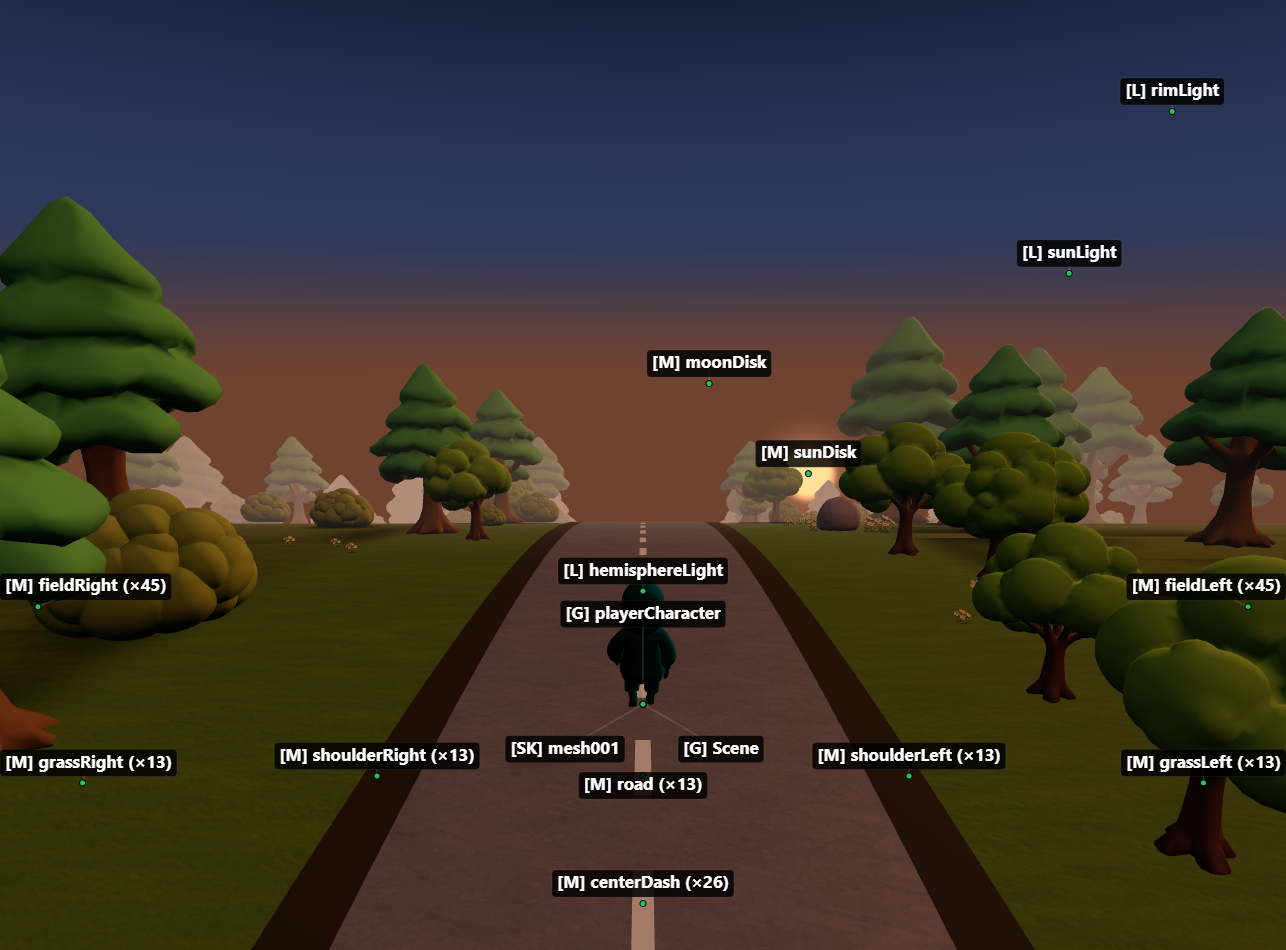
MCP server for inspecting and modifying Three.js scenes in real time — 59 tools for objects, materials, shaders, textures, animations, performance monitoring, memory diagnostics, and code generation.
Zero changes to your project. Works with vanilla Three.js, React Three Fiber, and any framework.
Setup
1. Add the MCP server
Claude Code
claude mcp add threejs-devtools-mcp -- npx threejs-devtools-mcp
Claude Desktop
Add to claude_desktop_config.json:
{
  "mcpServers": {
    "threejs-devtools-mcp": {
      "command": "npx",
      "args": ["-y", "threejs-devtools-mcp"]
    }
  }
}
Cursor
Add to .cursor/mcp.json in your project:
{
  "mcpServers": {
    "threejs-devtools-mcp": {
      "command": "npx",
      "args": ["-y", "threejs-devtools-mcp"]
    }
  }
}
Or use the HTTP transport — see Cursor setup guide.
Windsurf
Add to ~/.codeium/windsurf/mcp_config.json:
{
  "mcpServers": {
    "threejs-devtools-mcp": {
      "command": "npx",
      "args": ["-y", "threejs-devtools-mcp"]
    }
  }
}
VS Code (Copilot)
Add to .vscode/mcp.json:
{
  "servers": {
    "threejs-devtools-mcp": {
      "command": "npx",
      "args": ["-y", "threejs-devtools-mcp"]
    }
  }
}
OpenCode
Add to opencode.json in your project:
{
  "$schema": "https://opencode.ai/config.json",
  "mcp": {
    "threejs-devtools-mcp": {
      "type": "local",
      "command": ["npx", "-y", "threejs-devtools-mcp"],
      "enabled": true
    }
  }
}
2. Start your dev server and open the browser
Start your Three.js dev server as usual (npm run dev). The MCP server auto-detects the port from package.json and opens a browser at localhost:9222 with the devtools bridge injected.
Keep the browser tab open. The MCP server talks to your scene through a WebSocket bridge. Close the tab = tools stop working.
3. Ask the AI about your scene
"show me the scene tree"
"why is my model invisible?"
"make the car red"
"check for memory leaks"
"what's my FPS?"
"generate a React component from character.glb"
In-browser overlay
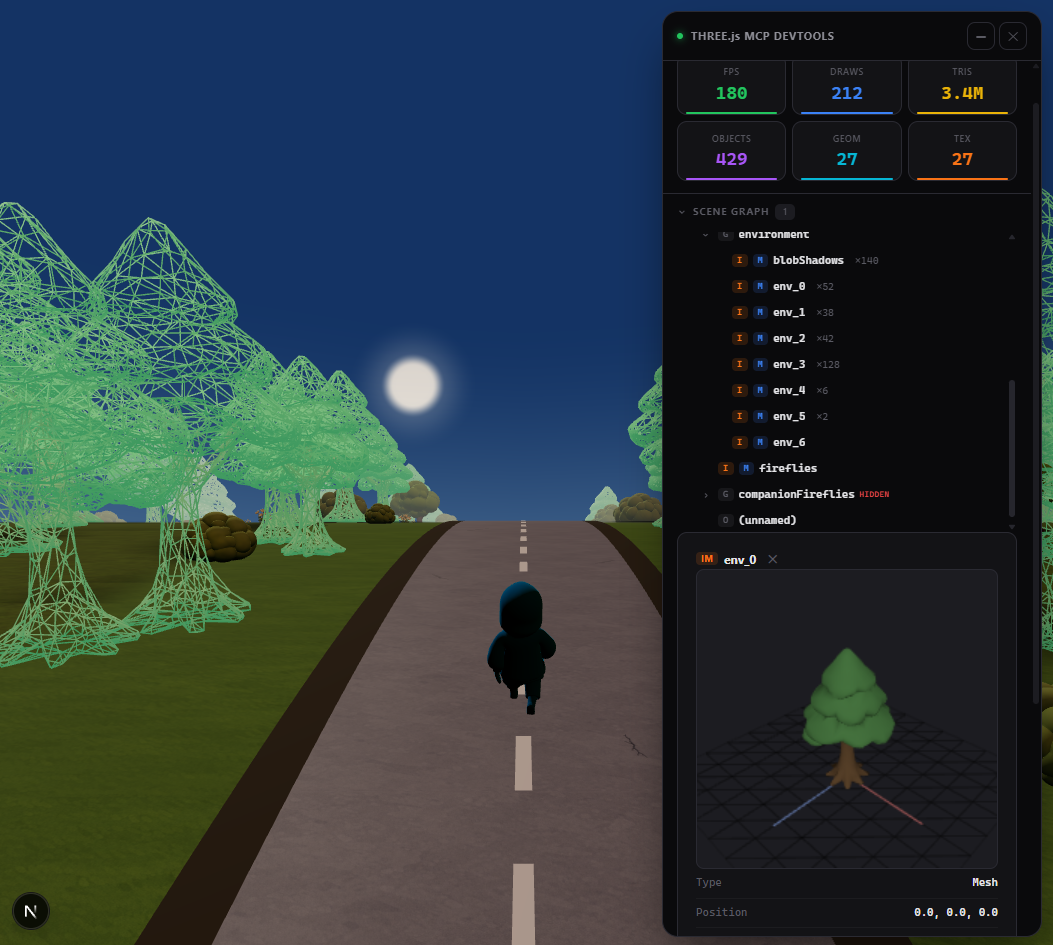
A built-in devtools panel with live performance stats, interactive scene graph, material editor, and 3D object preview. Activated automatically or via the toggle_overlay tool.
Tip: name your objects
Unnamed objects show as (unnamed) in the scene tree. Named objects are easier to find and modify:
// Three.js
mesh.name = "player";
// React Three Fiber
<mesh name="player" geometry={geometry} material={material} />
Documentation
- Tools reference — all 59 tools with parameters
- Advanced setup — animations, scene export, configuration, transports
- Cursor setup — step-by-step guide for Cursor
- Token-efficient workflow — best practices for saving context
License
MIT
Установить Three.js DevTools MCP в Claude Desktop, Claude Code, Cursor
unyly install three-js-devtools-mcpСтавит в Claude Desktop, Claude Code, Cursor и VS Code — сам разбирается с npx, uvx и сборкой из исходников.
Впервые? Поставь CLI: curl -fsSL https://unyly.org/install | sh
Или настроить вручную
Выполни в терминале:
claude mcp add three-js-devtools-mcp -- npx -y threejs-devtools-mcpFAQ
Three.js DevTools MCP MCP бесплатный?
Да, Three.js DevTools MCP MCP бесплатный — установка в пару кликов через Unyly без оплаты.
Нужен ли API-ключ для Three.js DevTools MCP?
Нет, Three.js DevTools MCP работает без API-ключей и переменных окружения.
Three.js DevTools MCP — hosted или self-hosted?
Self-hosted: сервер запускается локально на твоей машине командой из раздела установки.
Как установить Three.js DevTools MCP в Claude Desktop, Claude Code или Cursor?
Открой Three.js DevTools MCP на unyly.org, выбери вкладку своего клиента (Claude Desktop, Claude Code, Cursor) и нажми Install — конфиг сгенерируется автоматически, без правки JSON.
Похожие MCP
Fetch
Web content fetching and conversion for efficient LLM usage.
AWS KB Retrieval
Retrieval from AWS Knowledge Base using Bedrock Agent Runtime.
 автор: modelcontextprotocol
Spring AI MCP Server
Provides auto-configuration for setting up an MCP server in Spring Boot applications.
llm-analysis-assistant
A very streamlined mcp client that supports calling and monitoring stdio/sse/streamableHttp, and can also view request responses through the /logs page. It also
 автор: xuzexin-hz
Compare Three.js DevTools MCP with
Не уверен что выбрать?
Найди свой стек за 60 секунд
Автор?
Embed-бейдж для README
Похожее
Все в категории ai