
Toad Eye
БесплатноПоддерживаетсяObservability for MCP servers and LLM applications — traces, metrics, dashboards. One-line instrumentation for OpenAI, Anthropic, Gemini, and MCP. Self-hosted w

Описание
Observability for MCP servers and LLM applications — traces, metrics, dashboards. One-line instrumentation for OpenAI, Anthropic, Gemini, and MCP. Self-hosted with Grafana + Prometheus + Jaeger.
README
Observability for MCP servers and LLM applications.
One line of code. Full traces, metrics, and Grafana dashboards. Self-hosted. Privacy-first. No vendor lock-in.




Quick Start — MCP Server
Add observability to any MCP server in 2 lines:
import { McpServer } from "@modelcontextprotocol/sdk/server/mcp.js";
import { initObservability } from "toad-eye";
import { toadEyeMiddleware } from "toad-eye/mcp";

initObservability({ serviceName: "my-mcp-server" });

const server = new McpServer({ name: "my-server", version: "1.0.0" });
toadEyeMiddleware(server);

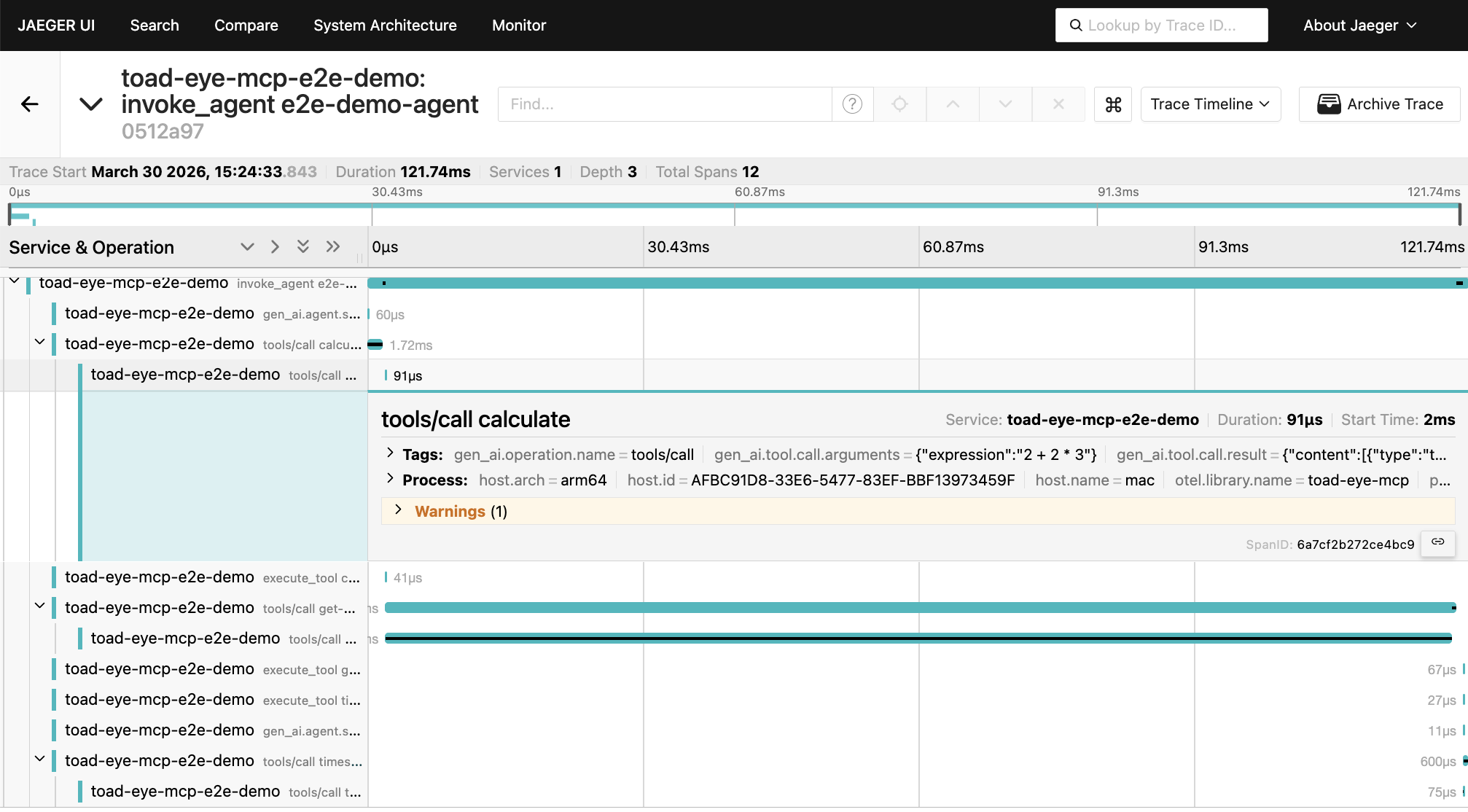
// Every tool call, resource read, and prompt is now traced.
// Spans appear in Jaeger. Metrics flow to Prometheus. Dashboards ready in Grafana.
Privacy by default — tool arguments and results are NOT recorded unless you opt in:
toadEyeMiddleware(server, {
  recordInputs: true,
  redactKeys: ["apiKey", "token"],
});
Safe for stdio transport — OTel diagnostics are redirected to stderr.
Quick Start — LLM Calls
Auto-instrument OpenAI, Anthropic, Gemini, and Vercel AI SDK — zero wrappers:
import { initObservability } from "toad-eye";

initObservability({
  serviceName: "my-app",
  instrument: ["openai", "anthropic"],
});

// Every SDK call is auto-traced — including streaming.
Set Up the Stack
npm install toad-eye
npx toad-eye init       # scaffold observability configs
npx toad-eye up         # start Grafana + Prometheus + Jaeger + OTel Collector
npx toad-eye demo       # send mock traffic — see data in Grafana immediately
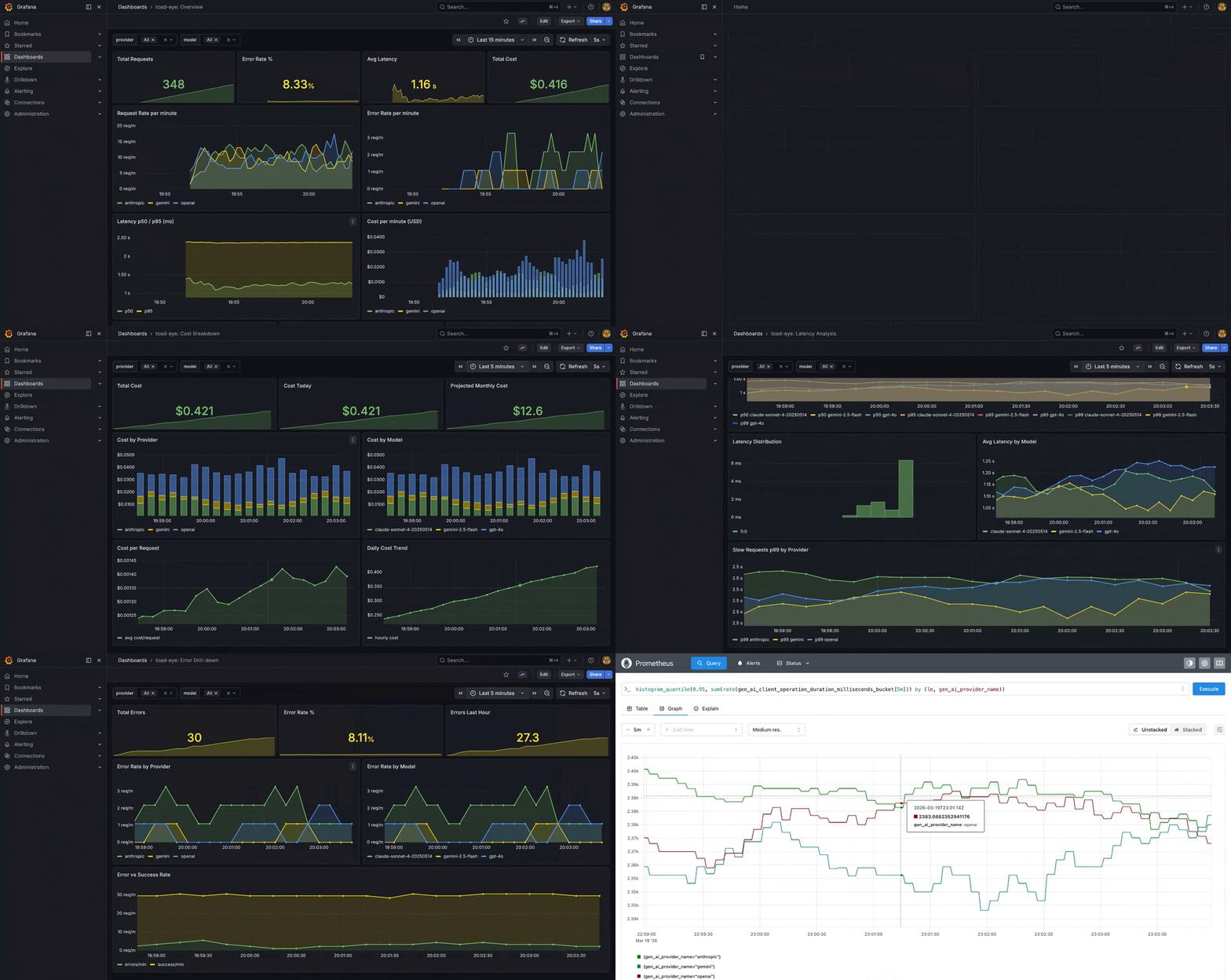
Open localhost:3100 (Grafana, admin/admin). 11 dashboards are pre-built and ready.
Requires: Docker Desktop (or Docker Engine + Compose plugin)
Why toad-eye
| Feature | toad-eye | Sentry MCP | Grafana Cloud (OpenLIT) |
|---|---|---|---|
| TypeScript-native | ✅ | ✅ | ❌ (Python) |
| Self-hosted | ✅ | ❌ | ❌ |
| MCP E2E tracing | ✅ | ❌ | ❌ |
| MCP-specific metrics | ✅ | Partial | Partial |
| Privacy controls | ✅ | ❌ | ❌ |
| Tool hallucination detection | ✅ | ❌ | ❌ |
| Budget guards | ✅ | ❌ | ❌ |
What You Get
Instrumentation: auto-instrument OpenAI, Anthropic, Gemini, Vercel AI SDK, and MCP servers — regular and streaming calls, with full cost tracking.
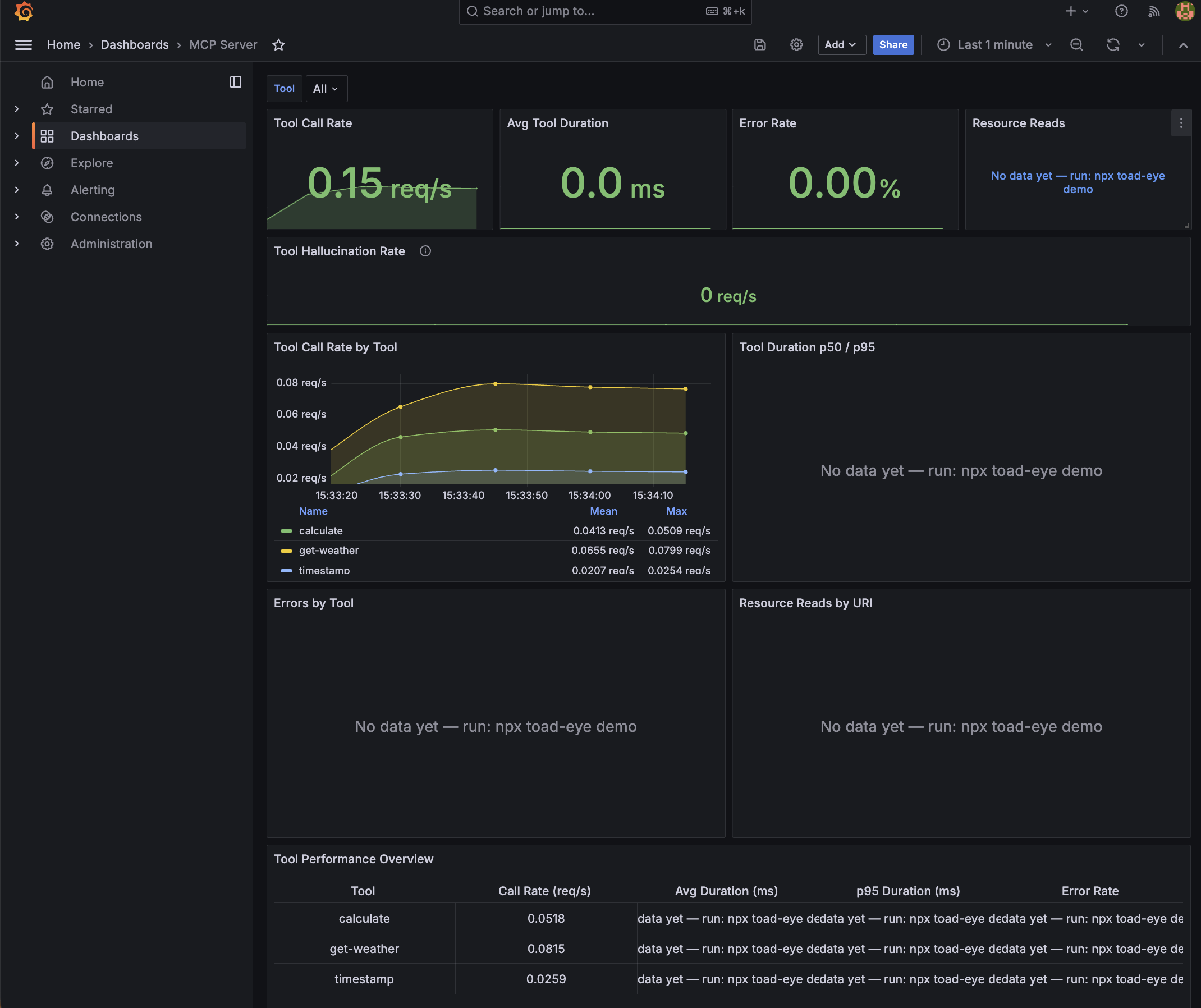
11 Grafana dashboards: Overview, Cost Breakdown, Latency Analysis, Errors, Model Comparison, FinOps Attribution, Provider Health, Agent Workflow, MCP Server, MCP End-to-End, MCP Tool Analytics.
Budget guards: daily, per-user, per-model spend limits. Three modes — warn, block, or auto-downgrade to a cheaper model.
Agent tracing: structured ReAct tracing with multi-agent support, handoffs, and loop detection. Follows OTel GenAI semantic conventions.
Privacy controls: recordContent: false to disable prompt/completion recording, built-in PII redaction (email, SSN, CC, phone), SHA-256 hashing, key redaction.
Alerting: cost spikes, latency anomalies, error rate alerts via Telegram, Slack, email, or webhook.
Semantic drift detection: catch silent LLM quality degradation by comparing responses to a saved baseline via embeddings.
Trace export: convert production Jaeger traces into regression test cases for toad-eval.
Budget Guards
initObservability({
  serviceName: "my-app",
  budgets: {
    daily: 50, // $50/day max
    perUser: 5, // $5/day per user
    perModel: { "gpt-4o": 30 }, // $30/day on GPT-4o
  },
  onBudgetExceeded: "block", // or "warn" or "downgrade"
});
Agent Observability
import { traceAgentQuery } from "toad-eye";

const result = await traceAgentQuery(
  { query: "What's the weather?", agentName: "weather-bot" },
  async (step) => {
    step({ type: "think", stepNumber: 1, content: "Need weather data" });
    const data = await getWeather();
    step({ type: "act", stepNumber: 2, toolName: "get_weather" });
    step({ type: "answer", stepNumber: 3, content: data.summary });
    return { answer: data.summary };
  },
);
// Produces: invoke_agent weather-bot → execute_tool get_weather
CLI
npx toad-eye init [--force]     Scaffold Docker Compose + observability configs
npx toad-eye up                 Start the stack
npx toad-eye down               Stop the stack
npx toad-eye status             Show running services and URLs
npx toad-eye demo               Send mock LLM traffic to Grafana
npx toad-eye export-trace <id>  Export a Jaeger trace to toad-eval YAML
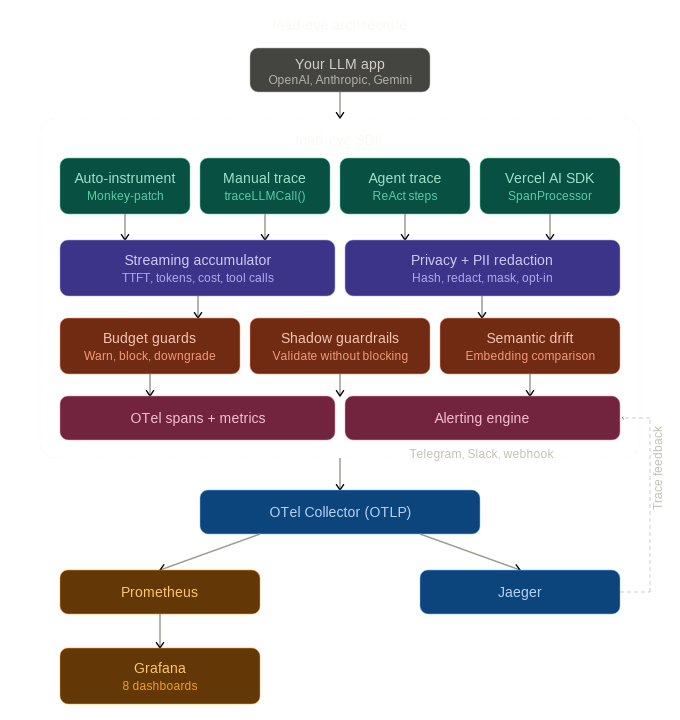
Architecture
Imports
import { initObservability, traceLLMCall } from "toad-eye"; // core
import { toadEyeMiddleware } from "toad-eye/mcp"; // MCP server middleware
import { AlertManager } from "toad-eye/alerts"; // alerting engine
import { createDriftMonitor } from "toad-eye/drift"; // semantic drift
import { exportTrace } from "toad-eye/export"; // trace → YAML
import { ToadEyeAISpanProcessor, withToadEye } from "toad-eye/vercel"; // Vercel AI SDK
Services
After npx toad-eye up:
Grafana         http://localhost:3100   (admin / admin)
Jaeger UI       http://localhost:16686
Prometheus      http://localhost:9090
OTel Collector  http://localhost:4318
OTel Compatibility
toad-eye follows OTel GenAI semantic conventions. Traces work natively with Jaeger, Datadog, Grafana Tempo, Honeycomb, SigNoz, Arize Phoenix, and any OTel-compatible backend.
Full metrics and span attribute reference: COMPATIBILITY.md
Tech Stack
TypeScript · OpenTelemetry SDK 3.x · Hono · Docker Compose (Prometheus, Jaeger, Grafana, OTel Collector) · Vitest (306+ tests)
Установить Toad Eye в Claude Desktop, Claude Code, Cursor
unyly install toad-eyeСтавит в Claude Desktop, Claude Code, Cursor и VS Code — сам разбирается с npx, uvx и сборкой из исходников.
Впервые? Поставь CLI: curl -fsSL https://unyly.org/install | sh
Или настроить вручную
Выполни в терминале:
claude mcp add toad-eye -- npx -y toad-eyeПошаговые гайды: как установить Toad Eye
FAQ
Toad Eye MCP бесплатный?
Да, Toad Eye MCP бесплатный — установка в пару кликов через Unyly без оплаты.
Нужен ли API-ключ для Toad Eye?
Нет, Toad Eye работает без API-ключей и переменных окружения.
Toad Eye — hosted или self-hosted?
Self-hosted: сервер запускается локально на твоей машине командой из раздела установки.
Как установить Toad Eye в Claude Desktop, Claude Code или Cursor?
Открой Toad Eye на unyly.org, выбери вкладку своего клиента (Claude Desktop, Claude Code, Cursor) и нажми Install — конфиг сгенерируется автоматически, без правки JSON.
Изменения
Версии и запрашиваемые доступы со временем.
- Новая версия опубликована
Похожие MCP
Opencode Omniroute Plugin
OpenCode plugin for the OmniRoute AI Gateway. Drives dynamic model discovery, /connect auth flow, and multi-instance OmniRoute providers via the official @openc
 автор: GitHub Actions
Roblox Studio
Enables AI coding tools to control Roblox Studio for workspace exploration, instance manipulation, and script management. It provides tools for playtesting, sce
 автор: paralov
Antigravity Drawio
MCP server that enables AI assistants to create, parse, render, and validate Draw.io diagrams programmatically.
 автор: S-SUJAN-S
Fetch
Web content fetching and conversion for efficient LLM usage.
Mcp
ModelContextProtocol server for enhancing JSON Resumes
 автор: mcpflow.io
Vault
Bitwarden/Vaultwarden MCP server — BYOK vault access with 6 tools, Send-based reveal, TOTP, and safe agent-write
 автор: agbergsmann
AWS KB Retrieval
Retrieval from AWS Knowledge Base using Bedrock Agent Runtime.
 автор: modelcontextprotocol
Spring AI MCP Server
Provides auto-configuration for setting up an MCP server in Spring Boot applications.
llm-analysis-assistant
A very streamlined mcp client that supports calling and monitoring stdio/sse/streamableHttp, and can also view request responses through the /logs page. It also
 автор: xuzexin-hz
MCP-Agent
A simple, composable framework to build agents using Model Context Protocol by [LastMile AI](https://www.lastmileai.dev)
 автор: lastmile-ai
Compare Toad Eye with
Не уверен что выбрать?
Найди свой стек за 60 секунд
Автор?
Embed-бейдж для README
Похожее
Все в категории ai