
Toolsmell
БесплатноНе проверенLint an MCP server's tool descriptions and JSON schemas for smells that make agents use the tools worse.

Описание
Lint an MCP server's tool descriptions and JSON schemas for smells that make agents use the tools worse.
README
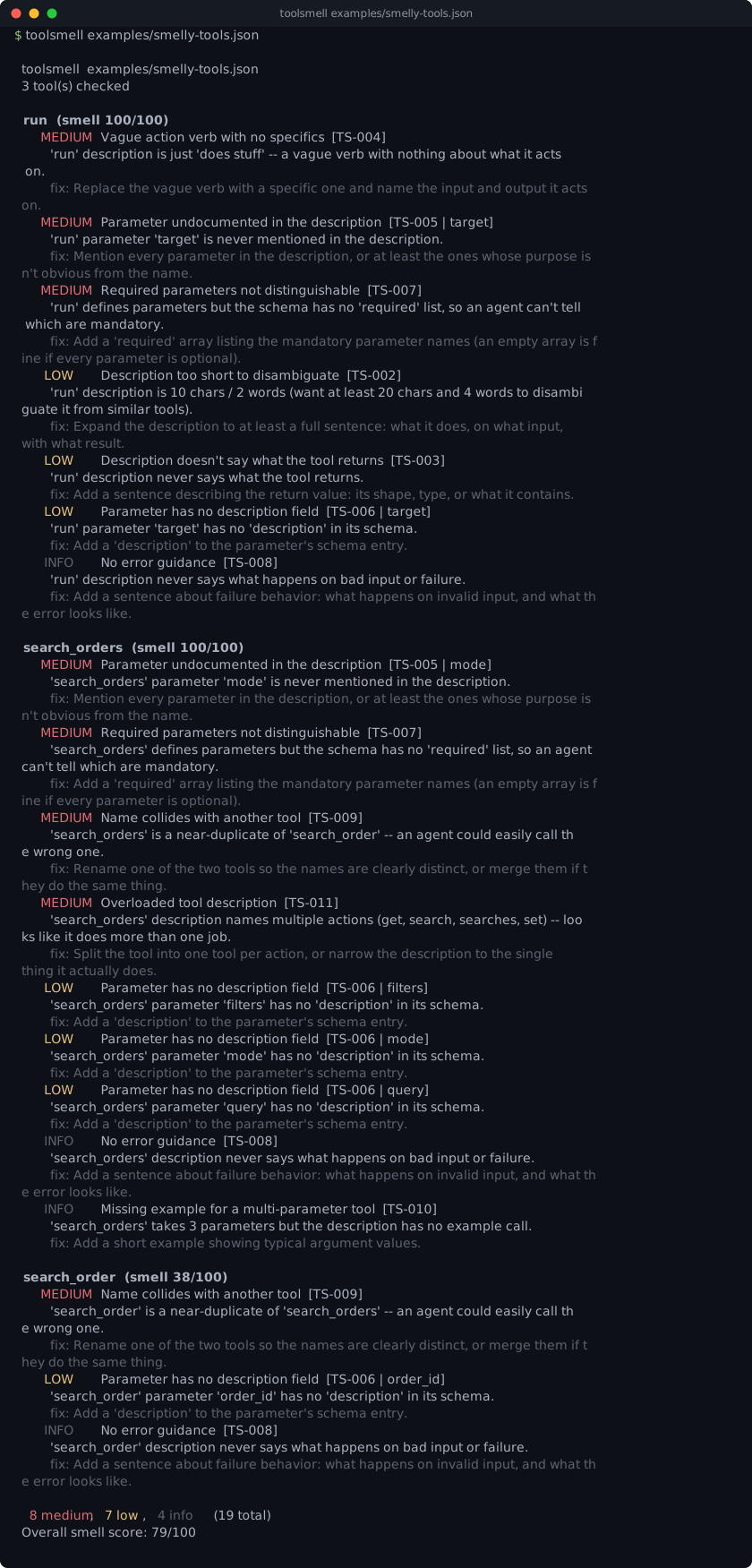
That's toolsmell run against examples/smelly-tools.json,
three tools handpicked to each trip a different smell: a description that's
just "does stuff," a search_orders tool whose description tries to cover
six jobs at once, and a search_order/search_orders pair an agent could
easily call the wrong one of.
toolsmell is a static linter for MCP tool definitions: point it at a
server's tools/list output and it flags description and JSON Schema
smells that make an agent pick the wrong tool or call it wrong. By default
it just reads a JSON file off disk and runs nothing. --stdio is the one
opt-in exception -- it spawns a real MCP server so you don't have to hand-build
the manifest yourself; see Getting the manifest.
Why
A 2026 study, arXiv:2602.14878 ("MCP Tool Descriptions Are Smelly!"), found that fixing description quality measurably improves agent task success on MCP tool calls. That finding is what motivated this tool. The rule set below is toolsmell's own, not lifted from the paper.
$ toolsmell examples/weather-tool-smelly.json --no-color

  toolsmell  examples/weather-tool-smelly.json
  1 tool(s) checked

  get_weather  (smell 100/100)
    MEDIUM  Vague action verb with no specifics  [TS-004]
          'get_weather' description is just 'Handles requests.' -- a vague verb with nothing about what it acts on.
          fix: Replace the vague verb with a specific one and name the input and output it acts on.
    MEDIUM  Parameter undocumented in the description  [TS-005 | location]
          'get_weather' parameter 'location' is never mentioned in the description.
          fix: Mention every parameter in the description, or at least the ones whose purpose isn't obvious from the name.
    MEDIUM  Parameter undocumented in the description  [TS-005 | units]
          'get_weather' parameter 'units' is never mentioned in the description.
          fix: Mention every parameter in the description, or at least the ones whose purpose isn't obvious from the name.
    MEDIUM  Required parameters not distinguishable  [TS-007]
          'get_weather' defines parameters but the schema has no 'required' list, so an agent can't tell which are mandatory.
          fix: Add a 'required' array listing the mandatory parameter names (an empty array is fine if every parameter is optional).
     LOW    Description too short to disambiguate  [TS-002]
          'get_weather' description is 17 chars / 2 words (want at least 20 chars and 4 words to disambiguate it from similar tools).
          fix: Expand the description to at least a full sentence: what it does, on what input, with what result.
     LOW    Description doesn't say what the tool returns  [TS-003]
          'get_weather' description never says what the tool returns.
          fix: Add a sentence describing the return value: its shape, type, or what it contains.
     LOW    Parameter has no description field  [TS-006 | location]
          'get_weather' parameter 'location' has no 'description' in its schema.
          fix: Add a 'description' to the parameter's schema entry.
     LOW    Enum-worthy free text  [TS-012 | units]
          'get_weather' parameter 'units' spells out allowed values in prose ("Either 'metric', 'imperial', or 'standard'.") instead of using a schema enum.
          fix: Add an 'enum' listing the allowed values to the parameter's schema instead of describing them in prose.
     INFO   No error guidance  [TS-008]
          'get_weather' description never says what happens on bad input or failure.
          fix: Add a sentence about failure behavior: what happens on invalid input, and what the error looks like.

  4 medium, 4 low, 1 info   (9 total)
  Overall smell score: 100/100
Fix the description and schema (see examples/weather-tool-clean.json) and the same tool comes back clean:
$ toolsmell examples/weather-tool-clean.json --no-color

  toolsmell  examples/weather-tool-clean.json
  1 tool(s) checked

  get_weather  (smell 0/100)
    no smells found

  0 smells   (0 total)
  Overall smell score: 0/100
Install
Pure standard library, Python 3.9+, no runtime dependencies.
pipx install git+https://github.com/munzzyy/toolsmell
Or clone it and it runs as-is:
git clone https://github.com/munzzyy/toolsmell
cd toolsmell
python -m toolsmell ./tools.json      # run it directly, no install
pip install -e .                      # or install the `toolsmell` command
toolsmell is not on PyPI yet, so pipx install toolsmell won't work.
Install from the repo until it is.
Usage
toolsmell ./tools.json              # a {"tools": [...]} manifest, the shape tools/list returns
toolsmell ./a.json ./b.json         # lint several manifests in one run
toolsmell ./tools.json --json       # machine-readable output
toolsmell ./tools.json --max-score 30   # tighten the failing threshold (default 50)
toolsmell ./tools.json --max-tool-score 40   # also fail if any single tool is this smelly
toolsmell --stdio "python my_server.py"   # spawn a live MCP server and lint its real response
toolsmell --list-rules              # print every rule id and exit
Pass as many manifests as you like. Each one gets its own report, and the
run exits 1 if any of them trips a gate. With --json, several files come
back as a single top-level JSON array rather than a run of concatenated
objects no parser would accept; one file still emits a bare object, so
existing consumers are unaffected.
--stdio and a target file are mutually exclusive: pass one or the other,
not both. --stdio is also the only thing in toolsmell that runs a
subprocess, so only point it at a server you already trust to execute -- see
Getting the manifest for the full trust model.
--max-score N fails the run (exit 1) if the overall smell score is at or
above N. That's the whole CI story:
- run: pip install git+https://github.com/munzzyy/[email protected]
- run: toolsmell ./tools.json --max-score 30
The overall score is a mean, so a mostly-clean server can bury one bad tool
under a passing --max-score. --max-tool-score N closes that gap: it fails
the run if any single tool scores at or above N, and prints which tool(s)
tripped it (on stderr) so a red CI run points straight at what to fix.
Selecting rules
Not every rule suits every server. --ignore switches rules off, --select
switches everything else off, and the two can't be combined:
toolsmell ./tools.json --ignore TS-003,TS-008   # skip the return-words and error-words checks
toolsmell ./tools.json --select TS-001,TS-005   # run only these two
A switched-off rule stops reporting and stops counting toward the smell
score, so ignoring a rule you disagree with also takes its weight out of
whatever --max-score is gating on. An unknown rule id exits 2 and names
it rather than being quietly skipped.
To make it stick, put the list in your pyproject.toml:
[tool.toolsmell]
ignore = ["TS-003", "TS-008"]
toolsmell looks for the nearest pyproject.toml at or above the manifest
it's linting (the working directory for --stdio). --ignore and
--select on the command line override the file. Reading the table needs
Python 3.11+ for tomllib, and toolsmell has no runtime dependencies, so
on 3.9 and 3.10 it prints a warning to stderr and runs every rule instead
of pretending the file was empty.
Getting the manifest
Most MCP servers define their tools in code, not as a file sitting on
disk, so there's usually no tools.json lying around to point at. Two
ways to get one:
--stdio (the easy way). Point toolsmell at the command that starts
your server and it does the rest -- spawns it, speaks just enough of the
MCP handshake over its stdin/stdout, and lints whatever comes back:
toolsmell --stdio "python my_server.py"
toolsmell --stdio "node server.js --port 0"
Servers on both sides of the MCP 2026-07-28 revision work. toolsmell opens
with a server/discover probe and drops back to the older initialize +
notifications/initialized handshake if the server hasn't heard of it, so
it doesn't need to be told which revision yours speaks. The one case it
won't retry is a server that answers the probe with
UnsupportedProtocolVersionError: that server does speak the new protocol
and has turned down toolsmell's version, and the old handshake wouldn't fix
that.
If the server dies before answering, toolsmell prints its exit status and
the tail of its stderr, since a missing module or a bad interpreter path is
the usual reason a first --stdio run fails.
This is the one thing in toolsmell that executes a subprocess, so it's
opt-in and worth being deliberate about: only point --stdio at a server
you already trust to run. The command is split with shlex and exec'd as
a real argv list -- never a shell -- so there's no shell-injection surface
in the command string itself, but the process still genuinely starts and
runs. Don't wire --stdio up to a command string that comes from a PR
description, an issue body, or any other untrusted input; that's handing
an attacker a way to pick what gets executed on your machine. The server's
tools/list response is treated as untrusted the same way a manifest file
already is -- it's data, not code, and it goes through the exact same
parser. toolsmell also enforces a wall-clock timeout on the whole exchange
and a size cap on the response, and kills the process afterward either way,
so a hung or misbehaving server can't wedge the run.
A static file (the manual way). Call the server's tools/list method
yourself and save what comes back, or paste the tools array into a file by
hand -- either way, once it's JSON on disk, toolsmell ./tools.json lints
it exactly the same.
pre-commit
You can run toolsmell as a pre-commit hook. Add this to your .pre-commit-config.yaml:
repos:
  - repo: https://github.com/munzzyy/toolsmell
    rev: v0.1.0  # replace with the latest version
    hooks:
      - id: toolsmell
        # You can override the files regex to match your manifest
        # files: ^tools.*\.json$
By default, the hook matches files with .*tools.*\.json$.
What it checks
See the Rules Reference for the full detail on each rule, its severity, and how to fix it.
- Missing, empty, or too-short descriptions.
- Descriptions that never say what the tool returns.
- A bare vague verb ("process", "handle", "manage", "do") with no specifics.
- Schema parameters the description never mentions.
- Schema parameters with no
descriptionof their own. - Parameters present but no
requiredlist to say which are mandatory. - Descriptions that never say what happens on bad input.
- Tool names that are near-duplicates of another tool in the same manifest.
- Multi-parameter tools with no example call.
- Descriptions that list several unrelated actions (probably two tools wearing one name).
- String parameters whose description spells out allowed values in prose
instead of a schema
enum.
Plus a handful of checks against MCP 2026-07-28 itself, where the spec says MUST and a conforming client drops the tool rather than warning about it:
- Tool names outside the 1 to 128 characters of
A-Za-z0-9_.-the spec allows. x-mcp-headervalues that aren't usable HTTP field names, including ones carrying a line break.- Two parameters mapped to header names that differ only in case.
x-mcp-headeron an object, array, ornumberparameter.- Tool icons whose
srcis not anhttps:ordata:URI.
What it does not do
- It's a static linter, not a security scanner. It never looks for prompt
injection, dangerous commands, or secrets -- that's a different tool's job.
A couple of the conformance rules do catch shapes that are also injection
vectors (a CRLF in an
x-mcp-header, ajavascript:icon), but they're there because the spec forbids them, and toolsmell stops at what the spec forbids. - It's not a runtime tester. Even with
--stdiorunning the server for real, toolsmell only ever callstools/list-- it never calls an actual tool, and it never touches the network (stdio is a local pipe, not a socket). - It only lints the shape
tools/listreturns: atoolsarray of{name, description, inputSchema}, whether that comes from a JSON file or a live--stdioserver. A Python file exporting a tool list with nothing willing to speak MCP over stdio is out of scope. - It can't reach a remote server yet. There's no HTTP or SSE transport, so
a hosted MCP server has to go through the static-file route below: call
tools/listyourself, save the response, and lint that. - The severities and thresholds are toolsmell's own judgment calls, not a
formula from the paper that motivated it. Tune
--max-scoreto your server; a clean score means nothing obvious tripped, not that the description is great prose. - The text checks assume English. The word lists (return words, error words, vague verbs) and the word-count heuristic are English-only, so a well-written description in another language can pick up false positives like "never says what it returns". Read a non-English manifest's findings with that in mind.
Exit codes
0-- the overall smell score is under--max-score(default 50), and no single tool trips--max-tool-scoreif you set it.1-- the overall score is at or above--max-score, or a single tool is at or above--max-tool-score. With several files, any one file tripping a gate fails the run.2-- usage error: no target given, the file doesn't exist, it isn't a valid tools manifest, an unknown rule id was passed to--ignoreor--select, or (with--stdio) the server couldn't be reached, timed out, or sent back something that isn't a valid response.
Contributing
Found a smell that should have been flagged and wasn't, or a false
positive? Open an issue with the smallest manifest that reproduces it. New
rules land with a fixture in tests/corpus/ (a smelly one that must be
caught, or a clean one that must stay quiet) so coverage only goes up. See
CONTRIBUTING.md.
License
MIT: free to use, change, and ship, commercial or not. See LICENSE.
Support
If toolsmell made your tools easier for agents to use, sponsoring is what keeps it maintained.
Установка Toolsmell
У этого сервера нет опубликованного пакета — он собирается из исходников. Открой репозиторий и следуй инструкции в README.
▸ github.com/munzzyy/toolsmellFAQ
Toolsmell MCP бесплатный?
Да, Toolsmell MCP бесплатный — установка в пару кликов через Unyly без оплаты.
Нужен ли API-ключ для Toolsmell?
Нет, Toolsmell работает без API-ключей и переменных окружения.
Toolsmell — hosted или self-hosted?
Self-hosted: сервер запускается локально на твоей машине командой из раздела установки.
Как установить Toolsmell в Claude Desktop, Claude Code или Cursor?
Открой Toolsmell на unyly.org, выбери вкладку своего клиента (Claude Desktop, Claude Code, Cursor) и нажми Install — конфиг сгенерируется автоматически, без правки JSON.
Похожие MCP
GitHub
PRs, issues, code search, CI status
 автор: GitHub
Filesystem
Secure file operations with configurable access controls.
Memory
Knowledge graph-based persistent memory system.
Template MCP Server
A CLI tool to create a new Model Context Protocol server project with TypeScript support, dual transport options, and an extensible structure
 автор: mcpdotdirect
Amap Maps Mcp Server
MCP server for using the AMap Maps API
 автор: duxiaohui
Supabase
Database, auth and storage
 автор: Supabase
Everything
Reference / test server with prompts, resources, and tools.
Git
Tools to read, search, and manipulate Git repositories.
Sequential Thinking
Dynamic and reflective problem-solving through thought sequences.
Time
Time and timezone conversion capabilities.
Compare Toolsmell with
Не уверен что выбрать?
Найди свой стек за 60 секунд
Автор?
Embed-бейдж для README
Похожее
Все в категории development