
Trinity Local
БесплатноНе проверенEnables running AI councils across Claude, GPT, and Gemini, synthesizing answers based on your personal taste lens, all locally without an API key.

Описание
Enables running AI councils across Claude, GPT, and Gemini, synthesizing answers based on your personal taste lens, all locally without an API key.
README
class: live
⠕ Trinity Local
tests license python security stars site
Ask all three. Keep what works.
Send one prompt to Claude, ChatGPT, and Gemini at once. A chairman shows you what they agreed on and exactly where they split — the cross-provider read no single lab can give you, because none of them can see the others. Then, from your own history, it learns which model to trust on your kind of question. Free, local, on the subscriptions you already pay for. No API key. Your transcripts never leave your machine.
Install — just an MCP and a Chrome extension. No new app, no cloud, no API key.
Inside Claude Code (or Codex CLI / Antigravity / Cursor) — just ask:
Run a Trinity council on whether to use SQLite or DuckDB for this analytics workload.
The agent calls mcp__trinity-local__run_council for you. Claude, Codex, and Gemini answer in parallel; the chairman synthesizes and returns the verdict inline:
Winner: DuckDB — all three agree it wins on analytical scan speed. Where they split: Claude flags SQLite's simpler ops story; Codex and Gemini don't. Why it matters for you: you've shipped solo before and kept picking the lower-ops option — so the chairman weights that split toward "SQLite if you'll operate it alone."
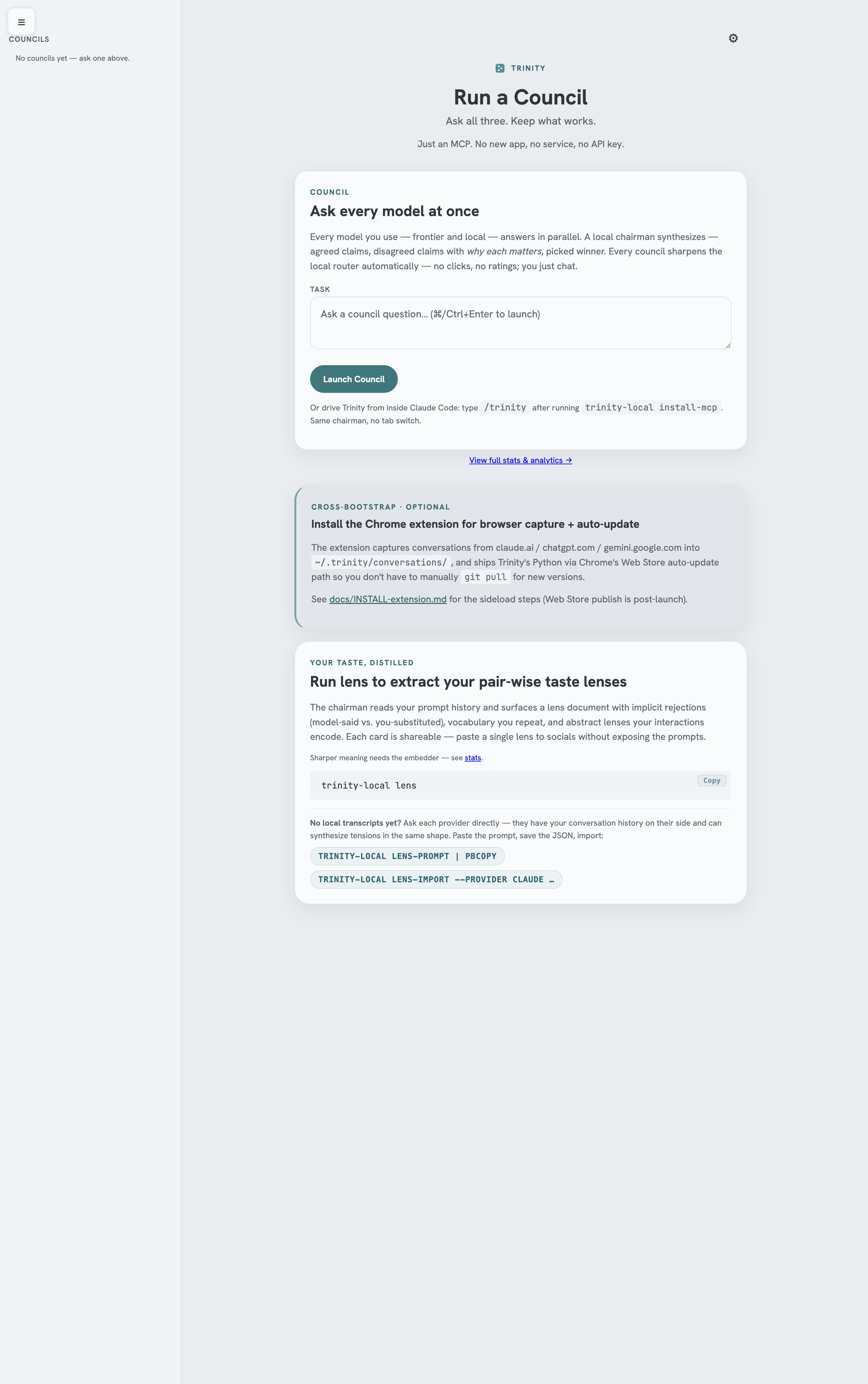
The cross-provider council — three labs in parallel, one synthesized verdict with the splits called out — is the part no single chat tab can do, and it works the moment you install. Over your first handful of councils, the chairman starts reading your lens: the pattern in how you rephrase, judge, and decide, distilled from your own transcripts — so it learns which split matters to you. The launchpad above is the same surface in a browser tab — open it from the Chrome extension to scan recent councils, your lens, and the topic graph.
The Chrome extension does two things. As you chat on claude.ai / chatgpt.com / gemini.google.com, it captures each conversation to ~/.trinity/conversations/ on your machine — no listening port, no upload; Chrome's Native Messaging spawns a local capture host on demand. And it hosts the launchpad you click open from the toolbar. Together with the CLI sessions on disk (~/.claude/, ~/.codex/, ~/.gemini/), the extension's captures are what your lens distills from.
You'll want at least Claude + Codex CLI installed. The magic is the disagreement — a council needs a second voice. One provider runs, but the "where they split" payoff needs two.
Then it gets sharper — the lens. The council gives you a synthesized answer now; the lens sharpens the next one. Every council, every rejected answer, every rephrase sharpens a profile of your judgment that lives only on your machine (Anthropic can't read your ChatGPT; OpenAI can't read your Claude). The longer you use it, the better it knows which model to trust on your kind of question — measured on the disagreements your own later work settles.
First-run note — councils work immediately; the personalized read layers in. Every council is full-fidelity from minute one — the cross-provider answer, the agreed claims, the splits — with nothing to download first. Only the "weighted toward what you'd pick" taste read sharpens with an optional one-time embedder: run
trinity-local download-embedder(~600 MB, local, one time) — without it the lens falls back to a coarser lexical match and the personalized read is muted, but the council itself is unaffected. The lens then builds in the background from your transcripts; the which-model-to-trust read sharpens over your first handful of councils, not on minute one.
No new app. No service. No API key. Captures flow to your machine; Trinity uploads nothing — your transcripts and lens stay on disk. Everything else is an MCP server inside the harnesses you already use. Free for individuals, forever — MIT, local. Running it across a team? Same product, with support: Trinity for teams.
Install
Recommended — one line. Clones the repo (you can read it end-to-end), installs the runtime deps, registers Trinity's MCP server in every harness it detects (Claude Code, Codex CLI, Antigravity, Cursor), and pre-wires the Chrome-capture host:
<!-- canonical:install_command -->curl -fsSL https://raw.githubusercontent.com/keepwhatworks/trinity/main/scripts/install.sh | bash<!-- /canonical -->
No PyPI, no npm, no API key — just git clone + a couple of shell wrappers in ~/.local/bin/. Verify with trinity-local status. To remove: trinity-local uninstall --yes.
In Claude Code? One-command plugin install. Trinity ships as a Claude Code plugin that registers the MCP server and adds native slash commands (/trinity-local:council, :ask, :lens) — no manual install-mcp:
/plugin marketplace add keepwhatworks/trinity
/plugin install trinity-local@trinity
You still install Trinity itself once (the curl line above — there's no PyPI package) — the plugin's launcher finds it. No Stop-hooks / review-gate: the plugin only adds commands + the MCP server, so it never gates your responses or runs away with your quota. Details: plugins/trinity-local/README.md.
Not comfortable in a terminal? Paste that one line into Claude Code — it runs inside your terminal and in the Claude Desktop app — and let Claude run the install for you. That's the easiest path if you arrived via the Chrome extension and have never opened a shell.
Manual MCP config — if the bootstrap missed a harness, or you want to wire one by hand, that's exactly what trinity-local install-mcp writes. Substitute PYTHON with your interpreter (which python3, or the absolute path the bootstrap printed).
For Claude Code (~/.claude.json), Cursor (~/.cursor/mcp.json), Antigravity (~/.gemini/settings.json), and other JSON harnesses — merge into the top-level mcpServers object:
{
  "mcpServers": {
    "trinity-local": {
      "command": "PYTHON",
      "args": ["-m", "trinity_local.main", "--mcp"]
    }
  }
}
For Codex CLI, append to ~/.codex/config.toml:
[mcp_servers.trinity-local]
command = "PYTHON"
args = ["-m", "trinity_local.main", "--mcp"]
For Antigravity (agy CLI) — model selection happens inside agy itself, not via MCP. Run /model and pick your Gemini (e.g. Gemini 3.1 Pro); Trinity's launchpad reads the persisted selection from ~/.gemini/antigravity-cli/settings.json.
Then ask any of these agents: "Run a Trinity council on …" — the MCP tools appear inline. Free, local, MIT. The CLI (trinity-local status, trinity-local lens, etc.) is the engine; the MCP tools are the agent surface.
Requirements: Python 3.10+ and at least one of the claude / codex / agy CLIs authenticated — Trinity works with just one (chairman synthesis + your lens), gets stronger with two (real disagreement), full canonical council with three. Ollama / MLX models you've pulled locally are auto-discovered and join the routing pool as free council members (ollama:<model> / mlx:<model>) — no config edit, no extra MCP tools. To remove: trinity-local uninstall --yes.
How it works
When you ask a hard question, Trinity runs it through Claude, ChatGPT, and Gemini in parallel and the chairman synthesizes one verdict — agreed claims, where they split, and why. That works the moment you install. In the background, Trinity reads the transcripts on your machine — CLI sessions on disk (Claude Code, Codex CLI, Antigravity), web chats the Chrome extension auto-captures locally (claude.ai, chatgpt.com, gemini.google.com), and any manual exports you've imported (claude.ai exports, ChatGPT exports, Gemini Takeout) — and distills the pattern in how you rephrase, push back, and decide into a taste lens. Over your first handful of councils, the chairman starts reading that lens: when answers tie on quality, it scores them against your named tensions and your taste picks the winner. The same lens powers personal evals — score any model against your own past corrections — and the choose tool: hand any agent a list of options and your lens ranks them instantly, with its own live accuracy score attached (measured prospectively on choices it never saw — no other tool can hand you that receipt).
Anthropic can't recommend ChatGPT. OpenAI can't recommend Claude. Google can't recommend either. The competitive constraint is structural, not technical. The labs that built the models you trust are commercially blocked from helping you use a competitor — so the cross-provider memory layer has to come from outside the labs. That's what Trinity is.
And — when a new model lands, score it against your taste
trinity-local eval-build      # one-time: build from your rejection signal (~/.trinity/me/preference_acts.jsonl)
trinity-local eval-run --target claude    # re-target whenever a new model lands (provider name: claude / codex / antigravity)
trinity-local eval-show       # per-axis bars: REFRAME / COMPRESSION / REDIRECT / SHARPENING
When Claude 5 lands: "Claude provider scored 0.88 on my taste — beats last release by 0.05." A headline number no lab can produce — because only the layer above the labs sees your transcripts across all three.
Your lens, generated from your prompts.
trinity-local lens --deep is the consolidation pass. Like sleep: it
reweights old facts in light of everything that's come in since,
resolves memories that contradicted each other, and connects
memories that were just sitting there with their neighbors — turning
a corpus of raw prompts into a hierarchical lens (identity → paired
tensions → subject basins → vocabulary) that the chairman reads top-down
on every council.
Traceability is non-negotiable. If it can't show its work, it
doesn't get to claim the thought. Every lens entry carries
tension_decisions — backreferences to the specific rejection pairs
that justify it. Open the launchpad's lens card and each claim links
back, clickable, to the model-said-vs-you-substituted moments it was
extracted from. No hidden inference, no "trust me." Inspect any claim;
walk the chain to the source.
The folder is the API. ~/.trinity/ is a CC0 JSON-Schema-validated
on-disk contract — memories/lens.md, memories/topics.json,
memories/vocabulary.md, core.md, scoreboard/picks.json. Any tool
(Aider / Cline / Continue / your own) can read or write through that
folder without going through Trinity's process. Schema in
docs/lens.md + docs/PREFERENCE_CORPUS_SPEC.md.
For tool builders
~/.trinity/ is the API surface. CC0, JSON-Schema-validated, adoptable
by Aider / Cline / Continue / anything else. Schema:
docs/PREFERENCE_CORPUS_SPEC.md.
Privacy by default
- Trinity uploads nothing. Your transcripts, prompt history, and lens stay on disk. (Councils dispatch your question to the labs through the CLIs you already authenticated — the same path as typing it there yourself — never to a Trinity server.)
- Anonymous categorical telemetry is on by default (Google Analytics 4). Two
payloads, both categorical/numeric only: the per-council event
(
task_type,winner,member_count,mode) and, from the launchpad, an anonymous provider win-rate snapshot (per-provider Elo / wins / total games — no task text). No prompt content, no lens text, no user_substitute strings ever. Disable any time withtrinity-local telemetry-disable; the data immediately stops flowing. Sending also requires GA4 credentials that the public build does not ship — withoutTRINITY_GA4_MEASUREMENT_ID+TRINITY_GA4_API_SECRETset, both the CLI and the launchpad silently no-op (nothing leaves your machine). - No hosted controller, no per-call billing. Trinity dispatches via the CLIs you already use — nothing to meter, nothing to bill. The taste signal you build stays yours.
Objections (the ones I had)
"I don't want to learn another UI — I just use Claude Code."
You don't. Trinity is an MCP server inside your existing harness (Claude Code, Codex CLI, Antigravity, Cursor). /trinity walks installation in one step. After that, your existing UI is the UI.
"I don't want a daemon running on my machine."
Trinity isn't a daemon. The MCP server spawns when your harness opens, exits when it closes. ~62 MB resident while connected. lsof -i | grep LISTEN shows nothing — no listening port, no background process.
"I don't want my data sent to a server."
Transcripts never leave your machine. Council fan-out goes from your laptop directly to the CLIs you already authenticated. No hosted controller. Anonymous categorical telemetry (the four discrete labels above — no prompt content) is on by default to close the feedback loop; turn it off any time with trinity-local telemetry-disable.
"I want my subscriptions actually used."
Trinity dispatches via your existing claude / codex / agy CLIs — using the tokens you've already paid for. Every council uses what you have. No new bill.
"I'm tired of copy-pasting between Claude / GPT / Gemini tabs." That's the whole point. Every council runs all three in parallel from one prompt.
"I want to know if a new model release is actually better for me."
trinity-local eval-run --target <provider> (claude / codex / antigravity — the provider you want to benchmark; the underlying model is whatever that provider currently ships) scores it against the prompts you've already rejected — your actual taste, not a synthetic benchmark. The score defends itself before it prints: every run probes its own judge and eval set with control candidates (can the judge tell your correction from the answer you rejected? does the model actually beat "echo the question back"?) and refuses the headline if a dumb baseline matches it — a refused number never ranks on the leaderboard or ships on a share card.
"I want the right model picked for the right task, automatically."
Every council teaches Trinity which model wins for which kind of question — automatically. The chairman's pick (lens-governed) is the signal; compute_personal_routing_table() aggregates it per task type. No human rating step. The launchpad surfaces the personal routing table; a deterministic pass places each council into its nearest lens basin and tallies the chairman-winner there (scoreboard/picks.json), so the next call routes on the model that's been winning your questions in that basin.
"How is this different from Anthropic's Dreaming?"
Same verb, different domain. Dreaming consolidates Claude sessions inside Anthropic's runtime — single-lab. Trinity dreams across the labs: ~/.claude/ + ~/.codex/ + ~/.gemini/ + claude.ai + ChatGPT + Gemini exports, on your machine. Even if Anthropic moves Dreaming server-side tomorrow, the server-side version still can't see OpenAI or Google transcripts — the labs are commercially prevented from reading each other. Cross-lab dreaming has to come from outside the labs, by definition. Dreaming makes Claude smarter at being Claude; Trinity learns which model wins which kind of YOUR question.
"Won't Anthropic just build cross-provider memory themselves?" They literally can't. Anthropic can't recommend ChatGPT; OpenAI can't recommend Claude; Google can't recommend either. The competitive constraint is structural, not technical. The cross-provider layer has to come from outside the labs — that's the whole point.
"Who's behind this? Why trust a random repo with my transcripts?"
Single developer, MIT, public source — small enough to audit in an evening. Trinity reads transcripts on your machine — written there either by your CLI sessions or by the Chrome extension's local capture host. Nothing leaves the machine. If you stop using it, ~/.trinity/ is plain JSON you can cat | jq without us.
"What happens if you abandon this project?"
The folder is the API. ~/.trinity/memories/lens.md is Markdown; council outcomes are human-readable JSON; the schema is at docs/PREFERENCE_CORPUS_SPEC.md. Your taste capture survives Trinity disappearing.
How is this different from [X]
| Trinity Local | LMArena | promptfoo / Claude evals | OpenRouter | Karpathy LLM Council | |
|---|---|---|---|---|---|
| Data source | Your own prompts | Crowd votes | Test fixtures | n/a (router) | Yours, but no persistence |
| Cost basis | Your own subscriptions | Hosted | Per-call API | Per-call API | Per-call API |
| Output | Structured Routing JSON + your lens |
Win-rate ranking | Pass/fail per case | Cheapest route | Three answers + summary |
| Privacy | Corpus stays on disk | n/a | n/a | Prompts route through their servers | Hosted |
| Personalization | Personal routing table improves with use | One global ranking | Per-test-suite | None | None |
| Personal benchmarks | eval-run scores any model against YOUR actual rejections |
Synthetic prompts | Static fixtures | n/a | n/a |
| Council reads through your lens | Your lens (mined from your transcripts) breaks the chairman's quality-ties + powers personal evals | n/a | n/a | n/a | Generic synthesis |
| Shareable artifact | lens PNG card |
Leaderboard link | Eval report | n/a | Per-prompt summary |
If you want "which model is best in general," LMArena. If you want "which model handles this codebase / this voice / this trade-off you keep making," Trinity.
Demo
A real council outcome — verbatim from ~/.trinity/council_outcomes/<id>.json after the council ran "name the single biggest remaining launch risk" against itself:
{
  "winner": "claude",
  "runner_up": "codex",
  "confidence": "high",
  "agreed_claims": [
    "The #1 risk is the /trinity skill not installing by the pip path.",
    "install-mcp must drop SKILL.md into ~/.claude/skills/trinity/ before ship."
  ],
  "disagreed_claims": [{
    "claim": "Post-validator must check for skill cache-staleness.",
    "providers_for": ["claude"],
    "providers_against": ["antigravity", "codex"],
    "why_matters": "install-mcp can succeed on disk but /trinity stays invisible to the open Claude Code session."
  }],
  "routing_lesson": "For launch_readiness_decision, prefer claude — surfaces second-order failure modes."
}
That's the payoff: agreed claims you can lean on, disagreed claims with the why, and a routing lesson that makes the next council pick the right chairman automatically. Trinity ran this against itself to ratify what would ship.
Architecture
Chairman synthesizes member outputs into structured Routing JSON; members run in
parallel (or chain mode for sequential refinement); lens-discovery is a 5-stage
pipeline (Stage 0 turn-pair rejections + Stages 1-4 basins→decisions→pair-mining→post-filter) ratifying tensions across ≥3 topical basins.
Want the full picture? docs/how-trinity-works.md walks the pipeline end-to-end — transcripts → embeddings → lens → runtime. Wire diagram + design rationale in docs/architecture.md.
What's next
Current repo state: v1.7 line, exact package v<!-- canonical:version -->1.7.397<!-- /canonical -->. The shipped surface is MCP-first: lens, council, status, and install are the advertised CLI verbs; the older lens-build / council-launch / dream names remain as compatibility aliases (dream folded into lens --deep 2026-07-04 — one concept) for launchpad dispatch and existing scripts. The most recent arc collapsed routing into the lens — consolidate now places each council into its nearest lens basin and tallies the chairman-winner there, so the learned routing can never drift into a stale embedding space. Earlier work tightened the launch path: extension auto-wiring, schema migrations, real ModernBERT embeddings, TF-IDF abstain-gates for semantic flows, corpus-purity guards, personal eval integrity, no-PII telemetry gates, and install-wrapper Python fallback.
Help
| Command | What it does |
|---|---|
trinity-local status |
Health + scoreboard + recent councils (absorbed doctor) |
trinity-local council --task "..." |
Run a council from the terminal |
trinity-local lens |
Build your lens from prompt history |
trinity-local lens --deep |
Mine your history + rebuild the whole memory layer |
trinity-local install |
Install or repair MCP / extension wiring |
trinity-local me-card |
Render your strongest lens as a PNG |
trinity-local portal-html --open-browser |
Open the launchpad |
trinity-local review-link <council_id> --json |
Mobile-safe review links |
trinity-local --help |
Full command list |
License
MIT — see LICENSE.
Установка Trinity Local
У этого сервера нет опубликованного пакета — он собирается из исходников. Открой репозиторий и следуй инструкции в README.
▸ github.com/keepwhatworks/trinityFAQ
Trinity Local MCP бесплатный?
Да, Trinity Local MCP бесплатный — установка в пару кликов через Unyly без оплаты.
Нужен ли API-ключ для Trinity Local?
Нет, Trinity Local работает без API-ключей и переменных окружения.
Trinity Local — hosted или self-hosted?
Self-hosted: сервер запускается локально на твоей машине командой из раздела установки.
Как установить Trinity Local в Claude Desktop, Claude Code или Cursor?
Открой Trinity Local на unyly.org, выбери вкладку своего клиента (Claude Desktop, Claude Code, Cursor) и нажми Install — конфиг сгенерируется автоматически, без правки JSON.
Похожие MCP
Fetch
Web content fetching and conversion for efficient LLM usage.
AWS KB Retrieval
Retrieval from AWS Knowledge Base using Bedrock Agent Runtime.
 автор: modelcontextprotocol
Spring AI MCP Server
Provides auto-configuration for setting up an MCP server in Spring Boot applications.
llm-analysis-assistant
A very streamlined mcp client that supports calling and monitoring stdio/sse/streamableHttp, and can also view request responses through the /logs page. It also
 автор: xuzexin-hz
Compare Trinity Local with
Не уверен что выбрать?
Найди свой стек за 60 секунд
Автор?
Embed-бейдж для README
Похожее
Все в категории ai