
Trip Planner Server
БесплатноНе проверенA journey-planning MCP server that manages itineraries including journeys, city stops, and plan items with CRUD operations and weather lookup.

Описание
A journey-planning MCP server that manages itineraries including journeys, city stops, and plan items with CRUD operations and weather lookup.
README
A journey-planning MCP server built with FastMCP, plus a LangGraph agent that connects to it alongside two public MCP servers. The agent manages a traveller's itinerary: journeys (trips as a whole), the city stops within a journey, and the plan items (sights, meals, activities) within each stop.
Architecture
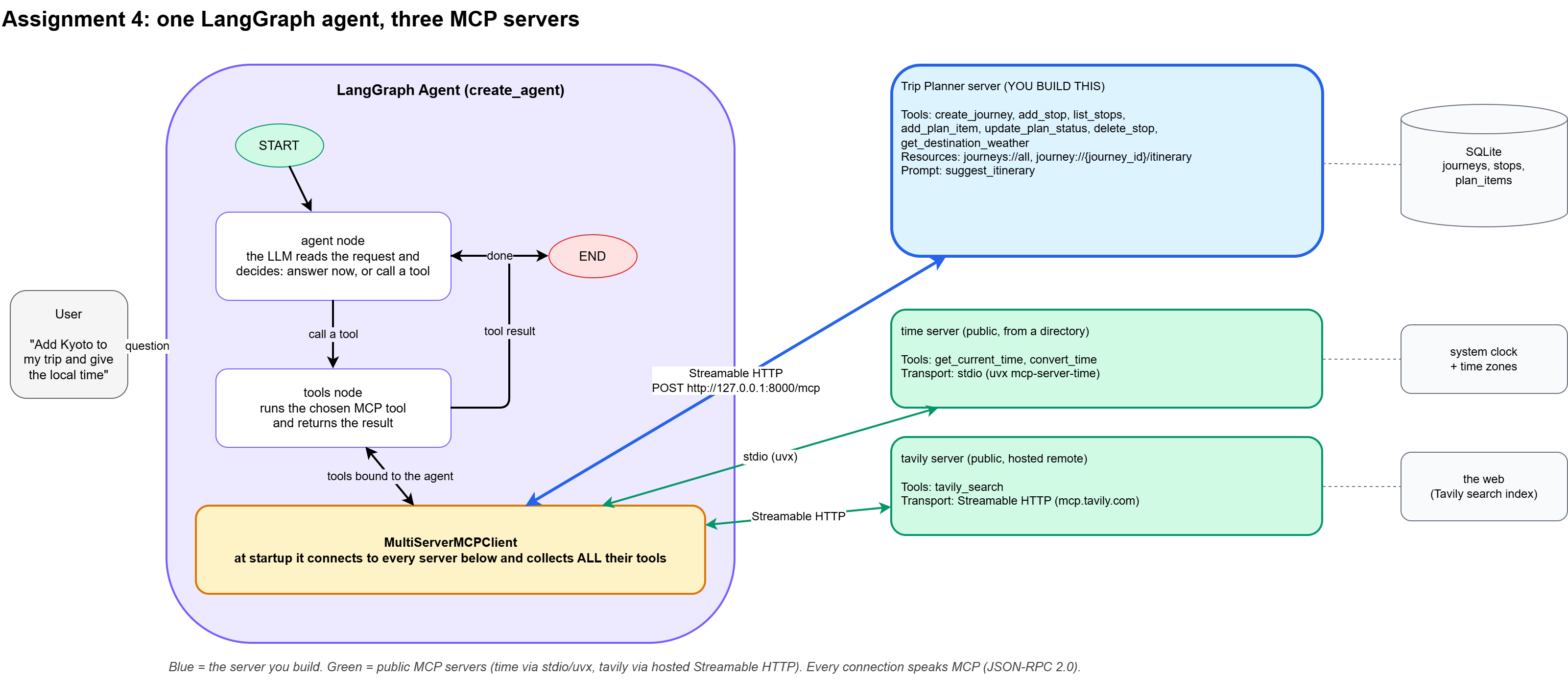
The user asks a question. The LangGraph agent thinks: if it needs a tool, it
calls one, gets the result, and thinks again — repeating until it has enough
to answer. MultiServerMCPClient connects to all three MCP servers when the
agent starts and hands every discovered tool to the agent. One server is
ours; two are public.
Data model, tools, resource, prompt
SQLite, three tables, one nesting level each:
| Table | Holds |
|---|---|
journeys |
A trip as a whole — title, home city, dates, budget |
stops |
A city leg within a journey — city, country, arrival date, nights, transport mode |
plan_items |
A sight/meal/activity within a stop — title, category, time window, priority, status |
Tools (backend/mcpserver/TripPlannerServer.py) — full CRUD plus a live weather lookup:
| Tool | CRUD |
|---|---|
create_journey |
Create |
add_stop |
Create |
add_plan_item |
Create |
list_stops |
Read |
update_plan_status |
Update |
delete_stop |
Delete (cascades to its plan items) |
get_destination_weather |
Calls the free Open-Meteo API (geocoding + current weather), no key needed |
Resources:
journeys://all— one-line summary of every journeyjourney://{journey_id}/itinerary— templated resource, a day-by-day itinerary for one journey (each stop with its plan items underneath)
Prompt:
suggest_itinerary(stop_id)— a reusable template that turns a stop's saved plan items into an hour-by-hour day plan
Public servers used, and why
time(uvx mcp-server-time, stdio) — official reference MCP server for timezone/local-time lookups. Trivial, zero-risk, no genuine remote alternative exists for this, so stdio is the right call here.tavily(Streamable HTTP,https://mcp.tavily.com/mcp) — a genuinely hosted remote MCP server (no local process at all) from Tavily, a reputable company in the LLM tooling space (the same search backend LangChain's own community tools use). It needs a free API key (tavily.com, no credit card). Picked over a plain page-fetchserver because it does real-time, ranked web search (attractions, travel advisories, local facts) rather than fetching one raw page — a much stronger fit for a trip planner. Deliberately avoided pulling a server from the public MCP registries (registry.modelcontextprotocol.io, Smithery, Glama) directly — those directories are unvetted, and searching them turned up entries with suspicious names during development. Tavily is a known, reputable company with a real product, not an anonymous registry listing.
Extras beyond the core CRUD flow
get_destination_weathercalls the free Open-Meteo API from inside a tool (geocoding + current weather, no key required).backend/integrations/fastapimcp_integration.pyserves REST (/health,/journeys) and MCP (/mcp) from one FastAPI ASGI app.add_stoplogs viactx.info(...), visible live in the MCP Inspector's notification panel.- A browser console (
backend/api/app.py+frontend/) — see below.
Console UI (bonus)
A small React console for driving the agent from a browser instead of the CLI: pick one of the 12 test questions (or type your own), watch each tool call and its result stream in live, tool by tool, as the agent runs.
backend/api/app.py wraps the same LangGraph agent from
backend/client/langgraphagent.py in a long-lived FastAPI process. It
connects to all three MCP servers once at startup, then streams each
question's step-by-step trace back to the browser as newline-delimited JSON.
Three processes, three terminals:
uv run backend/mcpserver/TripPlannerServer.py     # :8000 — the MCP server
uv run python -m backend.api.app                  # :8010 — streaming console API
cd frontend && npm install && npm run dev          # :5173 — the UI
Open the printed localhost URL. The left rail shows live server/tool
counts from /api/servers; the question list is the same 12-question set as
DocsAndDemo/question.md.
How to run it
Install dependencies (uses
uv):uv syncCopy
.env.exampleto.envand fill in:OPENAI_API_KEY=sk-... TAVILY_API_KEY=tvly-... # free key at https://tavily.comStart the server (terminal 1):
uv run backend/mcpserver/TripPlannerServer.pyLive at
http://127.0.0.1:8000/mcp(note the required/mcpsuffix).Optional — run the combined REST+MCP app instead:
uv run python -m backend.integrations.fastapimcp_integrationRun the agent (terminal 2):
uv run backend/client/langgraphagent.py "Add a 3-night stop in Kyoto to journey 1 and tell me the local time there"Optional — test the server directly in the MCP Inspector before running the agent:
npx @modelcontextprotocol/inspectorTransport: Streamable HTTP, URL:
http://127.0.0.1:8000/mcp.
Requires uv (Python/uvx) and Node.js (npx, for the Inspector) installed.
Example runs
Full tool-call traces are in screenshots/demo.txt. Summary:
- Write-only — "Create a new journey called 'Bali Getaway' from Mumbai, budget 1500, dates 2026-09-01 to 2026-09-10. Then add a 5-night stop in Bali, Indonesia to it." → Created journey #3 and stop #4 on our server.
- Write + public
time— "Add a 4-night stop in Reykjavik, Iceland to journey 3, and tell me the current local time there." → Added stop #5, and calledget_current_time(both tool calls fired in parallel in one turn) → 11:03, Saturday, Atlantic/Reykjavik (UTC+0). - Public
tavilyresearch — "What are the top attractions to see in Reykjavik right now, and are there any current travel advisories for Iceland?" → Real-time web search returned 8 ranked attractions and 3 current government travel advisories, with live sources.
Why an MCP server instead of plain Python functions in the agent?
Putting tools in an MCP server decouples what a tool can do from which
agent uses it. The same trip_planner server can be called by this
LangGraph agent, tested by hand in the MCP Inspector, or plugged into a
completely different agent or client later, all without touching the tool
code — because the server exposes a stable, self-describing contract
(schemas generated straight from function signatures and docstrings) over a
standard protocol, instead of being tangled into one agent's Python process.
It also means the server can run, scale, and fail independently of the
agent: if the trip-planner logic needs a different host, a different
language, or its own deployment schedule, that's an infrastructure change,
not a rewrite. Writing the same logic as inline Python functions works fine
for a single throwaway script, but it locks the tool to that one agent and
gives up all of that reuse, isolation, and discoverability for no benefit.
Video walkthrough
DocsAndDemo/12.07.2026_22.51.20_REC.mp4 — demo, architecture walkthrough, MCP connection config, and live tool calls across the local and public servers.
from github.com/Shivanilarokar/TripplannerAgent-langgraph-mcp-
Установка Trip Planner Server
У этого сервера нет опубликованного пакета — он собирается из исходников. Открой репозиторий и следуй инструкции в README.
▸ github.com/Shivanilarokar/TripplannerAgent-langgraph-mcp-FAQ
Trip Planner Server MCP бесплатный?
Да, Trip Planner Server MCP бесплатный — установка в пару кликов через Unyly без оплаты.
Нужен ли API-ключ для Trip Planner Server?
Нет, Trip Planner Server работает без API-ключей и переменных окружения.
Trip Planner Server — hosted или self-hosted?
Self-hosted: сервер запускается локально на твоей машине командой из раздела установки.
Как установить Trip Planner Server в Claude Desktop, Claude Code или Cursor?
Открой Trip Planner Server на unyly.org, выбери вкладку своего клиента (Claude Desktop, Claude Code, Cursor) и нажми Install — конфиг сгенерируется автоматически, без правки JSON.
Похожие MCP
GitHub
PRs, issues, code search, CI status
 автор: GitHub
Filesystem
Secure file operations with configurable access controls.
Memory
Knowledge graph-based persistent memory system.
Template MCP Server
A CLI tool to create a new Model Context Protocol server project with TypeScript support, dual transport options, and an extensible structure
 автор: mcpdotdirect
Compare Trip Planner Server with
Не уверен что выбрать?
Найди свой стек за 60 секунд
Автор?
Embed-бейдж для README
Похожее
Все в категории development