
Unwritten
БесплатноНе проверенGit-history hole detector: flags files and C# members that co-change with your edit but are absent

Описание
Git-history hole detector: flags files and C# members that co-change with your edit but are absent
README
Unwritten
The free, agent-native slice of change coupling. Unwritten learns from your git
history which files are expected to change together, and flags statistically
confident absences: "you changed OrderService.cs but not
OrderServiceTests.cs, and they co-change 94% of the time."
It runs as an MCP server so AI coding agents (Claude Code, Copilot) can check
their own edits for holes mid-session, and as a CLI for pre-commit hooks.
One dotnet tool execute, an index in .unwritten/, no server, no subscription,
no tokens.
Works on any language. File-level rules only need git history, so hole
detection ("file A usually change with file B") works the same on Python, TypeScript, Go, or mixed repos. C# repos
additionally get method-level rules ("you changed CalculateFreight but not
its test") and cosmetic-edit filtering; JSON files get key-level noise
filtering. Running the tool requires the .NET SDK
(10+) — already present on any .NET dev machine — but the repos it analyzes
can be anything.
This is not a new idea — and that's the point
Unwritten modernizes a 20-year-old research lineage for the agent era. The field is called change coupling (or evolutionary coupling), studied extensively by the Mining Software Repositories community:
- ROSE (Zimmermann, Weißgerber, Diehl & Zeller, 2004–2005) mined association rules from version history in an Eclipse plugin — "programmers who changed these functions also changed…" — explicitly to prevent errors from incomplete changes, including warnings about missing items.
- CodeScene (commercial) is the closest neighbor. Its delta analysis can also warn when an expected change pattern is broken — a file that usually changes with another is missing from a pull request. The difference is where and how it runs: CodeScene is a server product that analyzes pull requests after the fact, as part of a paid platform for code health, hotspots, and team analytics. Unwritten is one small free tool that answers the same kind of question while the code is being written — inside the coding agent's loop, before anything is committed — locally, with no server, and with every warning carrying its explicit confidence score and example commits as proof.
What Unwritten adds:
Built for AI assistants. Coding agents like Claude Code and Copilot can ask Unwritten "did I forget anything?" while they work — not after the pull request is opened. Older tools were built for humans clicking in an editor (ROSE, 2004) or review changes server-side after the fact (CodeScene).
Free and simple. Open source, runs on your machine, needs no server or account. One installed tool, one small index file in your repo — that's it.
Honest about certainty. If two files changed together 3 times out of 4, that could easily be coincidence. If it happened 90 times out of 100, it's a real pattern. Unwritten uses a statistical formula (the Wilson lower bound) that scores evidence based on both how often the pattern held and how much evidence there is:
- 3 out of 4 → raw ratio 75%, but confidence only 0.301 — too little evidence to trust
- 15 out of 17 → raw ratio 88%, confidence 0.657 — starting to look real
- 90 out of 100 → raw ratio 90%, confidence 0.826 — a real pattern
- 15 out of 15 → a perfect record, confidence 0.796 — a small project can earn high confidence, but perfection on 15 samples is still only 15 samples (it lands just under the 0.8 bar)
So more evidence is always worth more: 3 out of 4 and 90 out of 100 get very different scores, even though the percentages look similar. And when two patterns do end up with the same score, they've earned it — a small project needs a near-perfect record to reach what a large one reaches with a few exceptions.
Read more about it in How it works.
Why these thresholds (tested on real data)
We tested the idea on EF Core, a large Microsoft project (13,642 commits). The tool learned 1,976 patterns from the older history, then flagged "holes" — expected files that were missing from a change — in the 2,047 newest commits. We then checked: was the missing file actually changed soon after (within 10 commits)? If yes, the warning was probably right.
| Confidence | holes flagged | turned out to be right |
|---|---|---|
| 0.3–0.5 | 1,429 | ~10% (basically noise) |
| 0.6 | 254 | 50% |
| 0.7 | 328 | 66.5% |
| 0.8 | 133 | 79.7% |
The pattern is clear: below 0.6 the warnings are mostly noise, above 0.6 they quickly become trustworthy. That's why these defaults are built in (don't change them without re-testing):
- Warnings start at confidence 0.6 — where the data shows warnings start being right. The CLI blocks a commit only at 0.7.
- Commits touching more than 30 files are ignored during learning — big refactors and merges would teach false patterns.
- A file must have changed at least 10 times before rules about it are trusted.
- Every warning comes with proof — how many times the pattern held, and links to real example commits. A warning about something missing can't point at a file, so it has to bring its own evidence.
Quick start
From your repo's root:
- Warm up the index (optional — every command builds it on first use and keeps it current by itself; this just makes the first query fast).
dotnet tool execute Unwritten --yes -- reindex
Register as an MCP server — see As an MCP server.
(Recommended if using Claude Code) Make the check deterministic — a git pre-commit hook and a Claude Code Stop hook that feeds failing holes back to the agent before a commit actually is made:
dotnet tool execute Unwritten --yes -- install-hook --git --claude-code
That's it — your agent can now call check_holes after editing, and the hooks
catch the cases where it forgets to.
Use
No install step — dotnet tool execute downloads the tool on first use and
runs it (the shorter alias dnx works too, but examples here spell it out):
dotnet tool execute Unwritten --yes -- check --staged
Everything before -- is for the tool runner; everything after it is the
Unwritten command line.
The index lives in .unwritten/, a local cache rebuilt from history on demand.
The directory ships its own .gitignore, so nothing to add to yours. (To share
.unwritten/config.json with your team, commit it with git add -f.)
As an MCP server
Claude Code:
claude mcp add unwritten -- dotnet tool execute Unwritten --yes -- mcp
VS Code (Copilot Chat): create or edit .vscode/mcp.json in your workspace:
{
  "servers": {
    "unwritten": {
      "type": "stdio",
      "command": "dotnet",
      "args": ["tool", "execute", "Unwritten", "--yes", "--", "mcp"]
    }
  }
}
Visual Studio 2026 (GitHub Copilot Chat): the same servers snippet as VS Code,
in %USERPROFILE%\.mcp.json (all solutions) or a .mcp.json next to your solution
file — then restart Visual Studio so it loads the server.
Any other stdio MCP client: dotnet with
["tool", "execute", "Unwritten", "--yes", "--", "mcp"].
Through an MCP gateway (e.g. McpOrchestrator): the router's LLM only sees your capability description, so give it one that says when to call Unwritten. Copy this as the capability's instructions:
Unwritten — repo convention guard. Learns which files AND
code members (methods, classes) historically change together
(mined from git history, statistical confidence with evidence)
and flags expected-but-missing companion changes at both levels.

CALL THIS WHEN:
- You have made ANY code change in a git repo — modified a method,
  added a class, renamed something, edited config, created or
  deleted files — and are about to finish a task, commit, or hand
  back to the user → check_holes with the changed files (or omit
  files to auto-detect all uncommitted changes; pass baseRef =
  the pre-work commit if you committed during the session).
  Works at member level too: "you changed CalculateFreight but
  not its tests" — so call it even when only method bodies changed.
- You are planning a change and want to know which files or
  members usually accompany the one you're about to touch →
  expected_companions.
- A hole was flagged and you need to judge whether this case is a
  legitimate exception → explain_rule (returns historical evidence
  and past exceptions).
- The user asks "did I/you forget anything?", "what usually
  changes with this?", or mentions co-change/conventions →
  check_holes or expected_companions.
- Index maintenance: reindex after large history changes; stats
  for index health.

DO NOT CALL FOR: code quality/lint/style questions, test
execution, non-git workspaces, or questions about code *content*.
Warnings are patterns, not rules — high-confidence holes (≥0.7)
should be fixed or explicitly justified; lower ones are
suggestions.
Tools exposed:
| Tool | Purpose |
|---|---|
check_holes(repoPath, files?, minConfidence?, baseRef?) |
After editing, pass the files you touched — or omit files to auto-detect every uncommitted change. Returns expected-but-absent files with evidence, plus checkedFiles (how much history each input has: an empty result for a file with no history means "no data", not "all good"). Pass baseRef (the pre-work commit) when the session has already committed, so committed edits are still seen. |
expected_companions(file, repoPath, top=10) |
Ranked co-change companions of a file, regardless of threshold — proactive context when opening a file. |
explain_rule(fileA, fileB, repoPath) |
Full evidence for one rule: counts, confidence both directions, co-change commits, and recent commits where A changed alone (the exceptions). |
stats(repoPath) |
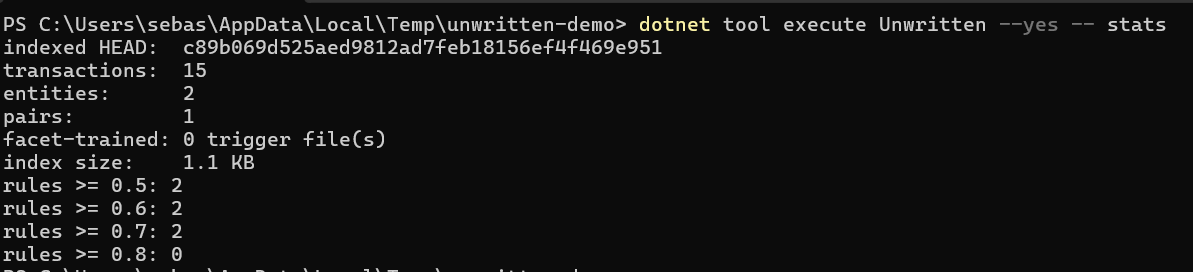
Index health: indexed HEAD, transaction/entity/pair counts, index size, rule counts at floors 0.5/0.6/0.7/0.8. |
reindex(repoPath) |
Force a full rebuild — after history rewrites or config changes. |
As a CLI
dotnet tool execute Unwritten --yes -- check                     # all uncommitted changes
dotnet tool execute Unwritten --yes -- check --staged            # staged files (pre-commit hooks)
dotnet tool execute Unwritten --yes -- check --base abc1234      # everything changed since that commit
dotnet tool execute Unwritten --yes -- check src/Foo.cs src/Bar.cs    # an explicit file set
dotnet tool execute Unwritten --yes -- check --staged --fail-at 0.8   # stricter gate
Holes at or above the report floor (0.6) are printed; the exit code is 1 when
any hole reaches the fail floor (0.7). Checked files with no or too little
history are called out with note: lines — silence from a file the index has
never seen means "no data", not "no problems".
The index is fully self-maintaining: the first call on a repository indexes its
full history (seconds to a minute on large repos); afterwards only new commits
are ingested, config changes are picked up automatically, and queries are pure
in-memory lookups. You never need to run reindex yourself except after a
git history rewrite.
Actual examples from a demo
Checking stats of the index show 1 pair that goes above the 0.7 rule
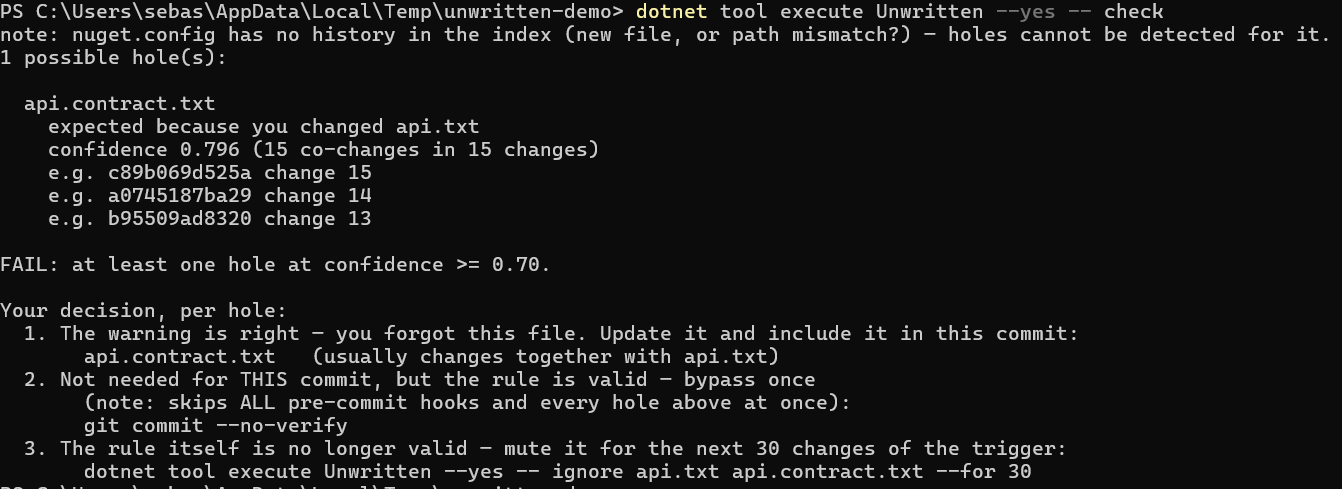
Checking stats after a change has been made to one of the files.
The tool will inform that there is one file with a confidence score above 0.7 that is not changed together with its pair. And it will show you 3 ways you can take to resolve the issue.
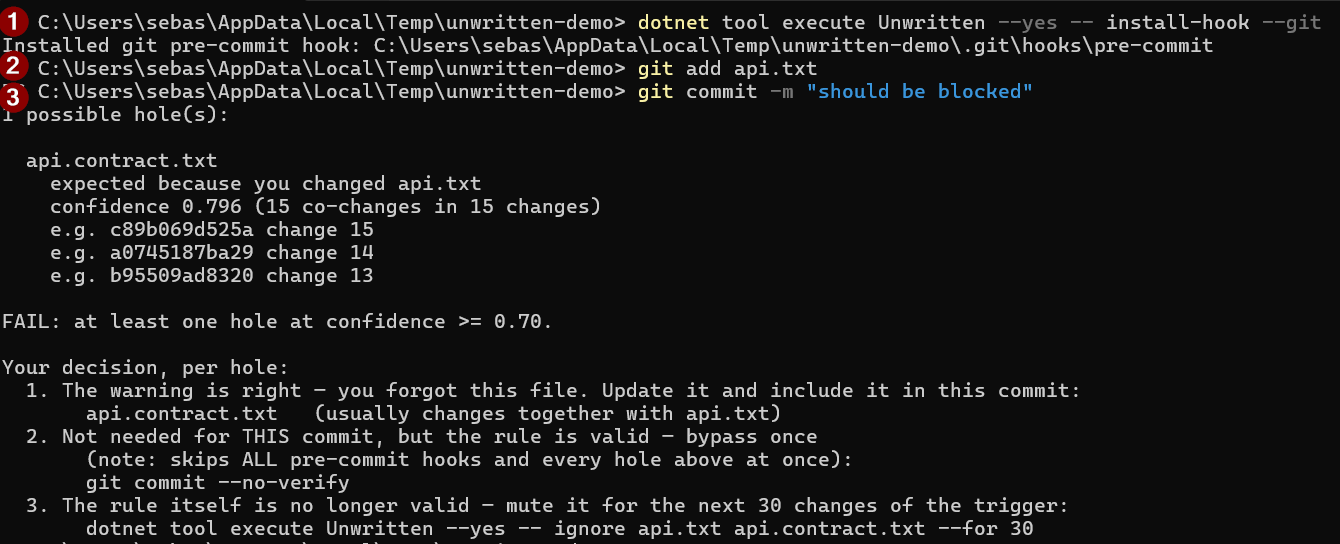
Installing the pre-commit hook gives same output
As hooks — deterministic checks
Relying on an agent (or a human) to remember to run the check is the weakest
link. install-hook makes it fire every time:
dotnet tool execute Unwritten --yes -- install-hook --git           # git pre-commit hook
dotnet tool execute Unwritten --yes -- install-hook --claude-code   # Claude Code Stop hook
--gitwrites.git/hooks/pre-commit(refusing to touch an existing foreign hook unless--force).--claude-codeadds a Stop hook to the repo's.claude/settings.json: whenever the agent finishes a turn while an uncommitted change has a failing hole, the report is fed back to the agent so it can fix or justify it. The hook fails open (never blocks on infrastructure problems) and never re-blocks within the same turn.
Manual pre-commit alternative — create .git/hooks/pre-commit (no extension) with:
#!/bin/sh
exec dotnet tool execute Unwritten --yes -- check --staged
and make it executable (chmod +x .git/hooks/pre-commit; not needed on
Windows). The commit is blocked when any hole reaches the fail floor (default
0.7); holes between 0.6 and 0.7 are printed as warnings but do not block. To
bypass once: git commit --no-verify.
With the pre-commit framework, add to
.pre-commit-config.yaml:
repos:
  - repo: local
    hooks:
      - id: unwritten
        name: unwritten hole check
        entry: dotnet tool execute Unwritten --yes -- check --staged
        language: system
        pass_filenames: false
With Husky: echo "dotnet tool execute Unwritten --yes -- check --staged" > .husky/pre-commit.
Muting a false rule — unwritten ignore
Sometimes a high-confidence rule is simply wrong for your situation and keeps
blocking commits. Content-aware suppression already absorbs cosmetic C# and
JSON edits automatically, and git commit --no-verify bypasses a single
commit — but for a persistently false pairing, mute it:
dotnet tool execute Unwritten --yes -- ignore docs/api.md src/openapi.json --for 30 --note "generated separately now"
dotnet tool execute Unwritten --yes -- ignore --list
dotnet tool execute Unwritten --yes -- ignore --remove docs/api.md src/openapi.json
Ignores are bounded by design — permanent mutes go stale and one day hide a
real omission. An ignore expires after the trigger has changed --for more
times (default 30): those are exactly the commits that either erode the false
rule (each trigger-alone commit lowers its confidence, so it often dies
naturally before the mute expires) or prove the coupling is real again. Muted
holes still appear as suppressed with their remaining budget — never silently
dropped — and check --strict overrides them. Ignores live in
.unwritten/ignores.json (machine-managed; keep your hands in config.json).
There is deliberately no MCP tool for creating ignores: muting a warning is a
human judgment, not something a coding agent should do to its own findings.
The loop is still closed, though — the check_holes/explain_rule tool
descriptions and the Stop-hook feedback instruct the agent that when it judges
a rule persistently false, it must say so and point you at unwritten ignore,
so the decision reaches you instead of dying in the agent's transcript.
Configuration — .unwritten/config.json
The first index build drops a fully commented template at
.unwritten/config.json, so the settings are discoverable right where they
live — uncomment a line to change it. All settings are optional; missing ones
use the validated defaults:
{
  "minSupport": 10,            // min changes of the trigger file before rules exist
  "maxTransactionSize": 30,    // commits touching more files are excluded from training
  "defaultMinConfidence": 0.6, // alert floor (check_holes + CLI report floor)
  "failConfidence": 0.7,       // CLI: exit 1 when a hole reaches this
  "maxExamplesPerPair": 10,    // evidence commits kept per file pair

  // Content-aware exceptions (JSON trigger files):
  "facetFloor": 0.6,           // Wilson floor for a key to count as predictive
  "minFacetSupport": 5,        // min changes of a key before it can be classified
  "facetCandidateFloor": 0.5,  // file-level confidence from which keys get trained
  "maxFacetsPerEntity": 64,    // beyond this the file is key-untrackable (fail open)
  "facetMaxDepth": 3,          // key-path depth cap (deeper rolls up)

  // Member-level indexing (C#/Roslyn), OFF by default:
  "memberLevel": false,        // enable member->member rules (first build costs seconds-to-minutes)
  "memberHistoryWindow": 5000, // member training covers this many most-recent commits
  "memberMinSupport": 10,      // min changes of a trigger member before member rules exist
  "memberMaxTransactionSize": 50 // commits changing more members are excluded (refactor noise)
}
Floors take effect immediately. Training settings (minSupport,
maxTransactionSize, maxExamplesPerPair, facet training settings) describe
how the index is built — Unwritten detects when they change (member settings
included) and rebuilds automatically on the next query, so no manual step is
needed. reindex remains the tool for history rewrites. Command-line flags
override the config file.
How it works
For every non-merge commit touching ≤ 30 files, Unwritten counts each file's
changes and each file pair's co-changes. A rule A→B exists when A has changed at
least 10 times and wilson_lb(co(A,B), count(A)) ≥ floor. The index lives in
.unwritten/index.json, keyed by the indexed HEAD; when HEAD moves, only the new
commits are counted.
Internally the engine is domain-neutral — it counts entities in transactions, and git is just the first adapter mapping commits to transactions and file paths to entity ids. This keeps the door open for member-level entities (Roslyn) and non-git event streams.
Content-aware exceptions for JSON files
For rules whose trigger is a JSON file, Unwritten additionally learns which
keys predict the co-change — the same Wilson scoring, one level down
(key paths like info.version, arrays collapsed to packages[].name).
When your current edit touched only keys that history says are
non-predictive (e.g. a description-only edit to a manifest whose version
key drives the coupling), the hole is suppressed: agents receive it with
suppressed: true plus the per-key evidence and may overrule; the CLI
prints one summary line and excludes it from the exit code (--strict
restores the old behavior).
The layer fails open in every direction: unknown keys, files that are
invalid JSON at either end of the diff, too many keys (>64), missing
history — all leave the alert untouched. Key training only runs for JSON
files that participate in rules, so index build cost is unchanged for
repos without JSON coupling. explain_rule exposes the per-key breakdown
(facetBreakdown) whenever it exists.
Method-level rules for C# (opt-in)
File-level rules can only say "you changed OrderService.cs but not
OrderServiceTests.cs". With "memberLevel": true, Unwritten learns the same
patterns one level deeper — per method: "you changed CalculateFreight but
not CalculateFreight_AppliesSurcharge". ("Member" is the C# umbrella term
the config and JSON output use — methods, constructors, properties, fields —
but in practice most rules are about methods.)
How it works. For every commit in the history window, each changed .cs
file is diffed syntactically (Roslyn, no compilation needed) to find which
members actually changed. Those members form the commit's transaction in a
second index (.unwritten/members.json), with ids like
Namespace.Type.Method/arity, scored with the same Wilson statistics as
files. check_holes then also reports memberHoles: companion methods that
history couples to the methods you actually changed, but which are absent from
your edit.
Why it helps:
- Precision. A file-level rule fires on any edit to the file. A method-level rule fires only when the coupled method itself changed — editing an unrelated helper in the same file raises no alarm, so warnings are rarer and more trustworthy.
- Noise immunity. "Changed" means the trivia-stripped syntax differs, so
comment- and whitespace-only edits change no member. This also suppresses
file-level holes for cosmetic C# edits (
suppressed: true, CLI--strictoverrides) — whether or not member indexing is enabled. - Survives refactoring. Member ids deliberately exclude the file path, so a method keeps its history when its file is moved or renamed — exactly where file-level history resets to zero.
Costs and caveats: the first member build parses every changed-file
version in the history window (default: most recent 5,000 commits) —
seconds on small repos, minutes on large ones; incremental updates are
cheap. Generated code (*.g.cs, *.Designer.cs, obj/) is excluded.
Commits changing more than 50 members are excluded as refactor noise.
Member renames reset history, and same-arity overloads share one entity.
Member histories are much sparser than file histories: young repos will
often have no member rules at the default support of 10 — that is the
statistics being honest, not a bug. expected_companions and
explain_rule accept member ids directly (auto-detected).
What it does NOT do (yet)
Honesty section — known limitations of phase 1:
- No rename tracking. Paths are taken as-is; a renamed file starts its
history from zero. (
git log --followstyle rename-following is a known gap.) - Content-level exceptions cover JSON and C# only. Other structured formats (YAML, TOML, XML) and other languages are treated at file level: any edit triggers the rule.
- Method-level (member) rules are C#-only, opt-in, and support-hungry. Repos need methods changed ≥10 times inside the history window before method rules exist; method renames and same-arity overloads blur identity.
- "Filled later" validation caveat. The empirical table above measures whether flagged holes were filled within 10 commits — a proxy for "the alert was right", not proof of causality. Some "unfilled" holes may still have been real omissions that were never fixed.
- One git call in
explain_rule. Hot-path queries (check_holes,expected_companions) are pure index lookups;explain_ruleadditionally runs one targetedgit log -- <fileA>to list commits where A changed alone.
Установка Unwritten
У этого сервера нет опубликованного пакета — он собирается из исходников. Открой репозиторий и следуй инструкции в README.
▸ github.com/Byggarepop/UnwrittenFAQ
Unwritten MCP бесплатный?
Да, Unwritten MCP бесплатный — установка в пару кликов через Unyly без оплаты.
Нужен ли API-ключ для Unwritten?
Нет, Unwritten работает без API-ключей и переменных окружения.
Unwritten — hosted или self-hosted?
Self-hosted: сервер запускается локально на твоей машине командой из раздела установки.
Как установить Unwritten в Claude Desktop, Claude Code или Cursor?
Открой Unwritten на unyly.org, выбери вкладку своего клиента (Claude Desktop, Claude Code, Cursor) и нажми Install — конфиг сгенерируется автоматически, без правки JSON.
Похожие MCP
GitHub
PRs, issues, code search, CI status
 автор: GitHub
Filesystem
Secure file operations with configurable access controls.
Memory
Knowledge graph-based persistent memory system.
Template MCP Server
A CLI tool to create a new Model Context Protocol server project with TypeScript support, dual transport options, and an extensible structure
 автор: mcpdotdirect
Compare Unwritten with
Не уверен что выбрать?
Найди свой стек за 60 секунд
Автор?
Embed-бейдж для README
Похожее
Все в категории development