
UOFastMCP
БесплатноНе проверенEnables interaction with U2 UniData/UniVerse databases through MCP tools for file, record, dictionary, and BP program operations, with built-in admin UI, JWT au

Описание
Enables interaction with U2 UniData/UniVerse databases through MCP tools for file, record, dictionary, and BP program operations, with built-in admin UI, JWT authentication, RBAC, and audit logging.
README
Enterprise MCP server for U2 UniData/UniVerse — JWT auth, RBAC, audit logging, built-in admin UI to simplify the setup process.
Developer: RokiPark · License: MIT · Python: 3.11+
Install & Run
# 1. Create a folder and virtual environment
python -m venv .venv
source .venv/bin/activate        # Windows: .venv\Scripts\activate

# 2. Install
pip install uofast-mcp

# 3. Set required env var
export JWT_SECRET_KEY=$(python -c "import secrets; print(secrets.token_hex(32))")
# Windows: set JWT_SECRET_KEY=<paste output of above>

# 4. Start
uofast-mcp
Server starts at http://localhost:8000
First-Time Setup
- Open http://localhost:8000/admin
- Log in:
admin/changeme123!
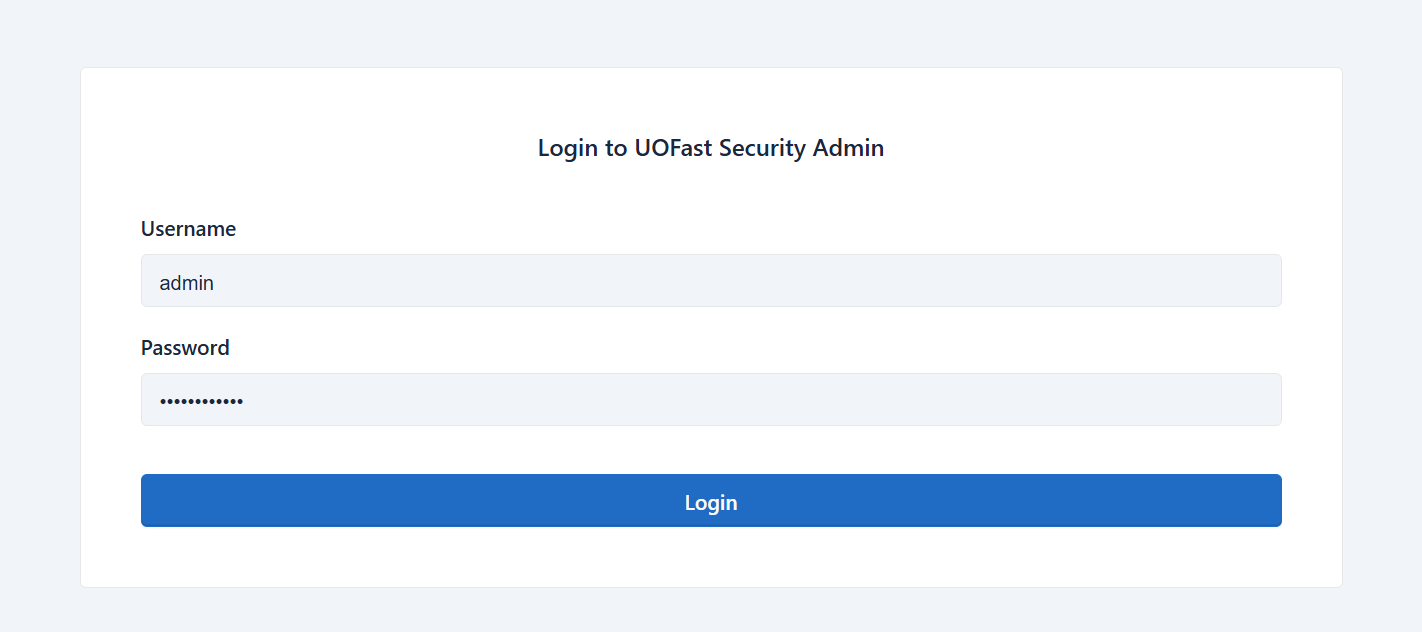
- Click Server Setup in the left menu
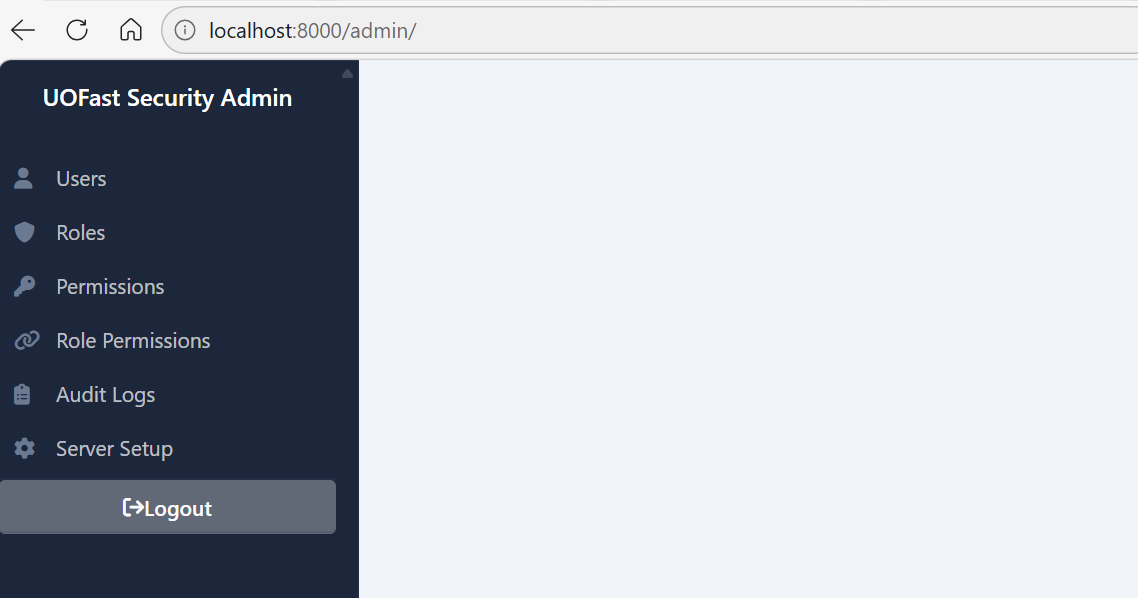
- Follow the 5-step wizard:
- Check prerequisites
- Set JWT secret + change admin password
- Configure your U2 connection (with live test)
- Review generated
.envandunidata_config.ini - Copy your Claude / VSCode / CLI connection config

Connect Claude
Run the command from Step 5 of the wizard, or get it any time from http://localhost:8000/auth/login.
claude mcp add --transport sse UOFastMCP http://localhost:8000/sse \
  --header "Authorization: Basic <your-base64-token>"
MCP Tools (20 tools)
| Category | Tools |
|---|---|
| Connections | list_connections, add_connection, close_connection |
| Files & Records | list_files, select_records, read_record, query_file, read_record_with_fields, write_record_with_fields |
| Dictionary | get_dict_items, query_with_dict_fields, read_dict_item, write_dict_item, update_dict_item, delete_dict_item |
| Commands & BP | execute_command, read_bp_program, write_bp_program, compile_bp_program |
Roles
| Role | Access |
|---|---|
admin |
Everything |
developer |
Read/write records, DICT, BP + manage connections |
analyst |
Read records, DICT + execute commands |
readonly |
Read connections, files, records, DICT |
service_account |
Same as readonly — customisable |
Manage users and permissions at http://localhost:8000/admin.
Admin UI
http://localhost:8000/admin — login with admin credentials.
| Section | URL | Purpose |
|---|---|---|
| Users | /admin/user/list |
Create/edit users, assign roles |
| Roles / Permissions | /admin/role/list |
Manage RBAC |
| Audit Logs | /admin/auditlog/list |
Every tool call logged — read-only |
| UniData Connections | /admin/connections |
View unidata_config.ini, test connections live |
| Server Setup | /admin/setup |
Change password, JWT secret, U2 connection |
Environment Variables
| Variable | Required | Default | Description |
|---|---|---|---|
JWT_SECRET_KEY |
Yes | — | Long random string — keep secret |
INITIAL_ADMIN_PASSWORD |
No | changeme123! |
Admin password on first startup |
DATABASE_URL |
No | sqlite+aiosqlite:///./data/security.db |
Security DB location |
ENABLE_DOCS |
No | true |
Set false to hide /docs in production |
API Endpoints
| Endpoint | Auth | Description |
|---|---|---|
GET /health |
None | Health check |
GET /sse |
Basic | MCP SSE connection |
GET/POST /auth/login |
None | Login page — returns ready-to-use connection config |
POST /auth/provision |
Admin | Create user + return their connection command |
GET /admin |
Admin session | Web admin UI |
GET /admin/connections |
Admin session | View UniData connections from unidata_config.ini |
GET /admin/setup |
Admin session | Server setup wizard |
GET /docs |
None | Swagger UI |
Troubleshooting
Server won't start — JWT_SECRET_KEY not set, or port 8000 in use (uvicorn uofast_mcp.app:app --port 8001).
401 Unauthorized — get credentials from /auth/login.
403 Forbidden — user's role lacks the required permission; check Admin → Role Permissions.
U2 connection fails — re-run Server Setup wizard to update credentials and test live.
Reset everything — delete data/security.db and restart (loses all users and audit logs).
License
MIT — © 2025 RokiPark. All rights reserved.
Установить UOFastMCP в Claude Desktop, Claude Code, Cursor
unyly install uofastmcpСтавит в Claude Desktop, Claude Code, Cursor и VS Code — сам разбирается с npx, uvx и сборкой из исходников.
Впервые? Поставь CLI: curl -fsSL https://unyly.org/install | sh
Или настроить вручную
Выполни в терминале:
claude mcp add uofastmcp -- uvx uofast-mcpFAQ
UOFastMCP MCP бесплатный?
Да, UOFastMCP MCP бесплатный — установка в пару кликов через Unyly без оплаты.
Нужен ли API-ключ для UOFastMCP?
Нет, UOFastMCP работает без API-ключей и переменных окружения.
UOFastMCP — hosted или self-hosted?
Self-hosted: сервер запускается локально на твоей машине командой из раздела установки.
Как установить UOFastMCP в Claude Desktop, Claude Code или Cursor?
Открой UOFastMCP на unyly.org, выбери вкладку своего клиента (Claude Desktop, Claude Code, Cursor) и нажми Install — конфиг сгенерируется автоматически, без правки JSON.
Похожие MCP
LibreOffice Tools
Enables AI agents to read, write, and edit Office documents via LibreOffice with token-efficient design. Supports multiple formats including DOCX, XLSX, PPTX, a
 автор: passerbyflutter
dannote/figma-use
Full Figma control: create shapes, text, components, set styles, auto-layout, variables, export. 80+ tools.
 автор: dannote
Logo.dev
Search and retrieve company logos by brand or domain. Customize size, format, and theme to match your design needs. Accelerate design, prototyping, and content
 автор: NOVA-3951
PIX4Dmatic
Enables GUI automation for controlling PIX4Dmatic on Windows through MCP. Supports launching, focusing, capturing screenshots, sending hotkeys, clicking UI elem
 автор: jangjo123
Compare UOFastMCP with
Не уверен что выбрать?
Найди свой стек за 60 секунд
Автор?
Embed-бейдж для README
Похожее
Все в категории design