
Usa Npn Server
БесплатноНе проверенEnables querying and exporting phenology data from the USA National Phenology Network, including raw data, phenometrics, and mapping capabilities.

Описание
Enables querying and exporting phenology data from the USA National Phenology Network, including raw data, phenometrics, and mapping capabilities.
README
code checks
unit tests
integration tests
docs
 GitHub License
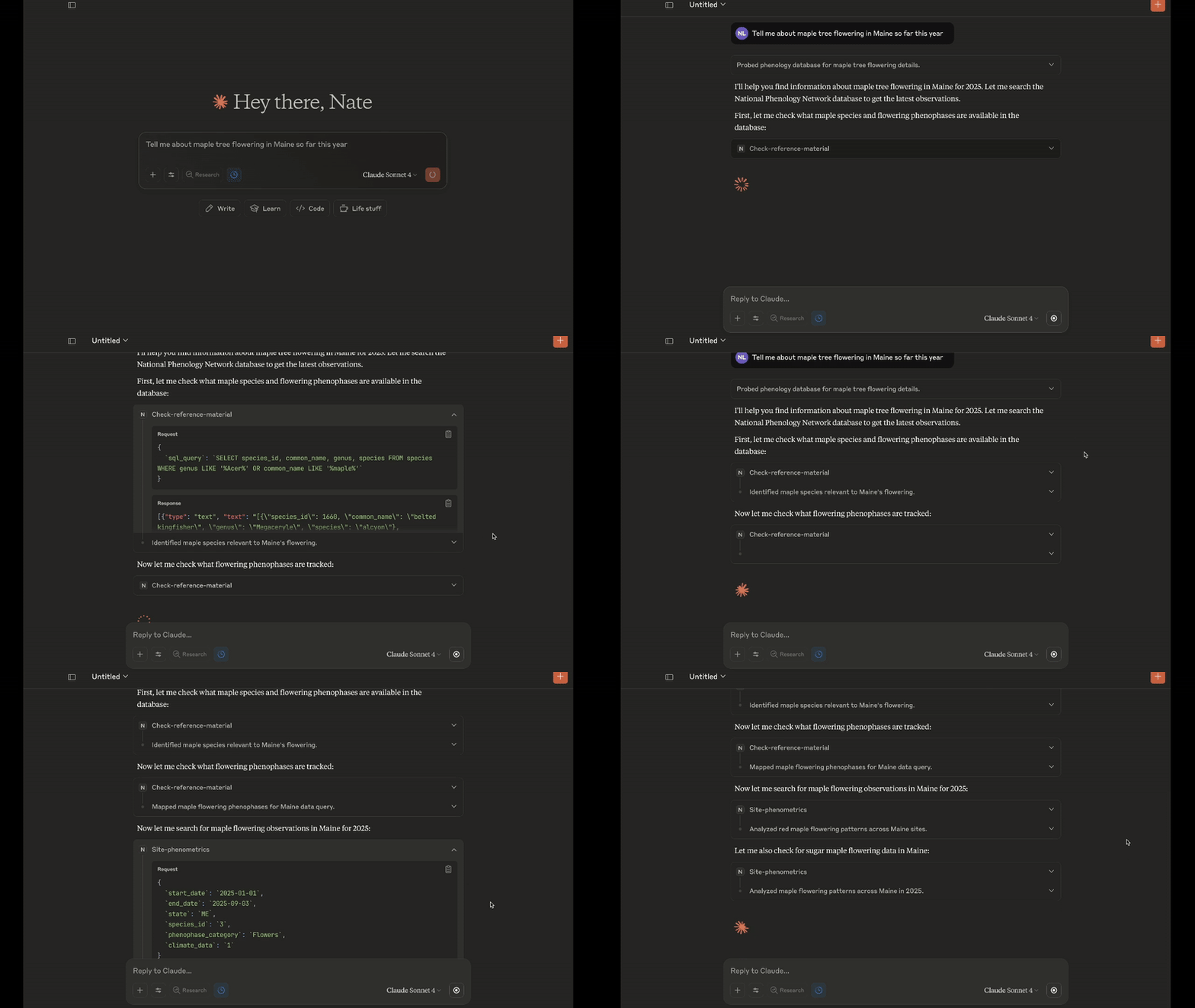
Available MCP Tools
export-raw-data- Exports raw data to JSON or JSONL files in allowed directories.get-raw-data- Fetches raw data instead of summaries as from other tools. Limited to 300 records with truncation message if exceeded.individual-phenometrics- Fetches individual phenometrics (summarized data).magnitude-phenometrics- Fetches magnitude phenometrics (magnitude data).mapping- Maps site phenometrics onto a map of the USA with optional color labeling.observation-comment- Fetches observation comments based on observation_id.query-literature- Queries database of structured summaries from 175 papers that use phenology and phenometrics data.query-reference-material- Queries database containing NPN API reference material using a generated SQL query.site-phenometrics- Fetches site phenometrics (site-level data).status-intensity- Fetches status and intensity data (raw observation data). Use sparingly (can return massive datasets), prioritize phenometrics tools.
Available MCP Resources
recent-queries- List of recent query hash IDs and metadata for cached data access.available-roots- List of available root directories for file export operations.
Available MCP Prompts
map-data- Generate a map of the data using the NPN API.
🧑🏿💻 Developing
Prerequisites
uv will manage the virtual environment and dependencies for you.
Install uv for your operating system:
macOS and Linux
curl -LsSf https://astral.sh/uv/install.sh | sh
Windows
In powershell, run:
# Install uv
powershell -ExecutionPolicy ByPass -c "irm https://astral.sh/uv/install.ps1 | iex"
Clone the repository
Using HTTPS (recommended for most users):
git clone https://github.com/VectorInstitute/usa-npn-mcp-server.git
Using SSH (if you have SSH keys configured with GitHub):
git clone [email protected]:VectorInstitute/usa-npn-mcp-server.git
After cloning with either method:
cd usa-npn-mcp-server
Installing dependencies
After uv is installed, run:
macOS and Linux
uv sync
source .venv/bin/activate
Windows
In powershell, run:
uv sync
. .\.venv\Scripts\activate.ps1
If the last command returns an error about running scripts being disabled on the system, you can run the following command in PowerShell to allow script execution for the current user:
Set-ExecutionPolicy RemoteSigned -Scope CurrentUser
Then run the activation command again:
. .\.venv\Scripts\activate.ps1
These commands set up and activate the .venv environment as specified in the pyproject.toml and uv.lock files.
Configuration
Configure for Claude Desktop App
You can download the Claude Desktop Application from here.
Once installed, you will need to modify your claude_desktop_config.json to make it aware of the MCP Server.
How to find and modify claude_desktop_config.json:
macOS and Linux
- Open Claude Desktop app
- Click on "Claude" in the menu bar and select "Settings"
- In the Settings window, click on the "Developer" tab in the left sidebar
- Click the "Edit Config" button
- This will open a Finder window showing the location of the
claude_desktop_config.jsonfile - Open the file with your preferred text editor
Add to claude config file:
{
  "mcpServers": {
    "npn": {
      "command": "bash",
      "args": [
        "-c",
        "source /absolute/path/to/usa-npn-mcp-server/.venv/bin/activate && uv run usa_npn_mcp_server /absolute/path/to/export/directory"
      ]
    }
  }
}
NOTE: Replace /absolute/path/to/usa-npn-mcp-server/ with local path to repo dir and /absolute/path/to/export/directory with local path to directory where you want exported files to be saved (or exclude this part to disable file export). You can specify multiple directories separated by spaces. For more info, see File Export Configuration.
Windows
- Open Claude Desktop app
- CTRL+Comma or Open the menu bar (three bar symbol top-left) and select "File" and "Settings"
- In the Settings window, click on the "Developer" tab in the left sidebar
- Click the "Edit Config" button
- This will open a window showing the location of the
claude_desktop_config.jsonfile - Open the file with your preferred text editor.
Add to claude config file:
{
  "mcpServers": {
  "npn": {
    "command": "cmd.exe",
    "args": [
      "/c",
      "C:\\absolute\\path\\to\\usa-npn-mcp-server\\.venv\\Scripts\\activate.bat && uv run usa_npn_mcp_server C:\\absolute\\path\\to\\export\\directory"
      ]
    }
  }
}
NOTE: Replace C:\\absolute\\path\\to\\usa-npn-mcp-server\\ with local path to repo dir and C:\\absolute\\path\\to\\export\\directory with local path to directory where you want exported files to be saved (or exclude this part to disable file export). You can specify multiple directories separated by spaces - be sure to use backslashes for Windows paths. For paths containing spaces and more details, see File Export Configuration.
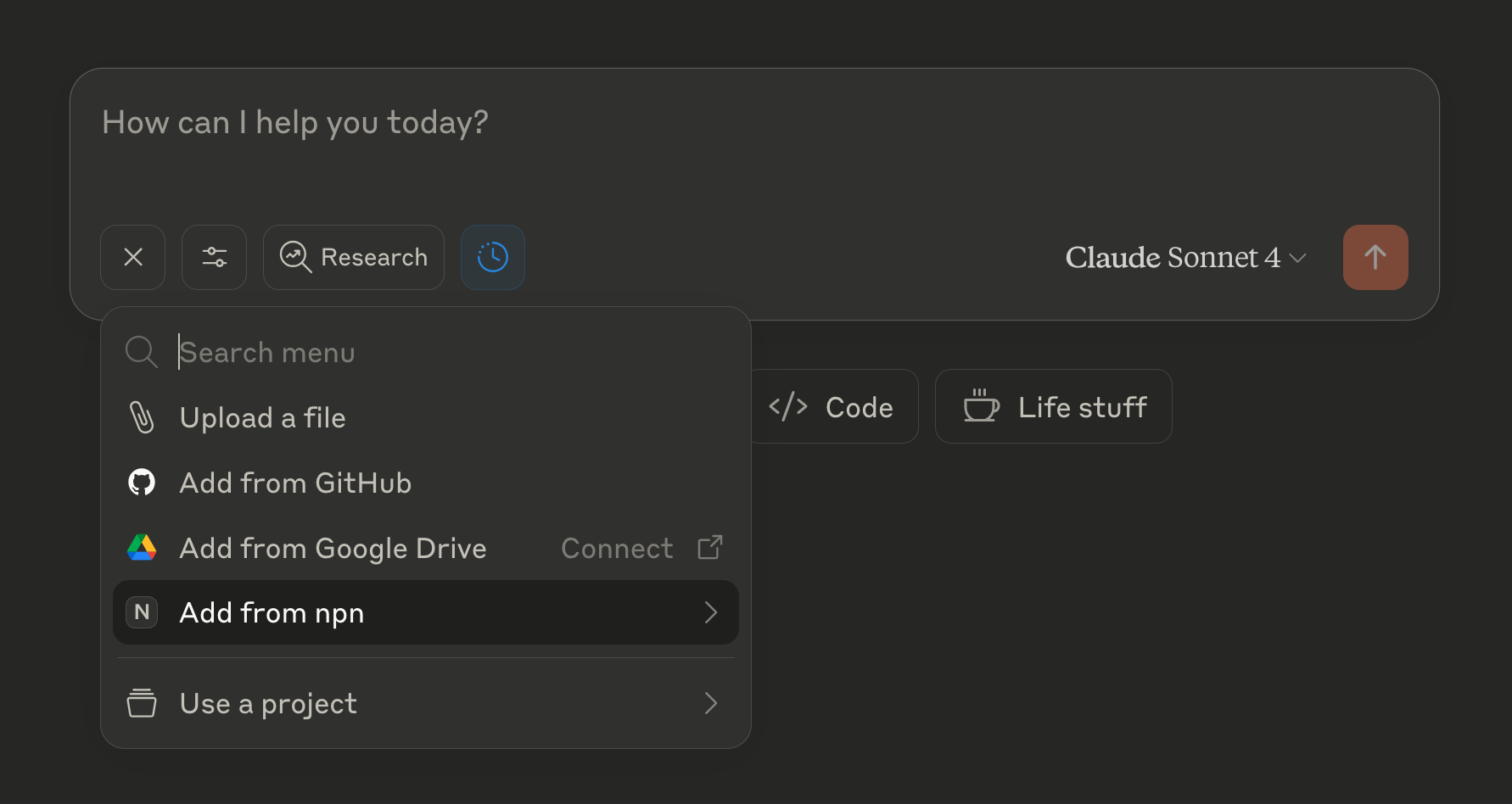
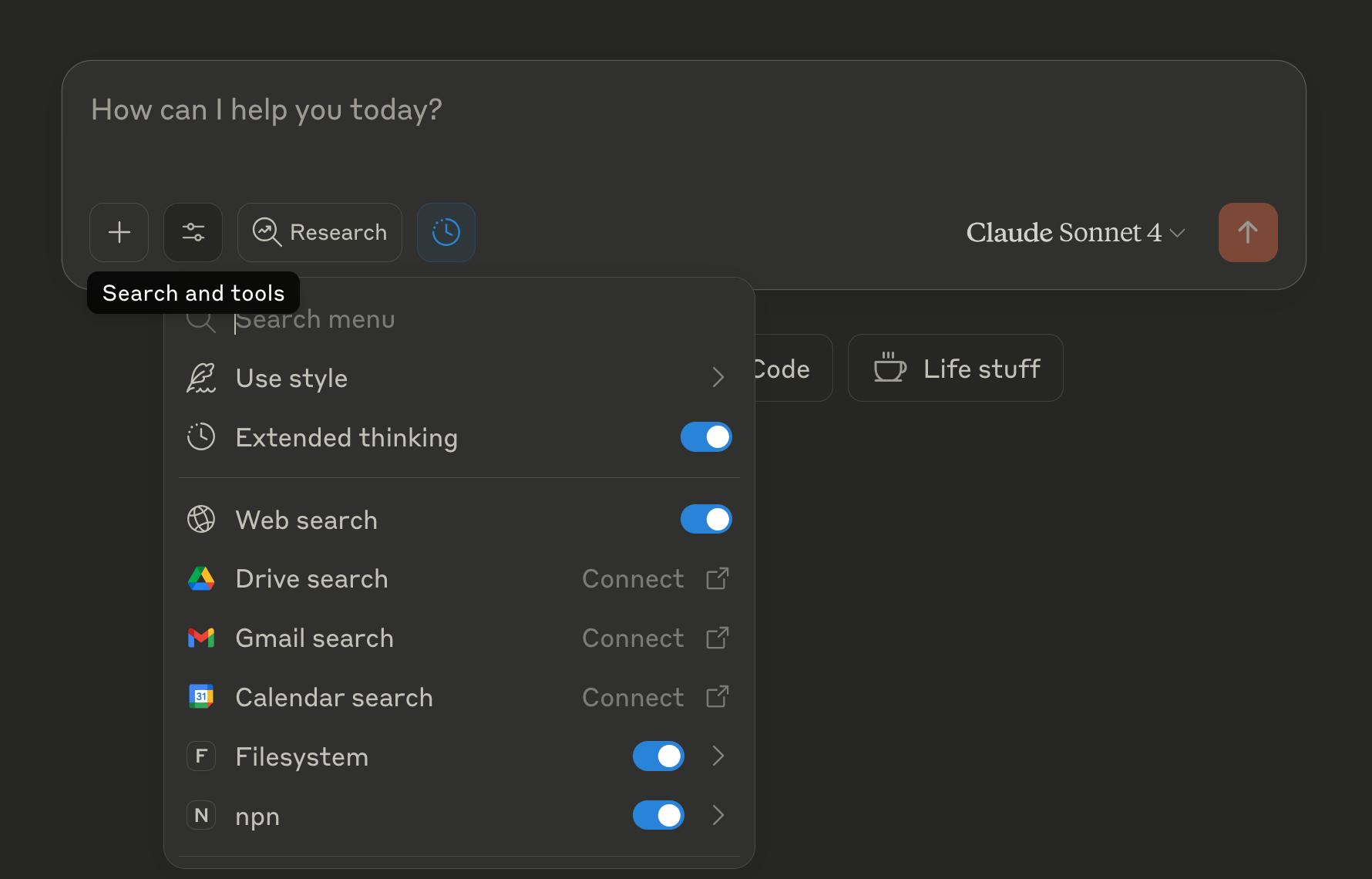
After saving the changes, restart Claude Desktop. If you receive no error messages from the Claude UI, the USA-NPN MCP server is likely installed correctly. Clicking the two buttons in the bottom left of the new chat box should reveal new options with npn labeling.
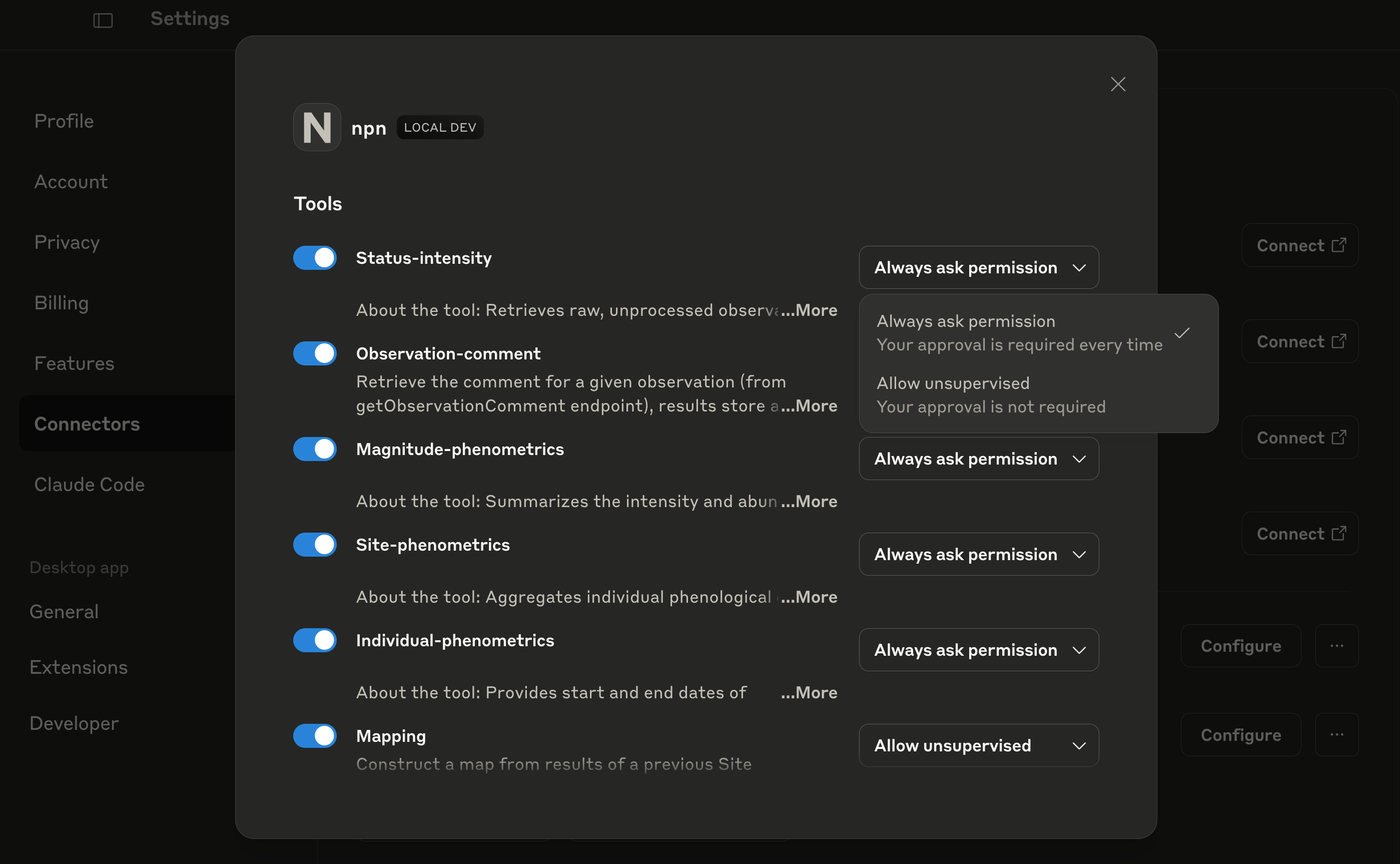
You should see a new local MCP server in the "Connectors" section of the Settings as below. This example has Filesystem and npn (usa-npn-mcp-server) MCP Servers enabled.
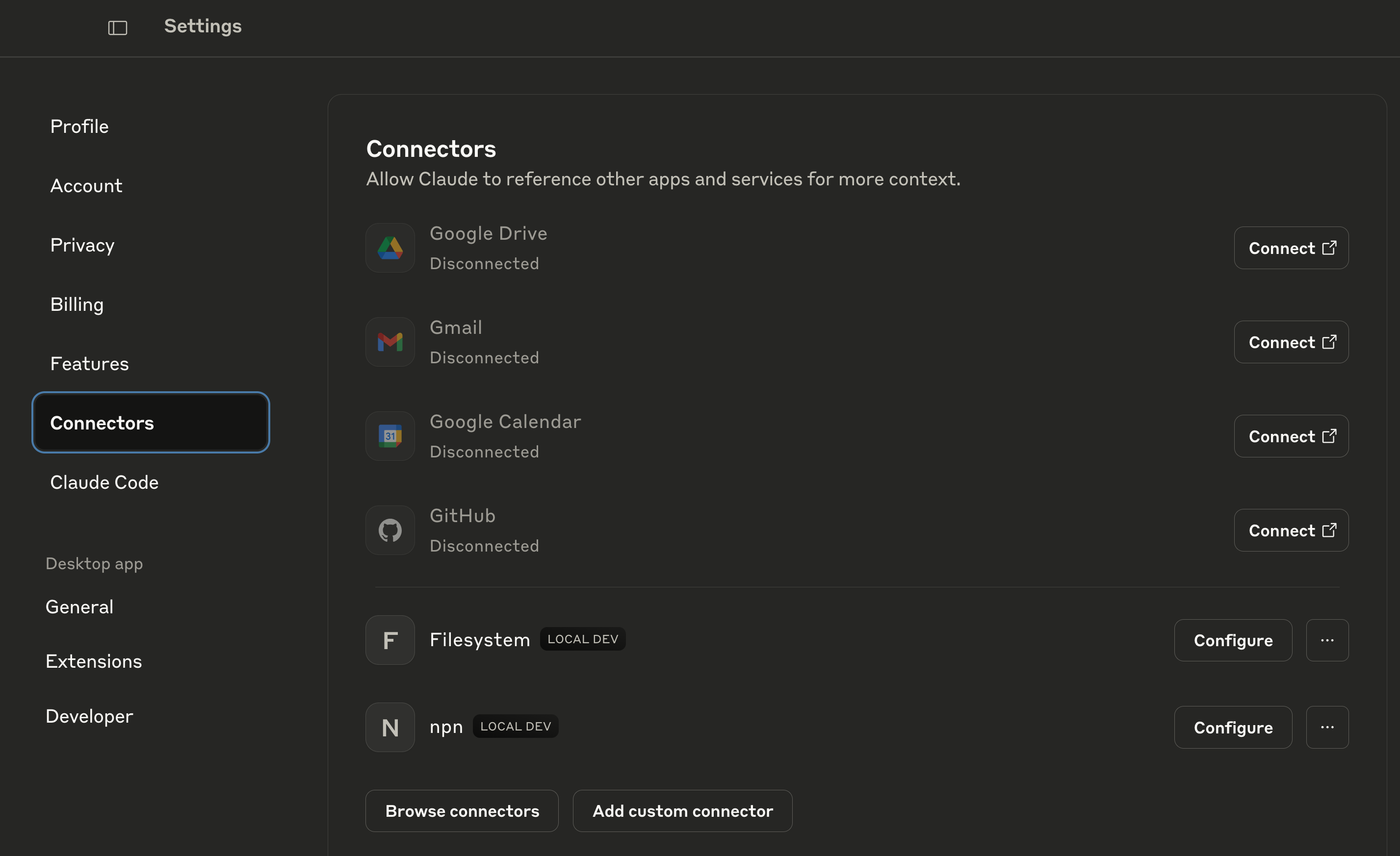
To enable tool use, you can click "Configure" (seen in the image above) and adjust which tools are enabled using the blue sliders and the permissions for each tool.
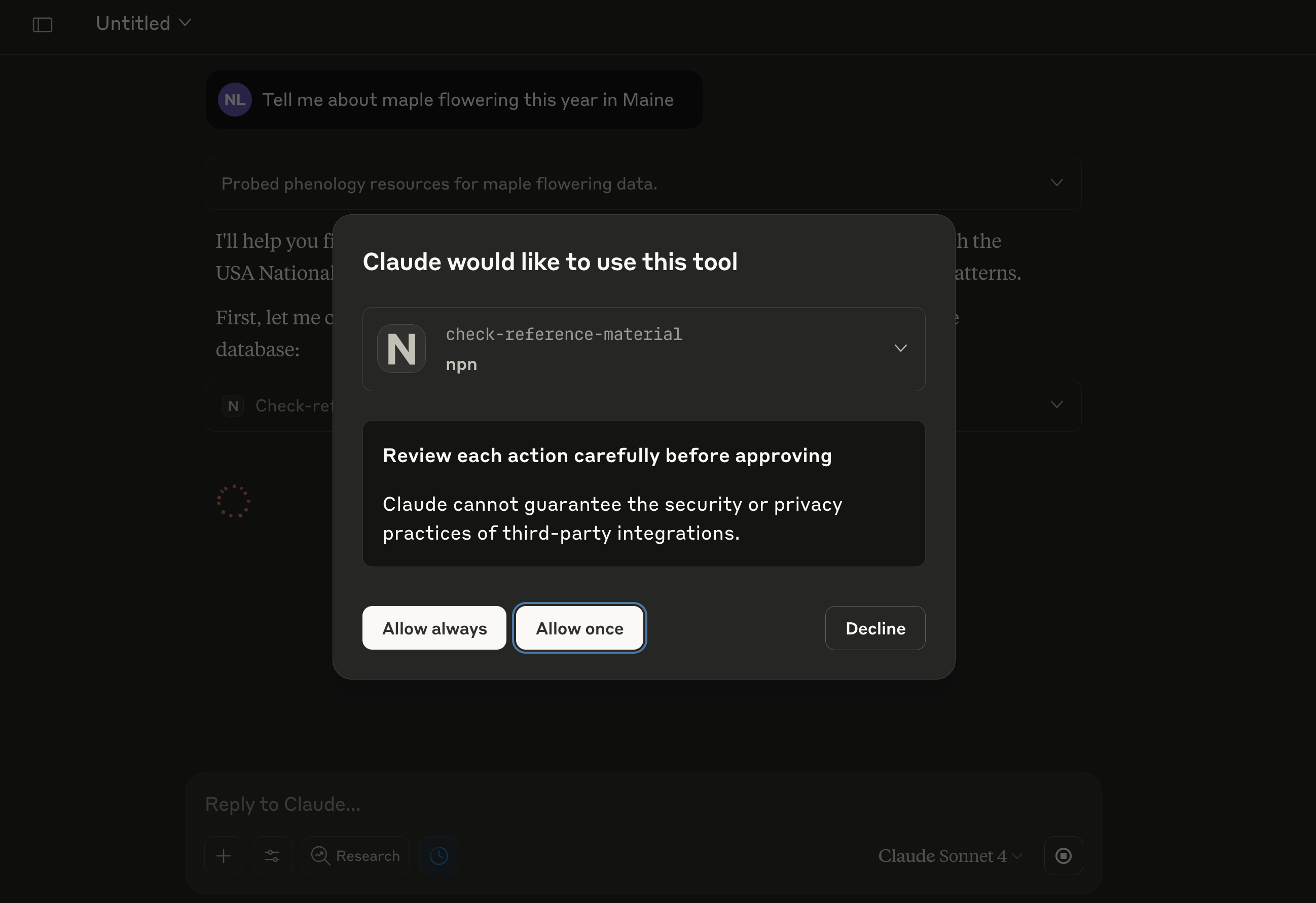
If you do not configure permissions this way, the tools will be enabled by default and permissions will be set to "Always ask permission" and each tool use will ask with an in-chat pop-up as below.
Recommended Complementary MCP Servers
Additional MCP Servers can be added to Claude Desktop in Settings using the Extensions tab by clicking Browse extensions. For use together with the USA-NPN MCP Server, the two following MCP Servers are recommended:
1. Filesystem:
- Let Claude access specified directories in your filesystem to read and write files.
- Configure
filesystemwith matching allowed directories asusa-npn-mcp-serverfor making data available during data analysis - both from recent queries saved to file and for externally sourced data files.
Note: A more fully featured alternative is Desktop Commander but it is not available in the listed extensions and would need to be configured by clicking add a custom one and performing custom installation and configuration. However, adding advanced or too many different MCP Servers to Claude can bloat your context window with tool descriptions. If you are experiencing context limitations, consider disabling some or all additional MCP Servers.
2. Context7:
- Let Claude access up-to-date code documentation for data analysis.
File Export Configuration
The server supports exporting data to files within specified directories. You can configure allowed export directories in two ways:
Command-line Arguments (Recommended)
Pass directory paths as arguments when starting the server:
# Single directory
uv run usa_npn_mcp_server /path/to/exports

# Multiple directories
uv run usa_npn_mcp_server /path/to/exports /path/to/another/dir
Environment Variable
Set the NPN_MCP_ALLOWED_DIRS environment variable:
# Unix/macOS (colon-separated)
export NPN_MCP_ALLOWED_DIRS="/path/to/exports:/path/to/another/dir"

# Windows (semicolon-separated)
set NPN_MCP_ALLOWED_DIRS="C:\path\to\exports;D:\another\dir"
Windows Paths with Spaces (Escaped Quotes Method)
For paths containing spaces, wrap each path with escaped double quotes (\"):
{
  "mcpServers": {
    "npn": {
      "command": "cmd.exe",
      "args": [
        "/c",
        "\\"C:\\\\Users\\\\John Doe\\\\Documents\\\\usa-npn-mcp-server\\\\.venv\\\\Scripts\\\\activate.bat\\" && uv run usa_npn_mcp_server \\"C:\\\\Program Files\\\\Data Export\\""
      ]
    }
  }
}
Multiple Windows Paths with Spaces
Quote each path individually when specifying multiple directories:
{
  "mcpServers": {
    "npn": {
      "command": "cmd.exe",
      "args": [
        "/c",
        "\\"C:\\\\Company Software\\\\NPN Tools\\\\usa-npn-mcp-server\\\\.venv\\\\Scripts\\\\activate.bat\\" && uv run usa_npn_mcp_server \\"D:\\\\Shared Data\\\\Research Projects\\" \\"E:\\\\Export Results\\\\Team Analysis\\""
      ]
    }
  }
}
Security Note: The server will only allow file operations within the specified directories for security.
Debugging
Debugging with MCP Inspector (Currently only macOS and Linux): To run a locally hosted MCP interpreter for debugging, use:
# Without file export
npx @modelcontextprotocol/inspector uv run usa_npn_mcp_server

# With file export to a specific directory
npx @modelcontextprotocol/inspector uv run usa_npn_mcp_server /path/to/exports
The first time you run this command you'll be prompted to download @modelcontextprotocol/inspector.
This command starts the MCP inspector within the uv-managed environment. The inspector can be used locally in-browser to inspect/test the server.
Testing dependencies: To install dependencies for testing (codestyle, unit tests, integration tests), run:
uv sync --dev
Other MCP Servers
For examples of other MCP servers and implementation patterns, see: https://github.com/modelcontextprotocol/servers
Установка Usa Npn Server
У этого сервера нет опубликованного пакета — он собирается из исходников. Открой репозиторий и следуй инструкции в README.
▸ github.com/VectorInstitute/usa-npn-mcp-serverFAQ
Usa Npn Server MCP бесплатный?
Да, Usa Npn Server MCP бесплатный — установка в пару кликов через Unyly без оплаты.
Нужен ли API-ключ для Usa Npn Server?
Нет, Usa Npn Server работает без API-ключей и переменных окружения.
Usa Npn Server — hosted или self-hosted?
Self-hosted: сервер запускается локально на твоей машине командой из раздела установки.
Как установить Usa Npn Server в Claude Desktop, Claude Code или Cursor?
Открой Usa Npn Server на unyly.org, выбери вкладку своего клиента (Claude Desktop, Claude Code, Cursor) и нажми Install — конфиг сгенерируется автоматически, без правки JSON.
Похожие MCP
GitHub
PRs, issues, code search, CI status
 автор: GitHub
Filesystem
Secure file operations with configurable access controls.
Memory
Knowledge graph-based persistent memory system.
Template MCP Server
A CLI tool to create a new Model Context Protocol server project with TypeScript support, dual transport options, and an extensible structure
 автор: mcpdotdirect
Compare Usa Npn Server with
Не уверен что выбрать?
Найди свой стек за 60 секунд
Автор?
Embed-бейдж для README
Похожее
Все в категории development