
V2ex
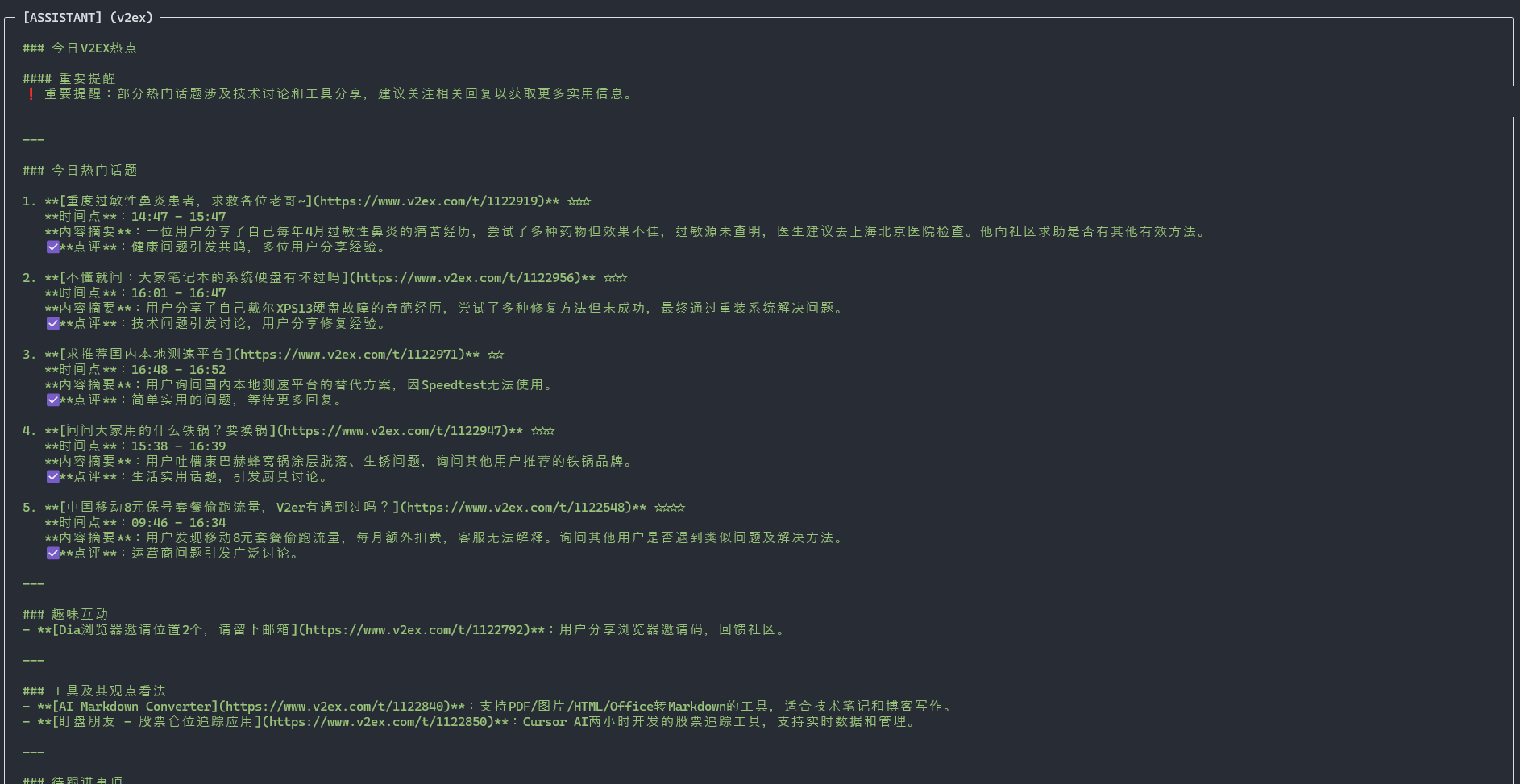
БесплатноНе проверенMCP server for V2EX API 2.0, exposing notifications, tokens, nodes, topics, comments, and daily summaries for MCP-compatible agents.

Описание
MCP server for V2EX API 2.0, exposing notifications, tokens, nodes, topics, comments, and daily summaries for MCP-compatible agents.
README
Description
mcp-server-v2ex is an MCP server that wraps the V2EX API 2.0 for MCP-compatible agents and developer tools. It exposes structured operations for notifications, token management, member profile lookup, node browsing, topic retrieval, comment retrieval, and daily hot-topic summaries.
The project is designed as a reusable integration layer for general-purpose agents rather than a client-specific plugin, so it can be connected to Claude Desktop, Codex, and other tools that support the Model Context Protocol.
For Chinese documentation, see README.zh-CN.md.
Available tools
notifications: Fetch the latest notificationsdelete_notifications: Delete selected notificationsmember_profile: Get the profile of the user associated with the API tokentoken: Inspect the current API tokencreate_token: Create a new API tokennodes: Get node informationnode_topics: List topics under a specific nodetopic_detail: Get the content of a topictopic_comments: Get replies for a topicdaily_summary: Generate a summary of recent hot topics
Installation
Install the package from npm:
npm install -g mcp-server-v2ex
Configuration
First, create or retrieve a V2EX API token from V2EX token settings.
Example MCP client configuration:
{
  "v2ex": {
    "command": "%APP_DATA%\\Local\\nvm\\v22.14.0\\node.exe",
    "args": [
      "%APP_DATA%\\Local\\nvm\\v22.14.0\\node_modules\\mcp-server-v2ex\\dist\\index.js"
    ],
    "env": {
      "V2EX_API_KEY": "your-token-here",
      "NODE_TLS_REJECT_UNAUTHORIZED": "0"
    }
  }
}
NODE_TLS_REJECT_UNAUTHORIZED=0 is only useful in special local networking setups, such as MITM proxy tooling. Do not enable it unless you understand the security tradeoff.
Changelog
v0.1.1/2025-04-02- Added daily hot-topic summaries
v0.1.0- Initial feature-complete release
Roadmap
- Improve daily hot-topic summarization for agent-driven workflows
- Expand documentation for broader MCP client integrations
Установка V2ex
У этого сервера нет опубликованного пакета — он собирается из исходников. Открой репозиторий и следуй инструкции в README.
▸ github.com/funnythingfunnylove/mcp-server-v2exFAQ
V2ex MCP бесплатный?
Да, V2ex MCP бесплатный — установка в пару кликов через Unyly без оплаты.
Нужен ли API-ключ для V2ex?
Нет, V2ex работает без API-ключей и переменных окружения.
V2ex — hosted или self-hosted?
Self-hosted: сервер запускается локально на твоей машине командой из раздела установки.
Как установить V2ex в Claude Desktop, Claude Code или Cursor?
Открой V2ex на unyly.org, выбери вкладку своего клиента (Claude Desktop, Claude Code, Cursor) и нажми Install — конфиг сгенерируется автоматически, без правки JSON.
Похожие MCP
GitHub
PRs, issues, code search, CI status
 автор: GitHub
Filesystem
Secure file operations with configurable access controls.
Memory
Knowledge graph-based persistent memory system.
Template MCP Server
A CLI tool to create a new Model Context Protocol server project with TypeScript support, dual transport options, and an extensible structure
 автор: mcpdotdirect
Compare V2ex with
Не уверен что выбрать?
Найди свой стек за 60 секунд
Автор?
Embed-бейдж для README
Похожее
Все в категории development