
Vicon DataStream Server
БесплатноНе проверенEnables AI agents and LLMs to interact with Vicon motion capture systems for real-time streaming of kinematic data, markers, force plates, eye trackers, and cam

Описание
Enables AI agents and LLMs to interact with Vicon motion capture systems for real-time streaming of kinematic data, markers, force plates, eye trackers, and camera calibration.
README
English | 中文
A full-featured Vicon motion capture data streaming server based on MCP (Model Context Protocol).
📚 SDK Reference: Vicon DataStream SDK Manual.pdf 📦 Based on SDK: Vicon DataStream SDK v1.12.145507h (Win64 Python)
✨ 100% Feature Complete: Implements all 47+ core functions of Vicon DataStream SDK.
Part of the ROSClaw Embodied Intelligence Operating System.
📋 Features
🔌 Connection Management
- ✅ TCP Direct Connection (Port 801)
- ✅ Multicast Connection (224.0.0.0/4)
- ✅ Multicast Forwarding Control
- ✅ Configurable Buffer Size
🏃 Kinematic Data (Complete)
- ✅ Global Pose: Position + 4 rotation formats (Euler/Quaternion/Matrix/Helical)
- ✅ Local Pose: Relative parent segment transform, 4 rotation formats
- ✅ Static Offset: PRE-POSITION/PRE-ORIENTATION
- ✅ Segment Hierarchy: Parent segments, child segments, root segment
- ✅ Occlusion Status: Real-time markers
📍 Marker Tracking
- ✅ Labeled Markers (subject + parent segment + position + occlusion)
- ✅ Unlabeled Markers (raw reflection points)
- ✅ Marker Ray Tracking (ray-tracing camera assignment)
📊 Biomechanical Devices
- ✅ Force Plate Data:
- Global coordinates: Force vector (N), Moment vector (Nm), Center of Pressure (mm)
- Local coordinates: Relative to force plate's own coordinate system
- Analog channel voltage
- ✅ Eye Tracker: Eye position + gaze vector (with occlusion detection)
- ✅ Generic Devices: EMG etc., auto-recognized units
📷 Cameras and Centroids
- ✅ Camera list (ID, type, resolution, display name)
- ✅ Dynamic cameras (movable cameras)
- ✅ Camera Calibration Parameters:
- Global pose (translation + 4 rotation types)
- Lens parameters (focal length, principal point, distortion coefficients k1,k2,k3)
- ✅ Centroid data (reflected point position + weight per camera)
⚙️ Advanced Configuration
- ✅ 3 Stream Modes (ClientPull/ClientPullPreFetch/ServerPush)
- ✅ Subject Filtering (receive only specified subjects)
- ✅ Coordinate System Mapping (6-direction customization, auto-detect Unity/Unreal/ROS)
- ✅ Latency Analysis (total latency + stage breakdown)
- ✅ Timecode (hours:minutes:seconds:frames)
- ✅ Wireless Network Optimization (Windows)
📚 Documentation Navigation
| Document | Description |
|---|---|
| 📖 Windows Setup Guide | Windows system detailed installation, configuration, troubleshooting |
| ⚙️ Configuration Reference | OpenClaw/Claude Desktop configuration details |
| 🏗️ Architecture | System architecture and technical details |
| ✅ Feature Checklist | Complete feature checklist |
| 📄 SDK Developer Manual | Vicon DataStream SDK v1.12.145507h Official PDF Documentation |
Windows Users Quick Start
If you use Windows, please check the Windows Complete Installation Guide, which includes:
- Vicon SDK download and installation steps
- Detailed SDK directory structure
- OpenClaw connection configuration (including multi-server configuration)
- Port description (801/804/8802/7000/51001)
- Real-time data acquisition complete tutorial
- Troubleshooting and performance optimization
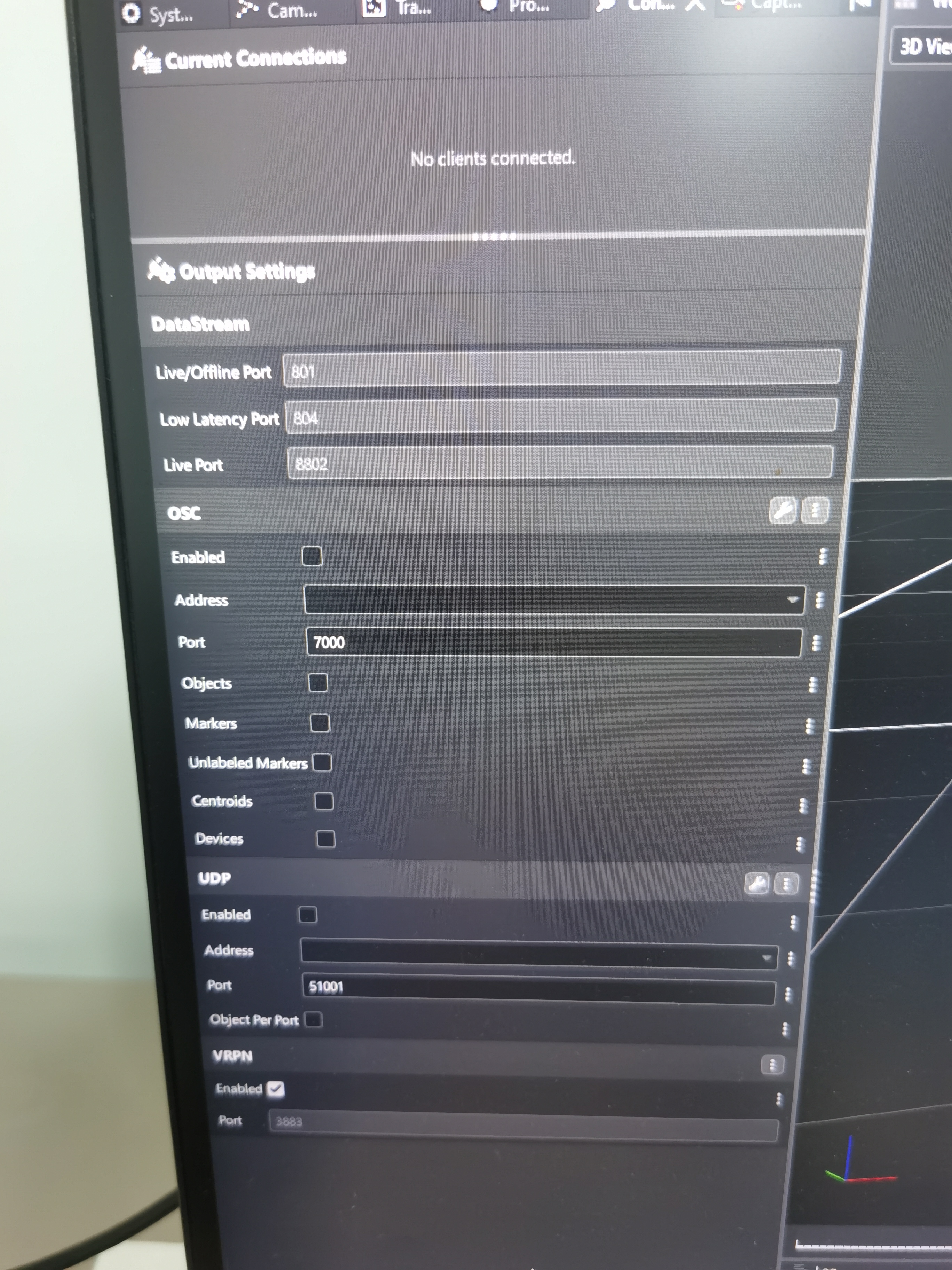
🚀 Quick Start
1. Install Vicon SDK
cd "D:\Program Files\Vicon\DataStream SDK\Win64\Python"
pip install -e vicon_dssdk
2. Install MCP Dependencies
cd vicon-datastream-mcp
pip install -r requirements.txt
3. Configure OpenClaw/Claude Desktop
Edit the configuration file (Windows path: C:\Users\<username>\.openclaw\openclaw.json):
{
  "mcpServers": {
    "vicon": {
      "command": "python",
      "args": ["D:/workspace/rosclaw/mcp/vicon-datastream-mcp/src/mcp_server.py"],
      "env": {
        "VICON_HOST": "192.168.20.24:801"
      }
    }
  }
}
Port Selection Reference:
| Port | Use Case | Latency |
|---|---|---|
| 801 | DataStream Live/Offline (Recommended) | Standard |
| 804 | DataStream Low Latency | Lower |
| 8802 | DataStream Live (Legacy Compatibility) | Standard |
💡 Tip: If port 801 connection fails, try 804 or 8802
Detailed configuration instructions can be found in the Windows Setup Guide
4. Run
# stdio mode (default)
python -m src.mcp_server

# SSE mode
python -m src.mcp_server --transport sse --port 8000
💬 Natural Language Examples
Connection and Configuration
"Connect to Vicon system"
→ vicon_connect(host="localhost:801")

"Connect via multicast using local IP 192.168.1.100"
→ vicon_connect_multicast(local_ip="192.168.1.100")

"Enable low latency push mode"
→ vicon_set_stream_mode("ServerPush")

"Set Unity coordinate system (Y-up)"
→ vicon_set_axis_mapping("Forward", "Up", "Right")

"Only receive Colin's data"
→ vicon_clear_subject_filter() + vicon_add_subject_filter("Colin")
Get Kinematic Data
"Get Colin's pelvis complete pose"
→ vicon_get_segment(subject_name="Colin", segment_name="Pelvis")
Returns: Global/Local/Static transforms, each containing Euler/Quaternion/Matrix/Helical

"Get all segments hierarchy"
→ vicon_get_all_segments("Colin")

"Get marker LPSI ray tracing information"
→ vicon_get_markers(subject_name="Colin")
Biomechanical Data
"Get force plate force and moment (global coordinates)"
→ vicon_get_force_plates()

"Get force plate local coordinate data"
→ vicon_get_force_plates(include_local=true)

"Get eye tracker 1 gaze direction"
→ vicon_get_eye_tracker(eye_tracker_id=1)
Cameras and Calibration
"List all cameras"
→ vicon_get_cameras()

"Get calibration parameters for camera Vantage001"
→ vicon_get_camera_calibration(camera_name="Vantage001")
Returns: Global pose + focal length + distortion coefficients

"Get centroid data for camera 1"
→ vicon_get_centroids(camera_name="Vantage 16 (2105980)")
Analysis and Debugging
"Analyze system latency bottleneck"
→ vicon_get_latency_samples()
Returns: {acquisition: 0.001s, processing: 0.005s, network: 0.002s}

"Get current frame timecode"
→ vicon_get_timecode()
Returns: 01:12:24:02

"Enable timing log debugging"
→ vicon_set_timing_log(client_log="timing.log")
🛠️ Complete MCP Tools List (36)
Connection (5)
| Tool | Description |
|---|---|
vicon_connect |
TCP connection |
vicon_connect_multicast |
Multicast connection |
vicon_start_multicast_transmit |
Start multicast forwarding |
vicon_stop_multicast_transmit |
Stop multicast forwarding |
vicon_set_buffer_size |
Set buffer size |
Data Configuration (5)
| Tool | Description |
|---|---|
vicon_enable_data |
Enable data type |
vicon_disable_data |
Disable data type |
vicon_check_data_enabled |
Check enabled status |
vicon_set_stream_mode |
Set stream mode |
vicon_get_frame |
Get frame |
Time and Latency (4)
| Tool | Description |
|---|---|
vicon_get_timecode |
Timecode |
vicon_get_frame_rates |
All frame rates |
vicon_get_latency_total |
Total latency |
vicon_get_latency_samples |
Latency samples |
Subjects and Segments (5)
| Tool | Description |
|---|---|
vicon_get_subjects |
Subject list |
vicon_clear_subject_filter |
Clear filter |
vicon_add_subject_filter |
Add filter |
vicon_get_segment |
Single segment data (full format) |
vicon_get_all_segments |
All segments |
Markers (2)
| Tool | Description |
|---|---|
vicon_get_markers |
Markers (with rays) |
vicon_get_unlabeled_markers |
Unlabeled markers |
Devices and Force Plates (4)
| Tool | Description |
|---|---|
vicon_get_devices |
Device list |
vicon_set_apex_feedback |
Apex haptic feedback |
vicon_get_force_plates |
Force plates (global + local) |
vicon_get_analog_voltage |
Analog voltage |
Eye Trackers (2)
| Tool | Description |
|---|---|
vicon_get_eye_trackers |
Eye tracker list |
vicon_get_eye_tracker |
Position + gaze vector |
Cameras (3)
| Tool | Description |
|---|---|
vicon_get_cameras |
Camera list |
vicon_get_centroids |
Centroid data |
vicon_get_camera_calibration |
Calibration parameters |
Coordinate System (3)
| Tool | Description |
|---|---|
vicon_set_axis_mapping |
Set coordinate system |
vicon_get_axis_mapping |
Get coordinate system |
vicon_get_server_orientation |
Server orientation |
Debugging (2)
| Tool | Description |
|---|---|
vicon_set_timing_log |
Timing log |
vicon_configure_wireless |
Wireless optimization |
📡 Data Format Examples
Segment Pose (Complete)
{
  "subject": "Colin",
  "segment": "Pelvis",
  "global": {
    "translation": {"x": -522.3, "y": -1.6, "z": 1119.1},
    "rotation_euler_xyz": {"x": 0.1, "y": -0.2, "z": 0.05},
    "rotation_quaternion": {"x": 0.0, "y": 0.1, "z": 0.0, "w": 0.99},
    "rotation_matrix": [[1,0,0], [0,1,0], [0,0,1]],
    "rotation_helical": {"x": 0.0, "y": 0.1, "z": 0.0, "magnitude": 0.1},
    "occluded": false
  },
  "local": { /* Relative to parent segment */ },
  "static": { /* PRE-POSITION/PRE-ORIENTATION */ },
  "hierarchy": {
    "parent": "Hips",
    "children": ["Spine", "LeftUpperLeg", "RightUpperLeg"]
  }
}
Force Plate Data
{
  "plate_id": 1,
  "global": {
    "force_vectors": [{"x": 0.0, "y": 0.0, "z": 823.5, "unit": "N"}],
    "moment_vectors": [{"x": 12.3, "y": -5.2, "z": 0.0, "unit": "Nm"}],
    "center_of_pressure": [{"x": 125.0, "y": -45.0, "z": 0.0, "unit": "mm"}]
  },
  "local": {
    /* Relative to force plate's own coordinate system */
  }
}
Camera Calibration
{
  "camera": "Vantage 16 (2105980)",
  "global_pose": {
    "translation": {"x": 1200.5, "y": -800.2, "z": 2400.0, "unit": "mm"},
    "rotation": {
      "euler_xyz": {"x": 0.0, "y": 0.1, "z": 0.0},
      "quaternion": {"x": 0.0, "y": 0.05, "z": 0.0, "w": 0.998}
    }
  },
  "lens": {
    "focal_length_mm": 24.0,
    "principal_point": {"x": 960.0, "y": 540.0},
    "lens_parameters": {"k1": 0.001, "k2": -0.0001, "k3": 0.0}
  }
}
🌐 Coordinate System Quick Reference
| Software | X | Y | Z | Call |
|---|---|---|---|---|
| Vicon Default | Forward | Left | Up | (default) |
| Unity | Forward | Up | Right | vicon_set_axis_mapping("Forward", "Up", "Right") |
| Unreal | Forward | Right | Up | vicon_set_axis_mapping("Forward", "Right", "Up") |
| ROS | Forward | Left | Up | vicon_set_axis_mapping("Forward", "Left", "Up") |
| Blender | Left | Forward | Up | vicon_set_axis_mapping("Left", "Forward", "Up") |
📁 Project Structure
vicon-datastream-mcp/
├── src/
│   ├── __init__.py              # Python package init
│   └── mcp_server.py            # Main MCP Server (81KB, complete implementation)
├── prompts/                     # Prompt templates
│   ├── system.txt               # System prompt
│   └── examples/                # Example prompts
│       └── basic_usage.txt
├── docs/                        # Documentation
│   ├── WINDOWS_SETUP.md         # Windows setup guide
│   ├── CONFIG.md                # Configuration guide
│   ├── ARCHITECTURE.md          # Architecture details
│   └── Vicon DataStream SDK Manual.pdf  # 📚 SDK v1.12.145507h official doc
├── config.json                  # MCP client configuration
├── requirements.txt             # Python dependencies
├── CHECKLIST.md                 # ✅ Feature completeness checklist
├── README.md                    # This document (English)
└── README.zh.md                 # Chinese version
🐛 Troubleshooting
SDK Not Found
# Method 1: Standard installation
cd "D:\Program Files\Vicon\DataStream SDK\Win64\Python"
pip install -e vicon_dssdk

# Method 2: Set environment variable
$env:VICON_SDK_PATH = "D:\Program Files\Vicon\DataStream SDK\Win64\Python"
Connection Failed
- Is Vicon Tracker/Nexus/Evoke running?
- Is DataStream enabled? (in software settings)
- Is firewall blocking port 801?
Empty Data
Ensure the correct call sequence:
vicon_connect()vicon_enable_data("segment")vicon_get_frame()vicon_get_segment(...)
📚 Related Resources
- Vicon Official Documentation
- MCP Protocol Specification
- SDK Path:
D:\Program Files\Vicon\DataStream SDK\
🔬 SDK Information
| Property | Value |
|---|---|
| SDK Name | Vicon DataStream SDK |
| SDK Version | 1.12.145507h |
| Protocol | TCP / Multicast |
| Documentation | SDK Manual |
| License | Vicon Proprietary |
Part of ROSClaw
- rosclaw — Core framework
- vicon-datastream-mcp — This repo
Made with precision for motion capture professionals 🎯
Generated by ROSClaw SDK-to-MCP Transformer SDK: Vicon DataStream SDK v1.12.145507h | Protocol: TCP/Multicast
Установка Vicon DataStream Server
У этого сервера нет опубликованного пакета — он собирается из исходников. Открой репозиторий и следуй инструкции в README.
▸ github.com/ros-claw/vicon-datastream-mcpFAQ
Vicon DataStream Server MCP бесплатный?
Да, Vicon DataStream Server MCP бесплатный — установка в пару кликов через Unyly без оплаты.
Нужен ли API-ключ для Vicon DataStream Server?
Нет, Vicon DataStream Server работает без API-ключей и переменных окружения.
Vicon DataStream Server — hosted или self-hosted?
Self-hosted: сервер запускается локально на твоей машине командой из раздела установки.
Как установить Vicon DataStream Server в Claude Desktop, Claude Code или Cursor?
Открой Vicon DataStream Server на unyly.org, выбери вкладку своего клиента (Claude Desktop, Claude Code, Cursor) и нажми Install — конфиг сгенерируется автоматически, без правки JSON.
Похожие MCP
Fetch
Web content fetching and conversion for efficient LLM usage.
AWS KB Retrieval
Retrieval from AWS Knowledge Base using Bedrock Agent Runtime.
 автор: modelcontextprotocol
Spring AI MCP Server
Provides auto-configuration for setting up an MCP server in Spring Boot applications.
llm-analysis-assistant
A very streamlined mcp client that supports calling and monitoring stdio/sse/streamableHttp, and can also view request responses through the /logs page. It also
 автор: xuzexin-hz
Compare Vicon DataStream Server with
Не уверен что выбрать?
Найди свой стек за 60 секунд
Автор?
Embed-бейдж для README
Похожее
Все в категории ai