

Описание
WebdriverIO mcp server
README
A custom Model Context Protocol (MCP) server for automating WebdriverIO (WDIO) browser-based testing using GitHub Copilot Agent's Agent Mode. It enables LLM-powered QA automation: provide a test scenario in plain English, and the server performs testing and auto-generates WebdriverIO test code using the registered tools.
📦 What is MCP Server?
The MCP (Model Context Protocol) Server allows developers to expose tools that can be invoked by GitHub Copilot Agents through LLMs.
This project extends MCP to support WebdriverIO automation, so your agent can:
- Interpret test scenarios
- Perform real-time UI testing
- Generate WDIO test automation code
🤖 Integration with GitHub Copilot Agent (Agent Mode)
Once configured, GitHub Copilot Agent (in Agent Mode) can:
- Communicate with this local MCP server
- Utilize WDIO-based tools to run and generate tests
- Dynamically interact with browsers using defined tools
⚙️ Local Setup Instructions
1. Clone and install dependencies
git clone https://github.com/your-username/wdio-mcp-server.git
cd wdio-mcp-server
npm install
2. Start the MCP Server
- Start the server by clicking the Start button on the
mcp.jsonfile in your IDE. 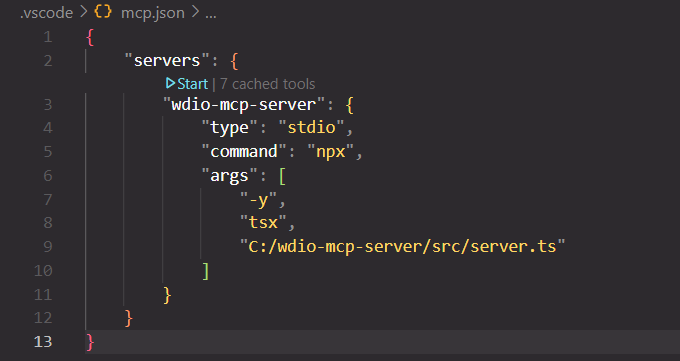
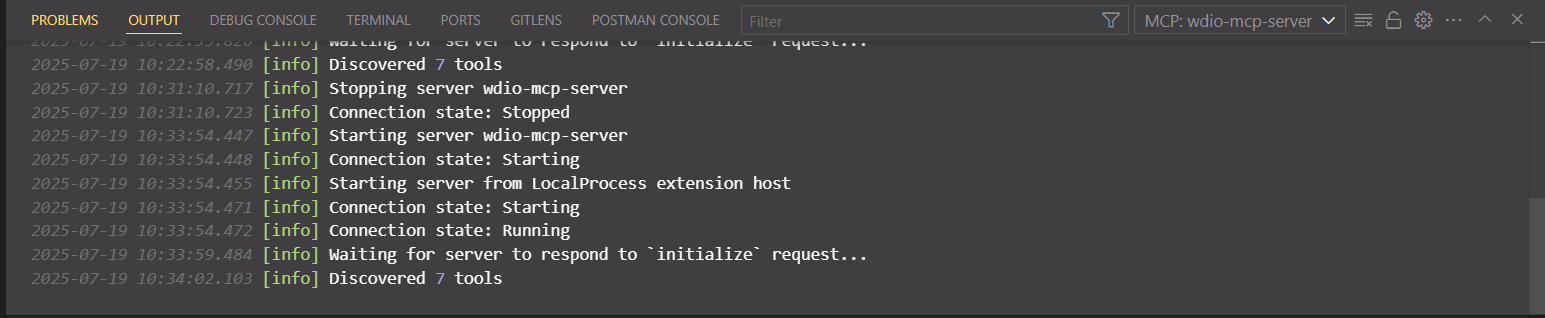
3. Validate the server is running
- Ensure the server is running and all tools are available.
4. Connect GitHub Copilot Agent with MCP Server
Launch GitHub Copilot Agent.
Go to ⚙️ Settings and enable Agent Mode.
(Optional) Disable the default LLM model if you prefer your own.
Click on Configure Tools.
Select all the tools exposed by this project:
openBrowsernavigateclickElementsetValuegetTextisDisplayedcloseBrowser
You're now ready to test!
Write your test scenarios in plain English and let the Copilot Agent automate your browser testing with WDIO.
🛠️ Available Tools
| Tool | Description |
|---|---|
openBrowser |
Launches a new browser session. |
navigate |
Navigates the browser to a specified URL. |
clickElement |
Clicks on a specified element on the web page. |
setValue |
Sets the value of an input field or form element. |
getText |
Retrieves the visible text from a specified element. |
isDisplayed |
Checks if a specified element is currently visible on the page. |
closeBrowser |
Closes the current browser session. |
🚀 Usage Examples
Example scenario (in plain English):
- Navigate to https://www.saucedemo.com/v1/index.html
- Login with
standard_user/secret_sauce - Add the first 2 products to the cart
- Click the cart icon and go to the cart page
- Verify 2 items are added and visible in the cart
The Copilot Agent will translate this scenario into a sequence of tool invocations and WDIO test code.
📝 How It Works
- You write a test scenario in plain English.
- The Copilot Agent interprets your scenario and calls the appropriate tools exposed by this MCP server.
- The server performs real browser automation using WebdriverIO.
- Optionally, the agent can generate reusable WDIO test code for your scenario.
🧩 Extending & Customizing
To add or modify tools:
- Edit the tool definitions in your MCP server code.
- Restart the server to expose new or updated tools.
- Update documentation as needed.
Установка Wdio
У этого сервера нет опубликованного пакета — он собирается из исходников. Открой репозиторий и следуй инструкции в README.
▸ github.com/siri100/wdio-mcp-serverFAQ
Wdio MCP бесплатный?
Да, Wdio MCP бесплатный — установка в пару кликов через Unyly без оплаты.
Нужен ли API-ключ для Wdio?
Нет, Wdio работает без API-ключей и переменных окружения.
Wdio — hosted или self-hosted?
Self-hosted: сервер запускается локально на твоей машине командой из раздела установки.
Как установить Wdio в Claude Desktop, Claude Code или Cursor?
Открой Wdio на unyly.org, выбери вкладку своего клиента (Claude Desktop, Claude Code, Cursor) и нажми Install — конфиг сгенерируется автоматически, без правки JSON.
Похожие MCP
GitHub
PRs, issues, code search, CI status
 автор: GitHub
Filesystem
Secure file operations with configurable access controls.
Memory
Knowledge graph-based persistent memory system.
Template MCP Server
A CLI tool to create a new Model Context Protocol server project with TypeScript support, dual transport options, and an extensible structure
 автор: mcpdotdirect
Compare Wdio with
Не уверен что выбрать?
Найди свой стек за 60 секунд
Автор?
Embed-бейдж для README
Похожее
Все в категории development