
Web Stylebook
БесплатноНе проверенProvides deterministic, read-only design knowledge for AI coding agents to help them choose visual directions, plan UI states, and compose design tokens, all wi

Описание
Provides deterministic, read-only design knowledge for AI coding agents to help them choose visual directions, plan UI states, and compose design tokens, all without network access.
README
web-stylebook-mcp
Design intelligence for AI coding agents. Stop shipping the same hero-plus-three-cards. Your agent gets scored design contracts — directions, UI-state plans, tokens — then writes the code from evidence.
npm version downloads license node MCP
English · 한국어
Coding agents default to the same generic UI because they can't decide what it should look like — so they fall back to hero + 3 cards + a gradient. web-stylebook-mcp is a Model Context Protocol server that hands the agent design contracts — scored visual directions, UI-state plans, and design tokens — drawn from the same curated catalog as webstylebook.com. It returns evidence, not code. Your agent still writes the code — now it knows what to build.
No API key. No model call. No network. No filesystem access. Deterministic, read-only, fully local.
Without it / with it
Without web-stylebook-mcp |
With web-stylebook-mcp |
|
|---|---|---|
| Direction | Guesses one look, commits to it | Scored candidates + reason codes + what it rejected and why |
| UI states | Happy path only; empty / error / loading bolted on later | Required / recommended / domain states up front, per surface |
| Tokens | Hand-picked hexes, contrast rarely checked | Role-based tokens with WCAG contrast warnings |
| Result | Generic AI UI | A defensible design contract the agent builds from |
Watch it decide
"High-density monitoring dashboard for SREs, watched all day on call. Calm, technical. Avoid cyberpunk."
// → recommend_design_direction  (input)
{
  "productDescription": "High-density monitoring dashboard for SREs, watched all day on call",
  "productType": "operational-saas",
  "tone": ["calm", "technical"],
  "density": "high",
  "usageFrequency": "daily",
  "avoid": ["cyberpunk"]
}
// ← result
{
  "confidence": "high",
  "candidates": [                      // all tied at 0.91 — ordering is NOT meaningful
    { "style": "notion-style",   "score": 0.91 },
    { "style": "platform-core",  "score": 0.91 },
    { "style": "quiet-utility",  "score": 0.91 },
    { "style": "runtime-signal", "score": 0.91 }
  ],
  "rejected": [
    { "style": "cyberpunk-glitch", "reasons": ["EXPLICITLY_AVOIDED", "DAILY_USE_OVERSTIMULATION"] },
    { "style": "aurora-gradient",  "reasons": ["PRODUCT_NOT_IDEAL", "DAILY_USE_OVERSTIMULATION"] }
  ],
  "pairing": "macos-liquid-glass + notion-style (quieter forms / nav)",
  "guidance": "Treat candidates as scored evidence; pick by product context. 4 are tied — ordering isn't meaningful; use differentiators."
}
Notice what it doesn't do: it doesn't pretend there's one winner. Four directions tie at 0.91, the rejects come with reason codes, and the guidance tells the model to make the final call. That honesty is the point — the server provides evidence, the agent decides.
Then turn the chosen direction into real tokens:
// → compose_design_tokens(style: "notion-style", format: "css-variables", theme: "light")
// 0 WCAG contrast warnings
:root {
  --color-canvas: #ffffff;
  --color-text:   #37352f;
  --color-accent: #2383e2;
  --color-border: #d3d3d1;
  /* … role-based color, type, spacing, radius, motion, density */
}
One request in — and the agent chose a direction, saw what was rejected and why, and got tokens that pass WCAG, without generating a line of code.
What an agent builds with it
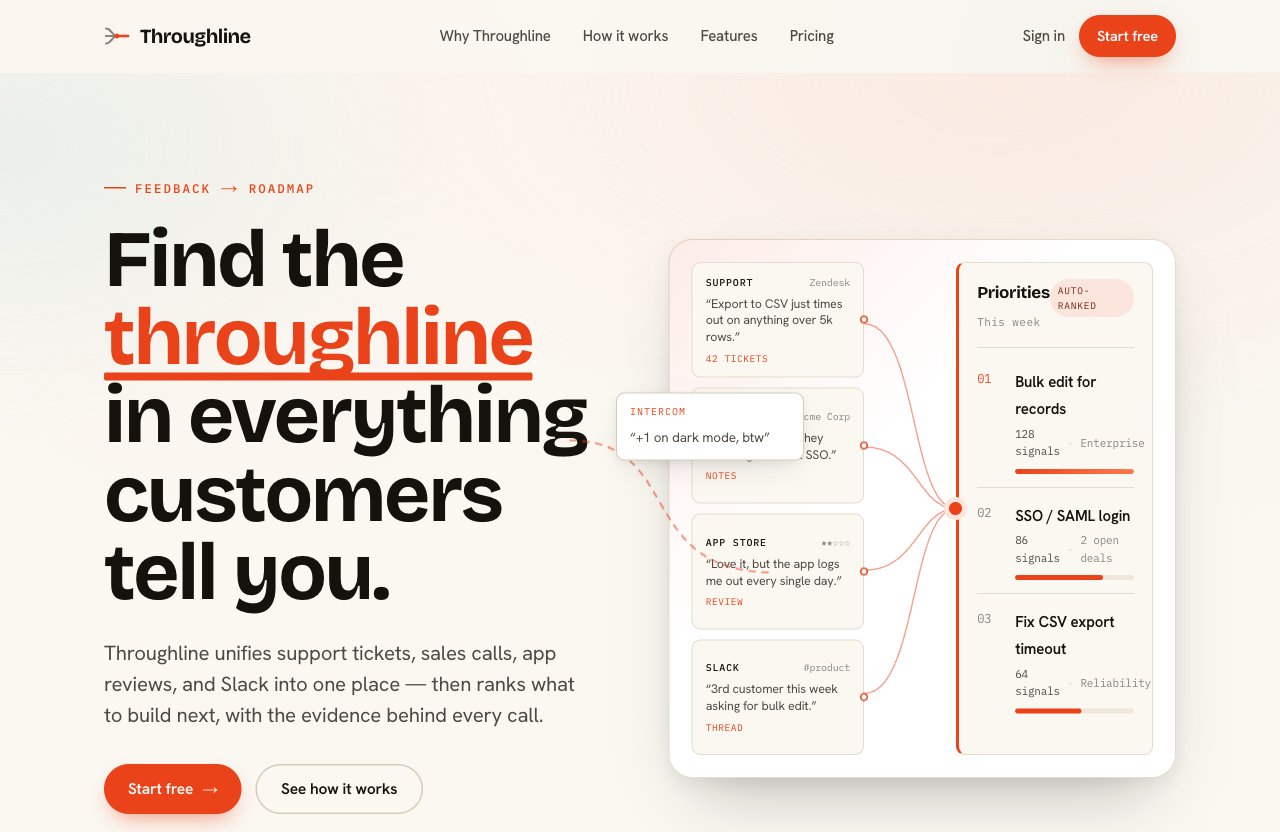
A different brief — "a marketing landing page for Throughline, a B2B SaaS that turns scattered customer feedback (support tickets, sales calls, app reviews, Slack) into one prioritized roadmap." No layout, no hero, no styling was specified. Following the companion skill, the agent composed the opening from the product's core idea instead of reaching for a stock hero: the right half is a bespoke diagram of the product's actual mechanic — feedback sources converging into an auto-ranked roadmap — not a decorative card you could paste onto any other site.
How it works
flowchart LR
    A[AI coding agent] -->|product, tone,<br/>density, usage| B(web-stylebook-mcp)
    B --> C{Bundled catalog<br/>read-only · offline}
    C --> D[recommend_design_direction]
    C --> E[compare_design_directions]
    C --> F[get_ui_state_plan]
    C --> G[compose_design_tokens]
    D & E & F & G -->|design contracts<br/>scores · reason codes · tokens| A
    A -->|writes code<br/>from evidence| H[Your UI]
The agent describes the product; the server scores its curated catalog and returns structured evidence. No code is generated and nothing leaves your machine.
Install
Requires Node ≥ 20.
Codex CLI · IDE extension
Use the Codex CLI:
codex mcp add web-stylebook -- npx -y web-stylebook-mcp@latest
Or add it to ~/.codex/config.toml. You can also use a project-scoped
.codex/config.toml in a trusted repository:
[mcp_servers.web-stylebook]
command = "npx"
args = ["-y", "web-stylebook-mcp@latest"]
Restart Codex or open a new session after editing config. In the Codex TUI, run /mcp
to confirm the server is active.
Claude Code
claude mcp add web-stylebook -- npx -y web-stylebook-mcp@latest
Cursor · Windsurf · generic MCP client
Add to your MCP config:
{
  "mcpServers": {
    "web-stylebook": {
      "command": "npx",
      "args": ["-y", "web-stylebook-mcp@latest"]
    }
  }
}
Claude Desktop
Add the same block to your claude_desktop_config.json, then restart:
- macOS:
~/Library/Application Support/Claude/claude_desktop_config.json - Windows:
%APPDATA%\Claude\claude_desktop_config.json
{
  "mcpServers": {
    "web-stylebook": {
      "command": "npx",
      "args": ["-y", "web-stylebook-mcp@latest"]
    }
  }
}
Tools
| Tool | What you get | The honest part |
|---|---|---|
recommend_design_direction |
Scored style candidates with reason codes, rejected styles with why, secondary pairings, confidence | The model makes the final pick — this is the evidence provider |
compare_design_directions |
2–4 directions compared across product-fit, repeated-use, density, trust, distinctiveness, accessibility-risk, motion, maintenance | No single winner is declared |
get_ui_state_plan |
Required / recommended / domain UI states for a surface (data-table, form, checkout, chat, developer-console) — triggers, must-show, must-not, a11y, motion | Covers the states agents forget: empty, error, loading, edge |
compose_design_tokens |
Role-based tokens (color, type, spacing, radius, motion, density) as json / css-variables / tailwind / typescript, light / dark / both |
Emits WCAG contrast warnings instead of hiding them |
Catalog: 48 styles · 20 components · 5 surfaces · 57 UI-state recipes · 29 motion profiles · 14 product archetypes.
Localized output
Every tool takes an optional locale. Reason codes, guidance, and labels come back in the requested language:
"en" | "ko" | "ja" // English · 한국어 · 日本語
Resources
Browse the catalog directly over MCP resources:
webstylebook://manifest
webstylebook://styles · /styles/{id}
webstylebook://motion · /motion/{id}
webstylebook://components · /components/{id}
webstylebook://states/surfaces · /states/{surface} · /states/{surface}/{state}
webstylebook://products · /products/{id}
webstylebook://policies/anti-patterns · /policies/verification
Prompts
Ready-made MCP prompts for common workflows:
design-product · design-screen · complete-ui-states · redesign-with-style · audit-design-direction
CLI
web-stylebook-mcp                 # run the server over stdio (default)
web-stylebook-mcp --version
web-stylebook-mcp --catalog-info
web-stylebook-mcp --validate-catalog
Companion skill
A companion skill ships in skill/ so your agent reaches for these tools at the right moment — and uses the results well (compose, don't recolor; offer multiple candidates; earn trust, don't fake it; land on reusable components):
Codex
- Copy or symlink
skill/web-stylebook-design/into a Codex skill location such as.agents/skills/web-stylebook-design/in your repo, or~/.agents/skills/web-stylebook-design/for your user profile. - If you do not want to install the skill, copy
skill/AGENTS.mdinto your project'sAGENTS.md.
Claude Code and other agents
- Point your agent's skills directory at
skill/web-stylebook-design/, or - Copy
skill/CLAUDE.mdinto your project'sCLAUDE.mdor equivalent rules file.
Privacy & security
| Property | |
|---|---|
| API key | None |
| Model calls | None |
| Network access | None — works fully offline |
| Project / filesystem access | None |
| Behavior | Deterministic, read-only |
The server reads from a catalog snapshot bundled in the package. Nothing is sent anywhere; the same inputs always yield the same contracts.
Compatibility
- Node: ≥ 20
- Transport: stdio (Model Context Protocol)
- Clients: Codex CLI / IDE extension, Claude Code, Claude Desktop, Cursor, Windsurf, and any MCP-compatible client
License
MIT — covers the code and the bundled catalog snapshot (free for commercial use).
The webstylebook.com website is licensed CC BY-NC. The same owner grants an MIT license for the catalog snapshot bundled in this package.
Установить Web Stylebook в Claude Desktop, Claude Code, Cursor
unyly install web-stylebook-mcpСтавит в Claude Desktop, Claude Code, Cursor и VS Code — сам разбирается с npx, uvx и сборкой из исходников.
Впервые? Поставь CLI: curl -fsSL https://unyly.org/install | sh
Или настроить вручную
Выполни в терминале:
claude mcp add web-stylebook-mcp -- npx -y web-stylebook-mcpFAQ
Web Stylebook MCP бесплатный?
Да, Web Stylebook MCP бесплатный — установка в пару кликов через Unyly без оплаты.
Нужен ли API-ключ для Web Stylebook?
Нет, Web Stylebook работает без API-ключей и переменных окружения.
Web Stylebook — hosted или self-hosted?
Self-hosted: сервер запускается локально на твоей машине командой из раздела установки.
Как установить Web Stylebook в Claude Desktop, Claude Code или Cursor?
Открой Web Stylebook на unyly.org, выбери вкладку своего клиента (Claude Desktop, Claude Code, Cursor) и нажми Install — конфиг сгенерируется автоматически, без правки JSON.
Похожие MCP
LibreOffice Tools
Enables AI agents to read, write, and edit Office documents via LibreOffice with token-efficient design. Supports multiple formats including DOCX, XLSX, PPTX, a
 автор: passerbyflutter
dannote/figma-use
Full Figma control: create shapes, text, components, set styles, auto-layout, variables, export. 80+ tools.
 автор: dannote
Logo.dev
Search and retrieve company logos by brand or domain. Customize size, format, and theme to match your design needs. Accelerate design, prototyping, and content
 автор: NOVA-3951
PIX4Dmatic
Enables GUI automation for controlling PIX4Dmatic on Windows through MCP. Supports launching, focusing, capturing screenshots, sending hotkeys, clicking UI elem
 автор: jangjo123
Compare Web Stylebook with
Не уверен что выбрать?
Найди свой стек за 60 секунд
Автор?
Embed-бейдж для README
Похожее
Все в категории design