
Webdev
БесплатноНе проверенProvides web development tools including taking screenshots and listing screens via MCP.

Описание
Provides web development tools including taking screenshots and listing screens via MCP.
README
An MCP server that provides useful web development tools.
Usage
Cursor
- To install in a project, add the MCP server to your
.cursor/mcp.json:
{
	"mcpServers": {
		"webdev": {
			"command": "npx",
			"args": ["webdev-mcp"],

		}
	}
}
- To install globally, add this command to your Cursor settings:
npx webdev-mcp
Windsurf
- Add the MCP server to your
~/.codeium/windsurf/mcp_config.jsonfile:
{
	"mcpServers": {
		"webdev": {
			"command": "npx",
			"args": ["webdev-mcp"]
		}
	}
}
Tools
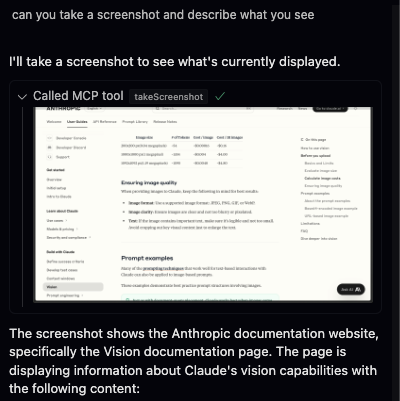
Currently, the only 2 tools are takeScreenshot and listScreens. Your agent can use the list screens tool to get the screen id of the screen it wants to screenshot.
The tool will return the screenshot as a base64 encoded string.
Tips
Make sure YOLO mode is on and MCP tools protection is off in your Cursor settings for the best experience. You might have to allow Cursor to record your screen on MacOS.
Установить Webdev в Claude Desktop, Claude Code, Cursor
unyly install webdev-mcpСтавит в Claude Desktop, Claude Code, Cursor и VS Code — сам разбирается с npx, uvx и сборкой из исходников.
Впервые? Поставь CLI: curl -fsSL https://unyly.org/install | sh
Или настроить вручную
Выполни в терминале:
claude mcp add webdev-mcp -- npx -y webdev-mcpFAQ
Webdev MCP бесплатный?
Да, Webdev MCP бесплатный — установка в пару кликов через Unyly без оплаты.
Нужен ли API-ключ для Webdev?
Нет, Webdev работает без API-ключей и переменных окружения.
Webdev — hosted или self-hosted?
Self-hosted: сервер запускается локально на твоей машине командой из раздела установки.
Как установить Webdev в Claude Desktop, Claude Code или Cursor?
Открой Webdev на unyly.org, выбери вкладку своего клиента (Claude Desktop, Claude Code, Cursor) и нажми Install — конфиг сгенерируется автоматически, без правки JSON.
Похожие MCP
GitHub
PRs, issues, code search, CI status
 автор: GitHub
Filesystem
Secure file operations with configurable access controls.
Memory
Knowledge graph-based persistent memory system.
Template MCP Server
A CLI tool to create a new Model Context Protocol server project with TypeScript support, dual transport options, and an extensible structure
 автор: mcpdotdirect
Compare Webdev with
Не уверен что выбрать?
Найди свой стек за 60 секунд
Автор?
Embed-бейдж для README
Похожее
Все в категории development