
Webfetch Camouflage
БесплатноНе проверенMCP server for fetching web content with browser fingerprint camouflage, converting HTML to clean Markdown to bypass bot detection.

Описание
MCP server for fetching web content with browser fingerprint camouflage, converting HTML to clean Markdown to bypass bot detection.
README
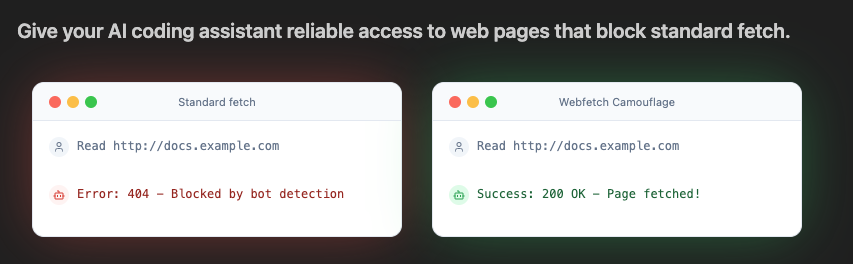
Webfetch Camouflage is an MCP server for fetching web content with browser camouflage using curl_cffi. It mimics real browser TLS/HTTP2 fingerprints to bypass bot detection, returning clean Markdown output converted from HTML.
Installation
Cursor
Add to .cursor/mcp.json:
{
  "mcpServers": {
    "webfetch-camouflage": {
      "command": "uvx",
      "args": ["git+https://github.com/tianhuil/webfetch-camouflage-mcp.git"]
    }
  }
}
Claude Code
claude mcp add-json webfetch-camouflage '{"command":"uvx","args":["git+https://github.com/tianhuil/webfetch-camouflage-mcp.git"]}'
VSCode
code --add-mcp '{"name":"webfetch-camouflage","command":"uvx","args":["git+https://github.com/tianhuil/webfetch-camouflage-mcp.git"]}'
Gemini CLI
gemini mcp add webfetch-camouflage uvx -- git+https://github.com/tianhuil/webfetch-camouflage-mcp.git
Codex CLI
codex mcp add webfetch-camouflage -- uvx git+https://github.com/tianhuil/webfetch-camouflage-mcp.git
Opencode
Add to opencode.json:
macOS/Linux: ~/.local/share/opencode/opencode.json
Windows: %LOCALAPPDATA%\opencode\opencode.json
{
  "$schema": "https://opencode.ai/config.json",
  "mcp": {
    "webfetch-camouflage": {
      "type": "local",
      "command": ["uvx", "git+https://github.com/tianhuil/webfetch-camouflage-mcp.git"],
      "enabled": true
    }
  }
}
Tool reference
The fetch_url tool accepts:
url(required): URL to fetchimpersonate(optional, default"chrome"): browser profile to impersonatetimeout(optional, default10): request timeout in secondsmax_chars(optional): maximum characters to return; truncates with...if set
Supported impersonation profiles:
- Chrome:
chrome99,chrome100,chrome101,chrome104,chrome107,chrome110,chrome116,chrome119,chrome120,chrome123,chrome124,chrome131,chrome133a,chrome136 - Firefox:
firefox133,firefox135 - Safari:
safari153,safari155,safari170,safari180,safari184,safari260 - Edge:
edge99,edge101,edge133,edge135
Notes on Development
Setup
git clone https://github.com/tianhuil/webfetch-camouflage-mcp.git
cd webfetch-camouflage-mcp
uv sync
Running the server
uv run webfetch-camouflage-mcp
Available tasks
poe test       # Run tests
poe lint       # Lint code
poe format     # Format code
poe typecheck  # Type check
uv run pip-audit  # Security audit
MCP server testing
Test the server directly via JSON-RPC:
echo '{"jsonrpc": "2.0", "id": 1, "method": "initialize", "params": {"protocolVersion": "2024-11-05", "capabilities": {}, "clientInfo": {"name": "test", "version": "1.0"}}}' | uv run webfetch-camouflage-mcp

echo '{"jsonrpc": "2.0", "id": 1, "method": "initialize", "params": {"protocolVersion": "2024-11-05", "capabilities": {}, "clientInfo": {"name": "test", "version": "1.0"}}}' | uvx git+https://github.com/tianhuil/webfetch-camouflage-mcp.git
Or use the helper script:
uv run python src/get_tool_details.py
Установка Webfetch Camouflage
У этого сервера нет опубликованного пакета — он собирается из исходников. Открой репозиторий и следуй инструкции в README.
▸ github.com/tianhuil/webfetch-camouflage-mcpFAQ
Webfetch Camouflage MCP бесплатный?
Да, Webfetch Camouflage MCP бесплатный — установка в пару кликов через Unyly без оплаты.
Нужен ли API-ключ для Webfetch Camouflage?
Нет, Webfetch Camouflage работает без API-ключей и переменных окружения.
Webfetch Camouflage — hosted или self-hosted?
Доступен hosted-вариант: Unyly запускает сервер в облаке, локальная установка не обязательна.
Как установить Webfetch Camouflage в Claude Desktop, Claude Code или Cursor?
Открой Webfetch Camouflage на unyly.org, выбери вкладку своего клиента (Claude Desktop, Claude Code, Cursor) и нажми Install — конфиг сгенерируется автоматически, без правки JSON.
Похожие MCP
Playwright
Browser automation, scraping, screenshots
 автор: Microsoft
Puppeteer
Browser automation and web scraping.
 автор: modelcontextprotocol
opentabs-dev/opentabs
Plugin-based MCP server + Chrome extension that gives AI agents access to web applications through the user's authenticated browser session. 100+ plugins with a
 автор: opentabs-dev
robhunter/agentdeals
1,500+ developer infrastructure deals, free tiers, and startup programs across 54 categories. Search deals, compare vendors, plan stacks, and track pricing chan
 автор: robhunter
Compare Webfetch Camouflage with
Не уверен что выбрать?
Найди свой стек за 60 секунд
Автор?
Embed-бейдж для README
Похожее
Все в категории browse