
Webmcpinspector
БесплатноНе проверенWebMCP Inspector discovers both declarative (HTML form-based) and imperative (JavaScript API) tools exposed via the WebMCP specification. It lets you view schem

Описание
WebMCP Inspector discovers both declarative (HTML form-based) and imperative (JavaScript API) tools exposed via the WebMCP specification. It lets you view schemas, edit attributes, execute tools, and test with Chrome's on-device Gemini Nano model, all through a live sandboxed browser session powered by Webfuse.
README
Inspect, debug, and augment WebMCP tools on any webpage — in real time.
WebMCP Inspector discovers both declarative (HTML form-based) and imperative (JavaScript API) tools exposed via the WebMCP specification. It lets you view schemas, edit attributes, execute tools, and test with Chrome's on-device Gemini Nano model, all through a live sandboxed browser session powered by Webfuse.
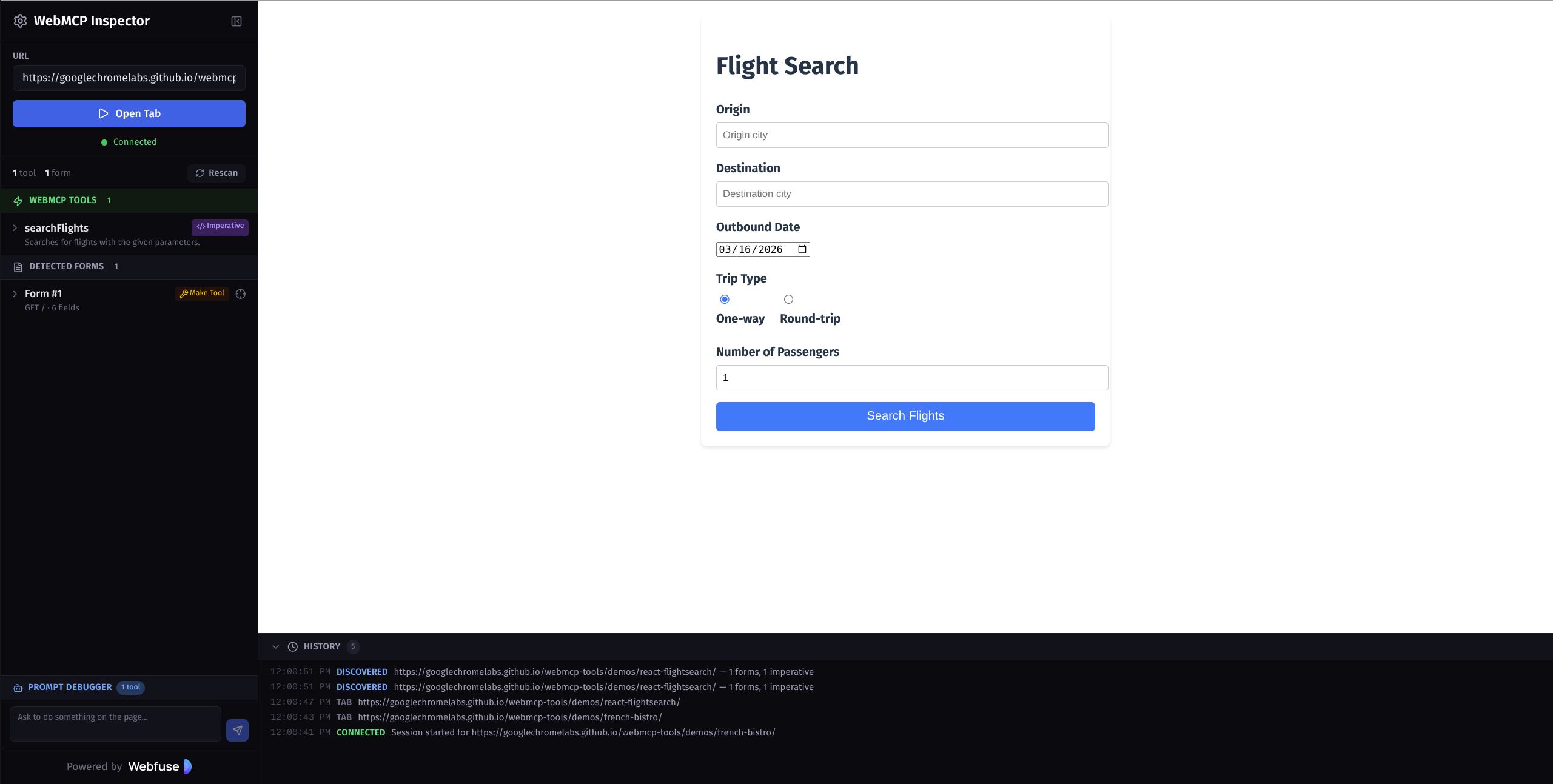
Live Demo
Features
Tool Discovery
- Declarative tools — Scans pages for HTML forms annotated with WebMCP attributes (
toolname,tooldescription,toolparamtitle,toolparamdescription,toolautosubmit) - Imperative tools — Detects tools registered via
navigator.modelContext.registerTool()with full input schema support (requires Chrome 146+) - Form augmentation — Turn any plain HTML form into a WebMCP tool by adding metadata through the UI. Overrides are saved per-URL in localStorage and restored automatically on revisit
Inspection & Debugging
- Schema viewer — View the generated JSON schema for any discovered tool
- Form highlighter — Locate and highlight forms directly on the target page
- Tool execution — Call any tool directly from the sidebar with typed parameter inputs and view results in real time
- Prompt Debugger — Chat interface powered by Chrome's built-in Gemini Nano model (via the Prompt API). The on-device agent autonomously discovers and calls tools based on natural language prompts
- Activity log — Real-time history of tool discovery, augmentation, execution, and navigation events
Environment
- Live preview — Target pages are rendered in a sandboxed Webfuse session alongside the inspector. No browser extension install required.
- Webfuse Extension — Included Manifest V3 content script for direct page introspection (used internally by Webfuse sessions)
- URL history — Recently visited URLs are saved and shown as autocomplete suggestions
Getting Started
Prerequisites
- Node.js 22+
- npm
Setup
git clone https://github.com/nichochar/webmcpinspector.git
cd webmcpinspector
npm install
Create a .env file from the example (required for dev mode):
cp .env.example .env
Fill in your Webfuse widget key and space ID for the development environment:
VITE_WIDGET_KEY_DEV=your_dev_widget_key
VITE_SPACE_ID_DEV=your_dev_space_id
Development
npm run dev
Opens at http://localhost:5173/inspect/.
Build
npm run build
Output goes to dist/.
Lint
npm run lint
Docker
docker build -t webmcp-inspector .
docker run -p 8080:80 webmcp-inspector
The app is served at http://localhost:8080/inspect/ with the landing page at /.
Project Structure
src/
  App.tsx              # Main app — session management, state, messaging
  components/
    Sidebar.tsx        # Tool/form listing, attribute editing, save/reset
    MainContent.tsx    # Iframe container (Webfuse session) + activity log
    PromptPanel.tsx    # Gemini Nano chat UI for tool execution via Prompt API
  types.ts             # Shared TypeScript interfaces
  analytics.ts         # Plausible analytics wrapper

public/
  extension/
    manifest.json      # Webfuse Extension manifest (Manifest V3)
    content.js         # Content script — form scanning, attribute patching,
                       #   imperative tool interception, message bridge
  landing.html         # Static landing page
How It Works
- Connect — Enter a URL. Webfuse opens a sandboxed browser session rendering the target page
- Scan — The content script scans the page for WebMCP-annotated forms and imperative tools registered via
navigator.modelContext - Inspect — Discovered tools appear in the sidebar with their attributes, parameters, and generated schemas
- Augment — Edit WebMCP attributes on any form or add them to plain forms. Changes are applied live via message passing and persisted in localStorage
- Execute — Call imperative tools directly with parameter inputs, or use the Prompt Debugger to have Gemini Nano orchestrate tool calls from natural language
- Debug — The activity log tracks all events. Schema viewer shows the exact JSON schema that would be exposed to an AI agent
Chrome Flags
Some features require experimental Chrome flags:
| Feature | Flag | Chrome Version |
|---|---|---|
| Imperative tools (JS API) | chrome://flags/#enable-webmcp-testing |
146+ |
| Prompt Debugger (Gemini Nano) | chrome://flags/#prompt-api-for-gemini-nano |
138+ |
Related Links
License
MIT
Установка Webmcpinspector
У этого сервера нет опубликованного пакета — он собирается из исходников. Открой репозиторий и следуй инструкции в README.
▸ github.com/aogz/webmcpinspectorFAQ
Webmcpinspector MCP бесплатный?
Да, Webmcpinspector MCP бесплатный — установка в пару кликов через Unyly без оплаты.
Нужен ли API-ключ для Webmcpinspector?
Нет, Webmcpinspector работает без API-ключей и переменных окружения.
Webmcpinspector — hosted или self-hosted?
Self-hosted: сервер запускается локально на твоей машине командой из раздела установки.
Как установить Webmcpinspector в Claude Desktop, Claude Code или Cursor?
Открой Webmcpinspector на unyly.org, выбери вкладку своего клиента (Claude Desktop, Claude Code, Cursor) и нажми Install — конфиг сгенерируется автоматически, без правки JSON.
Похожие MCP
Playwright
Browser automation, scraping, screenshots
 автор: Microsoft
Puppeteer
Browser automation and web scraping.
 автор: modelcontextprotocol
opentabs-dev/opentabs
Plugin-based MCP server + Chrome extension that gives AI agents access to web applications through the user's authenticated browser session. 100+ plugins with a
 автор: opentabs-dev
robhunter/agentdeals
1,500+ developer infrastructure deals, free tiers, and startup programs across 54 categories. Search deals, compare vendors, plan stacks, and track pricing chan
 автор: robhunter
Compare Webmcpinspector with
Не уверен что выбрать?
Найди свой стек за 60 секунд
Автор?
Embed-бейдж для README
Похожее
Все в категории browse