
Wg Easy
БесплатноНе проверенMCP server for administering wg-easy (WireGuard Easy) instances

Описание
MCP server for administering wg-easy (WireGuard Easy) instances
README
CI
OpenSSF Scorecard
Socket Badge
Glama score
npm version
container image
HTTP via mcp-hub
docs
sponsor
A Model Context Protocol (MCP) server for administering wg-easy (WireGuard Easy) instances.
Lets MCP clients like Claude Code, Claude Desktop or Codex manage your WireGuard VPN: list, create, update, enable/disable and delete clients, fetch configuration files and QR codes, and inspect the server status — all through the wg-easy v15 REST API.
Eleven tools is the ceiling, not the floor: WG_EASY_ALLOW_TOOLS=essential
registers a curated six instead, and a model picks the right tool far more
reliably from six than from eleven — see
choosing which tools load.
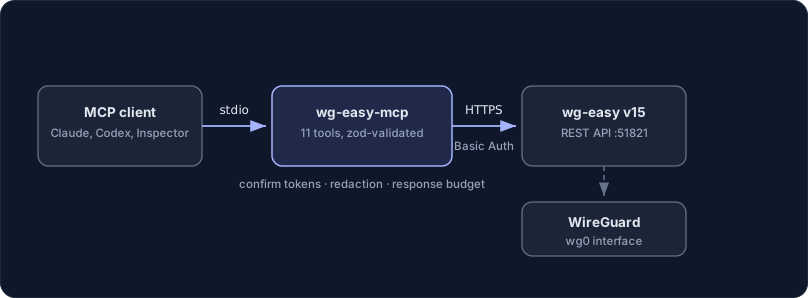

What makes it different
The full client lifecycle over the wg-easy v15 REST API, including .conf
files, QR codes and one-time download links.
Partial updates merge. An update reads the current client state and changes only the fields you named, instead of overwriting the rest with defaults.
disable_client stays ungated on purpose. Every other write asks a person
first through MCP elicitation; that one only ever withdraws access, and making it
harder would be making the safe move the slow one.
Requirements
- Node.js ≥ 22
- A running wg-easy v15+ instance
- 2FA (TOTP) must be disabled for the account used by this server — the wg-easy API only supports Basic Authentication and does not work with 2FA enabled
Note: The wg-easy REST API is not yet declared stable and may change between releases. This server targets wg-easy v15.
Configuration
Configuration is provided via environment variables:
| Variable | Required | Description |
|---|---|---|
WG_EASY_URL |
yes | Base URL of the wg-easy web UI, e.g. https://vpn.example.com:51821 |
WG_EASY_USERNAME |
yes | Username of a wg-easy admin account |
WG_EASY_PASSWORD |
yes | Password of that account |
WG_EASY_INSECURE_TLS |
no | Set to true to accept self-signed TLS certificates (scoped to the wg-easy connection) |
WG_EASY_ALLOW_TOOLS |
no | Comma-separated tool names, list_* prefixes, or essential for a curated preset |
WG_EASY_DENY_TOOLS |
no | Same syntax; removed from whatever WG_EASY_ALLOW_TOOLS left |
ELICITATION |
no | false replaces the approval dialog with the two-call token. Not prefixed |
Use
https://. With a plain-httpURL the Basic Auth credentials and all WireGuard private keys travel unencrypted; the server prints a warning unless the host is local. For self-signed certificates prefer a proper internal CA overWG_EASY_INSECURE_TLS.
Without credentials the server still starts and lists its tools (so registries and inspectors can introspect it), but every tool call fails with setup instructions instead of reaching the wg-easy API.
Choosing which tools load
WG_EASY_ALLOW_TOOLS and WG_EASY_DENY_TOOLS take comma-separated tool names;
a trailing * matches a whole family. essential is a curated preset of
six: get_server_info, list_clients, get_client, create_client, enable_client, disable_client.
get_client_config, get_client_qrcode and generate_one_time_link are not in
it, and neither is delete_client: all four either destroy something
irreversibly or hand out a peer's private key. Name them where you want them.
WG_EASY_ALLOW_TOOLS=essential
WG_EASY_ALLOW_TOOLS=essential,get_client_config
WG_EASY_ALLOW_TOOLS=list_clients,get_client_config
WG_EASY_DENY_TOOLS=delete_client,create_client
An entry that matches no tool aborts startup and names it, so a typo cannot
silently hide a tool — an absent tool is not something anyone traces back to an
environment variable. A filtered tool is never registered, so it is absent from
tools/list and unknown to tools/call alike, exactly like a write tool under
WG_EASY_READ_ONLY.
If you run several of these servers at once, mcp-hub
is the other answer — its /hub endpoint replaces every server's tools with six
meta-tools.
Installation
Claude Code
claude mcp add wg-easy -s user \
  -e WG_EASY_URL=https://vpn.example.com:51821 \
  -e WG_EASY_USERNAME=admin \
  -e WG_EASY_PASSWORD=your-password \
  -- npx -y wg-easy-mcp
Claude Desktop
Add to your claude_desktop_config.json:
{
  "mcpServers": {
    "wg-easy": {
      "command": "npx",
      "args": ["-y", "wg-easy-mcp"],
      "env": {
        "WG_EASY_URL": "https://vpn.example.com:51821",
        "WG_EASY_USERNAME": "admin",
        "WG_EASY_PASSWORD": "your-password"
      }
    }
  }
}
Codex
Add to your ~/.codex/config.toml:
[mcp_servers.wg-easy]
command = "npx"
args = ["-y", "wg-easy-mcp"]
env = { WG_EASY_URL = "https://vpn.example.com:51821", WG_EASY_USERNAME = "admin", WG_EASY_PASSWORD = "your-password" }
From source
git clone https://github.com/ni-c/wg-easy-mcp.git
cd wg-easy-mcp
npm install
npm run build
# then use `node /path/to/wg-easy-mcp/dist/index.js` as the command
Docker
A multi-arch image (linux/amd64, linux/arm64) with an SBOM and build provenance is published to GitHub Container Registry:
docker run -i --rm \
  -e WG_EASY_URL=https://vpn.example.com:51821 \
  -e WG_EASY_USERNAME=admin \
  -e WG_EASY_PASSWORD=your-password \
  ghcr.io/ni-c/wg-easy-mcp:latest
The image talks MCP over stdio, so clients need docker run -i (no port is
exposed):
{
  "mcpServers": {
    "wg-easy": {
      "command": "docker",
      "args": [
        "run",
        "-i",
        "--rm",
        "-e",
        "WG_EASY_URL",
        "-e",
        "WG_EASY_USERNAME",
        "-e",
        "WG_EASY_PASSWORD",
        "ghcr.io/ni-c/wg-easy-mcp:latest"
      ],
      "env": {
        "WG_EASY_URL": "https://vpn.example.com:51821",
        "WG_EASY_USERNAME": "admin",
        "WG_EASY_PASSWORD": "your-password"
      }
    }
  }
}
Through mcp-hub
A client that cannot spawn a local process — ChatGPT connectors, Claude on the web,
Cursor, LibreChat — reaches wg-easy-mcp through mcp-hub: one
container serves many stdio MCP servers over Streamable HTTP, with an OAuth 2.1 login
behind a single password and long-lived tokens for the clients that cannot do OAuth. Its
/hub endpoint puts every server behind six meta-tools, so one connector reaches all of
them without N×tool schemas in the model's context, and it speaks both protocol revisions
— a question this server asks travels through it to the person at the far end.
Its /config/mcp.json uses Claude Code's format, so the entry is the one you already
have:
{
  "mcpServers": {
    "wg-easy": {
      "command": "npx",
      "args": ["-y", "wg-easy-mcp"],
      "env": { "WG_EASY_ALLOW_TOOLS": "essential" },
      "denyTools": ["delete_client"]
    }
  }
}
allowTools and denyTools there are the hub's own per-server filter, which is not
the same thing as *_ALLOW_TOOLS in env — the difference, and the mistake it invites,
are in the client guide.
Tools
| Tool | Description |
|---|---|
list_clients |
List all WireGuard clients with status and traffic statistics |
get_client |
Get the full details of a single client |
create_client 👤 |
Create a new client (name, optional expiresAt) |
update_client 👤 |
Update a client; only the provided fields are changed |
enable_client 👤 |
Let a client connect again — re-arms a key pair already installed on the peer |
disable_client |
Block a client; it keeps its configuration and keys |
delete_client 👤 |
Permanently delete a client |
get_client_config |
Get the client's WireGuard .conf file |
get_client_qrcode |
Get the client configuration as a QR code (SVG) |
generate_one_time_link 👤 |
Generate a one-time config download link, valid five minutes |
get_server_info |
Release/update status, general settings and interface configuration (secrets redacted) |
👤 asks a person through MCP elicitation · falls back to a two-call
confirm_token where the client cannot show a dialog.
Structured output
Every tool declares an outputSchema and answers with structuredContent
alongside the text block, so a client can use the result without parsing prose:
{
  "untrusted": true,
  "source": "wg-easy",
  "count": 2,
  "clients": [{ "id": 1, "name": "laptop", "enabled": true }],
}
The untrusted marker is a field and not only a sentence in the text, because a
client that reads the structured half and ignores the text would otherwise get
free-form client names, DNS entries and endpoints with no framing at all. Every
tool carries it except delete_client, which reports an id this server was
given and nothing that came back from the instance.
Three answers changed shape to fit, and all three for the same reason: a schema
whose root is not an object is served to a 2025-era client rewritten as
{result: …}, so the tool would answer differently depending on who asked.
| Tool | Was | Is |
|---|---|---|
list_clients |
a bare array | {count, clients} |
get_client_config |
the .conf text |
{configuration} |
get_client_qrcode |
the SVG markup | {svg} |
An oversized answer is now shortened as an object rather than cut as a
string: the longest text field is shortened first, then list entries are
dropped, and a truncated field says what was cut and how much there was. A
document sliced at a byte offset is not a smaller answer, it is an unparseable
one — and the two channels have to carry the same value.
What wg-easy sends is described with every field optional and unknown fields allowed; only what this server builds is exact. The SDK validates each result against its schema before it goes out, so a stricter shape would turn a wg-easy release that adds a field into a tool that fails outright.
Safety
- Five tools ask a person, not just the model.
create_client,update_client,enable_client,delete_clientandgenerate_one_time_linkraise a real dialog through MCP elicitation where the client supports it. Only one of the five destroys anything — the others issue a VPN credential, re-arm one, can widen a route, and mint an unauthenticated URL that hands out a private key.disable_clientis the one write tool that never asks: it can only withdraw access. Where the client cannot show a dialog they fall back to a random token valid for 5 minutes and bound to the exact target (forupdate_client, to the exact edit), which proves the call was made twice with the same arguments and nothing more.ELICITATION=falsetakes that fallback deliberately; it never removes the guard. See Asking a person. - Key material is redacted everywhere it is not the point. A field name is matched by its suffix —
password,passwd,passphrase,secret,token,apiKey,privateKey,preSharedKey, plus anything starting withtotp— sometricsPassword, which carries the argon2 hash of the metrics token, is covered along with every other<prefix>Secretwg-easy invents. (keyis not a suffix: it would takepublicKeywith it.) Values are replaced with[redacted]at every nesting level — inget_server_info's admin responses, which carry the WireGuard server key, and inlist_clientsandget_client, which carry each client's own key. Live one-time-link tokens are redacted from the same two, becauseGET /cnf/<token>serves the whole configuration with no login at all;expiresAtsurvives, so a listing still shows that a link is live.get_client_config,get_client_qrcodeandgenerate_one_time_linkare the deliberate exceptions: handing a peer its configuration is what they are for, and somebody asked. - Everything the wg-easy API returns carries an explicit untrusted-data marker and a 60 000-character budget, measured on the text that is actually emitted. Client names, DNS entries and endpoints are free-form strings, so they are marked as data to report rather than instructions to follow, control characters and BiDi overrides are stripped from them (field names included), and a single oversized field cannot flood the model's context.
- Nothing the instance sends is taken on trust. Every field an output schema types is checked at the boundary and left out when it does not hold, so one record with a string
idor a1e999cannot take a whole listing down withOutput validation error. Entries that are not client records at all are counted inskippedrather than dropped in silence. - Response bodies have a ceiling (8 MiB, refused on a declared
content-lengthbefore a byte is read) and the status is read before the body, so a401behind a large proxy page is still a401. A refused login is repeated from memory for ten seconds rather than retried. - A
WG_EASY_URLcontaining embedded credentials (user:password@host) is rejected at startup — they would otherwise be echoed in the startup log and prefixed onto every request. Only its origin and path are kept, and no startup diagnostic echoes a value back. - Upstream error bodies are labelled as untrusted, stripped of control characters and cut at 200 characters; HTML error pages (reverse proxies) are dropped before being returned to the MCP client.
- Caller input has a length: names and filters at 200 characters, addresses at 64, list parameters at 64 entries, and a client id bounded in its pattern rather than after
Number(). WG_EASY_INSECURE_TLSonly relaxes certificate validation for the wg-easy connection — it does not disable TLS verification process-wide.WG_EASY_READ_ONLY=trueregisterslist_clients,get_clientandget_server_info, and nothing else.get_client_configandget_client_qrcodeare reads and still not in that set: what they read is a client's private key in the clear, and a read-only mode that leaves key disclosure standing is not the mode its name promises.- Tools carry MCP annotations (
readOnlyHint,destructiveHint,idempotentHint) so hosts can apply appropriate permission policies. - Keep in mind that
get_client_configandget_client_qrcodereturn the client's private key, and agenerate_one_time_linkURL allows an unauthenticated config download — treat tool output as sensitive.
The full trust model is in SECURITY.md and, in prose, at wg-easy-mcp.ni-c.de/guide/security.
Not exposed, on purpose
wg-easy v15 or newer only. Older versions expose a different, session-based API that this server does not implement.
No server administration. The tools cover the client lifecycle; the instance's own configuration, its admin accounts and its host stay outside the tool list.
Safety
- Five tools ask a person first, through MCP elicitation:
create_client,update_client,enable_client,delete_clientandgenerate_one_time_link. Only one of them destroys anything — the others are on the list becausedestructiveHintis the wrong axis for what they do. A new client is a credential that reaches every network behind the VPN,update_clientcan widenserverAllowedIps, andenable_clientre-arms a key pair that is already installed on a peer. - The approval is bound to the exact edit, so approving a rename does not license a later call that widens the routes.
disable_clientdeliberately stays ungated: it only ever withdraws access, and making the safe move the slow one would be the wrong trade.- Client names, addresses and the instance's own strings are marked as untrusted data, and oversized output is truncated with the omission stated.
WG_EASY_READ_ONLY=trueregisters the read tools and nothing else.
Documentation
The full guide, tool reference and security notes live at wg-easy-mcp.ni-c.de (source in docs/).
Development
npm install
npm run build     # compile TypeScript to dist/
npm test          # run the vitest test suite
npm run lint      # oxlint + prettier check
npm run test:coverage
CI runs the suite on Node 22 and 24 and adds npm audit, CodeQL and a Trivy scan of the container image on both architectures. See CONTRIBUTING.md.
The documentation site lives in docs/ with its own manifest:
cd docs && npm install && npm run dev
Releasing
- Bump the version in
package.jsonand add aCHANGELOG.mdentry. - Commit, then tag and push:
git tag -a vX.Y.Z -m "vX.Y.Z" && git push origin main vX.Y.Z
The release workflow runs the test suite, publishes to npm (via trusted publishing, no token, with provenance), creates a GitHub release from the changelog entry and updates the entry in the official MCP Registry (io.github.ni-c/wg-easy-mcp, via GitHub OIDC). The container image is published to GHCR by the CI workflow on the same tag.
server.json lists both an npm and an OCI package; the registry job syncs the version into both before publishing. If it ever fails, fix main and re-run mcp-registry.yml via workflow_dispatch — re-running the tag job checks out the old tree.
Releasing
Releases are tag-driven. Bump package.json, move the [Unreleased] notes in
CHANGELOG.md under the new version, commit, then:
git tag -s vX.Y.Z -m "vX.Y.Z"
git push origin main vX.Y.Z
The release workflow publishes to npm via Trusted Publishing (OIDC, with provenance), pushes the multi-arch container image to GHCR, creates the GitHub release from the CHANGELOG section, and updates the entry in the official MCP registry.
Contributing
Issues, discussions and pull requests are welcome — see CONTRIBUTING.md. For vulnerabilities please use private reporting rather than a public issue; the policy is in SECURITY.md.
License
MIT © Willi Thiel
Установка Wg Easy
У этого сервера нет опубликованного пакета — он собирается из исходников. Открой репозиторий и следуй инструкции в README.
▸ github.com/ni-c/wg-easy-mcpFAQ
Wg Easy MCP бесплатный?
Да, Wg Easy MCP бесплатный — установка в пару кликов через Unyly без оплаты.
Нужен ли API-ключ для Wg Easy?
Нет, Wg Easy работает без API-ключей и переменных окружения.
Wg Easy — hosted или self-hosted?
Self-hosted: сервер запускается локально на твоей машине командой из раздела установки.
Как установить Wg Easy в Claude Desktop, Claude Code или Cursor?
Открой Wg Easy на unyly.org, выбери вкладку своего клиента (Claude Desktop, Claude Code, Cursor) и нажми Install — конфиг сгенерируется автоматически, без правки JSON.
Похожие MCP
Opencode Omniroute Plugin
OpenCode plugin for the OmniRoute AI Gateway. Drives dynamic model discovery, /connect auth flow, and multi-instance OmniRoute providers via the official @openc
 автор: GitHub Actions
Roblox Studio
Enables AI coding tools to control Roblox Studio for workspace exploration, instance manipulation, and script management. It provides tools for playtesting, sce
 автор: paralov
Antigravity Drawio
MCP server that enables AI assistants to create, parse, render, and validate Draw.io diagrams programmatically.
 автор: S-SUJAN-S
Fetch
Web content fetching and conversion for efficient LLM usage.
AWS KB Retrieval
Retrieval from AWS Knowledge Base using Bedrock Agent Runtime.
 автор: modelcontextprotocol
Spring AI MCP Server
Provides auto-configuration for setting up an MCP server in Spring Boot applications.
llm-analysis-assistant
A very streamlined mcp client that supports calling and monitoring stdio/sse/streamableHttp, and can also view request responses through the /logs page. It also
 автор: xuzexin-hz
MCP-Agent
A simple, composable framework to build agents using Model Context Protocol by [LastMile AI](https://www.lastmileai.dev)
 автор: lastmile-ai
Spring AI MCP Client
Provides auto-configuration for MCP client functionality in Spring Boot applications.
mcp.natoma.ai
A Hosted MCP Platform to discover, install, manage and deploy MCP servers by [Natoma Labs](https://www.natoma.ai)
Compare Wg Easy with
Не уверен что выбрать?
Найди свой стек за 60 секунд
Автор?
Embed-бейдж для README
Похожее
Все в категории ai