
WhatsApp Bridge
БесплатноНе проверенGo-based WhatsApp bridge with comprehensive messaging, media handling, group management, and persistent chat history via whatsmeow.

Описание
Go-based WhatsApp bridge with comprehensive messaging, media handling, group management, and persistent chat history via whatsmeow.
README
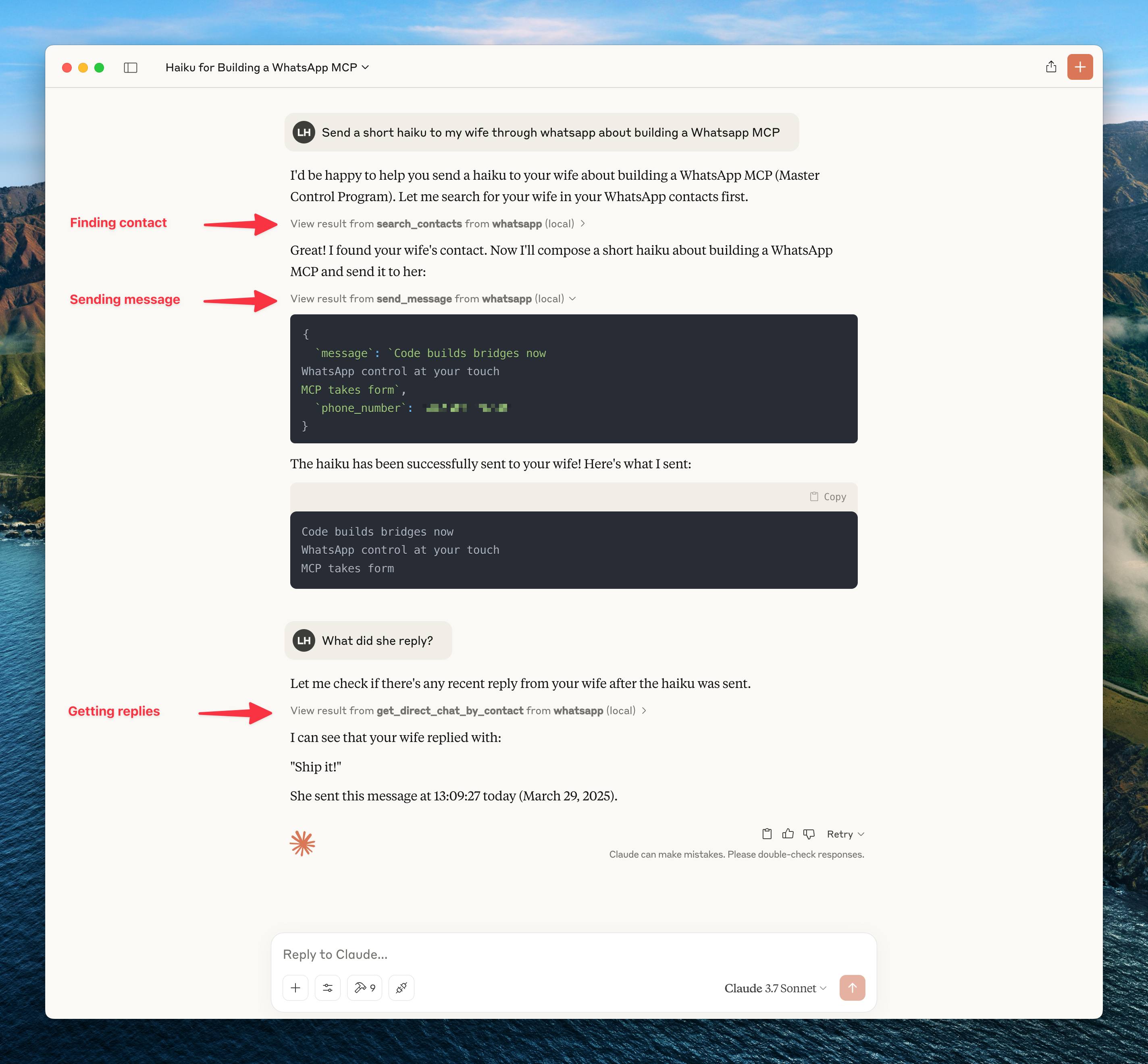
MCP server for WhatsApp that connects to your personal WhatsApp account via the WhatsApp Web multi-device API (using the whatsmeow library). Single Go binary — no Python or separate bridge process needed. All messages are stored locally in SQLite and only sent to the LLM when accessed through tools.
Installation
Option A — Install script (macOS / Linux, no Go required)
curl -fsSL https://raw.githubusercontent.com/ihiteshgupta/whatsapp-mcp/main/install.sh | sh
Installs the whatsapp-mcp binary to /usr/local/bin.
Option B — Homebrew (macOS / Linux)
brew install ihiteshgupta/tap/whatsapp-mcp
Requires the Homebrew tap to be set up. See ihiteshgupta/homebrew-tap.
Option C — go install (Go users)
go install github.com/ihiteshgupta/whatsapp-mcp/whatsapp-bridge-v2/cmd/whatsapp-mcp@latest
Option D — Build from source
git clone https://github.com/ihiteshgupta/whatsapp-mcp.git
cd whatsapp-mcp/whatsapp-bridge-v2
go build -o whatsapp-mcp ./cmd/whatsapp-mcp
Windows: CGO is required for SQLite. Install MSYS2, add
ucrt64\binto PATH, then rungo env -w CGO_ENABLED=1before building.
Configure your MCP client
Claude Desktop / Claude Code
Add to your Claude config:
- Claude Desktop:
~/Library/Application Support/Claude/claude_desktop_config.json - Claude Code:
~/.claude.json
{
  "mcpServers": {
    "whatsapp": {
      "command": "/usr/local/bin/whatsapp-mcp",
      "args": []
    }
  }
}
Replace
/usr/local/bin/whatsapp-mcpwith the actual path if you built from source (e.g./path/to/whatsapp-mcp/whatsapp-bridge-v2/whatsapp-mcp).
Cursor
Add to ~/.cursor/mcp.json:
{
  "mcpServers": {
    "whatsapp": {
      "command": "/usr/local/bin/whatsapp-mcp",
      "args": []
    }
  }
}
3. Authenticate
- Start your MCP client (Claude Desktop, Claude Code, or Cursor)
- A QR code will appear in the terminal and be saved to
~/.whatsapp-mcp/qrcode.png - Scan with WhatsApp on your phone (Settings → Linked Devices → Link a Device)
- Wait for history sync to complete
- Session persists in
~/.whatsapp-mcp/whatsapp.db— re-authentication needed every ~20 days
Data Storage
All data is stored locally in ~/.whatsapp-mcp/ (no config file needed):
~/.whatsapp-mcp/whatsapp.db— WhatsApp session (whatsmeow)~/.whatsapp-mcp/messages.db— Messages, chats, contacts, groups~/.whatsapp-mcp/qrcode.png— QR code image (created on first launch)
MCP Tools (55 total)
Messaging (8)
| Tool | Description |
|---|---|
send_message |
Send text message |
reply_to_message |
Reply to a specific message |
forward_message |
Forward a message |
edit_message |
Edit a sent message |
delete_message |
Delete a message |
react_to_message |
Add emoji reaction |
star_message |
Star a message |
unstar_message |
Unstar a message |
Chats (11)
| Tool | Description |
|---|---|
list_chats |
List all chats |
get_chat |
Get chat details |
list_messages |
Get messages from a chat |
archive_chat |
Archive a chat |
unarchive_chat |
Unarchive a chat |
pin_chat |
Pin a chat |
unpin_chat |
Unpin a chat |
mute_chat |
Mute chat notifications |
unmute_chat |
Unmute a chat |
mark_chat_read |
Mark chat as read |
delete_chat |
Delete a chat |
Contacts (6)
| Tool | Description |
|---|---|
search_contacts |
Search contacts |
get_contact |
Get contact details |
block_contact |
Block a contact |
unblock_contact |
Unblock a contact |
get_blocked_contacts |
List blocked contacts |
check_phone_registered |
Check if a phone number is registered |
Groups (13)
| Tool | Description |
|---|---|
create_group |
Create a new group |
get_group_info |
Get group info |
leave_group |
Leave a group |
add_group_members |
Add members |
remove_group_members |
Remove members |
promote_admin |
Promote to admin |
demote_admin |
Demote from admin |
set_group_name |
Change group name |
set_group_topic |
Change group topic |
set_group_photo |
Change group photo |
get_invite_link |
Get invite link |
revoke_invite_link |
Revoke invite link |
join_via_invite |
Join via invite link |
Media (7)
| Tool | Description |
|---|---|
send_image |
Send an image |
send_video |
Send a video |
send_audio |
Send audio/voice message |
send_document |
Send a document |
send_location |
Send a location |
send_contact_card |
Send a contact card |
download_media |
Download media from a message |
Presence (5)
| Tool | Description |
|---|---|
subscribe_presence |
Subscribe to presence updates |
send_typing |
Send typing indicator |
send_recording |
Send recording indicator |
set_online |
Set presence online |
set_offline |
Set presence offline |
Status (4)
| Tool | Description |
|---|---|
post_text_status |
Post text status |
post_image_status |
Post image status |
get_status_updates |
Get status updates |
delete_status |
Delete status |
Bridge (2)
| Tool | Description |
|---|---|
get_bridge_status |
Get health status |
get_connection_history |
Get connection history |
Troubleshooting
- QR Code not appearing: Check stderr output, or open
~/.whatsapp-mcp/qrcode.png - Session expired: Delete
~/.whatsapp-mcp/whatsapp.dband restart to re-authenticate - Out of sync: Delete both
~/.whatsapp-mcp/*.dbfiles and restart - Windows CGO error (
Binary was compiled with 'CGO_ENABLED=0'): Install MSYS2, adducrt64\binto PATH, rungo env -w CGO_ENABLED=1 - Device limit reached: Remove a device in WhatsApp → Settings → Linked Devices
Security Note
As with all MCP servers, be aware of prompt injection risks. This server can read your WhatsApp messages and send messages on your behalf — only connect trusted AI clients.
Development
cd whatsapp-bridge-v2
go test ./...
go build ./...
License
MIT
Установка WhatsApp Bridge
У этого сервера нет опубликованного пакета — он собирается из исходников. Открой репозиторий и следуй инструкции в README.
▸ github.com/ihiteshgupta/whatsapp-mcpFAQ
WhatsApp Bridge MCP бесплатный?
Да, WhatsApp Bridge MCP бесплатный — установка в пару кликов через Unyly без оплаты.
Нужен ли API-ключ для WhatsApp Bridge?
Нет, WhatsApp Bridge работает без API-ключей и переменных окружения.
WhatsApp Bridge — hosted или self-hosted?
Self-hosted: сервер запускается локально на твоей машине командой из раздела установки.
Как установить WhatsApp Bridge в Claude Desktop, Claude Code или Cursor?
Открой WhatsApp Bridge на unyly.org, выбери вкладку своего клиента (Claude Desktop, Claude Code, Cursor) и нажми Install — конфиг сгенерируется автоматически, без правки JSON.
Похожие MCP
Gmail
Read, send and search emails from Claude
 автор: Google
Slack
Send, search and summarize Slack messages
 автор: Slack
Runbear
No-code MCP client for team chat platforms, such as Slack, Microsoft Teams, and Discord.
Discord Server
A community discord server dedicated to MCP by [Frank Fiegel](https://github.com/punkpeye)
Compare WhatsApp Bridge with
Не уверен что выбрать?
Найди свой стек за 60 секунд
Автор?
Embed-бейдж для README
Похожее
Все в категории communication