
WhatsApp Automation
БесплатноНе проверенA WhatsApp MCP server providing 32 tools for Claude, Cursor, and Windsurf, including polls, stickers, status updates, events, live location, and group mentions.

Описание
A WhatsApp MCP server providing 32 tools for Claude, Cursor, and Windsurf, including polls, stickers, status updates, events, live location, and group mentions.
README
32 powerful WhatsApp tools for Claude, Cursor, and Windsurf, with features missing from lharries/whatsapp-mcp
This is a companion MCP tool package that runs alongside lharries/whatsapp-mcp. It adds features that lharries doesn't support.
What's in lharries/whatsapp-mcp vs This Repo
| Feature | lharries/whatsapp-mcp | This Repo |
|---|---|---|
| Search contacts | ✅ | ✅ included |
| List chats | ✅ | ✅ included |
| Read messages | ✅ | ✅ included |
| Send messages | ✅ | ✅ included |
| Send media/files | ✅ | ✅ included |
| Download media | ✅ | ✅ included |
| Detect bot menus & interactive messages | ❌ | ✅ |
| Send button/list-option responses | ❌ | ✅ |
| Poll voting (single and multiple-choice) | ❌ | ✅ |
| Animated reactions (confetti, fireworks) | ⚠️ Partial | ✅ Enhanced |
| Sticker manager (2026 packs) | ❌ | ✅ |
| Status creation (with effects, scheduling) | ❌ | ✅ |
| Event planner (RSVP tracking) | ❌ | ✅ |
| Live location (real-time sharing) | ⚠️ Basic | ✅ Enhanced |
| Group mentions (@all, @role, @specific) | ❌ | ✅ |
| No Go install needed | ❌ | ✅ |
| Pre-compiled Windows bridge | ❌ | ✅ |
Quick Install (Windows)
No coding needed. Just follow the steps below.
Before You Start
You need two free programs installed. Click each link, download, and run the installer:
- Node.js - Download from nodejs.org - click the big green "LTS" button
- Python uv - Open Start Menu, search for "cmd", open it, paste this and press Enter:
Then close the terminal window.winget install --id=astral-sh.uv -e
Step 1 - Download this repo
Click the green Code button at the top of this page, then click Download ZIP.
Unzip it anywhere you like (for example: C:\WhatsApp-Claude\).
Step 2 - Download the WhatsApp bridge
The bridge is what connects Claude to your WhatsApp account. It runs in the background.
Download WhatsApp Bridge for Windows
Save whatsapp-bridge-windows-x64.exe into the same folder where you unzipped this repo.
Step 3 - Run the setup
Open the folder where you unzipped everything. Double-click setup.bat.
It will install the required packages automatically. When it finishes, you will see a success message.
Step 4 - Start the bridge and scan the QR code
Double-click whatsapp-bridge-windows-x64.exe.
A QR code will appear in the window. Open WhatsApp on your phone:
- iPhone: Settings > Linked Devices > Link a Device
- Android: Menu (three dots) > Linked Devices > Link a Device
Scan the QR code. The window will show "Connected" and you can minimise it. You only need to scan once. After that it reconnects automatically.
Step 5 - Connect to Claude
Open Claude Desktop. Go to Settings > Developer > Edit Config.
Add the following inside the mcpServers section. Replace C:\WhatsApp-Claude with your actual folder path:
{
  "mcpServers": {
    "whatsapp": {
      "command": "node",
      "args": ["C:\\WhatsApp-Claude\\whatsapp-mcp-automation-main\\combined-server.js"]
    }
  }
}
Save the file and restart Claude.
Step 6 - Done ✅
In Claude, type: "What WhatsApp tools do you have?"
Claude will list all 32 available tools. You are ready to go.
Connect to Other AI Apps
Cursor IDE
Press Ctrl+Shift+P, search for "Open User Settings JSON", and add:
{
  "cursor.mcp.servers": {
    "whatsapp": {
      "command": "node",
      "args": ["C:\\WhatsApp-Claude\\whatsapp-mcp-automation-main\\combined-server.js"]
    }
  }
}
Restart Cursor.
Windsurf
Go to Settings > MCP Servers > Add Server and fill in:
- Command:
node - Args:
C:\WhatsApp-Claude\whatsapp-mcp-automation-main\combined-server.js
The 20 Extra Tools
🤖 Interactive Messages
Detect bot menus and respond to them — useful for chatbots, automated flows, and n8n bots
When a bot sends a numbered menu or button-style prompt, use detect_interactive_messages to read it and extract the available options. Then use send_button_response to pick an option — WhatsApp delivers button responses as plain text at the protocol level for personal accounts.
Example flow:
- Bot sends: "Choose a property type:\n1. Flat\n2. Villa\n3. PG"
detect_interactive_messagesreturns:options: ["Flat", "Villa", "PG"]send_button_responsewithoption_text: "Flat"→ sends "Flat" to the bot
Tools: detect_interactive_messages send_button_response
🗳️ Polls
Like creating a poll on Instagram, but for WhatsApp
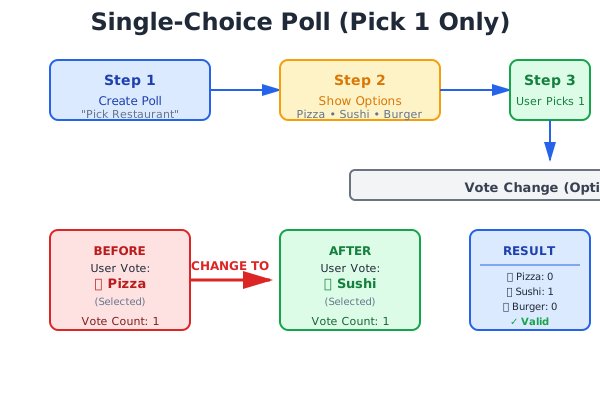
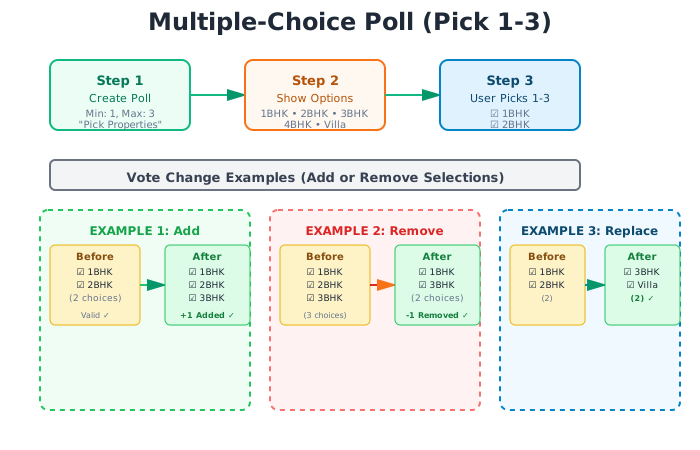
Create a single-choice poll (pick one answer) or a multiple-choice poll (pick several). Votes can be changed. You can close a poll when you are done.
Single-choice (pick exactly one):
Multiple-choice (pick several):
Tools: create_poll vote_poll change_vote get_poll_results list_polls close_poll
😍 Animated Reactions
React to a message with confetti, fireworks, sparkles, or hearts
Effect types: confetti fireworks sparkles hearts emoji effect
Tools: add_reaction get_message_reactions
🎨 Stickers
Send stickers from packs (includes a 2026 New Year pack built in)
Tools: send_sticker get_sticker_packs
📸 Status Updates
Post text, image, video, gif, or animated status updates with visibility controls
Visibility options: everyone contacts only close friends
Tools: create_status
🎉 Events
Create a group event and track RSVPs, like Google Calendar inside WhatsApp
RSVP options: accepted ✅ declined ❌ maybe 🤷 pending ⏳
Tools: create_event rsvp_event get_event_stats
📍 Live Location
Share your real-time location in a chat for 5 to 60 minutes
Tools: share_location stop_location_share
📢 Group Mentions
Send a message that notifies specific people in a group
Mention types: @all (everyone) @role (a named group) @specific (named individuals) @admin
Tools: send_mention create_group_role
How It Works
Your WhatsApp Phone
       |
whatsapp-bridge-windows-x64.exe   (runs in background, handles the WhatsApp connection)
       |
combined-server.js                (joins the two tool sets together, 32 tools total)
       |
   Claude / Cursor / Windsurf
This repo bundles two things together:
- ✅ The WhatsApp connection layer from lharries/whatsapp-mcp (MIT license) for reading and sending messages
- ✅ The extra automation tools in this repo for polls, reactions, events, and more
Troubleshooting
❓ The QR code window closed before I could scan it
Double-click whatsapp-bridge-windows-x64.exe again. A new QR code will appear.
❓ Claude says it cannot find the WhatsApp tools
Check that the path in your Claude config exactly matches where you put the folder. Use double backslashes in Windows paths (for example C:\\Users\\You\\whatsapp\\combined-server.js).
❓ The bridge says "connection lost"
This is normal if your computer was asleep. Double-click the bridge exe again to reconnect. You will not need to scan the QR code again after the first time.
❓ setup.bat says Node.js is not installed
Download and install it from nodejs.org, then double-click setup.bat again.
Privacy and Security 🔒
- ✅ All your messages are stored on your own computer only, in a local database
- ✅ Nothing is sent to any external server (other than the AI app you are using)
- ✅ The bridge connects directly to WhatsApp using the official multi-device API
- ✅ No credentials or phone numbers are stored in this repo
Legal Disclaimer
This project is for personal use only. It is not affiliated with, endorsed by, or sponsored by WhatsApp, Meta, or their parent companies.
Credits
- WhatsApp connection layer by lharries/whatsapp-mcp (MIT License)
- Extra automation tools by priyasogani8-star (MIT License)
Support & Donate
If you appreciate this project and want to support its ongoing development, here are a few ways you can do so:
- Donate: Click on the Sponsor button on top of this repository, thanks!
- Star: If you find this repository useful, please give it a star on GitHub!
- Spread the Word: Share it with your friends and colleagues!
Thank you for your support!
Установка WhatsApp Automation
У этого сервера нет опубликованного пакета — он собирается из исходников. Открой репозиторий и следуй инструкции в README.
▸ github.com/priyasogani8-star/whatsapp-mcp-automationFAQ
WhatsApp Automation MCP бесплатный?
Да, WhatsApp Automation MCP бесплатный — установка в пару кликов через Unyly без оплаты.
Нужен ли API-ключ для WhatsApp Automation?
Нет, WhatsApp Automation работает без API-ключей и переменных окружения.
WhatsApp Automation — hosted или self-hosted?
Self-hosted: сервер запускается локально на твоей машине командой из раздела установки.
Как установить WhatsApp Automation в Claude Desktop, Claude Code или Cursor?
Открой WhatsApp Automation на unyly.org, выбери вкладку своего клиента (Claude Desktop, Claude Code, Cursor) и нажми Install — конфиг сгенерируется автоматически, без правки JSON.
Похожие MCP
Fetch
Web content fetching and conversion for efficient LLM usage.
AWS KB Retrieval
Retrieval from AWS Knowledge Base using Bedrock Agent Runtime.
 автор: modelcontextprotocol
Spring AI MCP Server
Provides auto-configuration for setting up an MCP server in Spring Boot applications.
llm-analysis-assistant
A very streamlined mcp client that supports calling and monitoring stdio/sse/streamableHttp, and can also view request responses through the /logs page. It also
 автор: xuzexin-hz
Compare WhatsApp Automation with
Не уверен что выбрать?
Найди свой стек за 60 секунд
Автор?
Embed-бейдж для README
Похожее
Все в категории ai