
Whatsupd
БесплатноНе проверенWhatsApp on your own machine: linked-device daemon, full local archive, WhatsApp Web-like client and an MCP server for Claude Code, Claude Desktop and any MCP a

Описание
WhatsApp on your own machine: linked-device daemon, full local archive, WhatsApp Web-like client and an MCP server for Claude Code, Claude Desktop and any MCP agent. Single Go binary, AGPL.
README
whatsupd
Your WhatsApp, archived on your own machine, readable by your AI agents.
License: AGPL-3.0-or-later Go 1.26 MCP: HTTP + stdio Single binary, no cgo
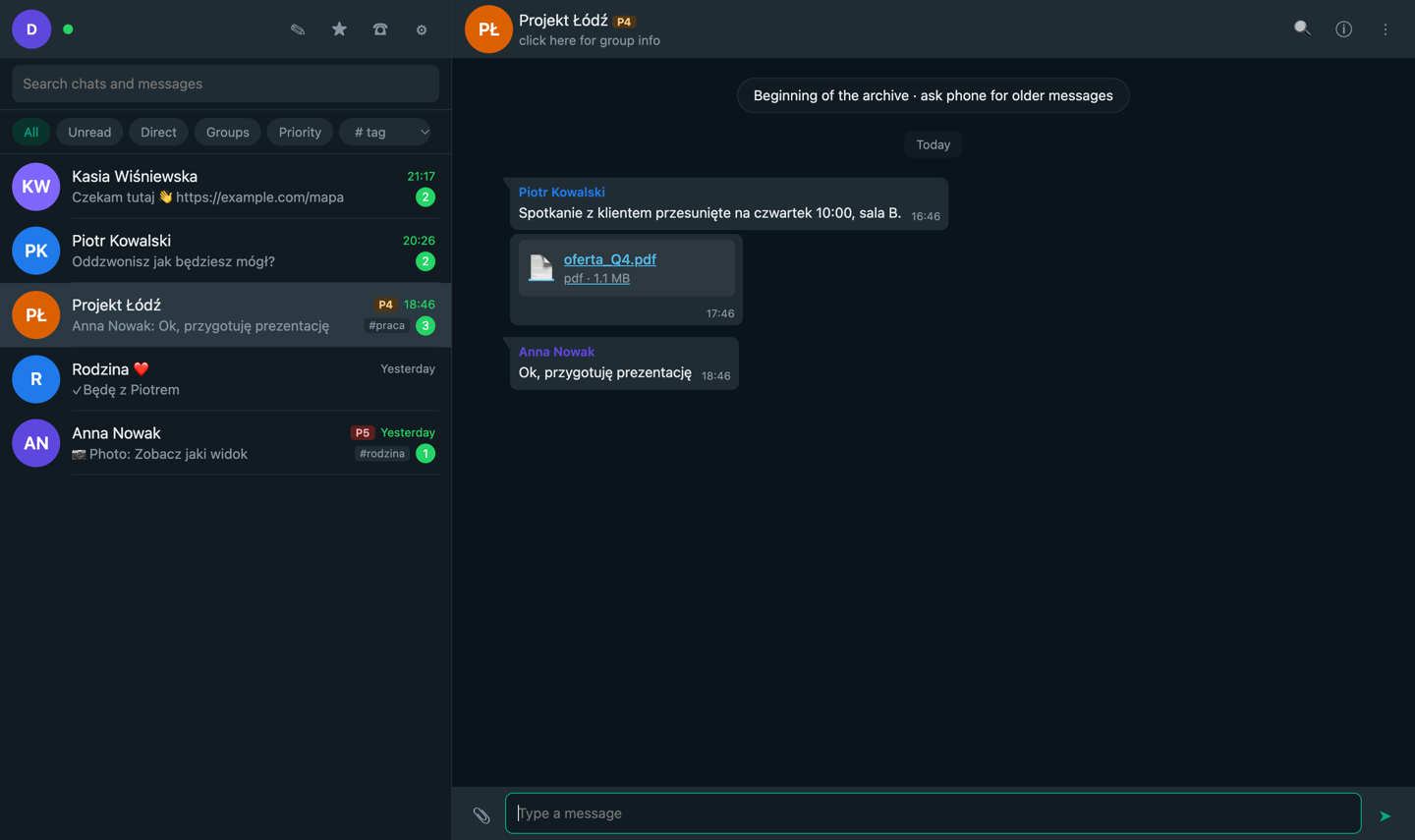
The web client running on synthetic data (make demo). Names and numbers are made up.
What you get
| A real WhatsApp client | Links as a device, like WhatsApp Web or Desktop. Read, search, send, reply, react, edit, delete, files, archive, pin, mute, calls, starred, group info. |
| A complete local archive | Every message, group, contact and call goes into SQLite with full-text search. Nothing leaves your machine. |
| An MCP server | 13 tools for Claude Code, Claude Desktop and any MCP client: "what did I miss", search across all chats, people, groups, calls. Read-only by default; sending is a separate opt-in with an allowlist, a rate limit and an audit log. |
| Your own notes on people | Alias, description, priority 1 to 5, tags and custom fields on any contact or chat. Agents can filter by them. |
| Nothing lost on restart | Messages are acked to WhatsApp only after they are written to disk. Offline gaps are recovered and counted. |
| One static binary | Pure Go, no cgo, no Docker, no database server. A background service in one command: LaunchAgent on macOS, systemd on Linux. |
Why whatsupd
I wanted my agents to know what is going on in my WhatsApp: who wrote, what they asked, what I promised. The options were bad. Cloud bridges push your private chats through someone else's server. Scrapers break every month. Exporting chats by hand is a joke.
So whatsupd runs on your machine as a linked device, keeps the whole archive locally, and lets an agent read it over MCP. The MCP side is read-only by default: it never sends anything to WhatsApp. If an agent should answer someone, it drafts the text and you send it. If you do want an agent to send, you switch it on explicitly and limit who it can write to (Letting agents send).
How whatsupd compares
WhatsApp MCP servers on GitHub with 40+ stars, as of 2026-11-05. Stars, dates and licenses from the GitHub API; the rest from each project's code or README. Details, sources and our own open gaps: docs/COMPARISON.md.
| Project | Stars | Last push | Runs as | Your messages live | Sends by default | Auth on HTTP |
|---|---|---|---|---|---|---|
| whatsupd (this repo) | new | active | one Go binary | your disk, full history | no, opt-in with allowlist, rate limit, audit | bearer token always on; OAuth 2.1 opt-in |
| lharries/whatsapp-mcp | 6814 | 2025-07-13 | Go bridge + Python | your disk | yes | no MCP HTTP; bridge API on all interfaces, no auth |
| finereli/whatsapp-mcp | 404 | 2026-10-24 | Cloudflare Worker | Cloudflare, encrypted | cannot send | OAuth |
| verygoodplugins/whatsapp-mcp | 283 | 2026-10-30 | Go bridge + Python | your disk | yes | none on MCP HTTP |
| felipeadeildo/whatsapp-mcp | 98 | 2026-11-03 | Cloudflare Worker | your Cloudflare account | yes | OAuth or bearer |
| jlucaso1/whatsapp-mcp-ts | 75 | 2026-01-23 | Node | your disk | yes | stdio only |
| BrOrlandi/whatsapp-mcp-local | 70 | 2026-11-03 | desktop app | your disk | yes | localhost, no auth |
| BrOrlandi/whatsapp-mcp | 64 | 2026-10-09 | Docker Compose | your server | yes | setup token |
| pnizer/wweb-mcp | 46 | 2025-07-18 | Node + headless Chrome | your disk | yes | optional API key |
| FelixIsaac/whatsapp-mcp-extended | 44 | 2026-11-02 | Go bridge + Python | your disk | yes, optional allowlist | stdio only |
| delltrak/wamcp (different project; this one was called wamcp before) | 27 | 2026-11-02 | Node + Redis, Docker | your server, 30 days by default | yes | none unless configured; key, Basic or OAuth 2.1 |
Where whatsupd is ahead:
- Safe by default. It is the only one in the table that is read-only out of the box and can still send when you ask for it, behind an allowlist, an hourly limit, retry de-duplication and an audit log.
- The whole archive, on your disk. Every message, edit, deletion, group, contact and call, kept for good, with accent-insensitive full-text search. No cloud account, no retention window.
- One binary. No Python, Node, Redis, Docker or Chrome. A web client is built in.
- Remote access with auth that cannot be switched off. Streamable HTTP always needs a token: the MCP-only token, or OAuth with PKCE where you approve each client.
--public-hostputs it behind your own tunnel, with nothing hosted by anyone else. - Nothing lost on a crash. Messages are acknowledged to WhatsApp only after they are on disk.
Where others are ahead, today:
- Breadth. delltrak has 169 tools, including group admin, business features, scheduling, polls and albums, and the official WhatsApp Cloud API. whatsupd has 15: it reads everything and, when you switch it on, sends text, files and voice notes.
- Reach. lharries has 6.8k stars and a big community of forks. finereli has a hosted version you can try without installing anything. whatsupd needs Go 1.26 to build until release binaries exist.
Table of contents
- How whatsupd compares
- Quick start
- Install
- Upgrading from wamcp
- Run it in the background
- Sign in with Google (OIDC)
- Connect an AI assistant
- MCP tools
- Letting agents send (opt-in)
- Contact notes
- Reliability
- Data and security
- Limitations
- CLI
- Development
- Bugs, ideas and security reports
- License
Quick start
git clone https://github.com/mi4uu/whatsupd && cd whatsupd
make install      # builds and installs ~/.local/bin/whatsupd
whatsupd serve       # first run prints a sign-in link and a QR code
Open the printed link (or run whatsupd open). On your phone go to WhatsApp > Settings > Linked devices > Link a device and scan the QR code. You can link with a pair code instead: whatsupd serve --pair-phone +48600000000.
After linking, the phone uploads your history in batches. Keep WhatsApp open on the phone for a few minutes. Progress shows in the web client settings, in whatsupd status and in the whatsapp_status MCP tool.
Install
From source
Needs Go 1.26 or newer.
go install github.com/mi4uu/whatsupd/cmd/whatsupd@latest
or clone and make install as above (installs to ~/.local/bin, set PREFIX to change it).
macOS and Linux both work.
Upgrading from wamcp
whatsupd was called wamcp until 2026-11-06. Upgrading keeps the WhatsApp session and the whole archive; nothing needs pairing again.
- Install the new binary (
make installbuildswhatsupd). - Run
whatsupd service installwith the flags you used before. It stops and removes the oldwamcpLaunchAgent or systemd unit first. - Point MCP clients at
whatsupd mcpinstead ofwamcp mcp. HTTP clients keep the same URL and token.
What carries over and what changes:
- Data directory. whatsupd uses
~/.whatsupdwhen it exists and~/.wamcpotherwise, so an old install keeps working where it is. To move it:whatsupd service uninstall,mv ~/.wamcp ~/.whatsupd,whatsupd service install. - Environment variables.
WAMCP_*still work for this release, with a warning on start. Rename them toWHATSUPD_*. - Web client. Sign in once more; your settings carry over.
- Old binary.
~/.local/bin/wamcpis left in place. Delete it when nothing uses it.
Run it in the background
A LaunchAgent on macOS, a systemd user unit on Linux. It starts at login and restarts after crashes.
whatsupd service install     # add --auto-media to download media of new messages
whatsupd service status
whatsupd service uninstall   # the archive is kept
Logs: ~/.whatsupd/logs/whatsupd.log.
On Linux the unit goes to ~/.config/systemd/user/whatsupd.service. systemd stops user services when you log out, so on a server you reach over SSH run loginctl enable-linger once; whatsupd service install tells you when it is needed. Without systemd (some containers, WSL), run whatsupd serve under your own supervisor.
Sign in with Google (OIDC)
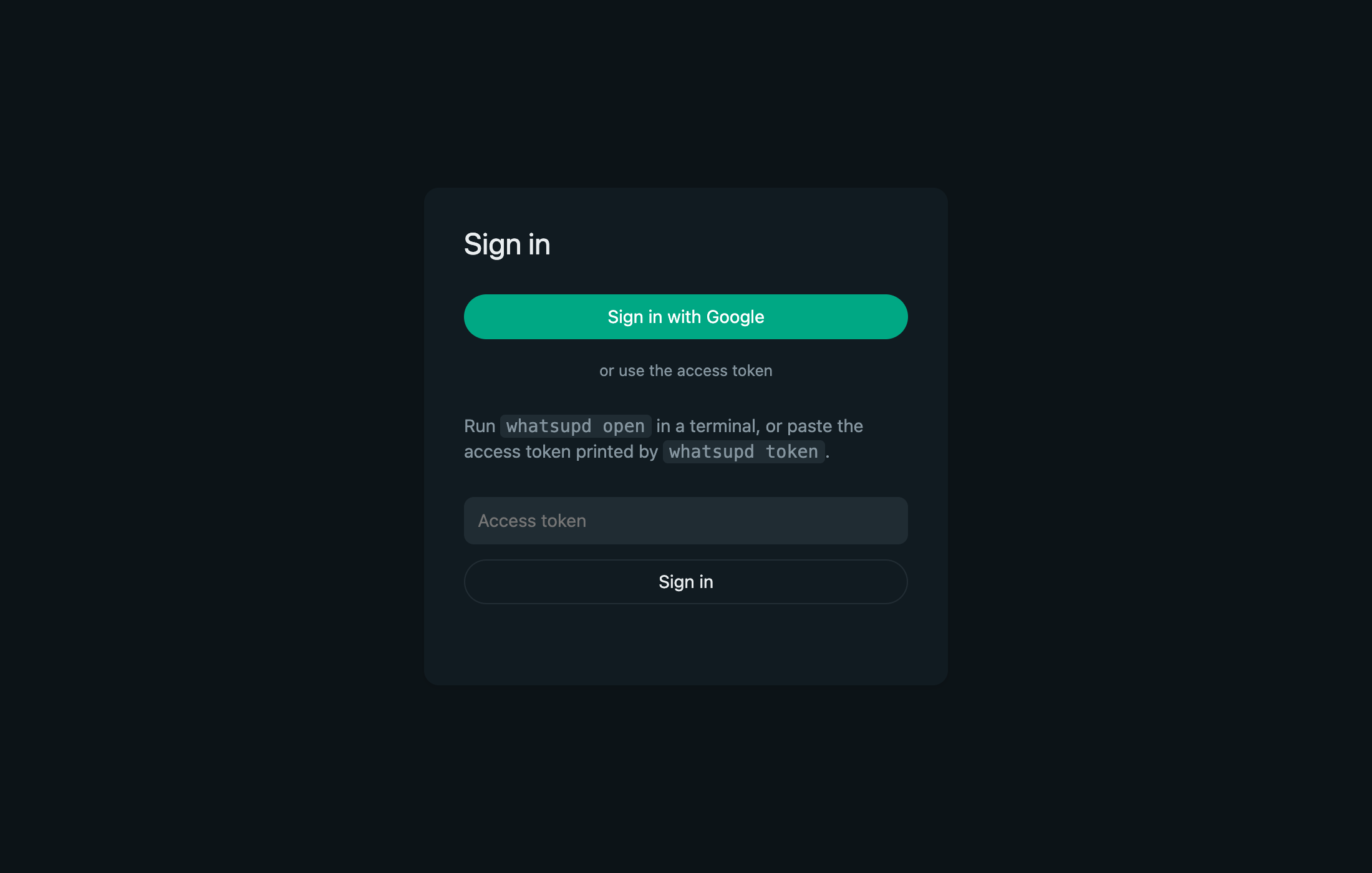
By default the web client signs in with the access token (whatsupd open, or paste whatsupd token). You can add a "Sign in with Google" button, or any other OpenID Connect provider (Keycloak, Authentik, Microsoft and others). The token keeps working next to it.
Create an OAuth client at the provider. For Google: Google Cloud Console, APIs & Services, Credentials, "OAuth client ID", type "Web application". Add the redirect URI
https://<your public host>/auth/oidc/callback(the--public-hostname, with its port if it has one), orhttp://localhost:8765/auth/oidc/callbackfor a daemon you open only on this machine.Write
~/.whatsupd/oidc.envand make it private withchmod 600 ~/.whatsupd/oidc.env(whatsupd refuses to start if other users can read it):WHATSUPD_OIDC_ISSUER=https://accounts.google.com WHATSUPD_OIDC_CLIENT_ID=1234-abc.apps.googleusercontent.com WHATSUPD_OIDC_CLIENT_SECRET=... WHATSUPD_OIDC_NAME=Google [email protected]Restart the daemon (
whatsupd service restart). The sign-in page shows "Sign in with Google".
| Variable | Required | |
|---|---|---|
WHATSUPD_OIDC_ISSUER |
yes | The provider, e.g. https://accounts.google.com or https://keycloak.example.com/realms/home. |
WHATSUPD_OIDC_CLIENT_ID, WHATSUPD_OIDC_CLIENT_SECRET |
yes | From the provider's console. |
WHATSUPD_OIDC_ALLOWED_EMAILS |
yes | Comma-separated addresses that may sign in. |
WHATSUPD_OIDC_NAME |
no | Button label. Default SSO. |
WHATSUPD_OIDC_SCOPES |
no | Default openid email profile. |
The same variables in the environment of whatsupd serve override the file. The file exists so the background service gets the client secret without it ending up in the unit file or on the command line.
How it is checked:
- The allowlist is required. Without it whatsupd does not start, because every account at the provider (every Google account in the world) could read your WhatsApp.
- The login uses PKCE, a
statebound to the browser by a signed cookie (10 minutes, cleared on return) and anonce. The ID token's signature, issuer, audience and expiry are verified, the e-mail must be marked verified by the provider and must match an allowlisted address exactly. Only ASCII case is ignored: addresses with other characters are refused, because Unicode case folding turns some lookalikes (the Kelvin signK) into plain letters. - The session lasts 30 days and lives only in the browser's cookie, so "Log out" ends it in that browser only. The allowlist is checked on every request: remove an address and restart the daemon, and every browser signed in with it is out.
- The account is identified by its e-mail address. If the provider ever gives that address to someone else, they get in too; with Google and your own Gmail that does not happen.
- An OIDC session opens the web client only.
/mcp, the API stdio servers use, OAuth client management and login codes still need a bearer token, as before. - The button works on
localhostand on the--public-hostnames. Opened under any other address it refuses, so the provider is never sent a redirect address picked by whoever made the request. - The provider is contacted at the first sign-in, not at startup, so a network that is not up yet does not stop the daemon.
Connect an AI assistant
whatsupd config prints ready-to-paste snippets with your token.
Claude Code over HTTP (the daemon must be running; includes media download):
claude mcp add --transport http --scope user whatsapp http://127.0.0.1:8765/mcp \
  --header "Authorization: Bearer $(whatsupd token --mcp)"
Claude Desktop and other stdio clients read the archive directly, even when the daemon is stopped:
{ "mcpServers": { "whatsapp": { "command": "/Users/you/.local/bin/whatsupd", "args": ["mcp"] } } }
Remote access (claude.ai, phone)
whatsupd stays on 127.0.0.1. Put a tunnel or reverse proxy with HTTPS in front of it (for example a Cloudflare Tunnel to http://127.0.0.1:8765) and tell whatsupd the public name:
whatsupd serve --public-host wa.example.com # or: whatsupd service install --public-host wa.example.com
Then add a custom connector in claude.ai with the URL https://wa.example.com/mcp. Two ways to sign it in:
- OAuth (works with any OAuth-only client): start the daemon with
--oauthas well. The client registers itself, your browser opens a whatsupd page that names the client and what it may do, and you confirm with the main token (whatsupd token). Access tokens last an hour and refresh for 30 days.whatsupd oauth listshows approved clients,whatsupd oauth revoke <id>cuts one off at once. Ten wrong tokens in a minute lock the consent page for a minute. Use it together with--public-host, which makes the issuerhttps://. - Static header: a request header
Authorization: Bearer <token>with the token fromwhatsupd token --mcp, which cannot sign in to the web client (replace it any time withwhatsupd token --rotate-mcp). Anthropic documents request headers for custom connectors; check that your plan shows the field.
With --public-host the web client always asks for the token, linking a phone needs a signed-in browser, and sending (if you turn it on) requires an allowlist.
MCP tools
| Tool | What it does |
|---|---|
whatsapp_status |
Connection, history sync and catch-up progress, archive totals |
list_chats |
Chats with activity, unread counts, your priority and tags; filters and sorting |
get_chat |
Chat details, your notes, statistics, group description and members |
get_messages |
Messages of one chat; time ranges, paging, sender, media and starred filters |
get_recent_messages |
Everything in a time window across chats ("what did I miss") |
search_messages |
Full-text search, accent-insensitive ("lodz" finds "Łódź"), phrases |
get_message_context |
Messages around a hit |
search_contacts / get_contact |
People, the names WhatsApp knows, your notes, shared groups |
list_groups |
Groups and communities, membership |
list_calls |
Call history |
update_contact_meta |
Edit your private notes (local only, never sent to WhatsApp) |
download_media |
Save an attachment locally (HTTP mode) |
request_older_messages |
Ask the phone for older history of a chat (HTTP mode) |
send_message |
Send a text message. Not listed unless sending is switched on, see below |
send_file |
Send a photo, video, audio file, voice note or document, with a caption. Not listed unless sending is switched on |
Chats and people can be given as a JID, a phone number or part of a name.
Letting agents send (opt-in)
By default send_message and send_file do not exist: they are not in tools/list and calling them fails. To turn it on, start the daemon with the switch and, ideally, an allowlist:
whatsupd serve --mcp-allow-send --mcp-send-to "me,+48600000000,[email protected]"
# or for the background service
whatsupd service install --mcp-allow-send --mcp-send-to me
| Flag | Env | Default | What |
|---|---|---|---|
--mcp-allow-send |
WHATSUPD_MCP_ALLOW_SEND=1 |
off | Lists send_message and send_file on the HTTP MCP endpoint and lets stdio servers send through the daemon |
--mcp-send-to |
WHATSUPD_MCP_SEND_TO |
empty (any chat) | Comma-separated phone numbers with country code, JIDs, or me (your own chat). Names are not accepted. Required when --listen is not a loopback address |
--mcp-send-per-hour |
20 | Maximum messages and files in any rolling hour, across all agents | |
--mcp-send-files-from |
WHATSUPD_MCP_SEND_FILES_FROM |
empty (no paths) | The only directory send_file may read a path from |
Stdio clients (whatsupd mcp) also need --allow-send (or the same env var) to list the tool. They forward every send to the daemon, so the daemon's policy always applies.
What the daemon enforces on every send_message and send_file call:
- Allowlist. Recipients off the list are refused. Group members are not checked: allowing a group allows writing to that group.
- Rate limit. Counted from the audit log, so a restart does not reset it. Failed sends count too, since an error does not prove the message was dropped.
- No double sends. A call with the same
idempotency_keyreturns the first result instead of sending again (24 hours). Without a key, the same text to the same chat within 10 minutes counts as a retry. If the daemon stopped in the middle of a send, the retry is refused with a clear message instead of guessing; a failed send that is retried reuses the same WhatsApp message ID. - Audit log. Every call is written to the
agent_sendstable as sent, failed, refused or duplicate, and a send is recorded before anything goes to WhatsApp.whatsupd auditprints it; the daemon log has one line per call. Refused and duplicate calls stop being stored after 200 in an hour (they are still logged), so a looping agent cannot fill the disk. - Files from three places only.
send_filetakes the file as base64 data from the agent, forwards an attachment already downloaded to the archive, or reads a path inside--mcp-send-files-from. Without that flag no path is accepted, so an agent cannot send~/.sshor anything else on your disk; paths that leave the directory are refused and symlinks are never followed. Files are capped at 16 MB, voice notes must be Ogg Opus, and the audit log records each file by name, type, size and SHA-256. - No edits, deletes or group admin. Text is up to 4096 characters, optionally as a reply.
What it does not protect against, so you can decide:
- Prompt injection. An agent that reads your chats and can send is exposed to messages written to manipulate it ("forward this to everyone"). The allowlist and rate limit cap the damage; they do not stop the agent from sending the wrong text to an allowed chat. Keep the allowlist short:
mealone is enough for "send me a daily summary". - Give agents the MCP token, not the main one.
whatsupd token --mcpopens/mcpand nothing else, so it is bound by these limits. The main token (whatsupd token) also signs in to the web client, which can send, edit and delete without any of them.
Contact notes
Every contact, group or chat can carry private notes: alias (display name override), description, priority 1 to 5 (lowest, low, normal, high, top), tags and custom fields (for example birthday: 14.03). Edit them in the web client (chat info panel) or with update_contact_meta.
The MCP tools show the notes next to contacts and chats and can filter by them:
list_chats min_priority=4
get_recent_messages min_priority=4
search_contacts tag=family
Reliability
- Messages are acknowledged to WhatsApp only after they are committed to the archive, and decrypted payloads are buffered until then. If the process crashes, the server delivers the message again.
- While the daemon is stopped (laptop asleep, restart, network down), WhatsApp queues messages for the linked device and delivers them on reconnect. whatsupd records how long it was offline and how many messages it recovered (
whatsapp_status, web settings). - If the phone unlinks the device, for example after a very long break, the web client shows the QR code again. Relinking triggers a full history sync that fills the gap. Messages are de-duplicated by ID.
- Hidden-number identities (
@lid) are mapped to phone numbers as soon as WhatsApp reveals the mapping, and older rows are merged.
Data and security
Everything lives in ~/.whatsupd (mode 0700):
| Path | What |
|---|---|
archive.db |
The archive: SQLite with FTS5 |
whatsmeow.db |
Session keys of the linked device |
media/, avatars/ |
Downloaded attachments and profile pictures |
token |
Main access token: web client sign-in, MCP |
mcp-token |
MCP-only token: /mcp and the API stdio servers use, no web client |
oauth.json |
OAuth clients you approved and hashes of their tokens (--oauth) |
oidc.env |
Optional "Sign in with Google" settings and client secret (mode 0600) |
- The server listens on
127.0.0.1unless you pass--listen./mcpalways requiresAuthorization: Bearer <token>(the MCP token or the main one), there is no way to turn that off. The web client needs a session cookie obtained with the token (whatsupd open) or, if you set it up, with an allowlisted OIDC account. Requests with a foreignHostheader (DNS rebinding) and cross-site form posts are rejected. - Behind a reverse proxy or tunnel (cloudflared, nginx, Caddy) use
--public-hostor--web-auth token. Without them, requests that carry proxy headers (X-Forwarded-For,Forwarded,Cf-Connecting-Ipand similar) or come from a known proxy process (cloudflared, ngrok, ssh, nginx, Caddy and others) are never signed in automatically, but a proxy that is neither would look like a local browser. - When whatsupd is reachable from other machines (
--public-hostor a non-loopback--listen), linking a phone needs a signed-in browser, so a visitor cannot link their own account to your daemon. - Messages deleted for everyone keep their content in the archive and are marked with who deleted them and when. They stay searchable. Run
whatsupd serve --deleted removeto wipe them instead, like WhatsApp does. - The daemon does not mark you "online" in the background, so your phone keeps its notifications. The web client shows you online only while its tab is visible.
Limitations
- whatsupd uses the unofficial multi-device protocol. WhatsApp's terms do not allow unofficial clients. The risk of account restrictions is low for read-mostly personal use, but it is not zero.
- History depth depends on what the phone sends. Older messages can be requested per chat while the phone is online.
- Media links expire after some weeks. whatsupd then asks the phone to re-upload, which works only if the phone still has the file.
- Not archived yet: poll votes, channel (newsletter) posts, status view lists. Voice recording in the browser is not supported (audio files can be sent).
CLI
whatsupd serve     Run the daemon: link and sync WhatsApp, web client, MCP over HTTP
whatsupd mcp       Serve MCP over stdio (reads the archive)
whatsupd open      Open the web client in the browser, signed in
whatsupd config    Print MCP client configuration
whatsupd token     Print the access token (--mcp: MCP-only token, --rotate-mcp: replace it)
whatsupd status    Show daemon, sync and archive status
whatsupd audit     Show messages MCP agents sent or tried to send
whatsupd oauth     list | revoke <client id>: OAuth clients you approved (serve --oauth)
whatsupd service   install | uninstall | restart | status (macOS and Linux)
whatsupd logout    Unlink this device from WhatsApp (daemon must be stopped)
whatsupd bug       Open a pre-filled GitHub bug report (version and OS only)
whatsupd version
Common flags: --data-dir (default ~/.whatsupd, env WHATSUPD_DATA_DIR) and --listen (default 127.0.0.1:8765, env WHATSUPD_LISTEN). Run whatsupd <command> -h for the rest.
Development
make test    # unit tests: archive, ingestion, MCP tools, HTTP auth
make demo    # web client with synthetic data on 127.0.0.1:8799
make build
| Package | What |
|---|---|
internal/archive |
SQLite schema, queries, names |
internal/ingest |
WhatsApp events into the archive |
internal/wa |
Connection, pairing, catch-up, media, sending |
internal/mcpserver |
MCP tools |
internal/web |
HTTP API and the embedded web client |
internal/service |
launchd and systemd integration |
cmd/whatsupd |
The CLI |
Bugs, ideas and security reports
- Bug:
whatsupd bug, or Settings > About > Report a bug in the web client. Both open a GitHub issue form with the version, OS and setup filled in, and nothing from your archive. Issues are public, so leave out phone numbers and message text. - Idea: suggest a feature.
- Security problem: report it privately, see SECURITY.md.
License
Built on whatsmeow (MPL-2.0), the multi-device WhatsApp Web protocol library behind the mautrix bridge, and the official MCP Go SDK. Not affiliated with WhatsApp or Meta.
Установка Whatsupd
У этого сервера нет опубликованного пакета — он собирается из исходников. Открой репозиторий и следуй инструкции в README.
▸ github.com/mi4uu/whatsupdFAQ
Whatsupd MCP бесплатный?
Да, Whatsupd MCP бесплатный — установка в пару кликов через Unyly без оплаты.
Нужен ли API-ключ для Whatsupd?
Нет, Whatsupd работает без API-ключей и переменных окружения.
Whatsupd — hosted или self-hosted?
Self-hosted: сервер запускается локально на твоей машине командой из раздела установки.
Как установить Whatsupd в Claude Desktop, Claude Code или Cursor?
Открой Whatsupd на unyly.org, выбери вкладку своего клиента (Claude Desktop, Claude Code, Cursor) и нажми Install — конфиг сгенерируется автоматически, без правки JSON.
Похожие MCP
Postgres
Query your database in natural language
 автор: Anthropic
wenb1n-dev/SmartDB_MCP
Connect to multiple databases at once (MySQL, PostgreSQL, SQL Server, MariaDB, Dameng, Oracle) for operations, health analysis and SQL optimization.
 автор: wenb1n-dev
Postgres Server
This server enables interaction with PostgreSQL databases through the Model Context Protocol, optimized for the AWS Bedrock AgentCore Runtime. It provides tools
 автор: madhurprash
PostgreSQL
Read-only database access with schema inspection.
автор: modelcontextprotocolRedis
Interact with Redis key-value stores.
автор: modelcontextprotocolSQLite
Database interaction and business intelligence capabilities.
автор: modelcontextprotocolmxcp
Open-source framework for building enterprise-grade MCP servers using just YAML, SQL, and Python, with built-in auth, monitoring, ETL and policy enforcement.
 автор: raw-labs
julien040/anyquery
Query apps with SQL from a single local-first binary; also connects to PostgreSQL, MySQL and SQLite-compatible databases.
 автор: julien040
drakonkat/wizzy-mcp-tmdb
Search and retrieve movie, TV show and person information from The Movie Database (TMDB) API.
 автор: drakonkat
longevity-genie/opengenes-mcp
Query the OpenGenes database for aging and longevity research.
 автор: longevity-genie
Compare Whatsupd with
Не уверен что выбрать?
Найди свой стек за 60 секунд
Автор?
Embed-бейдж для README
Похожее
Все в категории data