
Whoosh RAG
БесплатноНе проверенAn MCP server that provides full-text search over documentation using Whoosh, enabling AI assistants to find up-to-date, authoritative answers.

Описание
An MCP server that provides full-text search over documentation using Whoosh, enabling AI assistants to find up-to-date, authoritative answers.
README
A Model Context Protocol (MCP) server that provides full-text search capabilities for documentation using Whoosh. This allows AI assistants like Cline and GitHub Copilot to search and retrieve relevant documentation.
Rationale
Large language models (LLMs) are often trained on outdated code and documentation, which can lead to suggestions that use deprecated functions or patterns. This MCP server uses Whoosh for fast, precise, and explainable full-text search over your latest documentation, helping AI assistants and users find up-to-date, authoritative answers. This improves coding correctness and reliability, especially in technical environments. Whoosh is lightweight, CPU-friendly, and requires no embeddings or GPUs. For best results, include synonyms in your queries to broaden coverage.
Features
- Full-text search through markdown (.md, .mdx) and reStructuredText (.rst) documentation
- Section-based indexing for granular search results
- Stemming analyzer for better search matches
- Multiple search modes: snippets, full content, or by section
Tools Provided
The MCP server exposes the following tools to AI assistants:
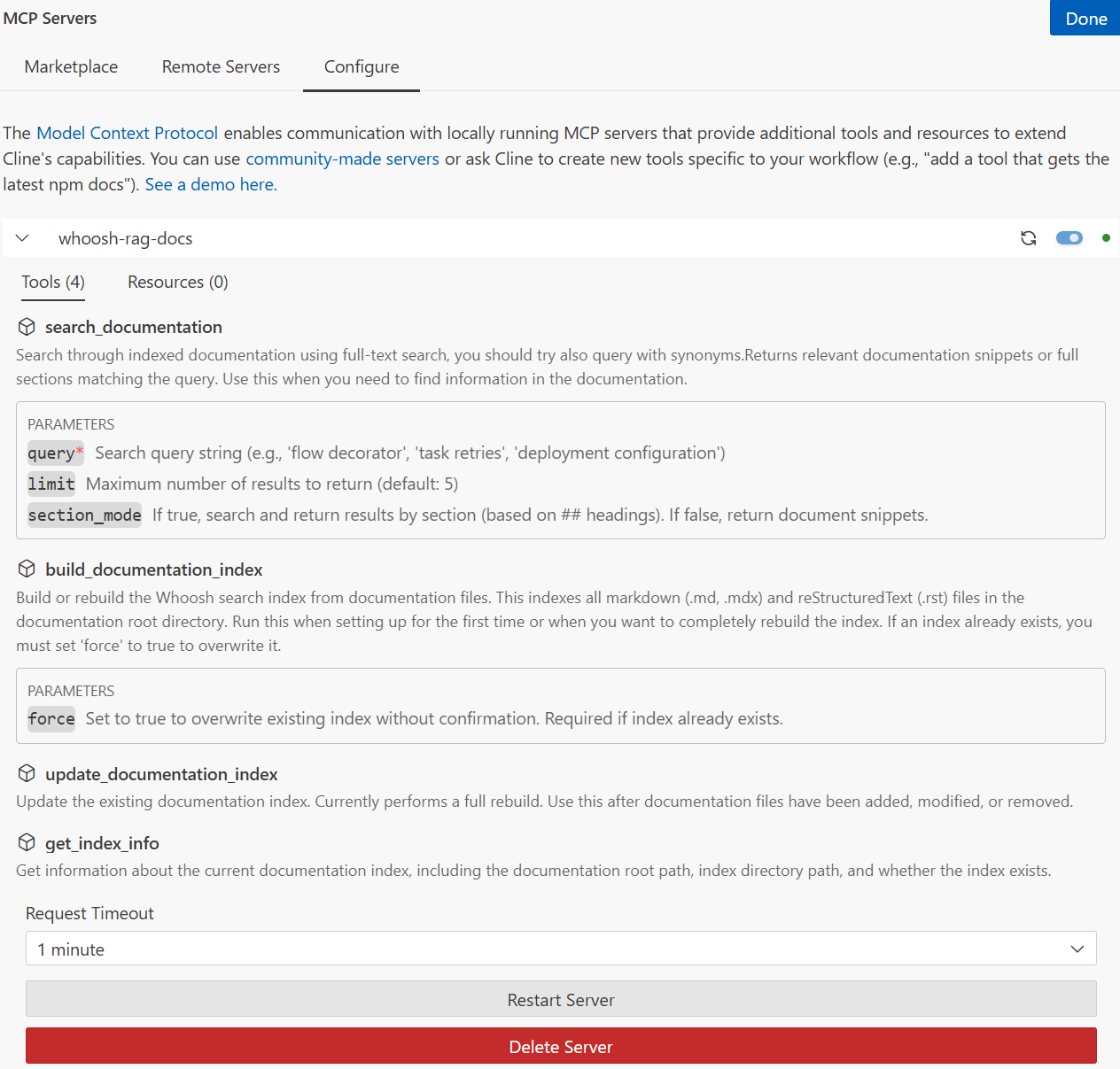
search_documentation- Search indexed documentation with full-text searchbuild_documentation_index- Build/rebuild the search index from documentation filesupdate_documentation_index- Update the existing index (currently performs full rebuild)get_index_info- Get information about the current index status
Installation
1. Install from PyPI
The easiest way to install the package is from PyPI:
pip install whoosh-rag-mcp
Alternatively, you can install directly from GitHub:
pip install git+https://github.com/jianlins/whoosh_rag_mcp.git
Or for development (editable install):
git clone https://github.com/jianlins/whoosh_rag_mcp.git
cd whoosh_rag_mcp
pip install -e .
2. Configure Environment Variables
The server uses environment variables to locate documentation:
DOCS_ROOT- Path to your documentation directory (default:./references)INDEX_DIR- Path to store the Whoosh index (default:./whoosh_index)
3. Configure MCP Server
Choose the appropriate configuration method based on your AI assistant:
Option A: For Cline (VS Code Extension)
Add the server configuration to your Cline MCP settings file:
Windows: %APPDATA%\Code - Insiders\User\globalStorage\saoudrizwan.claude-dev\settings\cline_mcp_settings.json
macOS: ~/Library/Application Support/Code - Insiders/User/globalStorage/saoudrizwan.claude-dev/settings/cline_mcp_settings.json
Linux: ~/.config/Code - Insiders/User/globalStorage/saoudrizwan.claude-dev/settings/cline_mcp_settings.json
Add this configuration to the mcpServers object:
{
  "mcpServers": {
    "whoosh-rag-docs": {
      "command": "python",
      "args": ["-m", "whoosh_rag_mcp.mcp_server"],
      "env": {
        "DOCS_ROOT": "c:/Users/YourUsername/Projects/whoosh_rag_mcp/references",
        "INDEX_DIR": "c:/Users/YourUsername/Projects/whoosh_rag_mcp/whoosh_index"
      },
      "disabled": false,
      "autoApprove": []
    }
  }
}
Important: Replace the paths with your actual project directory paths.
Cline MCP Configuration Example:
Option B: For GitHub Copilot Chat (VS Code Extension)
GitHub Copilot uses a different configuration format than Cline. You'll create an mcp.json file instead of editing settings.json.
Method 1: Using the Command Palette (Recommended)
Open the Command Palette (
Ctrl+Shift+Pon Windows/Linux orCmd+Shift+Pon macOS)Run the command: MCP: Add Server
When prompted, select stdio as the server type
Fill in the server details:
- Server name:
whoosh-rag-docs - Command:
python(or full path to Python if not in PATH) - Args:
- Click "Add argument" and enter
-m - Click "Add argument" again and enter
whoosh_rag_mcp.mcp_server
- Click "Add argument" and enter
- Server name:
Add environment variables:
- Click "Add environment variable"
- Name:
DOCS_ROOT, Value:c:/Users/YourUsername/Projects/whoosh_rag_mcp/references - Click "Add environment variable" again
- Name:
INDEX_DIR, Value:c:/Users/YourUsername/Projects/whoosh_rag_mcp/whoosh_index
Select where to save: Choose Global (for all workspaces) or Workspace (current project only)
Method 2: Manual Configuration
Create the MCP configuration file:
- For global (all workspaces): Run MCP: Open User Configuration from Command Palette
- For workspace (current project): Create
.vscode/mcp.jsonin your project
Add the server configuration:
{
  "servers": {
    "whoosh-rag-docs": {
      "command": "python",
      "args": ["-m", "whoosh_rag_mcp.mcp_server"],
      "env": {
        "DOCS_ROOT": "c:/Users/YourUsername/Projects/whoosh_rag_mcp/references",
        "INDEX_DIR": "c:/Users/YourUsername/Projects/whoosh_rag_mcp/whoosh_index"
      }
    }
  }
}
Note: Using python -m whoosh_rag_mcp.mcp_server is more portable than specifying the direct file path. Make sure the package is installed or your Python path includes the project directory.
If Python is not in your PATH, use the full path:
"command": "c:/Users/YourUsername/AppData/Local/Programs/Python/Python311/python.exe"Start the MCP server:
- Run MCP: List Servers from Command Palette
- Select
whoosh-rag-docsand click Start Server - Or enable auto-start: Set
chat.mcp.autostarttotruein VS Code settings
Verify the connection:
- Open GitHub Copilot Chat
- Click the Tools button in the chat input to see available tools
- You should see tools from
whoosh-rag-docslisted
4. Build the Index
Before searching, you need to build the index. You can either:
Option A: Use Cline to build the index:
- Ask Cline: "Use the build_documentation_index tool to index my documentation"
Option B: Build manually from command line:
python -m whoosh_rag_mcp.doc_retriever --build
Safety Feature: If an index already exists, you'll be prompted to confirm before overwriting it. This prevents accidental loss of your existing index.
CLI Options:
--build: Prompts for confirmation if index existspython -m whoosh_rag_mcp.doc_retriever --build--build-force: Skips confirmation and rebuilds immediatelypython -m whoosh_rag_mcp.doc_retriever --build-force
MCP Tool: When calling
build_documentation_index, if an index exists, you must set theforceparameter totrue:{ "force": true }
Usage
Once configured, AI assistants can use the tools automatically.
Using with Cline
Here are some example prompts:
- "Use the search_documentation tool to find information about task retries"
- "Search the documentation for flow decorators"
- "Look up deployment configuration in the docs"
- "Get the index info to see how many documents are indexed"
- "Build the documentation index"
Using with GitHub Copilot Chat
You can interact with the MCP server in several ways:
Method 1: Using @participant syntax (if supported):
@whoosh-rag-docs search for information about task retries
Method 2: Direct tool invocation (recommended):
Can you search the documentation for "flow decorators"?
Method 3: Natural language requests:
I need help understanding deployment configuration. Can you search the docs?
Example Copilot Chat interactions:
- "Search the indexed documentation for examples of error handling"
- "Find information about async/await patterns in the docs"
- "What does the documentation say about configuration options?"
- "Search for 'authentication' in the documentation"
Project Structure
whoosh_rag_mcp/
├── src/
│   └── whoosh_rag_mcp/
│       ├── __init__.py        # Package initialization
│       ├── mcp_server.py      # MCP server implementation
│       └── doc_retriever.py   # Core search and indexing logic
├── references/                # Your documentation files go here
│   ├── dask_docs/
│   ├── prefect_docs/
│   └── setuptools_docs/
├── whoosh_index/              # Search index (auto-generated)
├── pyproject.toml             # Package configuration (setuptools)
├── requirements.txt           # Python dependencies
└── README.md                  # This file
How It Works
- The MCP server runs as a subprocess and communicates via stdio
- AI assistants discover available tools through the MCP protocol
- When you ask to search documentation, the assistant calls the
search_documentationtool - The server uses Whoosh to perform full-text search on indexed documents
- Results are returned to the assistant, which can then use them to answer your questions
Manual Usage (Optional)
You can also use the search functionality directly from the command line:
# Build the index (will prompt for confirmation if index exists)
python -m whoosh_rag_mcp.doc_retriever --build

# Force rebuild the index (skips confirmation prompt)
python -m whoosh_rag_mcp.doc_retriever --build-force

# Update the index (currently same as --build, will prompt if index exists)
python -m whoosh_rag_mcp.doc_retriever --update

# Search documentation
python -m whoosh_rag_mcp.doc_retriever --query "your search terms" --json

# Search by section
python -m whoosh_rag_mcp.doc_retriever --query "your search terms" --section --json

# Get full content
python -m whoosh_rag_mcp.doc_retriever --query "your search terms" --full --json
Troubleshooting
Server Not Connecting (Cline)
- Check that Python is in your PATH
- Verify the paths in your MCP settings are correct (use absolute paths)
- Check that dependencies are installed:
pip install -r requirements.txt - Look for error messages in Cline's MCP server logs
Visual Reference:

GitHub Copilot Chat Issues
MCP server not appearing or not starting:
Verify the configuration file:
- GitHub Copilot uses
mcp.json, NOTsettings.json - Open your MCP configuration: Run MCP: Open User Configuration (for global) or check
.vscode/mcp.json(for workspace) - Verify the file exists and contains valid JSON
- GitHub Copilot uses
Check the configuration format:
- Must use the
"servers"key (not"mcpServers"like Cline) - Configuration must be valid JSON (no trailing commas, proper escaping)
- Example valid configuration:
{
  "servers": {
    "whoosh-rag-docs": {
      "command": "python",
      "args": ["-m", "whoosh_rag_mcp.mcp_server"],
      "env": {
        "DOCS_ROOT": "c:/path/to/references",
        "INDEX_DIR": "c:/path/to/whoosh_index"
      }
    }
  }
}
- Must use the
Start the MCP server:
- Run MCP: List Servers from Command Palette
- Find
whoosh-rag-docsand select Start Server - Check for any error messages in the output
Verify Python path:
- Open terminal:
python --version - If command not found, use full Python path in the
"command"field - Windows:
"c:/Users/YourUsername/AppData/Local/Programs/Python/Python311/python.exe" - macOS/Linux:
"/usr/local/bin/python3"or"/usr/bin/python3"
- Open terminal:
Check VS Code Output panel:
- Open Output panel:
View > Output - Select "GitHub Copilot Chat" from the dropdown
- Look for MCP-related error messages
- Open Output panel:
Restart VS Code completely:
- Close all VS Code windows
- Reopen VS Code
- Wait a few seconds for extensions to initialize
Test the MCP server manually:
python -m whoosh_rag_mcp.mcp_server- The server should start without errors
- Press
Ctrl+Cto stop
Copilot not using the MCP tools:
Build the index first (required before searches work):
python -m whoosh_rag_mcp.doc_retriever --buildBe explicit in your requests:
- Instead of: "Tell me about task retries"
- Try: "Search the documentation for task retries"
- Or: "Use the search_documentation tool to find information about task retries"
Check if GitHub Copilot Chat supports MCP:
- MCP support in GitHub Copilot Chat is a newer feature
- Ensure you have the latest version of the GitHub Copilot extension
- Check extension updates:
Extensions > Search for "GitHub Copilot" > Update if available
No Search Results
- Make sure the index is built: ask Cline to run
get_index_info - If index doesn't exist, build it with
build_documentation_index - Check that
DOCS_ROOTpoints to a directory containing .md, .mdx, or .rst files
Index Build Fails
- Verify
DOCS_ROOTdirectory exists and contains documentation files - Check file permissions - ensure the server can read the documentation files
- Ensure write permissions for
INDEX_DIR
License
MIT License - see LICENSE file for details
Установить Whoosh RAG в Claude Desktop, Claude Code, Cursor
unyly install whoosh-rag-mcpСтавит в Claude Desktop, Claude Code, Cursor и VS Code — сам разбирается с npx, uvx и сборкой из исходников.
Впервые? Поставь CLI: curl -fsSL https://unyly.org/install | sh
Или настроить вручную
Выполни в терминале:
claude mcp add whoosh-rag-mcp -- uvx whoosh-rag-mcpFAQ
Whoosh RAG MCP бесплатный?
Да, Whoosh RAG MCP бесплатный — установка в пару кликов через Unyly без оплаты.
Нужен ли API-ключ для Whoosh RAG?
Нет, Whoosh RAG работает без API-ключей и переменных окружения.
Whoosh RAG — hosted или self-hosted?
Self-hosted: сервер запускается локально на твоей машине командой из раздела установки.
Как установить Whoosh RAG в Claude Desktop, Claude Code или Cursor?
Открой Whoosh RAG на unyly.org, выбери вкладку своего клиента (Claude Desktop, Claude Code, Cursor) и нажми Install — конфиг сгенерируется автоматически, без правки JSON.
Похожие MCP
Fetch
Web content fetching and conversion for efficient LLM usage.
AWS KB Retrieval
Retrieval from AWS Knowledge Base using Bedrock Agent Runtime.
 автор: modelcontextprotocol
Spring AI MCP Server
Provides auto-configuration for setting up an MCP server in Spring Boot applications.
llm-analysis-assistant
A very streamlined mcp client that supports calling and monitoring stdio/sse/streamableHttp, and can also view request responses through the /logs page. It also
 автор: xuzexin-hz
Compare Whoosh RAG with
Не уверен что выбрать?
Найди свой стек за 60 секунд
Автор?
Embed-бейдж для README
Похожее
Все в категории ai