
Windows Website Downloader
БесплатноНе проверенMCP tool for Claude to download entire Windows working website url and assets and save to a library for AI use.

Описание
MCP tool for Claude to download entire Windows working website url and assets and save to a library for AI use.
README
MseeP.ai Security Assessment Badge
MCP Website Downloader
Simple MCP server for downloading documentation websites and preparing them for RAG indexing.
Features
- Downloads complete documentation sites, well big chunks anyway.
- Maintains link structure and navigation, not really. lol
- Downloads and organizes assets (CSS, JS, images), but isn't really AI friendly and it all probably needs some kind of parsing or vectorizing into a db or something.
- Creates clean index for RAG systems, currently seems to make an index in each folder, not even looked at it.
- Simple single-purpose MCP interface, yup.
Installation
Fork and download, cd to the repository.
uv venv
./venv/Scripts/activate
pip install -e .
Put this in your claude_desktop_config.json with your own paths:
   "mcp-windows-website-downloader": {
     "command": "uv",
     "args": [
       "--directory",
       "F:/GithubRepos/mcp-windows-website-downloader",
       "run",
       "mcp-windows-website-downloader",
       "--library",
       "F:/GithubRepos/mcp-windows-website-downloader/website_library"
     ]
   },
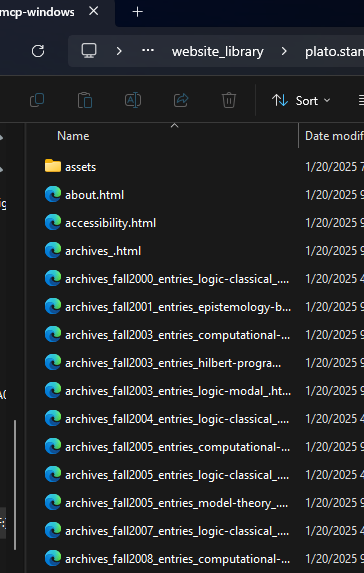
Other Usage you don't need to worry about and may be hallucinatory lol:
- Start the server:
python -m mcp_windows_website_downloader.server --library docs_library
- Use through Claude Desktop or other MCP clients:
result = await server.call_tool("download", {
    "url": "https://docs.example.com"
})
Output Structure
docs_library/
  domain_name/
    index.html
    about.html
    docs/
      getting-started.html
      ...
    assets/
      css/
      js/
      images/
      fonts/
    rag_index.json
Development
The server follows standard MCP architecture:
src/
  mcp_windows_website_downloader/
    __init__.py
    server.py    # MCP server implementation
    core.py      # Core downloader functionality
    utils.py     # Helper utilities
Components
server.py: Main MCP server implementation that handles tool registration and requestscore.py: Core website downloading functionality with proper asset handlingutils.py: Helper utilities for file handling and URL processing
Design Principles
Single Responsibility
- Each module has one clear purpose
- Server handles MCP interface
- Core handles downloading
- Utils handles common operations
Clean Structure
- Maintains original site structure
- Organizes assets by type
- Creates clear index for RAG systems
Robust Operation
- Proper error handling
- Reasonable depth limits
- Asset download verification
- Clean URL/path processing
RAG Index
The rag_index.json file contains:
{
  "url": "https://docs.example.com",
  "domain": "docs.example.com",
  "pages": 42,
  "path": "/path/to/site"
}
Contributing
- Fork the repository
- Create a feature branch
- Make your changes
- Submit a pull request
License
MIT License - See LICENSE file
Error Handling
The server handles common issues:
- Invalid URLs
- Network errors
- Asset download failures
- Malformed HTML
- Deep recursion
- File system errors
Error responses follow the format:
{
  "status": "error",
  "error": "Detailed error message"
}
Success responses:
{
  "status": "success",
  "path": "/path/to/downloaded/site",
  "pages": 42
}
Установка Windows Website Downloader
У этого сервера нет опубликованного пакета — он собирается из исходников. Открой репозиторий и следуй инструкции в README.
▸ github.com/angrysky56/mcp-windows-website-downloaderFAQ
Windows Website Downloader MCP бесплатный?
Да, Windows Website Downloader MCP бесплатный — установка в пару кликов через Unyly без оплаты.
Нужен ли API-ключ для Windows Website Downloader?
Нет, Windows Website Downloader работает без API-ключей и переменных окружения.
Windows Website Downloader — hosted или self-hosted?
Self-hosted: сервер запускается локально на твоей машине командой из раздела установки.
Как установить Windows Website Downloader в Claude Desktop, Claude Code или Cursor?
Открой Windows Website Downloader на unyly.org, выбери вкладку своего клиента (Claude Desktop, Claude Code, Cursor) и нажми Install — конфиг сгенерируется автоматически, без правки JSON.
Похожие MCP
Opencode Omniroute Plugin
OpenCode plugin for the OmniRoute AI Gateway. Drives dynamic model discovery, /connect auth flow, and multi-instance OmniRoute providers via the official @openc
 автор: GitHub Actions
Roblox Studio
Enables AI coding tools to control Roblox Studio for workspace exploration, instance manipulation, and script management. It provides tools for playtesting, sce
 автор: paralov
Antigravity Drawio
MCP server that enables AI assistants to create, parse, render, and validate Draw.io diagrams programmatically.
 автор: S-SUJAN-S
Fetch
Web content fetching and conversion for efficient LLM usage.
Mcp
ModelContextProtocol server for enhancing JSON Resumes
 автор: mcpflow.io
Vault
Bitwarden/Vaultwarden MCP server — BYOK vault access with 6 tools, Send-based reveal, TOTP, and safe agent-write
 автор: agbergsmann
AWS KB Retrieval
Retrieval from AWS Knowledge Base using Bedrock Agent Runtime.
 автор: modelcontextprotocol
Spring AI MCP Server
Provides auto-configuration for setting up an MCP server in Spring Boot applications.
llm-analysis-assistant
A very streamlined mcp client that supports calling and monitoring stdio/sse/streamableHttp, and can also view request responses through the /logs page. It also
 автор: xuzexin-hz
MCP-Agent
A simple, composable framework to build agents using Model Context Protocol by [LastMile AI](https://www.lastmileai.dev)
 автор: lastmile-ai
Compare Windows Website Downloader with
Не уверен что выбрать?
Найди свой стек за 60 секунд
Автор?
Embed-бейдж для README
Похожее
Все в категории ai