
WinWright
БесплатноНе проверенcivyk-winwright is a Playwright-style MCP server for Windows desktop and browser automation. It provides 59 tools for controlling WPF, WinForms, Win32 apps, and

Описание
civyk-winwright is a Playwright-style MCP server for Windows desktop and browser automation. It provides 59 tools for controlling WPF, WinForms, Win32 apps, and Chrome/Edge via the Model Context Protocol. A unified automation layer connecting Claude and MCP-compatible agents to native Windows UI and web interfaces.
README
GitHub Release License Platform MCP
Windows automation server for the Model Context Protocol.
52 consolidated tools for desktop (WPF, WinForms, Win32), browser (Chrome/Edge via CDP),
and system management — accessible to AI agents over MCP, or driven directly from the
command line (winwright call …) when MCP is blocked.
Describe tests in plain English — the AI agent does the rest
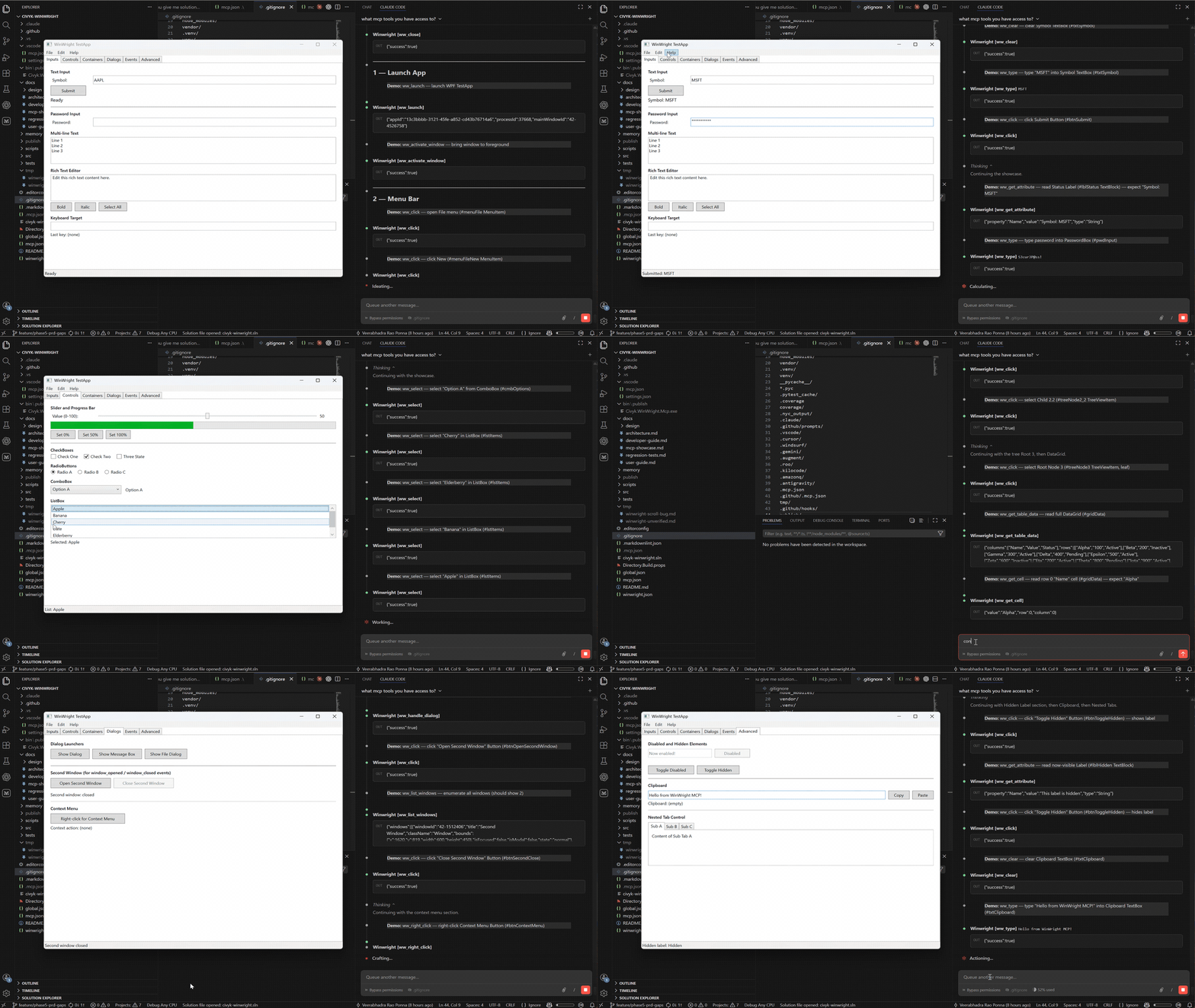
You write test cases in plain English. The AI agent uses WinWright's MCP tools to discover UI controls, perform actions, and record everything as a portable JSON script.
Replay recorded scripts — no AI agent needed
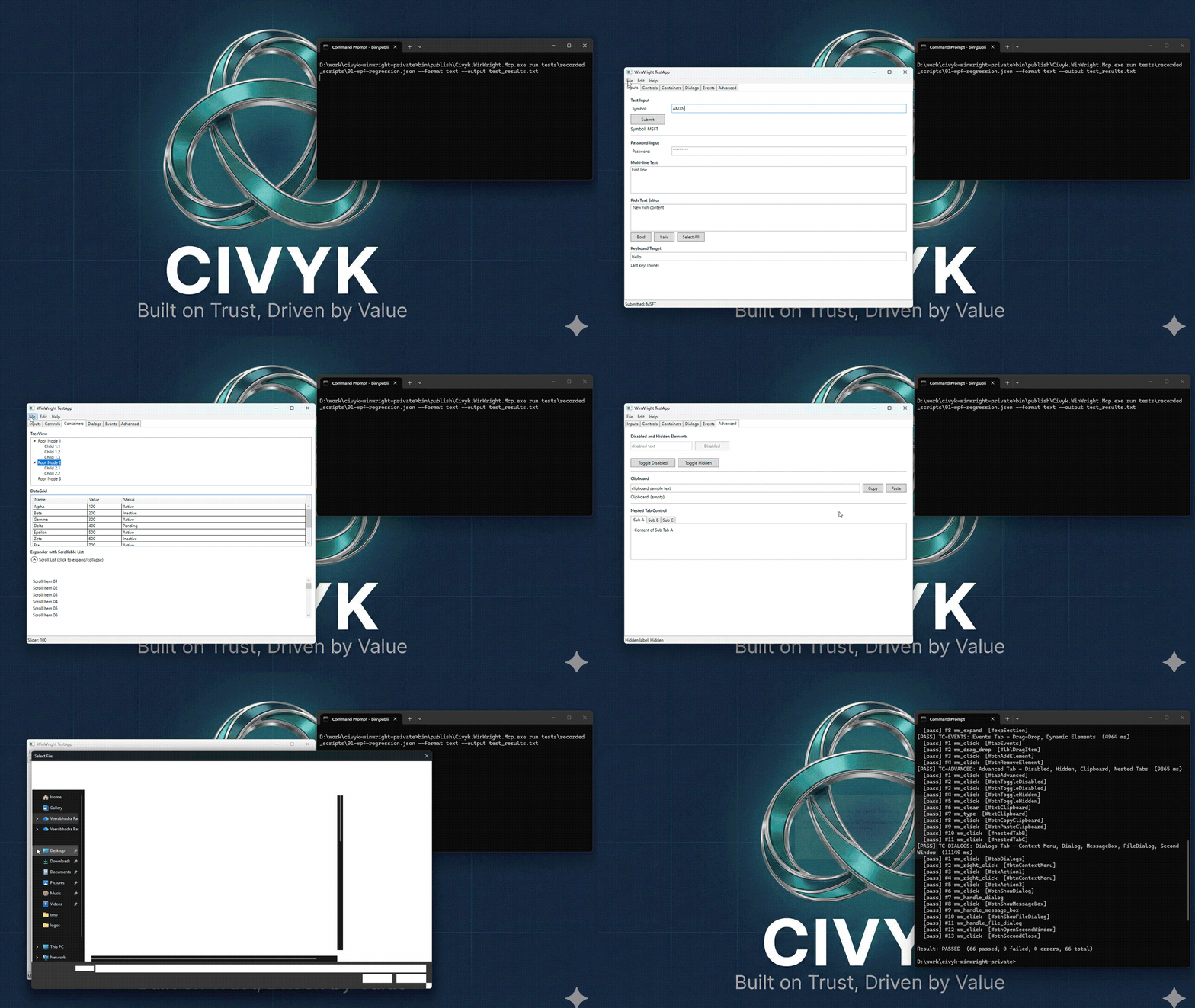
Once recorded, scripts run deterministically with winwright run — no AI agent,
no LLM calls, no token costs. Results are the same every time.
If the UI layout changes, WinWright can self-heal broken selectors automatically
(winwright heal). For larger UI redesigns, ask the AI agent to update the script —
still faster than rewriting tests from scratch.
Why this matters:
- Save AI costs — the agent records once, scripts replay for free
- Deterministic results — every run produces identical, reproducible outcomes
- Easy maintenance — self-healing selectors and AI-assisted script repair
Contents
- Quick Start
- Install
- MCP Client Configuration
- CLI Mode (when MCP is blocked)
- Use Cases
- Tools
- Configuration
- Who Is This For
- How It Compares
- Support
- License
Quick Start
Install, configure your MCP client, then ask the agent to do something:
"Launch Notepad, type 'Hello from WinWright', then read back what you typed."
The agent calls WinWright tools and returns results:
ww_launch    → { "processId": 12840, "mainWindowTitle": "Untitled - Notepad" }
ww_type      → { "success": true }
ww_get_value → { "value": "Hello from WinWright" }
Every tool returns structured JSON. The agent decides which tools to call and in what order — you describe the goal in plain language.
Install
Download from GitHub Releases:
| Asset | Architecture |
|---|---|
winwright-*-win-x64.zip |
Intel/AMD 64-bit |
winwright-*-win-arm64.zip |
ARM64 (Surface Pro, etc.) |
MCP Client Configuration
Claude Code / VSCode (stdio)
{
  "servers": {
    "winwright": {
      "type": "stdio",
      "command": "C:/path/to/Civyk.WinWright.Mcp.exe",
      "args": ["mcp"]
    }
  }
}
Claude Code / VSCode (HTTP)
Start the server first: Civyk.WinWright.Mcp.exe serve --port 8765
{
  "servers": {
    "winwright": {
      "type": "http",
      "url": "http://localhost:8765/mcp"
    }
  }
}
Claude Desktop
{
  "mcpServers": {
    "winwright": {
      "command": "C:/path/to/Civyk.WinWright.Mcp.exe",
      "args": ["mcp"]
    }
  }
}
CLI Mode (when MCP is blocked)
Many corporate environments block MCP. WinWright can be driven entirely from the command line
instead — the same tools, the same automation, with no MCP client between the agent and the
tool. A background daemon (a loopback serve instance) owns the live sessions, so the appId
returned by ww_launch stays valid across separate commands.
winwright tools                          # discover the tool surface (replaces MCP advertisement)
winwright call ww_launch --exePath "C:\Apps\MyApp.exe"   # -> {"appId":"app-1", ...}
winwright call ww_click  --appId app-1 --selector "#submit"
winwright call ww_get_value --appId app-1 --selector "#status"
winwright call ww_close  --appId app-1
JSON results go to stdout (safe to pipe to jq); diagnostics go to stderr. The daemon auto-starts
on the first call, binds to loopback only, and self-exits when idle.
Because the CLI doesn't advertise its capabilities the way MCP does, install the bundled Claude Code skill so an agent knows how to use it — embedded in the binary, so it installs offline:
winwright skills install --scope user      # -> %USERPROFILE%\.claude\skills\winwright\
winwright skills install --scope project   # -> <cwd>\.claude\skills\winwright\
Use Cases
Each card links to a detailed walkthrough with real prompts, tool call parameters, and example output. Browse all guides in docs/use-cases/.
Scripted UI Test Automation for CI
Record an AI session once — the agent discovers the UI, performs actions, embeds assertions — then export a portable JSON script that replays in CI without an AI agent. Describe your app or paste your existing manual test suite; the agent scripts it automatically.
Autonomous Desktop Automation
Give an AI agent access to your desktop. It launches apps, moves data between them, fills forms, and takes screenshots for verification — no scripts to write or maintain.
Legacy App Data Extraction
Many enterprise apps have no API. If Windows UI Automation can see a control, WinWright can read its value. Extract data from apps that were never built for integration.
Scripted Desktop Automation for Repeated Tasks
Record a repetitive daily workflow once. Export as an RPA script and replay on demand — no AI agent required after the recording. Ideal for report exports, data imports, and any multi-step task that runs the same way every time.
AI-Powered UI Testing
An AI agent explores your WinForms or WPF app, finds elements, and asserts state. No brittle XPath selectors to maintain — the agent adapts when UI changes.
Bulk Data Validation
Drive an app through 50+ records automatically. Compare each displayed value against a reference table and get a structured pass/fail report with discrepancy details.
Cross-App Workflows
Automate workflows that span desktop apps and browser — read from an accounting app, submit to a web portal, screenshot the confirmation.
Application Health Monitoring
Verify a running app is alive and responsive — process running, connection status showing 'Connected', service healthy. Pair with Windows Task Scheduler for scheduled checks.
Remote Administration
Manage processes, services, registry, and scheduled tasks on remote machines over HTTP. Five-layer security: IP allowlist, Windows Negotiate auth, AD group authorization, rate limiting, and per-user session limits.
Accessibility Auditing
Traverse the full UIA element tree. Check that controls have names, buttons have labels, and keyboard paths exist. The AI agent generates a compliance report.
Dialog and Modal Handling
Detect unexpected confirmation dialogs, file-save prompts, and Win32 MessageBox popups after every click. Handle or dismiss them without breaking the automation flow.
Tools
52 consolidated tools across four categories, plus a cross-cutting security layer (merged from 110+ via action/mode parameters):
| Category | Tools | What it does |
|---|---|---|
| Desktop Automation | 33 | Launch/attach/close apps, click, type, read values, screenshots, tree navigation and queries, waits, grids (ww_grid), dialogs (ww_dialog), windows (ww_window), clipboard, session handles (UIA3) |
| System | 8 | Processes, registry, environment variables, file system, network, services, scheduled tasks, machine control |
| AI Agent | 7 | Semantic snapshots & state diffing (ww_snapshot), element inspection (ww_inspect), event watching, test case recording, selector healing (ww_heal_script), ww_get_schema for tool discovery |
| Browser | 4 | Chrome/Edge via CDP — sessions, pages, elements, advanced (eval/forms/dialogs). No Selenium dependency |
| Security | — | Cross-cutting: runtime permission guards with AD group overrides, JSONL audit logging |
Each tool supports multiple actions via an action parameter (e.g., ww_service(action="list"), ww_snapshot(action="get")), reducing the total tool count while maintaining full functionality. Discover the live surface anytime with winwright tools.
Configuration
Create winwright.json next to the binary (or %APPDATA%\WinWright\winwright.json).
All settings live under a top-level WinWright section:
{
  "WinWright": {
    "Permissions": {
      "AllowShell": false,
      "AllowProcessKill": false,
      "AllowRegistryWrite": false,
      "AllowFileWrite": false,
      "AllowServiceControl": false,
      "AllowTaskScheduler": false,
      "AllowPower": false,
      "AllowLockScreen": false,
      "AllowMachineEnv": false,
      "AllowBrowserEval": false,
      "AllowNetworkProbe": true,
      "AllowFileRead": true
    },
    "Audit": {
      "Enabled": true,
      "RetentionDays": 30
    }
  }
}
All destructive operations are disabled by default — enable only what you need.
AllowNetworkProbe (ping/DNS) and AllowFileRead (ww_file read/list) are the only
default-true permissions; both are read-only, and worth setting to false when serving
over HTTP to remote clients. Gated calls are audit-logged to daily-rotated
audit-YYYY-MM-DD.jsonl files.
CLI
winwright mcp                                    Start MCP server (stdio)
winwright serve --port N                         Start MCP server (HTTP, default 8765)
winwright tools [--json|<name>]                  List the tool surface (CLI discovery; no MCP client needed)
winwright call <tool> [--param value …]          Invoke one tool via the local daemon (CLI automation)
winwright daemon <start|stop|status>             Control the background host that owns CLI sessions
winwright skills <install|list|uninstall>        Install the bundled Claude Code skill (offline)
winwright run <script.json> [--format text|junit] [--output <file>] [--screenshots [--screenshots-dir <dir>]]
                                                 Replay a recorded automation script
winwright heal <script.json> [--output <file>] [--min-confidence <0-1>]
                                                 Probe broken selectors against a live UI and repair them
                                                 (launches/attaches using the script's own metadata)
winwright inspect <pid>                          Dump UIA element tree for a process
winwright doctor                                 Verify environment prerequisites
Requirements
- Windows 10 or 11 (x64 or ARM64)
- No .NET runtime needed for the binary download — it's self-contained
Who Is This For
Good fit:
- QA engineers testing WinForms, WPF, or Win32 apps who want AI-assisted test creation
- Developers building AI agents that need to interact with the Windows desktop
- Teams extracting data from legacy enterprise apps that have no API
- Anyone automating repetitive multi-app workflows on Windows
Not a good fit:
- Linux or macOS automation — WinWright is Windows-only (UIA is a Windows API)
- Web-only testing — use Playwright instead; WinWright's browser tools are for mixed desktop+browser workflows
- High-throughput data pipelines — UIA reads controls one at a time; if you need bulk data transfer, a proper API or database connection is better
How It Compares
| WinWright | UiPath | Power Automate Desktop | Playwright | |
|---|---|---|---|---|
| What it automates | Desktop + browser + system | Desktop + browser + system | Desktop + browser + cloud | Browser only |
| How you use it | AI agent via MCP (natural language) | Visual workflow designer | Visual workflow designer | Code (JS/Python/C#) |
| Desktop support | WPF, WinForms, Win32 (UIA3) | WPF, WinForms, Win32, Java, SAP | WPF, WinForms, Win32 | None |
| Browser support | Chrome/Edge via CDP | Chrome, Edge, Firefox | Chrome, Edge, Firefox | Chrome, Edge, Firefox, Safari |
| Selector model | AI picks elements by name/type | Visual selector recorder | Visual selector recorder | CSS/XPath selectors |
| Cost | Free | Licensed (per-user/bot) | Free (desktop), licensed (cloud) | Free |
| Setup | Single binary, no runtime | Full install + studio | Windows store app | npm install |
| Designed for | AI agents and MCP clients | Enterprise RPA | Business user automation | Developer testing |
WinWright is not an RPA platform. It's a tool server that gives AI agents access to Windows. If you need a visual workflow builder or enterprise orchestration, UiPath or Power Automate are better choices. If you need browser-only testing, Playwright is more mature.
WinWright fits where those tools don't — when an AI agent needs to see and operate the Windows desktop, or when you need desktop + browser in one MCP session.
Support
Help keep this project alive and growing!
If WinWright has helped your development workflow, consider supporting its continued development. Your contribution helps with:
- Ongoing maintenance and bug fixes
- New feature development
- Infrastructure costs
50% of all donations go directly to children's charities helping those in need. The remaining funds support project maintenance and feature upgrades.
Every contribution, no matter the size, makes a difference.
- Issues: GitHub Issues
- Changelog: GitHub Releases
License
Free to use for any purpose — personal, academic, commercial. See LICENSE for full terms. Attribution required when redistributing.
Built on Trust, Driven by Value — Civyk
Установка WinWright
У этого сервера нет опубликованного пакета — он собирается из исходников. Открой репозиторий и следуй инструкции в README.
▸ github.com/civyk-official/civyk-winwrightFAQ
WinWright MCP бесплатный?
Да, WinWright MCP бесплатный — установка в пару кликов через Unyly без оплаты.
Нужен ли API-ключ для WinWright?
Нет, WinWright работает без API-ключей и переменных окружения.
WinWright — hosted или self-hosted?
Self-hosted: сервер запускается локально на твоей машине командой из раздела установки.
Как установить WinWright в Claude Desktop, Claude Code или Cursor?
Открой WinWright на unyly.org, выбери вкладку своего клиента (Claude Desktop, Claude Code, Cursor) и нажми Install — конфиг сгенерируется автоматически, без правки JSON.
Похожие MCP
LibreOffice Tools
Enables AI agents to read, write, and edit Office documents via LibreOffice with token-efficient design. Supports multiple formats including DOCX, XLSX, PPTX, a
 автор: passerbyflutter
dannote/figma-use
Full Figma control: create shapes, text, components, set styles, auto-layout, variables, export. 80+ tools.
 автор: dannote
Logo.dev
Search and retrieve company logos by brand or domain. Customize size, format, and theme to match your design needs. Accelerate design, prototyping, and content
 автор: NOVA-3951
Design Inspiration Server
Searches top design platforms like Dribbble and Behance to provide UI inspiration, color palettes, and layout patterns via the Serper API. It allows users to re
 автор: YonasValentin
PIX4Dmatic
Enables GUI automation for controlling PIX4Dmatic on Windows through MCP. Supports launching, focusing, capturing screenshots, sending hotkeys, clicking UI elem
 автор: jangjo123
Figma
Extract design specs and assets
 автор: Figma
mcp-dockmaster
An Open-Sourced UI to install and manage MCP servers for Windows, Linux and macOS.
ariekogan/ateam-mcp
Build, validate, and deploy multi-agent AI solutions on the ADAS platform. Design skills with tools, manage solution lifecycle, and connect from any AI environm
 автор: ariekogan
thinkchainai/mcpbundles
MCP Bundles: Create custom bundles of tools and connect providers with OAuth or API keys. Use one MCP server across thousands of integrations, with programmatic
 автор: thinkchainai
arikusi/nakkas
MCP server that turns AI into an SVG artist. One rendering engine with JSON config, AI controls all design parameters. CSS @keyframes + SMIL animations, 16+ ele
 автор: arikusi
Compare WinWright with
Не уверен что выбрать?
Найди свой стек за 60 секунд
Автор?
Embed-бейдж для README
Похожее
Все в категории design