
Wquestions
БесплатноНе проверенLets you model any domain (spa, barbershop, clinic, etc.) using 7 fixed axes and query it via natural language, with no per-domain schema required.

Описание
Lets you model any domain (spa, barbershop, clinic, etc.) using 7 fixed axes and query it via natural language, with no per-domain schema required.
README
Model any domain in 7 questions.
An MCP server that lets Claude Desktop (or any MCP client) build and query a knowledge model of anything — a spa, a barbershop, a clinic, a bank — using one fixed set of tools. No per-domain schema to write, ever.
The problem
Every domain today gets its own bespoke ontology or database schema: a CRM schema for sales, a clinical model for a clinic, a different one again for a bank or a taxi dispatcher. None of it transfers between domains, and none of it was designed for an LLM to reason over — each new domain means new modeling work before an AI can even start answering questions about it.
WQuestions replaces all of that with a single fixed index: 7 axes that any fact, in any domain, answers. Model a domain by asserting facts on those 7 axes; query it the same way no matter what the domain is.
The 7 axes
| Axis | Question | Holds |
|---|---|---|
| Q | who | agents |
| O | what | objects, and reified situations (facts treated as things) |
| L | where | places |
| T | when | time points and intervals |
| N | how much | magnitudes with a unit |
| K | which / what kind | atemporal categories, types, states |
| M | how | the predicates that connect Q/O/L/T/N/K to each other — structural, not a value axis |
Quickstart
Add this to your Claude Desktop config (claude_desktop_config.json) and
restart Claude Desktop:
{
  "mcpServers": {
    "wquestions": {
      "command": "uvx",
      "args": ["wquestions-mcp"]
    }
  }
}
Prefer to run from source? Clone this repo and, from the repo root,
pip install -e . into a virtualenv (the engine is bundled — no other
package needed). Then point command/args at that venv's wquestions-mcp
script (e.g. command: ".../.venv/bin/wquestions-mcp", args: []) instead
of uvx.
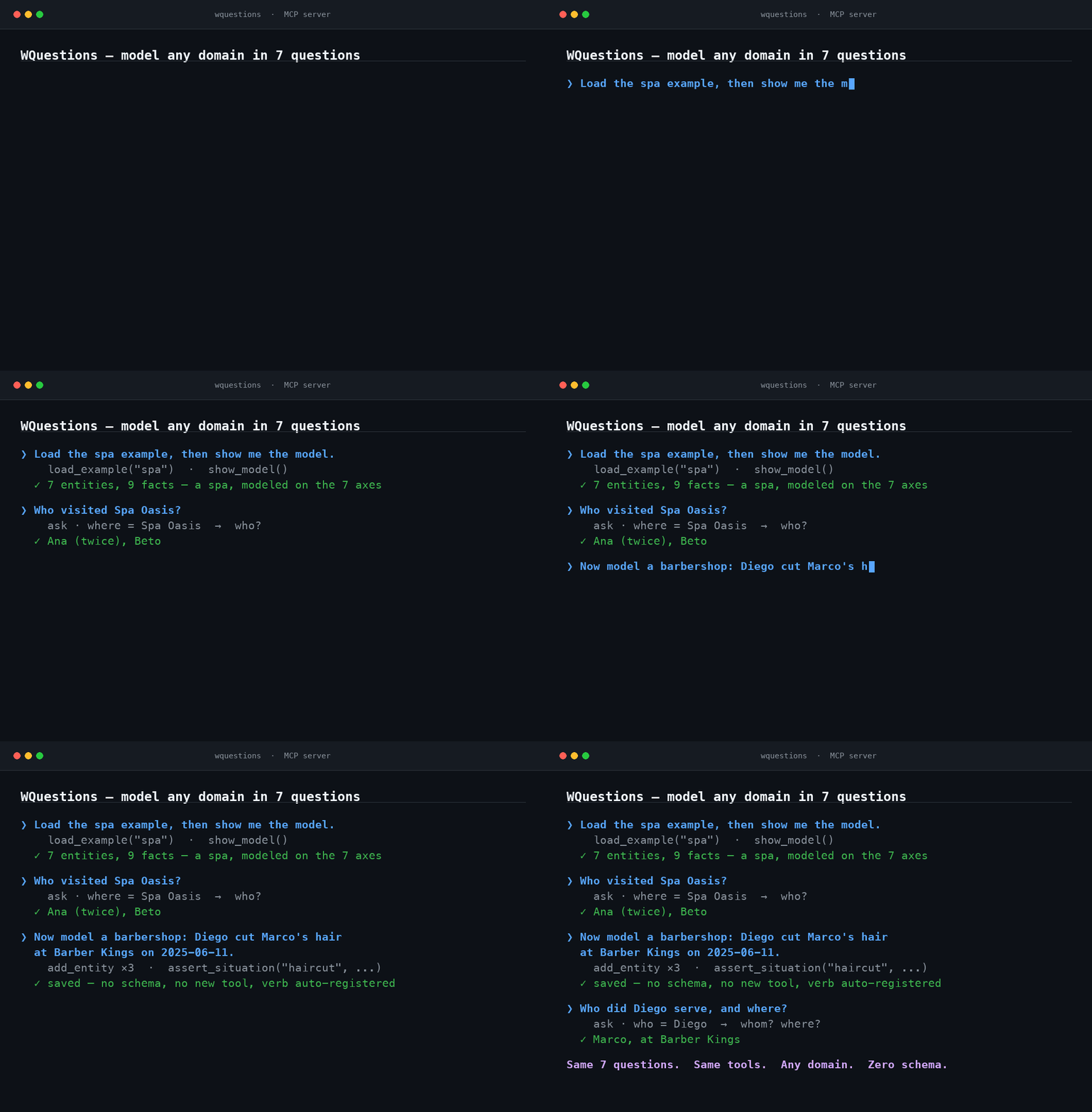
Then ask Claude: "Load the spa example, then show me the model." See DEMO.md for the full 30-second walkthrough.
Tools
| Tool | Does |
|---|---|
list_axes |
Describe the 7 axes |
list_roles |
List canonical roles (who/what/where/... connectors), typed by domain and range |
add_entity |
Create an individual on a value axis (Q, O, L, T, N, K); for the N axis pass value + unit (a K entity id or inline spec) — a magnitude without a unit is rejected |
define_verb |
Register a situation type and its roles — optional, assert_situation auto-registers unknown verbs |
assert_situation |
Assert a fact: reify a situation and attach its roles |
correct |
Correct/update a role on an existing situation by re-asserting it (append-only; ask returns the latest, history=true shows the trail) |
ask |
Query by projection — fix some roles, ask for others, optionally as of a point in time; pass history=true for the full time-ordered trail instead of just the current value |
show_model |
Dump the current universe: every entity and fact |
load_example |
Load a prebuilt demo universe (spa) to try queries instantly |
reset |
Clear the model and start a fresh universe |
How it works
The LLM client does the natural-language-to-structure step: it reads "Diego
cut Marco's hair at Barber Kings on 2025-06-11" and turns it into
role-labeled arguments (agente: diego, paciente: marco, lugar_de: barber_kings). The server never parses English — it takes those roles,
validates them against the 7-axis model, and runs ingest and query over the
wq engine. Same engine, same 10 tools, whether the domain behind them is a
spa or a barbershop.
Persistence
By default the server persists your universe to an append-only log and reloads on restart, so a modeled domain survives across sessions — you never rebuild by hand. Nothing is ever overwritten; corrections are appended and the log is the source of truth.
- Default location:
~/.wquestions/universe.jsonl. - Choose a file: set
WQUESTIONS_LOG=/path/to/domain.jsonl. Point each domain at its own file (e.g. one per MCP server entry in your client config) — a single log holds one live universe at a time (aresetstarts a fresh domain within it). - Turn it off (pure in-memory):
WQUESTIONS_LOG=off.
show_model reports the active log path and how many events were replayed, so
you can confirm persistence is on.
Further reading
The 7-axis model — why it's fixed, what each axis actually commits to, and how it holds up once you push on it — is worked out in full in WQuestions, the book this project comes from (Spanish). Start with Chapter 8, El espacio multidimensional for the axis model itself, or the table of contents.
Установка Wquestions
У этого сервера нет опубликованного пакета — он собирается из исходников. Открой репозиторий и следуй инструкции в README.
▸ github.com/joseabantomarin/wquestions-mcpFAQ
Wquestions MCP бесплатный?
Да, Wquestions MCP бесплатный — установка в пару кликов через Unyly без оплаты.
Нужен ли API-ключ для Wquestions?
Нет, Wquestions работает без API-ключей и переменных окружения.
Wquestions — hosted или self-hosted?
Доступен hosted-вариант: Unyly запускает сервер в облаке, локальная установка не обязательна.
Как установить Wquestions в Claude Desktop, Claude Code или Cursor?
Открой Wquestions на unyly.org, выбери вкладку своего клиента (Claude Desktop, Claude Code, Cursor) и нажми Install — конфиг сгенерируется автоматически, без правки JSON.
Похожие MCP
GitHub
PRs, issues, code search, CI status
 автор: GitHub
Filesystem
Secure file operations with configurable access controls.
Memory
Knowledge graph-based persistent memory system.
Template MCP Server
A CLI tool to create a new Model Context Protocol server project with TypeScript support, dual transport options, and an extensible structure
 автор: mcpdotdirect
Compare Wquestions with
Не уверен что выбрать?
Найди свой стек за 60 секунд
Автор?
Embed-бейдж для README
Похожее
Все в категории development