
Yougile
БесплатноНе проверенMCP server for YouGile project management. Provides 57 tools covering 100% of YouGile API v2, enabling natural language management of projects, boards, columns,

Описание
MCP server for YouGile project management. Provides 57 tools covering 100% of YouGile API v2, enabling natural language management of projects, boards, columns, tasks, chats, users, and more.
README
npm version License: MIT TypeScript Node.js
MCP server for YouGile project management. 57 tools covering 100% of YouGile API v2.
Works with Claude, ChatGPT, Gemini CLI, VS Code, Cursor, and any MCP-compatible client.
README on Russian / README на русском
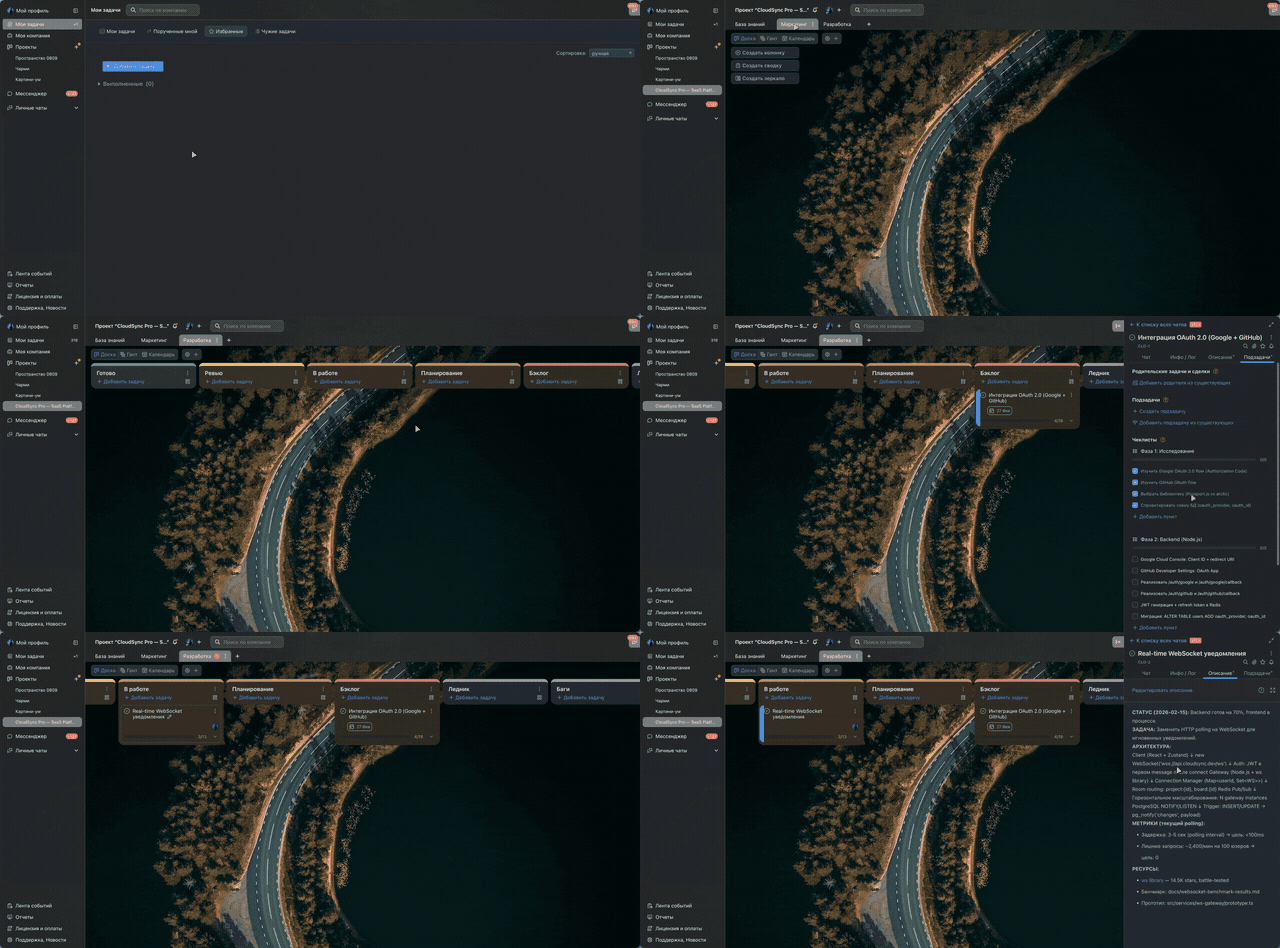
AI agent creates project, boards, columns, and tasks with rich descriptions — all via MCP
Quick Start
Auto-setup (recommended)
npx @nebelov/yougile-mcp --setup
Logs you into YouGile, gets an API key, and writes the config for your AI tool.
Manual setup
- Get an API key from YouGile (Settings > API or
POST /auth/keys) - Add to your AI tool config:
Claude Code (~/.claude.json):
{
  "mcpServers": {
    "yougile": {
      "command": "npx",
      "args": ["-y", "@nebelov/yougile-mcp"],
      "env": { "YOUGILE_API_KEY": "your-key" }
    }
  }
}
Claude Desktop (claude_desktop_config.json):
{
  "mcpServers": {
    "yougile": {
      "command": "npx",
      "args": ["-y", "@nebelov/yougile-mcp"],
      "env": { "YOUGILE_API_KEY": "your-key" }
    }
  }
}
Gemini CLI (~/.gemini/settings.json):
{
  "mcpServers": {
    "yougile": {
      "command": "npx",
      "args": ["-y", "@nebelov/yougile-mcp"],
      "env": { "YOUGILE_API_KEY": "your-key" }
    }
  }
}
VS Code (.vscode/mcp.json):
{
  "mcpServers": {
    "yougile": {
      "command": "npx",
      "args": ["-y", "@nebelov/yougile-mcp"],
      "env": { "YOUGILE_API_KEY": "your-key" }
    }
  }
}
ChatGPT Setup
Option A: Hosted (recommended)
Use the hosted server at you-mcp.com — no installation needed.
In ChatGPT (web):
- Settings > Apps & Connectors > Advanced > Developer Mode ON
- Click Create > paste
https://you-mcp.com/mcp> Save - Open any chat > click + > More > Developer Mode > enable your connector
- ChatGPT will redirect you to login with your YouGile email and password
- Your credentials go directly to YouGile's API (zero-knowledge proxy — the server never sees your password)
Option B: Self-hosted (ngrok)
Requires ngrok (free).
Step 1. Start the server with HTTP transport:
YOUGILE_API_KEY=your-key npx @nebelov/yougile-mcp --http --port 3000
Step 2. In a second terminal, create an HTTPS tunnel:
ngrok http 3000
Copy the https://...ngrok-free.app URL from ngrok output.
Step 3. In ChatGPT (web):
- Settings > Apps & Connectors > Advanced > Developer Mode ON
- Click Create > paste
https://YOUR-URL.ngrok-free.app/mcp> Save - Open any chat > click + > More > Developer Mode > enable your connector
Available Tools (57)
| Module | Tools | Description |
|---|---|---|
| projects | 4 | list, get, create, update |
| boards | 4 | list, get, create, update |
| columns | 4 | list, get, create, update |
| tasks | 6 | list, get, create, update, get/set chat-subscribers |
| chat | 8 | messages (list, send, get, delete) + group chats (list, get, create, update) |
| users | 5 | list, get, invite, update, delete |
| company | 2 | get, update |
| departments | 4 | list, get, create, update |
| project-roles | 5 | list, get, create, update, delete |
| string-stickers | 6 | CRUD + create/update state |
| sprint-stickers | 6 | CRUD + create/update state |
| webhooks | 3 | list, create, update |
Bundled Skill
The package includes skill/SKILL.md — a best-practices guide for working with YouGile through AI. Copy it to your project or Claude Code skills directory for better task management.
API Patterns
- Soft delete:
PUT {deleted: true}works for all entities.DELETEmethod only works for project roles. - Pagination:
{paging: {count, limit, offset, next}, content: [...]}. Exception:/webhooksreturns raw array. - Sticker fields: Use
name(nottitle) for stickers and states. - Task assigned: Array of UUIDs
["uuid1", "uuid2"], not an object. - Chat messages:
PUTonly supports{deleted: true}— editing text is not possible. - State IDs: 12-char hex strings (not UUID).
Environment Variables
| Variable | Required | Description |
|---|---|---|
YOUGILE_API_KEY |
Yes | YouGile API key |
YOUGILE_API_HOST_URL |
No | Custom API URL (default: https://yougile.com/api-v2) |
Development
git clone https://github.com/nebelov/yougile-mcp
cd yougile-mcp
npm install
npm run dev
License
MIT
Установка Yougile
У этого сервера нет опубликованного пакета — он собирается из исходников. Открой репозиторий и следуй инструкции в README.
▸ github.com/nebelov/yougile-mcpFAQ
Yougile MCP бесплатный?
Да, Yougile MCP бесплатный — установка в пару кликов через Unyly без оплаты.
Нужен ли API-ключ для Yougile?
Нет, Yougile работает без API-ключей и переменных окружения.
Yougile — hosted или self-hosted?
Self-hosted: сервер запускается локально на твоей машине командой из раздела установки.
Как установить Yougile в Claude Desktop, Claude Code или Cursor?
Открой Yougile на unyly.org, выбери вкладку своего клиента (Claude Desktop, Claude Code, Cursor) и нажми Install — конфиг сгенерируется автоматически, без правки JSON.
Похожие MCP
GitHub
PRs, issues, code search, CI status
 автор: GitHub
Filesystem
Secure file operations with configurable access controls.
Memory
Knowledge graph-based persistent memory system.
Template MCP Server
A CLI tool to create a new Model Context Protocol server project with TypeScript support, dual transport options, and an extensible structure
 автор: mcpdotdirect
Compare Yougile with
Не уверен что выбрать?
Найди свой стек за 60 секунд
Автор?
Embed-бейдж для README
Похожее
Все в категории development