
Yt Analytics
БесплатноНе проверенMCP server for YouTube channel deep analytics, extracting transcripts and computing quantitative metrics like WPM, profanity, and humor taxonomy, with multi-cre

Описание
MCP server for YouTube channel deep analytics, extracting transcripts and computing quantitative metrics like WPM, profanity, and humor taxonomy, with multi-creator comparison dashboards.
README
MCP server for YouTube channel deep analytics. Extracts transcripts, computes quantitative metrics (WPM, profanity, humor taxonomy, rhetoric fingerprint, title formula, posting schedule), and generates multi-creator comparison dashboards.
Tools
| Tool | Description |
|---|---|
yt_analyze_channel |
Analyze a channel: download transcripts, compute metrics, cache results |
yt_list_analyses |
List all cached channel analyses |
yt_get_analysis |
Retrieve full cached analysis JSON for a channel |
yt_remove_analysis |
Remove a cached analysis |
yt_compare_creators |
Build a tabbed HTML comparison dashboard from cached analyses |
Quick Start
# Install
cd yt-analytics-mcp
npm install

# Add to Claude Code settings
# ~/.claude/settings.json → mcpServers
Claude Code Config
{
  "mcpServers": {
    "yt-analytics": {
      "command": "node",
      "args": ["/path/to/yt-analytics-mcp/src/index.js"],
      "env": {
        "YT_ANALYTICS_DATA": "/path/to/yt-analytics-mcp/data"
      }
    }
  }
}
Usage
Analyze a single channel
Analyze @BennJordan's channel (20 videos, tech niche)
→ calls yt_analyze_channel with channel="@BennJordan", limit=20, niche="tech"
Returns structured JSON with per-video and aggregate metrics:
- WPM (words per minute) with niche baseline comparison
- Profanity density per minute
- Humor taxonomy (crude, self-deprecating, confrontational, hyperbolic, absurd)
- Rhetoric fingerprint (connector word frequencies: but, so, because, if you, etc.)
- Title formula (CAPS usage, exclamation marks, parentheticals)
- Posting schedule (day-of-week distribution, monthly activity, cadence gaps)
Build a comparison dashboard
Compare all analyzed channels in a tabbed dashboard
→ calls yt_compare_creators
Generates a self-contained HTML file with:
- Sticky tab bar for switching between creators
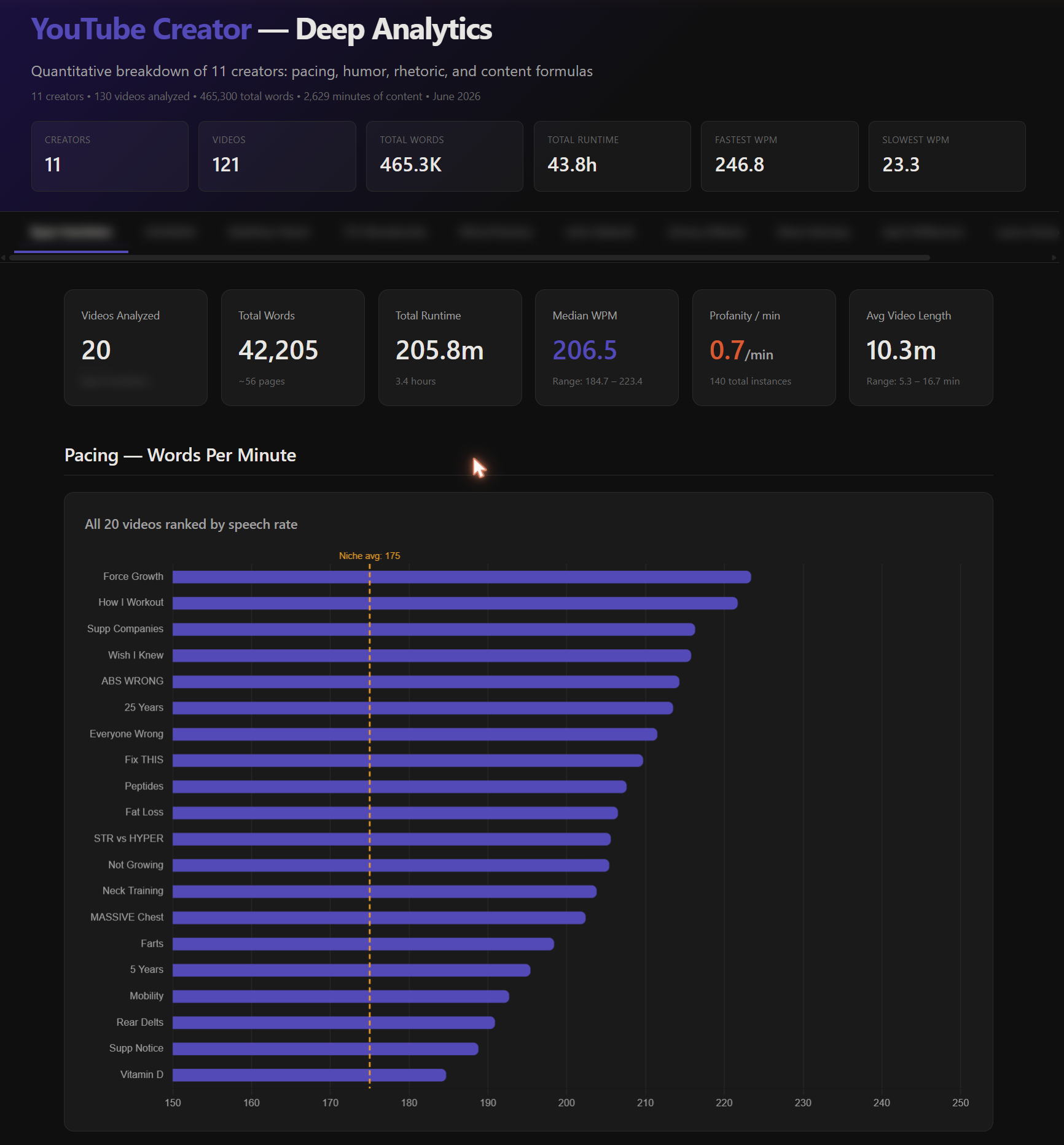
- KPI cards (videos, words, runtime, median WPM, profanity, avg length)
- WPM horizontal bar chart with niche average line
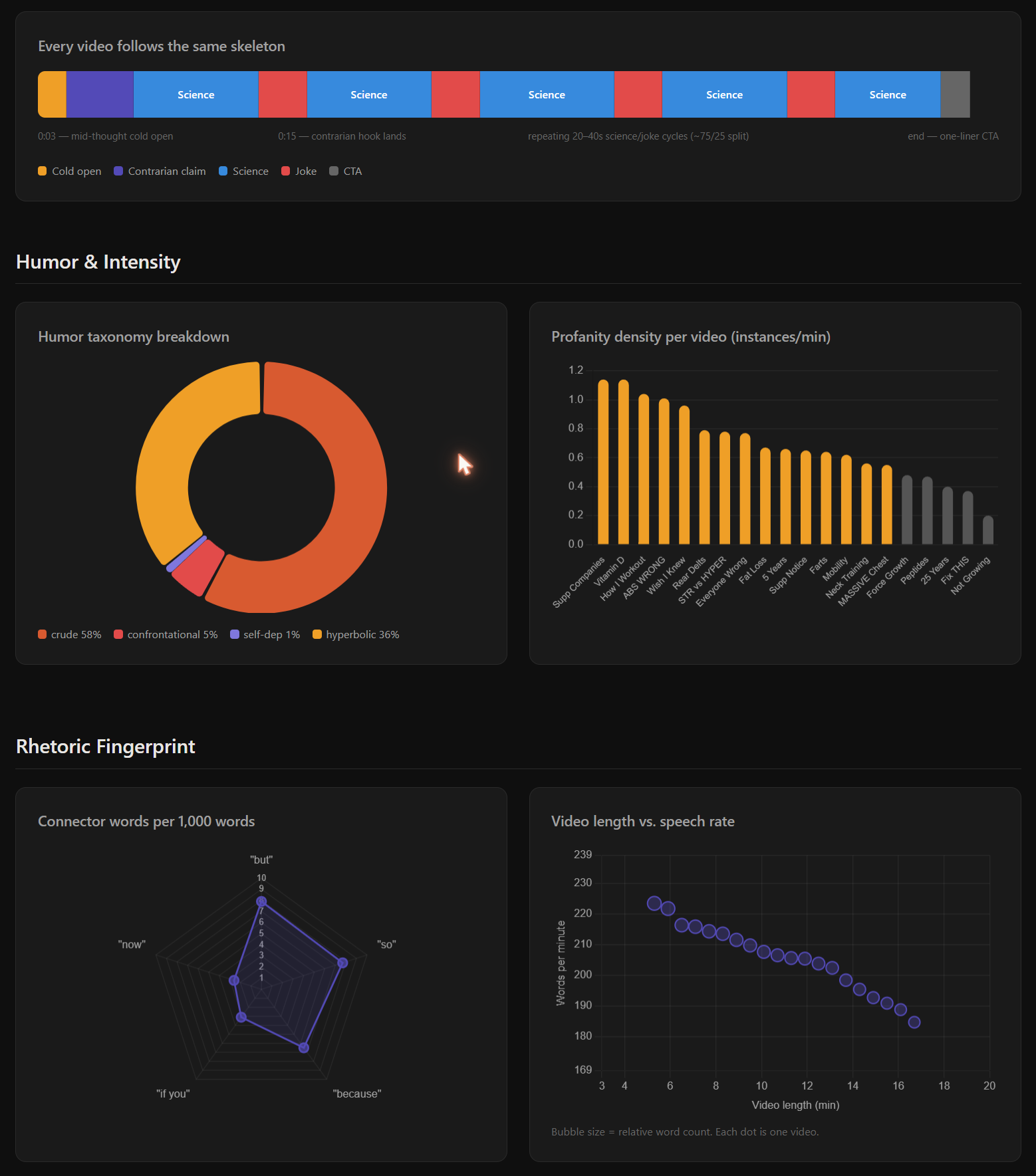
- Video structure timeline
- Humor taxonomy doughnut chart
- Profanity density bar chart
- Rhetoric radar chart
- Video length vs. speech rate bubble chart
- Posting schedule — day-of-week bar chart, monthly activity line chart, cadence stats
- Title formula badges
- Opening line pattern breakdown
- Connector language grid
- Per-video data table
- Written analysis
Workflow
1. yt_analyze_channel → analyze @Creator1 (cached)
2. yt_analyze_channel → analyze @Creator2 (cached)
3. yt_analyze_channel → analyze @Creator3 (cached)
4. yt_compare_creators → build tabbed dashboard from all cached analyses
The companion /yt-analytics skill adds Gemini qualitative analysis on top — editing mechanics, humor quotes, video structure timelines, energy modulation — then merges with the MCP's quantitative data.
Filtering by date
Analyze @RyanHumiston — last 2 years only, 20 videos
→ yt_analyze_channel with channel="@RyanHumiston", limit=20, max_age_days=730
The --max-age-days flag filters out videos older than N days before analysis.
Niche Baselines
| Niche | Avg WPM |
|---|---|
| Fitness | ~170 |
| Tech | ~160 |
| Commentary | ~190 |
| Educational | ~150 |
| Gaming | ~180 |
| News | ~175 |
| Woodworking | ~175 |
| Music | ~165 |
Requirements
- Node.js 18+
- Python 3.10+ with
yt-dlpandyoutube-transcript-apiinstalled - No API keys needed
Data Storage
Analyses are cached as JSON files in the data/ directory (configurable via YT_ANALYTICS_DATA env var). Transcript files are stored in data/transcripts/.
Architecture
yt-analytics-mcp/
├── src/
│   └── index.js          # MCP server + HTML generator
├── scripts/
│   └── analyze_channel.py # Transcript extraction + quantitative analysis
├── docs/                  # Example screenshots
├── data/                  # Cached analyses (JSON) + transcripts
├── package.json
└── README.md
The MCP server wraps the Python analysis script and adds:
- Result caching and management
- Multi-creator comparison HTML generation
- Structured tool interfaces for Claude Code
Установка Yt Analytics
У этого сервера нет опубликованного пакета — он собирается из исходников. Открой репозиторий и следуй инструкции в README.
▸ github.com/KewkLW/yt-analytics-mcpFAQ
Yt Analytics MCP бесплатный?
Да, Yt Analytics MCP бесплатный — установка в пару кликов через Unyly без оплаты.
Нужен ли API-ключ для Yt Analytics?
Нет, Yt Analytics работает без API-ключей и переменных окружения.
Yt Analytics — hosted или self-hosted?
Self-hosted: сервер запускается локально на твоей машине командой из раздела установки.
Как установить Yt Analytics в Claude Desktop, Claude Code или Cursor?
Открой Yt Analytics на unyly.org, выбери вкладку своего клиента (Claude Desktop, Claude Code, Cursor) и нажми Install — конфиг сгенерируется автоматически, без правки JSON.
Похожие MCP
Omni Video
An MCP server that transforms LLM-enabled IDEs into professional video editors by pre-processing footage into text proxies, generating motion graphics via HTML/
 автор: buildwithtaza
ARA
Generate images, video and audio from any AI agent — one connector.
 автор: ARA
YouTube
Transcripts, channel stats, search
 автор: YouTube
EverArt
AI image generation using various models.
 автор: modelcontextprotocol
Compare Yt Analytics with
Не уверен что выбрать?
Найди свой стек за 60 секунд
Автор?
Embed-бейдж для README
Похожее
Все в категории media