
Zaragoza Tram
БесплатноНе проверенProvides real-time tram arrival estimations and station listings for Zaragoza's public transportation system through the DNDzgz API.

Описание
Provides real-time tram arrival estimations and station listings for Zaragoza's public transportation system through the DNDzgz API.
README
This is an MCP (Model Context Protocol) server that provides information about the Zaragoza tram system, including real-time tram arrival estimations and station information using the DNDzgz API.
Installation
- Clone the repository:
git clone https://github.com/danilat/mcp-dndzgz.git
cd mcp-dndzgz
- Install dependencies:
npm install
Running the Application
Add a the environment variable with a valid google maps api key and run it with the http transport
GOOGLE_MAPS_API_KEY=your-api-key npm start:http
The server will start you should configure yout MCP client to connect.
Or start the server using stdio trasport:
Configure in your MCP client using npx, for example:
{
    "mcpServers": {
      "dndzgz": {
        "command": "npx @dndzgz/mcp",
        "env": {
          "GOOGLE_MAPS_API_KEY": "your-api-key"
        }
      }
    }
}
The server will start and connect to the MCP server.
Available Tools
The server provides the following tools:
zaragoza-tram-estimations: Get real-time arrival estimations for a specific tram station- Parameters:
station(number): ID of the tram station
- Returns: JSON with estimated arrival times for both directions
- Parameters:
zaragoza-tram-stations: Get a list of all tram stations in Zaragoza- Parameters:
latitude(number): Latitude to sort stations by proximitylongitude(number): Longitude to sort stations by proximity
- Returns: JSON with station information including location, name, and ID
- Parameters:
zaragoza-bus-stops: Get all bus stops in Zaragoza- Parameters:
latitude(number): Latitude to sort stops by proximitylongitude(number): Longitude to sort stops by proximity
- Returns: JSON with bus stop locations, names, IDs, and lines
- Parameters:
zaragoza-bus-estimations: Get real-time arrival estimations for a specific bus stop- Parameters:
stop(number): ID of the bus stop
- Returns: JSON with estimated arrival times for each line serving that stop
- Parameters:
zaragoza-bizi-stations: Get all Bizi stations in Zaragoza (public bicycle rental service)- Parameters:
latitude(number): Latitude to sort stations by proximitylongitude(number): Longitude to sort stations by proximity
- Returns: JSON with Bizi station locations, names, and IDs
- Parameters:
zaragoza-bizi-estimations: Get real-time availability of bikes and free slots in a Bizi station- Parameters:
station(number): ID of the Bizi station
- Returns: JSON with bikes and parking slot availability
- Parameters:
google-maps-link: Get a Google Maps link for a specific location- Parameters:
latitude(number): Latitude of the locationlongitude(number): Longitude of the location
- Returns: Google Maps URL showing the specified location
- Parameters:
geolocation-from-address: Get the geolocation (latitude and longitude) from an address and the formatted address that was found- Parameters:
address(string): The address to geolocate (e.g., "Plaza de San Francisco, Zaragoza, Spain")
- Returns: JSON with latitude, longitude, confidence level, and formatted address
- Parameters:
Dependencies
- @modelcontextprotocol/sdk: ^1.9.0
Example
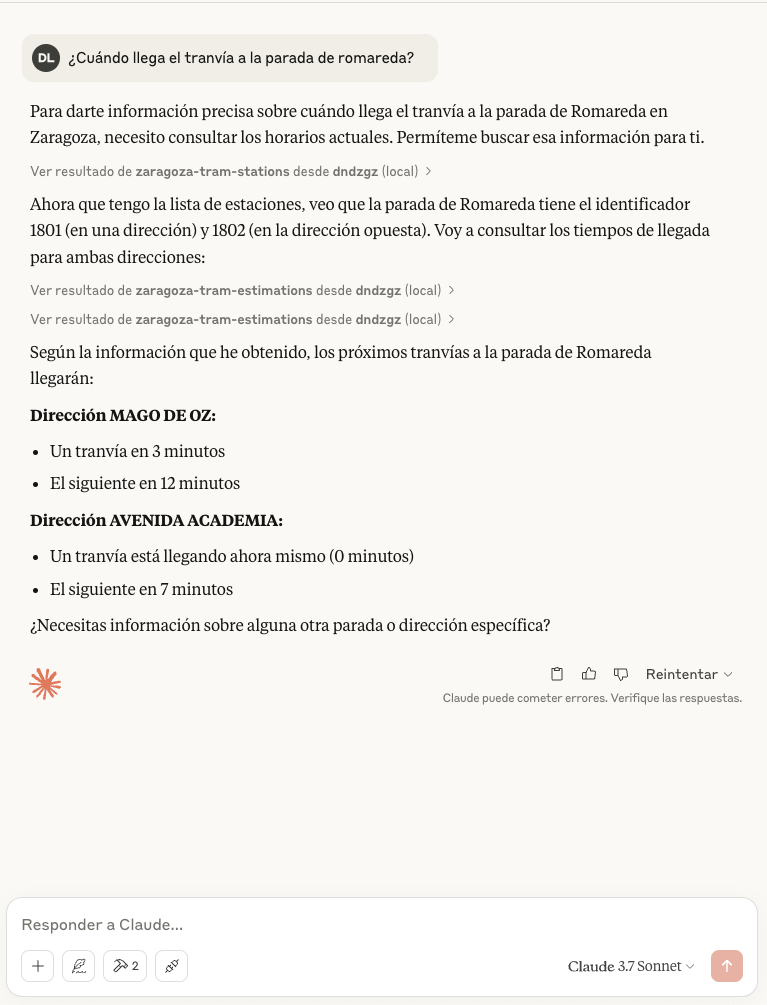
There is an screenshot with example using Claude Desktop
Установка Zaragoza Tram
У этого сервера нет опубликованного пакета — он собирается из исходников. Открой репозиторий и следуй инструкции в README.
▸ github.com/danilat/mcp-dndzgzFAQ
Zaragoza Tram MCP бесплатный?
Да, Zaragoza Tram MCP бесплатный — установка в пару кликов через Unyly без оплаты.
Нужен ли API-ключ для Zaragoza Tram?
Нет, Zaragoza Tram работает без API-ключей и переменных окружения.
Zaragoza Tram — hosted или self-hosted?
Self-hosted: сервер запускается локально на твоей машине командой из раздела установки.
Как установить Zaragoza Tram в Claude Desktop, Claude Code или Cursor?
Открой Zaragoza Tram на unyly.org, выбери вкладку своего клиента (Claude Desktop, Claude Code, Cursor) и нажми Install — конфиг сгенерируется автоматически, без правки JSON.
Похожие MCP
GitHub
PRs, issues, code search, CI status
 автор: GitHub
Filesystem
Secure file operations with configurable access controls.
Memory
Knowledge graph-based persistent memory system.
Template MCP Server
A CLI tool to create a new Model Context Protocol server project with TypeScript support, dual transport options, and an extensible structure
 автор: mcpdotdirect
Compare Zaragoza Tram with
Не уверен что выбрать?
Найди свой стек за 60 секунд
Автор?
Embed-бейдж для README
Похожее
Все в категории development