
Zephyr
БесплатноНе проверенEnables reading test cases and test steps from Zephyr Scale using the Zephyr Scale API.

Описание
Enables reading test cases and test steps from Zephyr Scale using the Zephyr Scale API.
README
Agentic test generation for eZRX+ — converts Zephyr Scale test cases into Playwright integration tests using Claude Code or Codex.
What this repo does
- Runs a Zephyr Scale MCP server to fetch test cases and steps.
- Runs a code-review-graph MCP server to index the frontend codebase for token-efficient context loading.
- Provides a
/write-integration-testcommand that Claude Code reads from.claude/commands/— no global config needed.
All generated tests are written into datasource/frontend/ (a local clone of
the frontend repo). Nothing is installed or modified in the real frontend repo.
Requirements
- Node.js 20.6 or later
- Python 3.10 or later with
code-review-graphinstalled:pip install code-review-graph - Claude Code CLI or Codex CLI
- Git Bash or WSL on Windows
Setup (first time)
1. Clone and enter the repo
git clone <repository-url>
cd zephyr-test-zuellig-agentic
2. Create .env
Get a Zephyr Scale API token:
- Sign in to Jira.
- Open profile menu → Zephyr Scale API Access Tokens.
- Create a token and copy it.
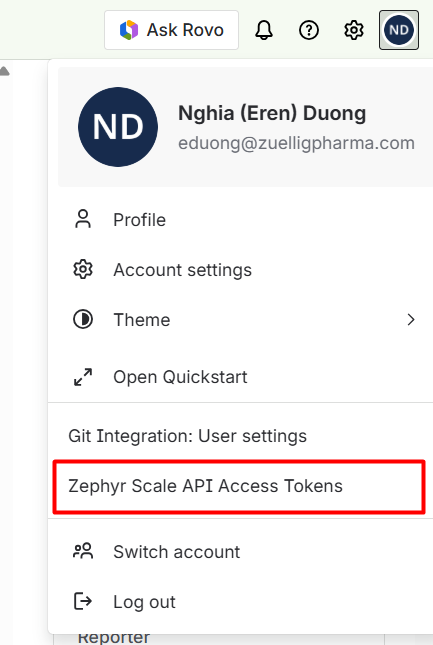
Then:
cp .env.example .env
Fill in the values:
ZEPHYR_API_TOKEN=your-zephyr-api-token
FRONTEND_REPO_URL=https://github.com/your-org/frontend.git
.env is gitignored — do not commit your token.
3. Run setup
./setup.sh
This will:
- Clone
FRONTEND_REPO_URLintodatasource/frontend/ - Build the code-review-graph index for the frontend
- Build the Zephyr MCP server from source
- Generate
.mcp.jsonfor Claude Code project-level MCP
4. Open in Claude Code
Open the zephyr-test-zuellig-agentic/ folder in Claude Code (not datasource/frontend/).
Claude Code auto-loads .mcp.json — both MCP servers start automatically.
Verify:
/mcp
Both zephyr and code-review-graph should show as connected.
Daily usage
Write a test from a Zephyr TC
/write-integration-test EZRX-T10000
Claude will:
- Fetch the TC name, objective, and steps from Zephyr
- Search the codebase graph for relevant page objects and similar specs
- Generate the spec file (and any new page object methods / locators needed)
- Run
tsc --noEmitandplaywright test --listto verify
Generated files land in datasource/frontend/integration_test/. Commit and push from there.
Update the graph after local changes
When you edit files in datasource/frontend/ and want Claude to see the changes:
./update-graph.sh
Pull latest frontend + update graph
git -C datasource/frontend pull --ff-only
./update-graph.sh
Troubleshooting
.mcp.json missing — run ./setup.sh to regenerate it.
datasource/frontend missing — run ./setup.sh to clone the frontend repo.
MCP not connected — restart Claude Code after setup.sh completes, then check /mcp.
ZEPHYR_API_TOKEN error — make sure .env exists and ZEPHYR_API_TOKEN is set.
code-review-graph not found — run pip install code-review-graph.
Development
npm run typecheck
npm run build
Zephyr MCP source is in src/; compiled output goes to build/.
from github.com/Sotatek-NghiaDuong2/zephyr-test-zuellig-agentic
Установка Zephyr
У этого сервера нет опубликованного пакета — он собирается из исходников. Открой репозиторий и следуй инструкции в README.
▸ github.com/Sotatek-NghiaDuong2/zephyr-test-zuellig-agenticFAQ
Zephyr MCP бесплатный?
Да, Zephyr MCP бесплатный — установка в пару кликов через Unyly без оплаты.
Нужен ли API-ключ для Zephyr?
Нет, Zephyr работает без API-ключей и переменных окружения.
Zephyr — hosted или self-hosted?
Доступен hosted-вариант: Unyly запускает сервер в облаке, локальная установка не обязательна.
Как установить Zephyr в Claude Desktop, Claude Code или Cursor?
Открой Zephyr на unyly.org, выбери вкладку своего клиента (Claude Desktop, Claude Code, Cursor) и нажми Install — конфиг сгенерируется автоматически, без правки JSON.
Похожие MCP
GitHub
PRs, issues, code search, CI status
 автор: GitHub
Filesystem
Secure file operations with configurable access controls.
Memory
Knowledge graph-based persistent memory system.
Template MCP Server
A CLI tool to create a new Model Context Protocol server project with TypeScript support, dual transport options, and an extensible structure
 автор: mcpdotdirect
Compare Zephyr with
Не уверен что выбрать?
Найди свой стек за 60 секунд
Автор?
Embed-бейдж для README
Похожее
Все в категории development