
Zesarux
БесплатноНе проверенControls the ZEsarUX ZX Spectrum emulator via ZRCP protocol for debugging, memory operations, tape/disk loading, and more.

Описание
Controls the ZEsarUX ZX Spectrum emulator via ZRCP protocol for debugging, memory operations, tape/disk loading, and more.
README
MCP server for ZEsarUX ZX Spectrum emulator using ZRCP protocol.
dtz-labs - Vibe coding 8-bit machines like there is no tomorrow
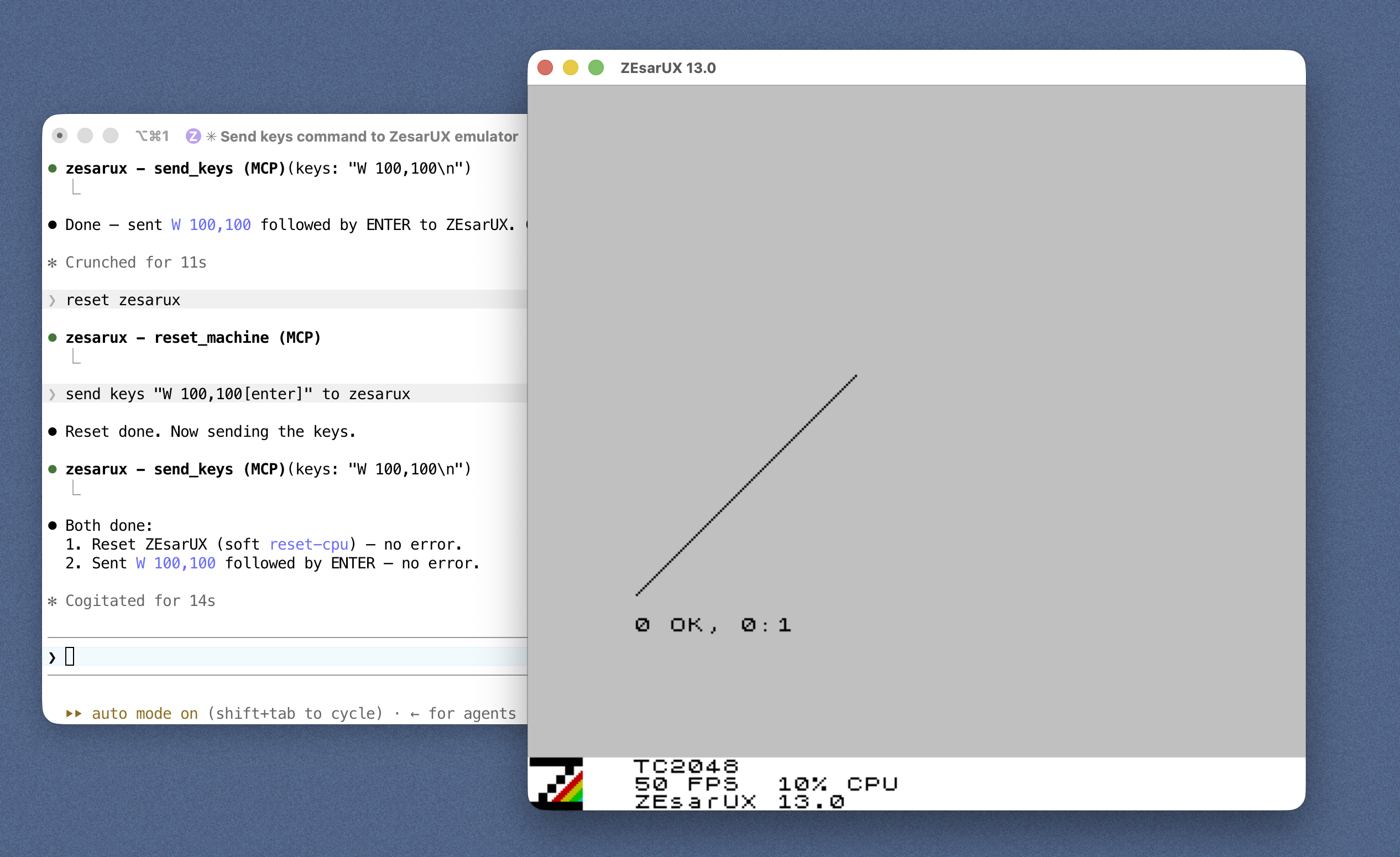
Features
13 tool categories with 50+ operations: machine control, PEEK/POKE, debugging (breakpoints, registers, disassembly), tape/disk loading, snapshots, keyboard input, assembly, and more.
Quick Start
Each client launches the server over stdio via npx — no clone or build needed.
The server then connects to ZEsarUX on ZRCP port 10000, auto-launching it for you
if nothing is listening there (on by default). Pick your client below; you'll
still need ZEsarUX installed — see Installation.
Claude Code
Register the server with one command:
claude mcp add zesarux -- npx -y @dtz-labs/zesarux-mcp
Auto-launch is on by default. To disable it (only connect to a ZEsarUX you start yourself), set the env var:
claude mcp add zesarux --env ZESARUX_AUTOLAUNCH=false -- npx -y @dtz-labs/zesarux-mcp
Claude Desktop
Edit claude_desktop_config.json (macOS:
~/Library/Application Support/Claude/claude_desktop_config.json; Windows:
%APPDATA%\Claude\claude_desktop_config.json), then restart Claude Desktop:
{
  "mcpServers": {
    "zesarux": {
      "command": "npx",
      "args": ["-y", "@dtz-labs/zesarux-mcp"]
    }
  }
}
Codex
Add to ~/.codex/config.toml:
[mcp_servers.zesarux]
command = "npx"
args = ["-y", "@dtz-labs/zesarux-mcp"]
Opencode
Add to opencode.json (project) or ~/.config/opencode/opencode.json (global):
{
  "$schema": "https://opencode.ai/config.json",
  "mcp": {
    "zesarux": {
      "type": "local",
      "command": ["npx", "-y", "@dtz-labs/zesarux-mcp"],
      "enabled": true
    }
  }
}
Installation
1. Install ZEsarUX
macOS:
brew install zesarux
xattr -dr com.apple.quarantine /Applications/zesarux.app
Why the second command? macOS Gatekeeper tags any app that wasn't downloaded through the App Store (or signed/notarized by an identified developer) with a
com.apple.quarantineextended attribute. ZEsarUX isn't notarized, so the first time you launch it Gatekeeper refuses to open it ("can't be opened because Apple cannot check it for malicious software").xattr -drrecursively strips that attribute from the app bundle, telling Gatekeeper to trust it. This is needed because the Homebrew cask drops the.appinto/Applicationsbut cannot clear the quarantine flag for you.
Linux:
sudo apt-get install zesarux
Or download from: ZEsarUX releases
For Windows, compiling from source, and enabling ZRCP via the config file, see the full Installation & Configuration guide.
2. Start ZEsarUX with ZRCP
zesarux --enable-remoteprotocol --remoteprotocol-port 10000
Or skip this step — the server auto-launches ZEsarUX for you by default (see Auto-launching ZEsarUX below).
3. Install the MCP Server
The server is published to npm as @dtz-labs/zesarux-mcp.
Your MCP client launches it on demand via npx (see Quick Start),
so nothing needs installing. To have it on your PATH as zesarux-mcp, install
it globally:
npm install -g @dtz-labs/zesarux-mcp
From source (for development)
git clone https://github.com/dtz-labs/zesarux-mcp.git
cd zesarux-mcp
npm install
npm run build   # produces dist/index.js
Then point your config at "command": "node", "args": ["/absolute/path/to/zesarux-mcp/dist/index.js"].
Environment variables
| Variable | Default | Description |
|---|---|---|
ZESARUX_HOST |
localhost |
Host where ZEsarUX ZRCP is listening |
ZESARUX_PORT |
(auto) | ZRCP port (matches --remoteprotocol-port). Unset in AUTO mode → first free port ≥ 10000; set it to pin a specific port |
LOG_LEVEL |
info |
debug | info | warn | error (all logs go to stderr) |
ZESARUX_TIMEOUT |
30000 |
ZRCP request timeout, ms |
ZESARUX_RETRY_ATTEMPTS |
3 |
Connection retry attempts |
ZESARUX_AUTO_RECONNECT |
true |
Reconnect automatically if the link drops |
ZESARUX_AUTOLAUNCH |
true |
Start ZEsarUX automatically if it isn't reachable (set false to opt out) |
ZESARUX_PATH |
(auto-detected) | Explicit path to the ZEsarUX binary |
ZESARUX_ARGS |
(none) | Extra args appended when launching (e.g. --vo null --ao null for headless) |
ZESARUX_LAUNCH_TIMEOUT |
20000 |
How long to wait for the ZRCP port after launching, ms |
Auto-launching ZEsarUX
By default, when ZEsarUX isn't reachable on startup the server finds a local
ZEsarUX binary, launches it with --enable-remoteprotocol --remoteprotocol-port <port>, waits for the port, then connects. Set ZESARUX_AUTOLAUNCH=false to opt
out (only connect to a ZEsarUX you started yourself). An emulator the server
launched is terminated when the server stops; a ZEsarUX you started yourself is
left untouched. See
Installation & Configuration for
binary discovery order and headless use.
You can also control the emulator process at runtime with the launch_emulator
and kill_emulator tools (the latter only stops an emulator the server
started). And if a tool call fails because the connection dropped, the server
will — unless ZESARUX_AUTOLAUNCH=false — try once to relaunch ZEsarUX and
reconnect before retrying the call.
Running several servers (automatic ports)
In AUTO mode (auto-launch on, ZESARUX_PORT not set) the server picks the
first free port ≥ 10000 and launches its own ZEsarUX there. So you can
register several MCP servers with no port configuration at all and they fan out
automatically — the first takes 10000, the next 10001, then 10002, … each
with its own emulator:
claude mcp add zesarux-a -- npx -y @dtz-labs/zesarux-mcp
claude mcp add zesarux-b -- npx -y @dtz-labs/zesarux-mcp
To pin a server to a specific port — or to attach to an emulator that is
already running — set ZESARUX_PORT explicitly (e.g. ZESARUX_PORT=10000); the
server then uses exactly that port and does not scan. Automatic port selection
only happens in AUTO mode; with ZESARUX_AUTOLAUNCH=false the server just
connects to ZESARUX_PORT (default 10000).
Documentation
- Documentation index - Start here
- Installation & Configuration - Install ZEsarUX and the server
- Configuring MCP Clients - Claude Desktop/Code, Codex, OpenCode, JetBrains
- Available Tools - All tools with examples
- Example Usage - Talk-to-it and quick call examples
- Development - Build, structure, protocol mapping
- Troubleshooting - Common problems
- ZRCP Specification - Complete protocol reference
Quick Examples
// Reset and set machine
{"name": "reset_machine"}
{"name": "set_machine", "arguments": {"machine": "128k"}}

// Read/write memory
{"name": "peek", "arguments": {"address": "4000", "length": 256}}
{"name": "poke", "arguments": {"address": "4000", "value": [255, 0]}}

// Debugging
{"name": "get_registers"}
{"name": "set_breakpoint", "arguments": {"index": 1, "type": "execute", "address": "8000"}}

// Load tape
{"name": "load_file", "arguments": {"filename": "/path/game.tap"}}
License
MIT
dtz-labs - Keeping 8-bit alive until 2065
Установка Zesarux
У этого сервера нет опубликованного пакета — он собирается из исходников. Открой репозиторий и следуй инструкции в README.
▸ github.com/dtz-labs/zesarux-mcpFAQ
Zesarux MCP бесплатный?
Да, Zesarux MCP бесплатный — установка в пару кликов через Unyly без оплаты.
Нужен ли API-ключ для Zesarux?
Нет, Zesarux работает без API-ключей и переменных окружения.
Zesarux — hosted или self-hosted?
Self-hosted: сервер запускается локально на твоей машине командой из раздела установки.
Как установить Zesarux в Claude Desktop, Claude Code или Cursor?
Открой Zesarux на unyly.org, выбери вкладку своего клиента (Claude Desktop, Claude Code, Cursor) и нажми Install — конфиг сгенерируется автоматически, без правки JSON.
Похожие MCP
GitHub
PRs, issues, code search, CI status
 автор: GitHub
Filesystem
Secure file operations with configurable access controls.
Memory
Knowledge graph-based persistent memory system.
Template MCP Server
A CLI tool to create a new Model Context Protocol server project with TypeScript support, dual transport options, and an extensible structure
 автор: mcpdotdirect
Compare Zesarux with
Не уверен что выбрать?
Найди свой стек за 60 секунд
Автор?
Embed-бейдж для README
Похожее
Все в категории development