
Bug Report Tool
FreeNot checkedMCP server that converts informal issue descriptions into structured, developer-ready bug reports using Groq, with automatic classification into bug, feature re

About
MCP server that converts informal issue descriptions into structured, developer-ready bug reports using Groq, with automatic classification into bug, feature request, question, or unclear. Enables agents to generate bug reports directly without the web form.
README
Converts an informal issue description into a structured, developer-ready bug report. A classification step runs first, so feature requests and questions aren't forced into fake bug reports with fabricated severity or reproduction steps. The core logic is exposed two ways: a REST API for the human-facing web form, and an MCP tool for agent callers.
What you need before starting
- Python 3.10+
- Node.js 18+ and npm
- A Groq API key — required. Get one free at https://console.groq.com/keys (sign up, go to "API Keys", create a new key, no credit card, ~2 minutes). Without this key the backend will not start.
- Docker Desktop (optional, only if running via Docker Compose) — https://www.docker.com/products/docker-desktop/
Screenshots
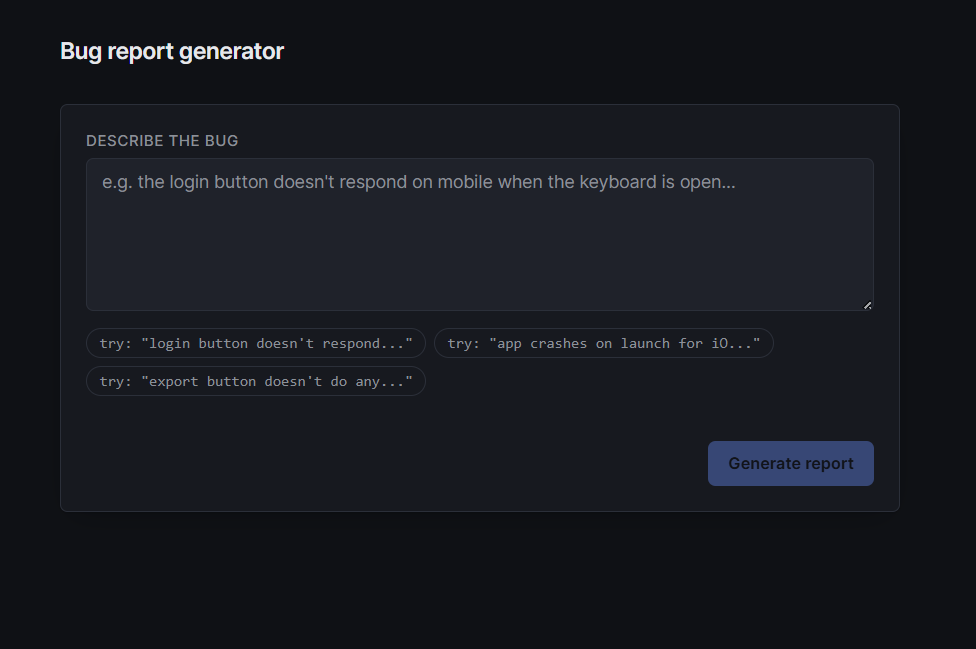
Describe the bug
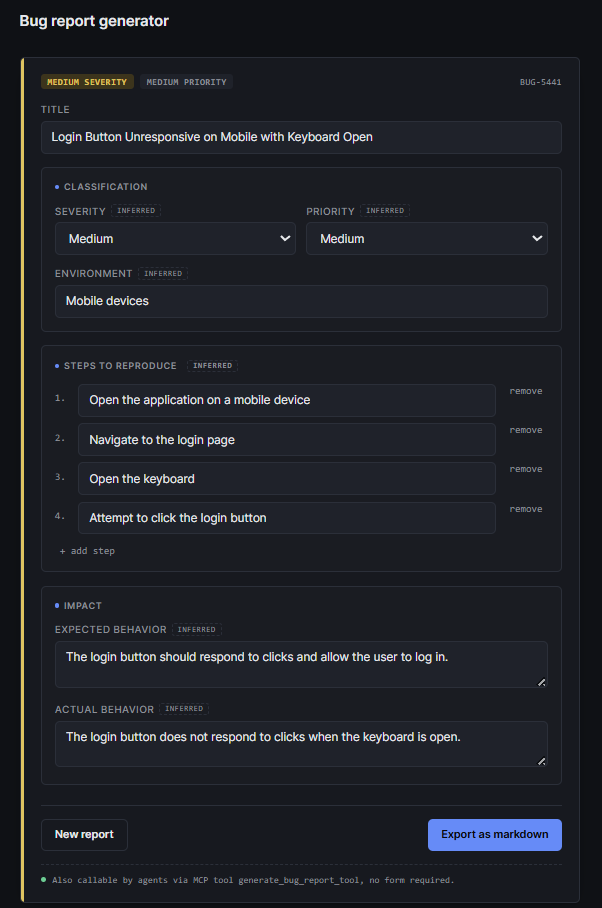
Structured, editable report
Project structure
bug_report/
├── backend/
│   ├── main.py             FastAPI REST endpoint (/api/generate)
│   ├── mcp_server.py       MCP tool, same logic, for agent callers
│   ├── groq_client.py      Single Groq call shared by both interfaces
│   ├── schema.py           Pydantic schema — shared response shape
│   ├── Dockerfile          Container build for the backend
│   ├── .env                Your Groq API key goes here (you create this)
│   └── .env.example        Template for the above
├── frontend/
│   ├── src/
│   │   ├── App.jsx
│   │   ├── components/
│   │   │   ├── ReportEditor.jsx
│   │   │   └── ExportPreview.jsx
│   │   └── lib/api.js
│   ├── Dockerfile          Container build for the frontend
│   └── package.json
├── docker-compose.yml
├── .dockerignore
├── requirements.txt
└── README.md
Option A: Run locally (Python + Node)
1. Backend setup
Open a terminal in the project root.
cd backend
python -m venv venv
venv\Scripts\activate
pip install -r ..\requirements.txt
Create your .env file:
copy .env.example .env
Open backend\.env in a text editor and paste in your key:
GROQ_API_KEY=your_actual_key_here
Start the backend:
uvicorn main:app --reload --port 8000
Leave this terminal running. You should see Application startup complete. Confirm it's up by visiting http://localhost:8000/health in a browser — it should return {"status":"ok"}.
2. Frontend setup
Open a second terminal in the project root.
cd frontend
npm install
npm run dev
Open http://localhost:5173 in your browser. The backend must already be running (step 1) for report generation to work.
3. (Optional) MCP server, for agent access
The MCP server exposes the same bug-report logic as a tool other agents (Claude Desktop, MCP Inspector, etc.) can call directly, without going through the web form.
cd backend
venv\Scripts\activate
python mcp_server.py
To test it with MCP Inspector:
npx @modelcontextprotocol/inspector
In the Inspector UI: Transport Type STDIO, Command python, Arguments mcp_server.py, then click Connect.
Option B: Run with Docker
Requires Docker Desktop installed and running.
1. Add your API key. Docker Compose reads it from backend/.env, this file is not included in the repo (it's gitignored for security). Create it before starting:
cd backend
copy .env.example .env
Edit backend\.env and paste in your key:
GROQ_API_KEY=your_actual_key_here
2. Build and start both services from the project root:
cd ..
docker compose up --build
First run takes a few minutes while images build. Watch the logs for Uvicorn running on http://0.0.0.0:8000 from the backend service with no errors.
3. Verify:
- http://localhost:8000/health → should return
{"status":"ok"} - http://localhost:5173 → app UI, submit a test description end to end
4. Stop:
Ctrl+C
docker compose down
Environment variables reference
| Variable | Required | Where | Description |
|---|---|---|---|
GROQ_API_KEY |
Yes | backend/.env |
Your Groq API key. The app calls llama-3.3-70b-versatile via Groq's chat completions API. Never committed to the repo, both local and Docker setups require you to supply your own. |
No other environment variables or API keys are needed.
Guardrails implemented
- Classification gate: every input is classified as
bug,feature_request,question, orunclearbefore any bug-specific fields are generated. Onlybuggets severity, priority, and repro steps populated. - Structured output enforced: Groq's
response_format: json_objectkeeps the model's output inside the expected schema. - Instruction isolation: the system prompt explicitly states user input cannot override its rules (basic prompt-injection guard).
- Input floor: descriptions under 10 characters are rejected before an API call is made.
Troubleshooting
KeyError: 'GROQ_API_KEY'on startup: your.envfile is missing or not inbackend/, or the key name is misspelled.TypeError: Client.__init__() got an unexpected keyword argument 'proxies': version mismatch betweengroqandhttpx. Runpip install --upgrade groqinside the activated venv.- Frontend shows a network error: confirm the backend is running on port 8000 and
frontend/src/lib/api.jspoints tohttp://localhost:8000. - CORS error in browser console: confirm the frontend is running on port 5173 (
main.py's CORS config only allows that origin by default). - Docker build fails or hangs: confirm Docker Desktop is fully started (steady whale icon, not animating) before running
docker compose up. - Docker backend container exits immediately: almost always a missing or empty
backend/.env, see Option B step 1.
Roadmap
- Screenshot analysis via a vision-capable Groq model
- Log file analysis and stack trace correlation
- Duplicate bug detection via embedding similarity
- Trace-to-code mapping (agentic repository search)
Installing Bug Report Tool
This server has no published package — it is built from source. Open the repository and follow its README.
▸ github.com/Adnan-commits/bug_report_toolFAQ
Is Bug Report Tool MCP free?
Yes, Bug Report Tool MCP is free — one-click install via Unyly at no cost.
Does Bug Report Tool need an API key?
No, Bug Report Tool runs without API keys or environment variables.
Is Bug Report Tool hosted or self-hosted?
A hosted option is available: Unyly runs the server in the cloud, no local setup required.
How do I install Bug Report Tool in Claude Desktop, Claude Code or Cursor?
Open Bug Report Tool on unyly.org, pick your client tab (Claude Desktop, Claude Code, Cursor) and press Install — the config is generated automatically, no JSON editing.
Related MCPs
GitHub
PRs, issues, code search, CI status
 by GitHub
Filesystem
Secure file operations with configurable access controls.
Memory
Knowledge graph-based persistent memory system.
Template MCP Server
A CLI tool to create a new Model Context Protocol server project with TypeScript support, dual transport options, and an extensible structure
 by mcpdotdirect
Amap Maps Mcp Server
MCP server for using the AMap Maps API
 by duxiaohui
Supabase
Database, auth and storage
 by Supabase
Everything
Reference / test server with prompts, resources, and tools.
Git
Tools to read, search, and manipulate Git repositories.
Sequential Thinking
Dynamic and reflective problem-solving through thought sequences.
Time
Time and timezone conversion capabilities.
Compare Bug Report Tool with
Not sure what to pick?
Find your stack in 60 seconds
Author?
Embed badge for your README
Browse similar
All development MCPs