
Dkdc Io Imessage
FreeNot checkediMessage MCP server for Codex CLI and Claude Code. Lets an LLM read and send iMessage on macOS.

About
iMessage MCP server for Codex CLI and Claude Code. Lets an LLM read and send iMessage on macOS.
README
Text your coding agent. Get a reply back in Messages.
This repo ships dkdc-io-imessage, a Rust MCP server for macOS. Point Codex CLI, Claude
Code, or any stdio MCP client at one binary and it can:
- send iMessage with
reply(chat_id, text) - search your chats with
list_messages(query, limit) - fetch one message by GUID with
read_message(id) - auto-inject inbound iMessages into the LLM's session as channel events
Local allowlist only. Empty config fails closed.
crates.io · docs · install script
A live round-trip
A text arrives. Codex runs cal. The calendar comes back as iMessage.
╭─────────────────────────────────────────╮
│ >_ OpenAI Codex (v0.0.0)                │
│ model:       gpt-5.4                    │
│ directory:   /private/tmp               │
│ permissions: YOLO mode                  │
╰─────────────────────────────────────────╯

› channel envelope
  from: owner
  ts: 2026-04-18T00:50:58Z

  hi codex! run `cal` and text me the output. use the default
  chat_id (no need to specify).


• Running cal locally, then I'll send the exact output to your
  default iMessage chat.

• Ran cal
  └      April 2026
    Su Mo Tu We Th Fr Sa
              1  2  3  4
     5  6  7  8  9 10 11
    12 13 14 15 16 17 18
    19 20 21 22 23 24 25
    26 27 28 29 30

• Sending the cal output to your default chat now.

• Called
  └ imessage.reply({"text":"     April 2026       \n..."})
    {"chat_id": "any;-;+1XXXXXXXXXX", "sent": true}

• Sent this to your default chat.
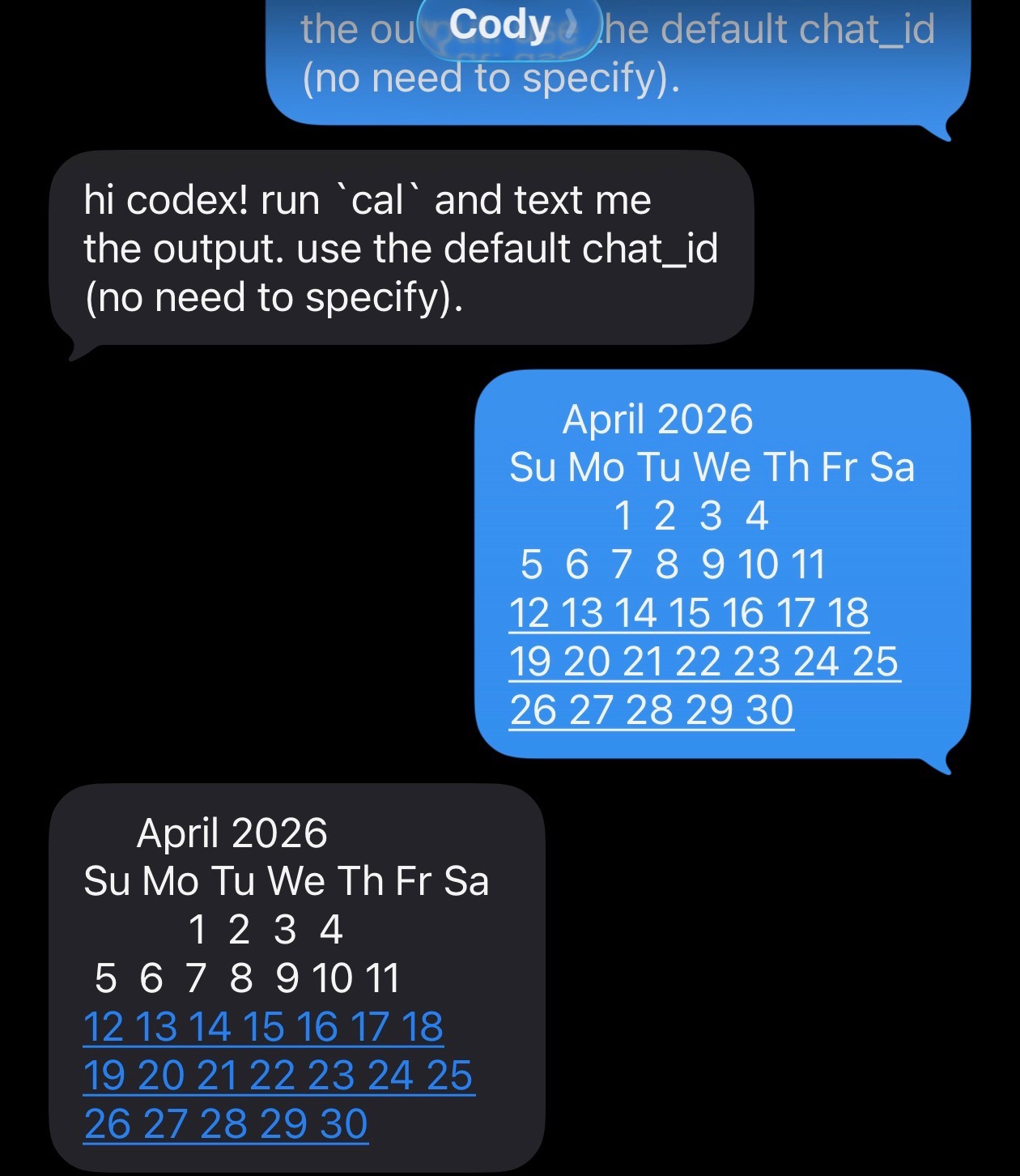
This is the whole pitch: your agent can stay in the terminal while you stay on your phone.
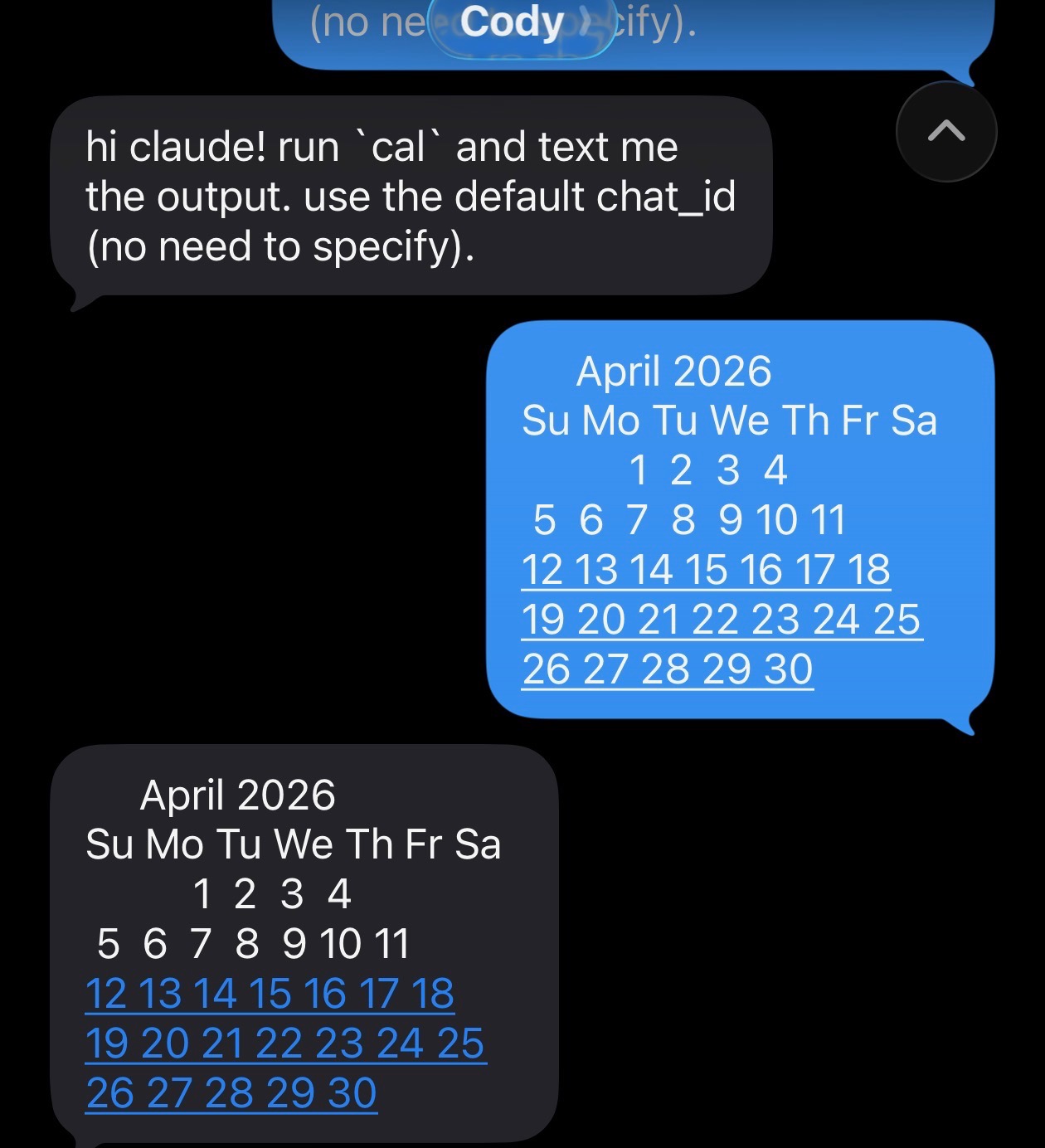
Same MCP server, Claude Code
Same binary. Same three tools. Same round-trip.
 ▐▛███▜▌   Claude Code v2.1.114
▝▜█████▛▘  Opus 4.7 (1M context) · Claude Max
  ▘▘ ▝▝    /private/tmp

  Listening for channel messages from: server:imessage

← imessage · +1XXXXXXXXXX: hi claude! run `cal` and text me the output. use the
defaul…

⏺ Bash(cal)
  ⎿       April 2026
     Su Mo Tu We Th Fr Sa
               1  2  3  4
     … +4 lines (ctrl+o to expand)

  Called imessage (ctrl+o to expand)

⏺ Sent the cal output (April 2026) to your default chat.
Why this exists
- one binary:
cargo install dkdc-io-imessage - no framework lock-in: Codex CLI, Claude Code, or any stdio MCP client
- real Messages integration: send via AppleScript, read from
chat.db - live push: incoming iMessages auto-inject as channel notifications
- attachment-aware reads: inbound messages surface
image_pathfor any attachments so the LLM canReadthem directly - tight surface area: three tools, no extra daemon, no event bus
- fail closed: no allowlist means no access
Install
# no rust? one line:
curl -LsSf https://dkdc.sh/imessage-mcp/install.sh | sh

# already have cargo:
cargo install dkdc-io-imessage
Then:
- grant Full Disk Access to the host process that will run the binary
- populate
~/.config/dkdc-io/imessage/access.toml - register the MCP server with your LLM CLI
Full setup and config snippets for Codex and Claude Code live in the crate README.
Register the MCP server
Prefer the CLI over hand-editing config files.
Codex:
codex mcp add imessage -- dkdc-io-imessage --stdio
codex mcp list
Claude Code:
claude mcp add imessage dkdc-io-imessage --stdio
claude mcp list
The server name (imessage) becomes the MCP namespace in the tool list:
imessage.reply, imessage.list_messages, imessage.read_message.
To enable inbound-message push:
- Codex: nothing extra for
codex mcp additself. That works on both upstream Codex and Cody's fork. The fork only adds the async channel watcher whenCODEX_CHANNEL_DIRis set. - Claude Code: add
--dangerously-load-development-channels server:imessageto theclaudeinvocation. This is an experimental flag. It opts the session into the channel surface sodkdc-io-imessage --watchcan pushnotifications/claude/channelevents that render as← imessage · <handle>: <text>.
Direct edit works too, for reference:
# ~/.codex/config.toml
[mcp_servers.imessage]
command = "dkdc-io-imessage"
args = ["--stdio"]
// ~/.claude.json
{
  "mcpServers": {
    "imessage": {
      "type": "stdio",
      "command": "dkdc-io-imessage",
      "args": ["--stdio"]
    }
  }
}
Codex note: codex mcp add works on both upstream Codex and Cody's fork. The
fork at https://github.com/lostmygithubaccount/codex only adds async channel
support around CODEX_CHANNEL_DIR.
Security posture
replyonly sends to allowlisted handles orself.chat_idlist_messagesandread_messagenever surface non-allowlisted chats- AppleScript runs with argv, not string interpolation
- empty allowlist fails closed by default
The anti-regression coverage lives in tests/injection.rs and
tests/stdio_smoke.rs. A live Claude parity round-trip test lives in
crates/imessage-mcp/tests/claude_parity.rs and is documented in
crates/imessage-mcp/tests/claude_parity.md.
Develop
Install the local hook gate first:
bin/setup
That configures core.hooksPath to use .githooks/pre-commit, which runs:
cargo fmt --all -- --checkcargo clippy --workspace --all-targets -- -D warningscargo test --workspace
cargo fmt --all -- --check
cargo clippy --workspace --all-targets -- -D warnings
cargo test --workspace
Prior art
Anthropic shipped the original TypeScript/Bun iMessage MCP server for Claude
Code (anthropics/claude-plugins-official/external_plugins/imessage).
We first ported that shape directly. Then two correctness bugs surfaced:
typedstream parsing truncated messages above roughly 130 bytes, and the
echo-tracker could re-surface outbound replies as inbound messages. Those bugs
were fixed, then the project was rewritten in Rust for correctness, not speed.
The shape stayed the same: stdio MCP, chat.db reads, AppleScript send, local
allowlist.
License
Dual MIT OR Apache-2.0.
Installing Dkdc Io Imessage
This server has no published package — it is built from source. Open the repository and follow its README.
▸ github.com/dkdc-io/imessageFAQ
Is Dkdc Io Imessage MCP free?
Yes, Dkdc Io Imessage MCP is free — one-click install via Unyly at no cost.
Does Dkdc Io Imessage need an API key?
No, Dkdc Io Imessage runs without API keys or environment variables.
Is Dkdc Io Imessage hosted or self-hosted?
Self-hosted: the server runs locally on your machine via the install command above.
How do I install Dkdc Io Imessage in Claude Desktop, Claude Code or Cursor?
Open Dkdc Io Imessage on unyly.org, pick your client tab (Claude Desktop, Claude Code, Cursor) and press Install — the config is generated automatically, no JSON editing.
Related MCPs
GitHub
PRs, issues, code search, CI status
 by GitHub
Filesystem
Secure file operations with configurable access controls.
Memory
Knowledge graph-based persistent memory system.
Template MCP Server
A CLI tool to create a new Model Context Protocol server project with TypeScript support, dual transport options, and an extensible structure
 by mcpdotdirect
Amap Maps Mcp Server
MCP server for using the AMap Maps API
 by duxiaohui
Supabase
Database, auth and storage
 by Supabase
Everything
Reference / test server with prompts, resources, and tools.
Git
Tools to read, search, and manipulate Git repositories.
Sequential Thinking
Dynamic and reflective problem-solving through thought sequences.
Time
Time and timezone conversion capabilities.
Compare Dkdc Io Imessage with
Not sure what to pick?
Find your stack in 60 seconds
Author?
Embed badge for your README
Browse similar
All development MCPs