
jparkerweb/mcp-sqlite
FreeNot checkedModel Context Protocol (MCP) server that provides comprehensive SQLite database interaction capabilities.

About
Model Context Protocol (MCP) server that provides comprehensive SQLite database interaction capabilities.
README
This is a Model Context Protocol (MCP) server that provides comprehensive SQLite database interaction capabilities.

Maintained by

Features
- Complete CRUD operations (Create, Read, Update, Delete)
- Database exploration and introspection
- Execute custom SQL queries
Setup
Define the command in your IDE's MCP Server settings:
e.g. Cursor:
{
    "mcpServers": {
        "MCP SQLite Server": {
            "command": "npx",
            "args": [
                "-y",
                "mcp-sqlite",
                "<path-to-your-sqlite-database.db>"
            ]
        }
    }
}
e.g. VSCode:
{
    "servers": {
        "MCP SQLite Server": {
            "type": "stdio",
            "command": "npx",
            "args": [
                "-y",
                "mcp-sqlite",
                "<path-to-your-sqlite-database.db>"
            ]
        }
    }
}
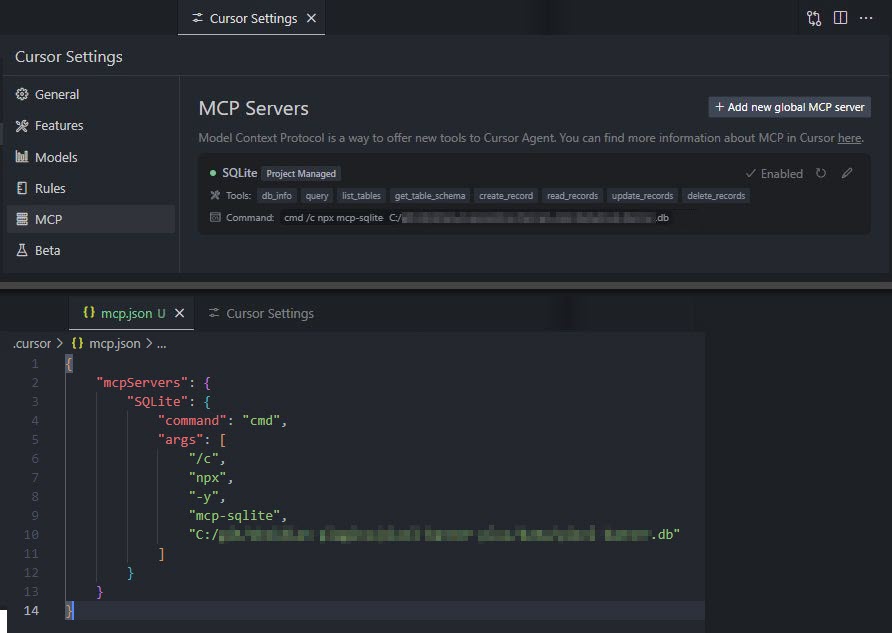
Your database path must be provided as an argument.
Available Tools
Database Information
db_info
Get detailed information about the connected database.
Example:
{
  "method": "tools/call",
  "params": {
    "name": "db_info",
    "arguments": {}
  }
}
list_tables
List all tables in the database.
Example:
{
  "method": "tools/call",
  "params": {
    "name": "list_tables",
    "arguments": {}
  }
}
get_table_schema
Get detailed information about a table's schema.
Parameters:
tableName(string): Name of the table
Example:
{
  "method": "tools/call",
  "params": {
    "name": "get_table_schema",
    "arguments": {
      "tableName": "users"
    }
  }
}
CRUD Operations
create_record
Insert a new record into a table.
Parameters:
table(string): Name of the tabledata(object): Record data as key-value pairs
Example:
{
  "method": "tools/call",
  "params": {
    "name": "create_record",
    "arguments": {
      "table": "users",
      "data": {
        "name": "John Doe",
        "email": "[email protected]",
        "age": 30
      }
    }
  }
}
read_records
Query records from a table with optional filtering.
Parameters:
table(string): Name of the tableconditions(object, optional): Filter conditions as key-value pairslimit(number, optional): Maximum number of records to returnoffset(number, optional): Number of records to skip
Example:
{
  "method": "tools/call",
  "params": {
    "name": "read_records",
    "arguments": {
      "table": "users",
      "conditions": {
        "age": 30
      },
      "limit": 10,
      "offset": 0
    }
  }
}
update_records
Update records in a table that match specified conditions.
Parameters:
table(string): Name of the tabledata(object): New values as key-value pairsconditions(object): Filter conditions as key-value pairs
Example:
{
  "method": "tools/call",
  "params": {
    "name": "update_records",
    "arguments": {
      "table": "users",
      "data": {
        "email": "[email protected]"
      },
      "conditions": {
        "id": 1
      }
    }
  }
}
delete_records
Delete records from a table that match specified conditions.
Parameters:
table(string): Name of the tableconditions(object): Filter conditions as key-value pairs
Example:
{
  "method": "tools/call",
  "params": {
    "name": "delete_records",
    "arguments": {
      "table": "users",
      "conditions": {
        "id": 1
      }
    }
  }
}
Custom Queries
query
Execute a custom SQL query against the connected SQLite database.
Parameters:
sql(string): The SQL query to executevalues(array, optional): Array of parameter values to use in the query
Example:
{
  "method": "tools/call",
  "params": {
    "name": "query",
    "arguments": {
      "sql": "SELECT * FROM users WHERE id = ?",
      "values": [1]
    }
  }
}
Built with
Appreciation
If you enjoy this library please consider sending me a tip to support my work 😀
🍵 tip me here
Installing jparkerweb/mcp-sqlite
This server has no published package — it is built from source. Open the repository and follow its README.
▸ github.com/jparkerweb/mcp-sqliteFAQ
Is jparkerweb/mcp-sqlite MCP free?
Yes, jparkerweb/mcp-sqlite MCP is free — one-click install via Unyly at no cost.
Does jparkerweb/mcp-sqlite need an API key?
No, jparkerweb/mcp-sqlite runs without API keys or environment variables.
Is jparkerweb/mcp-sqlite hosted or self-hosted?
Self-hosted: the server runs locally on your machine via the install command above.
How do I install jparkerweb/mcp-sqlite in Claude Desktop, Claude Code or Cursor?
Open jparkerweb/mcp-sqlite on unyly.org, pick your client tab (Claude Desktop, Claude Code, Cursor) and press Install — the config is generated automatically, no JSON editing.
Related MCPs
wenb1n-dev/SmartDB_MCP
A universal database MCP server supporting simultaneous connections to multiple databases. It provides tools for database operations, health analysis, SQL optim
 by wenb1n-dev
Postgres Server
This server enables interaction with PostgreSQL databases through the Model Context Protocol, optimized for the AWS Bedrock AgentCore Runtime. It provides tools
 by madhurprash
Postgres
Query your database in natural language
 by Anthropic
PostgreSQL
Read-only database access with schema inspection.
by modelcontextprotocolCompare jparkerweb/mcp-sqlite with
Not sure what to pick?
Find your stack in 60 seconds
Author?
Embed badge for your README
Browse similar
All data MCPs