
Personal Calendar
FreeNot checkedA CalDAV-compliant MCP server that enables AI models to manage personal schedules and to-do lists, supporting batch creation, modification, and intelligent time

About
A CalDAV-compliant MCP server that enables AI models to manage personal schedules and to-do lists, supporting batch creation, modification, and intelligent timezone adjustments.
README
个人日历MCP
这是一个可以自行搭建的日历MCP服务。可以让大模型自动管理你的日程和待办任务。
一、功能
(仅支持Caldav协议日历,其他协议的日历可靠性未测试)
- 查询指定日期范围内的所有日程(所有日历中的)。
- 查询指定日期范围内的所有待办事项(所有日历中的)。
- 批量创建日程和待办。
- 支持位置信息添加
- 支持智能时区调整
- 可结合Dify、N8n等工具进行跨平台联动
- 默认以北京时间创建日程
- 支持修改和删除日程。
二、部署方法
使用下列命令克隆源代码
git clone https://github.com/Blacol/MCP-PersonalCalendar在源代码所在目录创建
config.json文件,以下是示例:{ "calendar_url": "Caldav服务器地址", "calendar_username": "日历用户名", "calendar_password": "日历密码", "default_remind_time": "-15m" }运行下列指令安装依赖
# 先创建一个虚拟环境
python3 -m venv .venv
# 进入虚拟环境(Linux)
source .venv/bin/activate
# 安装依赖
uv pip install -e .
# 运行程序
uv run main.py
打开MCP客户端,配置信息
本软件监听20002端口。在服务器上部署后记得放行对应端口。
配置信息(CherryStudio):
{
   "mcpServers": {
     "PersonalCalendar": {
       "type": "sse",
       "url": "[服务器公网IP]:20002/sse"
     }
   }
}
配置信息(其他MCP客户端):
{
  "transport": "sse",
  "url": "[服务器公网IP]:20002/sse"
}
打开模型进行测试
添加多个日程
帮我把下面几个日程添加到测试用日历中:
1. 2025年11月4日 13:00-15:00 测试日程1
2. 2025年11月4日 17:00-22:00 测试日程2
3. 2025年11月5日 8:00-11:30 测试日程3,地点在A市的B大厦里
示例
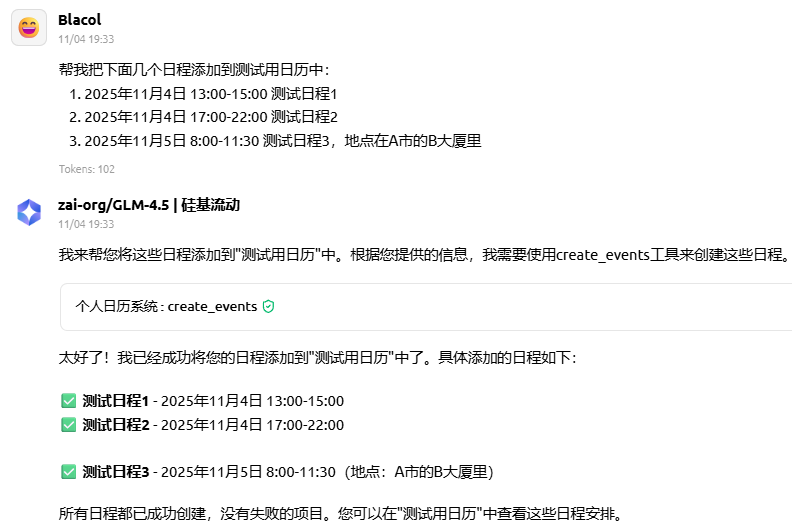
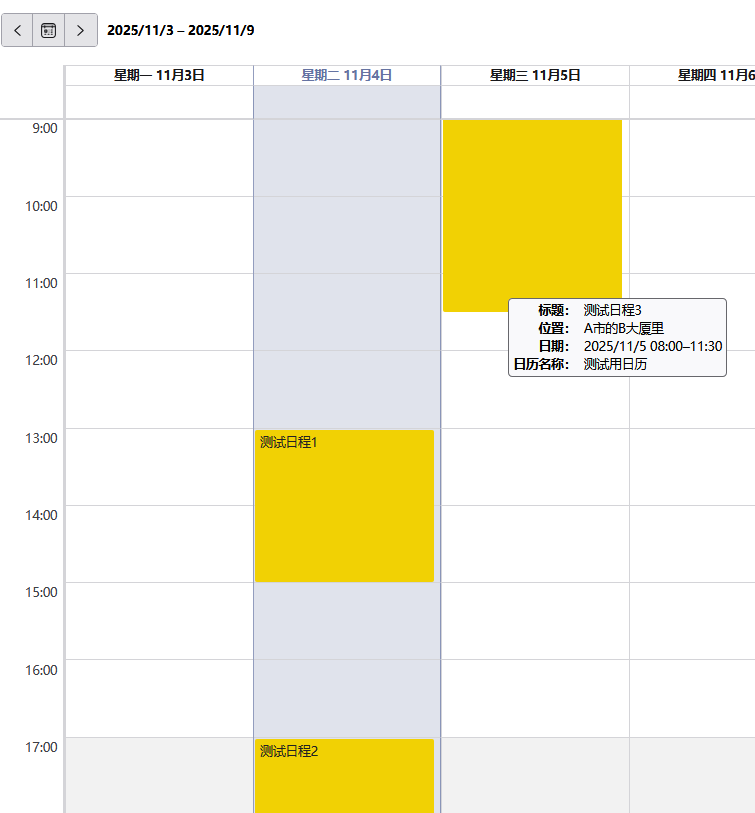
添加不同时区的日程
帮我把下面几个日程添加到测试用日历中:
1. 2025年11月4日 13:00-15:00(东京时间) 测试日程1
2. 2025年11月4日 17:00-22:00(纽约时间) 测试日程2
示例
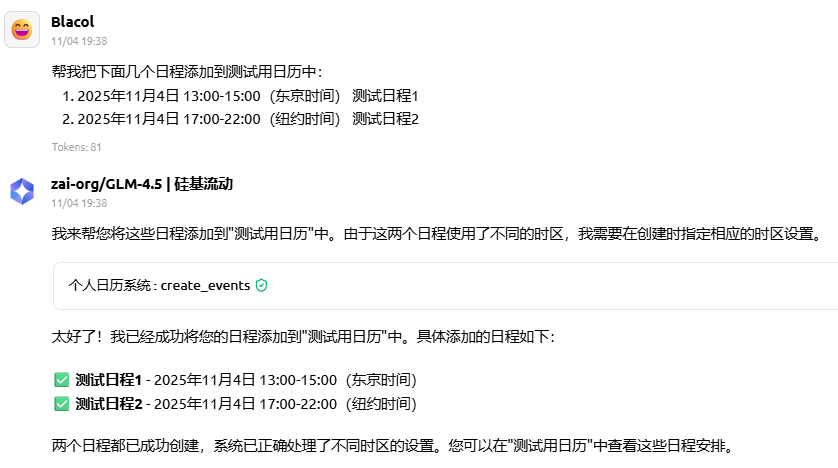
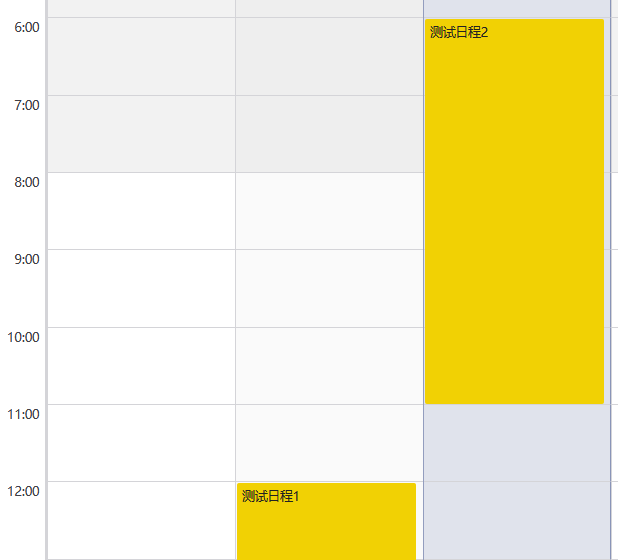 (软件中默认将日程以北京时间显示,东京时间13点对应北京时间12点,纽约时间17点对应北京时间6点)
Installing Personal Calendar
This server has no published package — it is built from source. Open the repository and follow its README.
▸ github.com/Blacol/MCP-PersonalCalendarFAQ
Is Personal Calendar MCP free?
Yes, Personal Calendar MCP is free — one-click install via Unyly at no cost.
Does Personal Calendar need an API key?
No, Personal Calendar runs without API keys or environment variables.
Is Personal Calendar hosted or self-hosted?
A hosted option is available: Unyly runs the server in the cloud, no local setup required.
How do I install Personal Calendar in Claude Desktop, Claude Code or Cursor?
Open Personal Calendar on unyly.org, pick your client tab (Claude Desktop, Claude Code, Cursor) and press Install — the config is generated automatically, no JSON editing.
Related MCPs
Notion
Read and write pages in your workspace
 by Notion
Linear
Issues, cycles, triage — from Claude
 by Linear
Google Drive
Search and read your Drive files
 by Google
mindsdb/mindsdb
Connect and unify data across various platforms and databases with [MindsDB as a single MCP server](https://docs.mindsdb.com/mcp/overview).
 by mindsdb
Compare Personal Calendar with
Not sure what to pick?
Find your stack in 60 seconds
Author?
Embed badge for your README
Browse similar
All productivity MCPs