
Agent Cost
FreeNot checkedTracks AI agent token usage and spending in real time, with budget alerts, per-task cost breakdown, and a visual dashboard.

About
Tracks AI agent token usage and spending in real time, with budget alerts, per-task cost breakdown, and a visual dashboard.
README
MCP server that tracks AI agent token usage and spending in real time. Budget alerts, per-task cost breakdown, visual dashboard, daily/weekly/monthly reports.
Works with any MCP client: Claude Code, Cursor, Windsurf, Codex, Gemini CLI, and more.
Why?
Every developer using AI agents worries about spending. Most tools don't tell you what each message costs until the bill arrives.
This MCP server tracks it in real time — per message, per model, per day. Set a budget, get alerts, see exactly where your money goes.
Features
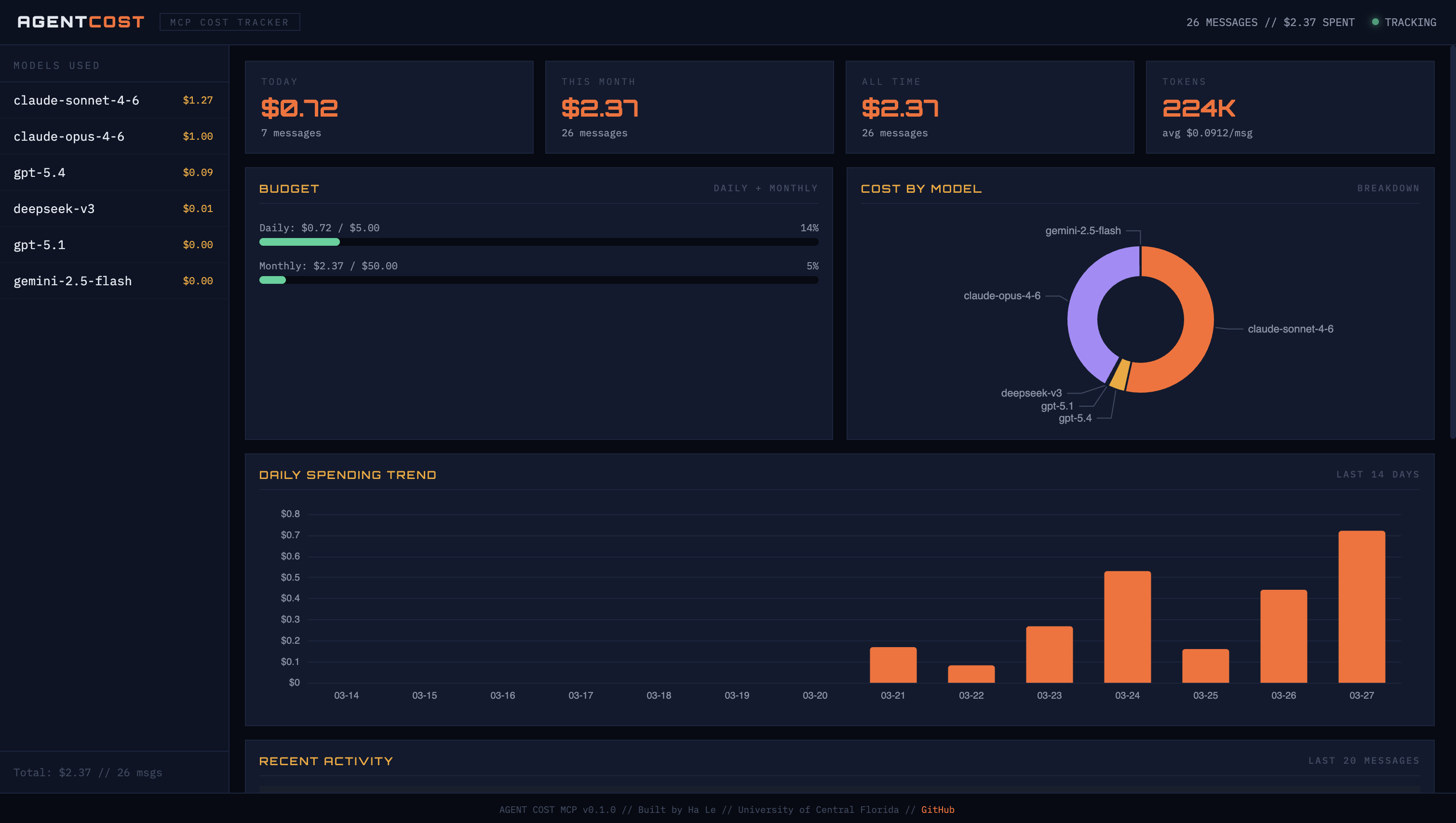
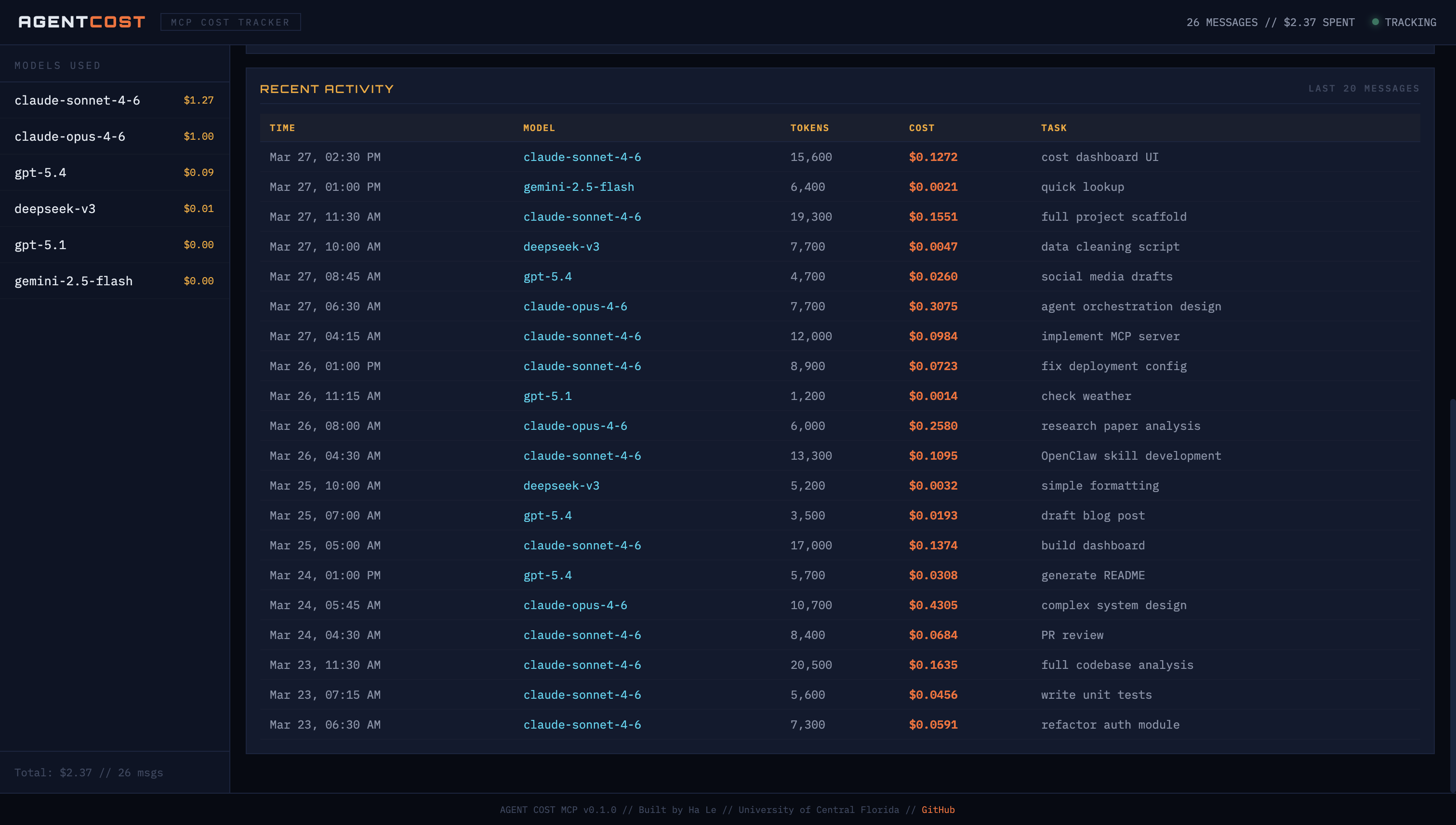
- Visual dashboard — dark-themed web UI with spending charts, budget gauges, and activity log
- Per-message cost logging — see what each AI interaction costs instantly
- Budget alerts — warns when approaching daily/monthly limits
- Cost reports — today, this week, this month, all time
- Model breakdown — donut chart showing which model eats your budget
- Spending trends — 14-day bar chart with color-coded spending
- 15+ models supported — Claude, GPT, DeepSeek, Gemini, Llama
- Estimate before running — check cost before expensive tasks
- Local storage — all data stays on your machine (
~/.agent-cost-mcp/) - Auto-refresh — dashboard updates every 30 seconds
Quick Start
1. Install
pip install agent-cost-mcp
Or with uv:
uv pip install agent-cost-mcp
2. Add to your AI tool
Claude Code — add to ~/.claude/settings.json:
{
  "mcpServers": {
    "agent-cost": {
      "command": "agent-cost-mcp"
    }
  }
}
Cursor — add to .cursor/mcp.json:
{
  "mcpServers": {
    "agent-cost": {
      "command": "agent-cost-mcp"
    }
  }
}
Windsurf — add to MCP config:
{
  "mcpServers": {
    "agent-cost": {
      "command": "agent-cost-mcp"
    }
  }
}
3. Open the dashboard
open dashboard.html
Or serve it locally:
cd ~/.agent-cost-mcp && python3 -m http.server 3456
# Open http://localhost:3456/dashboard.html
The dashboard reads from ~/.agent-cost-mcp/cost-log.json and auto-refreshes every 30 seconds. Leave it open in a browser tab while you work.
MCP Tools
These tools are available to any connected MCP client:
| Tool | What it does | Example |
|---|---|---|
log_cost |
Log token usage and cost for a task | log_cost(model="claude-sonnet-4-6", tokens_in=1500, tokens_out=800, task="code review") |
cost_report |
Get spending report | cost_report(period="today") — also: week, month, all |
set_budget |
Set daily/monthly budget limits | set_budget(daily_limit=5.00, monthly_limit=50.00) |
cost_trend |
Show daily spending chart | cost_trend(days=7) |
estimate_cost |
Estimate cost without logging | estimate_cost(model="claude-opus-4-6", tokens_in=5000, tokens_out=3000) |
supported_models |
List all models + pricing | supported_models() |
How It Works
You use Claude Code / Cursor / Windsurf normally
        ↓
MCP server logs each interaction (model, tokens, cost)
        ↓
Data saved to ~/.agent-cost-mcp/cost-log.json
        ↓
Dashboard reads the JSON and shows charts
        ↓
Budget alerts warn you before you overspend
The MCP server runs as a background process alongside your AI tool. You don't need to do anything extra — it tracks automatically when tools call log_cost.
Example Session
> How much did that last message cost?
Logged: $0.0165 (1,500 in / 800 out, claude-sonnet-4-6)

> Show my spending for today
# Cost Report — Today (2026-03-27)
- Messages: 26
- Tokens: 187,000 (118,000 in / 69,000 out)
- Total cost: $2.14
- Avg cost/message: $0.082

## By Model
  claude-opus-4-6: $0.99 (46%)
  claude-sonnet-4-6: $0.93 (43%)
  gpt-5.4: $0.19 (9%)
  deepseek-v3: $0.01 (1%)
  gemini-2.5-flash: $0.00 (<1%)

## Budget
  Daily: $2.14 / $5.00 (43%)
  Monthly: $12.43 / $50.00 (25%)

> Set my daily budget to $3
Budget set: $3.00/day, $50.00/month
Supported Models
| Model | Input ($/1M) | Output ($/1M) |
|---|---|---|
| claude-opus-4-6 | $15.00 | $75.00 |
| claude-sonnet-4-6 | $3.00 | $15.00 |
| claude-haiku-4-5 | $0.80 | $4.00 |
| gpt-5.4 | $2.50 | $10.00 |
| gpt-5.2 | $1.50 | $6.00 |
| gpt-5.1 | $0.60 | $2.40 |
| gpt-4o | $2.50 | $10.00 |
| gpt-4o-mini | $0.15 | $0.60 |
| deepseek-v3 | $0.27 | $1.10 |
| deepseek-r1 | $0.55 | $2.19 |
| gemini-2.5-pro | $1.25 | $10.00 |
| gemini-2.5-flash | $0.15 | $0.60 |
| llama-4-maverick | $0.20 | $0.60 |
Missing a model? Open an issue or PR.
Data Storage
All data stored locally at ~/.agent-cost-mcp/cost-log.json. Nothing is sent to external services. Your spending data never leaves your machine.
Contributing
PRs welcome. Areas to improve:
- Add more model pricing
- Auto-detect token counts from MCP protocol metadata
- Export reports to CSV/PDF
- Slack/Discord alert integrations
License
MIT
Author
Built by Ha Le — University of Central Florida
Install Agent Cost in Claude Desktop, Claude Code & Cursor
unyly install agent-cost-mcpInstalls into Claude Desktop, Claude Code, Cursor & VS Code — handles npx, uvx and build-from-source repos for you.
First time? Get the CLI: curl -fsSL https://unyly.org/install | sh
Or configure manually
Run in your terminal:
claude mcp add agent-cost-mcp -- uvx --from git+https://github.com/vanthienha199/agent-cost-mcp agent-cost-mcpFAQ
Is Agent Cost MCP free?
Yes, Agent Cost MCP is free — one-click install via Unyly at no cost.
Does Agent Cost need an API key?
No, Agent Cost runs without API keys or environment variables.
Is Agent Cost hosted or self-hosted?
Self-hosted: the server runs locally on your machine via the install command above.
How do I install Agent Cost in Claude Desktop, Claude Code or Cursor?
Open Agent Cost on unyly.org, pick your client tab (Claude Desktop, Claude Code, Cursor) and press Install — the config is generated automatically, no JSON editing.
Related MCPs
Notion
Read and write pages in your workspace
 by Notion
Linear
Issues, cycles, triage — from Claude
 by Linear
Google Drive
Search and read your Drive files
 by Google
mindsdb/mindsdb
Connect and unify data across various platforms and databases with [MindsDB as a single MCP server](https://docs.mindsdb.com/mcp/overview).
 by mindsdb
Compare Agent Cost with
Not sure what to pick?
Find your stack in 60 seconds
Author?
Embed badge for your README
Browse similar
All productivity MCPs