
Agentic Cal
FreeNot checkedUnified email and calendar management with AI agent, supporting email operations, calendar availability, and time blocking via MCP tools.

About
Unified email and calendar management with AI agent, supporting email operations, calendar availability, and time blocking via MCP tools.
README
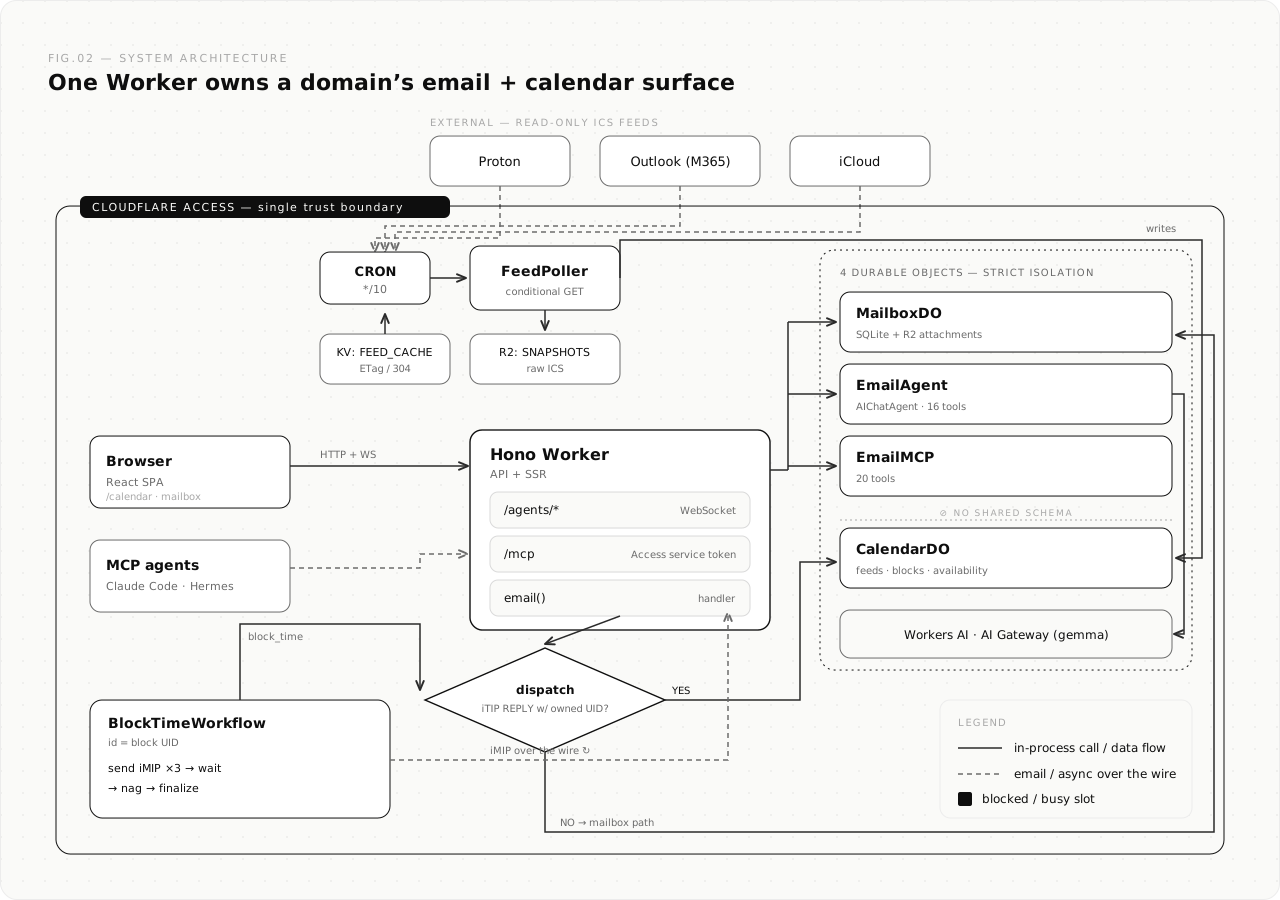
Agentic email + calendar hub on Cloudflare Workers. One Worker owns your domain's email surface: a full self-hosted email client with an AI agent, plus a unified calendar that aggregates Proton / Outlook / iCloud into one busy/free model and writes time blocks back to all three, using nothing but standards-compliant email invitations. No OAuth, no CalDAV, no provider APIs.
Forked from cloudflare/agentic-inbox (Apache 2.0) as a chassis: cloned, renamed, owned. Not tracked against upstream.
In one paragraph: the read path polls each provider's secret ICS publish link every 10 minutes (conditional GETs via KV, raw snapshots to R2) and expands everything (recurrence rules, exceptions, timezones) into a unified busy/free model in a Durable Object. The write path is RFC 5546 over RFC 6047: blocking time emails a standards-compliant invitation to each account, the native client renders a normal meeting invite, and the acceptance (METHOD:REPLY) routes back into the same Worker's email() handler where a Cloudflare Workflow tracks per-account acceptance. Clients accept; providers do the writing.
What it does
- Full email client. Send and receive via Cloudflare Email Routing; rich text composer, threading, folders, search, attachments. Each mailbox is an isolated Durable Object (SQLite) with R2 for attachments.
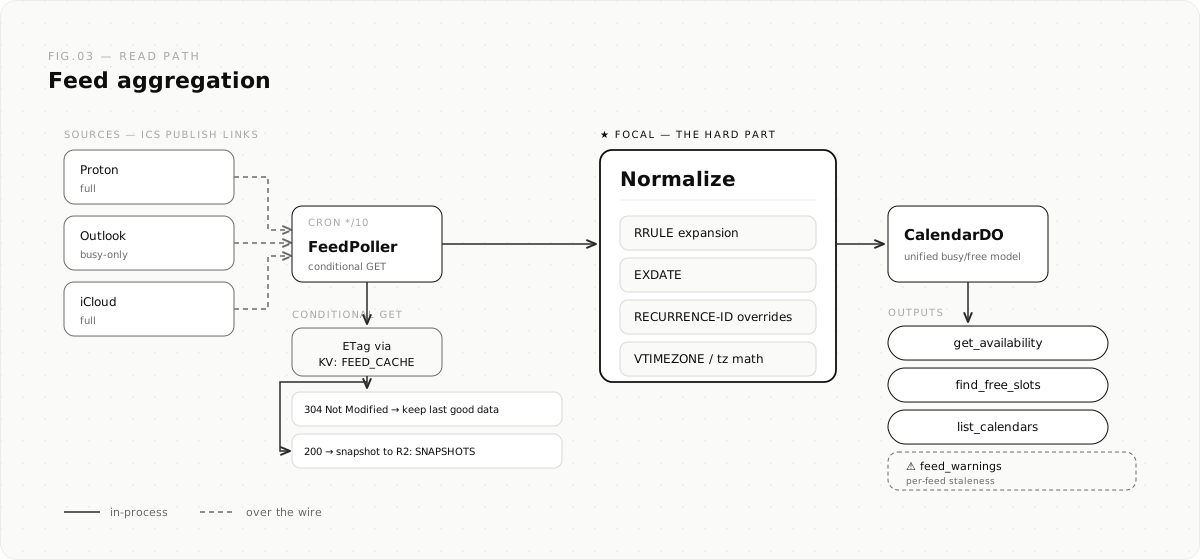
- Unified calendar (read). Each provider publishes a read-only ICS feed (Proton "share via link", Outlook "publish calendar", iCloud "public calendar"). A cron poller normalizes all of them (RRULE expansion, EXDATE, RECURRENCE-ID overrides, timezones) into one availability model (served ±12 months past and future) with per-feed staleness warnings.
- Calendar write path (iMIP).
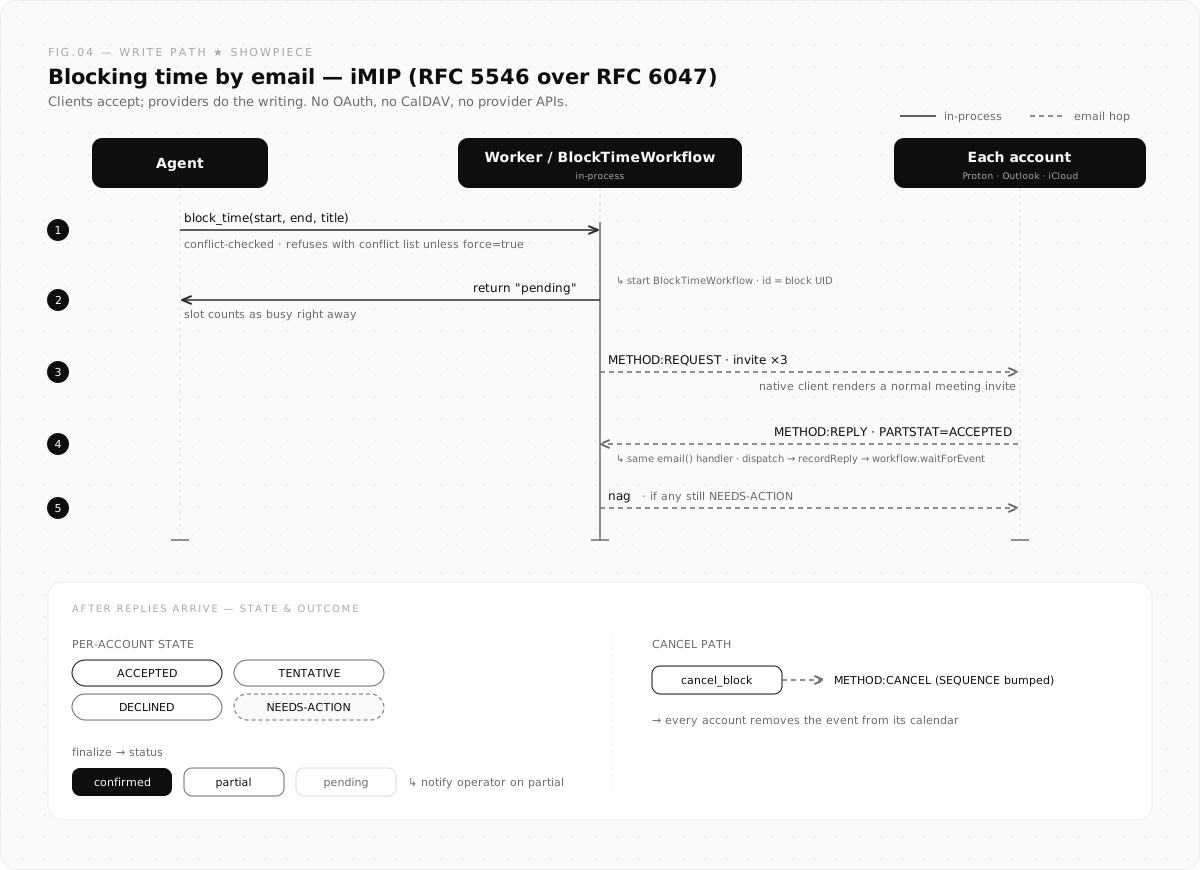
block_timeemails an RFC 5546/6047 invitation to each account; native clients render a normal meeting invite; acceptances route back into the same Worker and a Cloudflare Workflow tracks the lifecycle (send, wait, nag, finalize) per block. - MCP server.
/mcpbehind Cloudflare Access exposes 22 tools (13 email + 9 calendar:get_availability,find_free_slots,block_time,get_block_status,cancel_block,delete_block,purge_cancelled_blocks,list_blocks,list_calendars) for external agents such as Claude Code, Hermes, or anything speaking MCP, authenticated with an Access service token. - Built-in AI agent. Chat panel with an 18-tool surface (9 email + 9 calendar, overlapping but not identical to the 22 exposed over
/mcp), powered by Workers AI (default@cf/google/gemma-4-26b-a4b-it, swappable via theAGENT_MODELvar) with all model traffic routed through AI Gateway. Auto-drafts replies to inbound email, and checks real availability before answering scheduling emails. Drafts always require explicit confirmation before sending. - Calendar UI.
/calendarworkspace with three tabs (Calendar, Feeds, Time blocks): a month/week/day view, paste-the-link feed registration and health, and a filterable time-blocks list showing per-block acceptance state (✓ ✗ ~ …) with one-click cancel and purge of cancelled blocks.
How it works
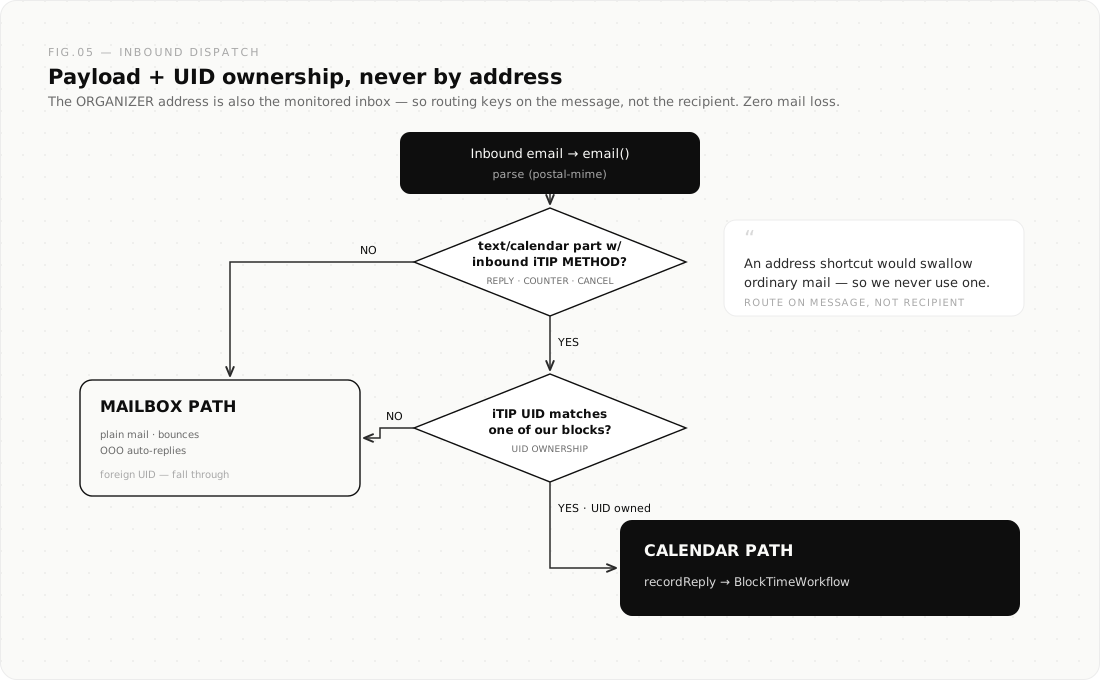
Three flows carry the whole system. The read path folds three providers into one busy/free model; the write path blocks time using nothing but email; and inbound dispatch routes every message by its content, never by its address.
Read path: three calendars into one busy/free model
Write path: blocking time by email (iMIP, RFC 5546 over RFC 6047)
Inbound dispatch: route on the message, never the address
Stack
- Frontend: React 19, React Router v7, Tailwind CSS, Zustand, TipTap,
@cloudflare/kumo - Backend: Hono, Workers, Durable Objects (SQLite), Workflows, R2, KV, Email Routing + Email Service, cron triggers
- Calendar:
ical.js(parsing/expansion), hand-rolled RFC 5545 authoring,mimetextenvelopes - AI: Cloudflare Agents SDK (
AIChatAgent), AI SDK v6, Workers AI via AI Gateway (AGENT_MODEL/AI_GATEWAY_IDvars) - Auth: Cloudflare Access JWT validation (fails closed in production)
Deploy
One-click
The Deploy to Cloudflare button above provisions the Worker plus its resources (Durable Objects, the block-time Workflow, R2 buckets, KV namespace, cron trigger, Workers AI) on your account and prompts you for your domain values.
The button cannot do everything. Finish with these manual steps, in order:
- Cloudflare Access: enable one-click Access on the Worker; set the
POLICY_AUD+TEAM_DOMAINsecrets from the modal. The app intentionally returns 500 until this is done. Create a service token for any MCP agent. - AI Gateway: create a gateway matching the
AI_GATEWAY_IDvar (defaultt9-agentic-cal), or set the var to""to call Workers AI directly. - Email Routing: on your domain, add a catch-all rule → this Worker; enable Email Service for sending; add your calendar invite addresses as verified destination addresses.
- Vars: set
DOMAINSto your domain andORGANIZER_ADDRtocalendar@<your-domain>. This single address is both the meeting organizer and a normal monitored inbox: dispatch routes RSVPs to the calendar path and everything else to the inbox by payload + UID (never by address), so ordinary mail to it is never swallowed. - Feeds: open
/calendarand paste your three ICS publish links (table below).
Manual / local
npm install
npm run dev        # local dev (uses .dev.vars, see .dev.vars.example)
npm run typecheck  # cf-typegen + react-router typegen + tsc -b, run before every push
npx tsx scripts/smoke-ics.ts && npx tsx scripts/smoke-availability.ts && npx tsx scripts/smoke-imip.ts
Cloning manually instead of using the button? Create your own KV namespace (wrangler kv namespace create calendar-feed-cache) and R2 buckets (agentic-inbox, calendar-snapshots), and put your KV id in wrangler.jsonc. Then deploy with wrangler deploy.
Registering calendar feeds
Open /calendar (button on the Mailboxes page). One card per provider: paste the publish link, set the invite address, save, hit Poll now:
| Provider | Where to generate the link | Recommended detail |
|---|---|---|
| Proton | Proton Calendar → Settings → Share calendar via link | full |
| Outlook (M365) | Settings → Calendar → Shared calendars → Publish a calendar → ICS | busy-only (Microsoft caches; feed lags hours) |
| iCloud | Apple Calendar → calendar info → Public Calendar → copy webcal:// link |
full |
webcal://URLs are converted automatically; stored publish URLs are write-only secrets (only a truncated form is ever echoed).- The invite email per feed is where iMIP invitations are sent (usually the account's own address).
- The cron repolls every 10 minutes; a failing feed keeps its last good data and surfaces the error on the card and in
feed_warnings.
API equivalents (behind Access): GET/POST /api/v1/calendar/feeds, DELETE /api/v1/calendar/feeds/:id, POST /api/v1/calendar/poll, GET /api/v1/calendar/stats, GET /api/v1/calendar/events, GET /api/v1/calendar/blocks, DELETE /api/v1/calendar/blocks/:uid (?purge=1 to delete as well as cancel), POST /api/v1/calendar/blocks/purge-cancelled.
Connecting an agent over MCP
Endpoint:   https://<your-worker>/mcp
Auth:       CF-Access-Client-Id / CF-Access-Client-Secret (Access service token)
All 22 tools are self-describing over MCP (list_tools returns full schemas and usage guidance). Semantics worth knowing up front: block_time is asynchronous; it returns pending immediately (the slot counts as busy right away) and refuses with a conflict list unless force is set; acceptance per account is tracked by a Workflow and read via get_block_status. Tool responses include feed_warnings when a calendar feed is stale or erroring, so agents should hedge availability statements accordingly, and should never state availability without a same-turn tool call.
Trust model
Any principal passing the shared Cloudflare Access policy can access all mailboxes and the calendar, including via /mcp (tools take a mailboxId parameter). There is no per-mailbox authorization; the Access policy is the single trust boundary. The same grant includes setting each mailbox's agent system prompt (Settings → it is fed verbatim to the model), so the Access boundary also governs what the agent is instructed to do. This is fine for a single operator. Before any multi-person use, put the app behind a properly-scoped team Access app: otherwise every principal reaches every mailbox and can rewrite the agent's instructions.
Untrusted email content is structurally isolated. Email subjects and bodies are attacker-controlled, so when the read tools (get_email, get_thread, search_emails) hand message content to the agent or to an MCP client, that content is wrapped in nonce-keyed data fences and labelled untrusted, so the model treats it as data rather than instructions. The autonomous auto-draft path additionally runs an AI prompt-injection scanner and fails closed.
Troubleshooting Access
Invalid or expired Access token→POLICY_AUDorTEAM_DOMAINsecret is stale. Toggle Access off/on for the Worker to get the modal again, and reset both secrets.Cloudflare Access must be configured in production→ intentional fail-closed behavior; enable Access and set the secrets.
Architecture
License
Apache 2.0. See LICENSE. Derived from cloudflare/agentic-inbox, © Cloudflare, Inc.
Installing Agentic Cal
This server has no published package — it is built from source. Open the repository and follow its README.
▸ github.com/talalakkari/agentic-calFAQ
Is Agentic Cal MCP free?
Yes, Agentic Cal MCP is free — one-click install via Unyly at no cost.
Does Agentic Cal need an API key?
No, Agentic Cal runs without API keys or environment variables.
Is Agentic Cal hosted or self-hosted?
A hosted option is available: Unyly runs the server in the cloud, no local setup required.
How do I install Agentic Cal in Claude Desktop, Claude Code or Cursor?
Open Agentic Cal on unyly.org, pick your client tab (Claude Desktop, Claude Code, Cursor) and press Install — the config is generated automatically, no JSON editing.
Related MCPs
Gmail
Read, send and search emails from Claude
 by Google
Slack
Send, search and summarize Slack messages
 by Slack
Runbear
No-code MCP client for team chat platforms, such as Slack, Microsoft Teams, and Discord.
Discord Server
A community discord server dedicated to MCP by [Frank Fiegel](https://github.com/punkpeye)
Compare Agentic Cal with
Not sure what to pick?
Find your stack in 60 seconds
Author?
Embed badge for your README
Browse similar
All communication MCPs