
Agentic Comments
FreeMaintainedComment threads and suggestions anchored to any content, from people and agents.

About
Comment threads and suggestions anchored to any content, from people and agents.
README
Comment threads and suggestions anchored to any content, from people and agents.
Status: see npm for the latest released version. The
mainbranch can have changes that npm does not have yet.
Install
Requires Node.js 22 or later. yjs is a peer dependency. Your app and this package must use the same
copy of yjs, because the package checks the Yjs types of your document. Install both:
npm install agentic-comments yjs
Quick start
import * as Y from "yjs";
import { Comments, stamp, textAnchor } from "agentic-comments";

const doc = new Y.Doc();
doc.getText("body").insert(0, "Hello brave world");

const comments = new Comments(doc);
const ada = stamp({ kind: "human", name: "ada" });
const scribe = stamp({ kind: "agent_of_human", name: "scribe" });

const thread = comments.add({ anchor: textAnchor(doc.getText("body"), 6, 11), body: "Word choice? @scribe" }, ada);
comments.reply(thread.id, { body: "I suggest a shorter word." }, scribe);
comments.resolve(thread.id, ada);
The Comments object lives on a Yjs document. Send the document updates with your
normal sync, and every replica sees the same threads.
Features
- Threads anchored to a text range, a cell key, a slide element, or a canvas element. You can add your own anchor type.
- A text anchor uses Yjs relative positions, so it follows its text through edits.
- Messages with mentions. Resolve and reopen a thread.
- Suggestions: a change your app proposes. A person, or an agent with the accept scope, accepts it. An agent never accepts or rejects its own. Two replicas that accept at once apply it once.
- The host stamps every author. An operation never reads an author from its input.
- Every message keeps the author kind, so agent comments stay marked as machine-made.
- Replies and status merge across replicas. Two replicas that resolve at once agree.
- A malformed thread from a bad replica is skipped. A bad message is left out, and
skippedon the thread counts those.problems()names them.
Edit, delete, export, and erase
comments.editMessage(threadId, messageId, { body, mentions? }, actor)changes a body. The id, author, time, and place stay. The message getseditedAtandeditedBy. A resolved thread refuses an edit.comments.deleteMessage(threadId, messageId, actor)removes one message. The last message of a thread stays: delete the thread instead.comments.deleteThread(threadId, actor)removes a thread. Its author can do it while every message is theirs.comments.exportPerson(name, actor)returns the messages a person wrote, the status change of theirs that stands, and their edits to other people's messages. It holds no one else's words.unreadcounts stored entries with their name that the read cannot show (a bad message, an unreadable thread). When it is not 0, the export is not complete.suggestions.exportPersonlists their suggestions and decisions, with its ownunreadcount.comments.erasePerson(name, actor)replaces each message of that person with a tombstone: the body is[erased], the author name iserased, and mentions go. The author kind stays, so machine-made work stays marked. The thread keeps its shape, order, and times. It works on the stored entries, so it also reaches a bad message, a message past the read limit, and a copy that a merge hid. A status change of theirs and their name as an editor get the tombstone name.suggestions.erasePersondoes the same for their suggestions (it drops the summary, and the change of a pending or rejected one, which can then no longer be accepted) and their decisions. No principal can have the nameerased.
A self-export or self-erase covers only the actor's own kind: a message that human:ada wrote and one that
user_token:ada wrote are two principals, and unread does not count the other kind. Ask a moderator for
both. Erase rewrites a status record, so an erase and a real status change made at once on two replicas keep
only one of them. An accepted suggestion keeps its change, which is still the author's text.
Only the author can edit or delete a message, and a person can export or erase their own data: the same kind
and name. A principal with the comments:moderate scope (MODERATE_SCOPE) can do it for anyone, and an
export or erase by a moderator covers every kind with that name. The host gives that scope to an owner or
admin. An edit made by a moderator records the moderator in editedBy. Nobody but a moderator can delete an
erased message or a thread that holds one.
Replicas that edit one message at once leave a copy each. When the copies agree on the author kind and time, the read keeps the erased copy, or else the latest edit. An edit and a delete made at once keep the edit.
Account export and erase
import { commentsAccount } from "agentic-comments/account" lets a host export and erase one person's data
without reading the storage layout. Pass the subject ({ kind, name }) and { documents, actor }. Each
document is { id, comments, suggestions }. The actor is made with stamp() and must name the subject.
exportAccount returns JSON records in messages, statusChanges, edits, suggestions, decisions,
documents, and unread. eraseAccount tombstones the same data as erasePerson and returns counts. A second
erase counts 0, except unread: see below.
The package keeps no grants or audit rows. A host that runs the HTTP worker passes worker: docs (the
CommentsDocs of the worker). Then the run also covers every stored document: the subject's messages and
suggestions in it, and the creator that the worker keeps on each row. The creators are listed under documents
and get the tombstone name on erase. Without worker, that data stays. A stored document is erased in one
transaction. A stored document that documents also lists is refused, before any write. The check compares ids
only. A row whose creator cannot be read shows in unread of the export, and in the unread count of the erase,
which leaves the row in place. unread counts every row it cannot read, whoever made it, so it can stay above 0 on a repeat. A store that loses a race gives CONFLICT: run the erase again.
A run covers only the subject's own kind: human:ada does not reach agent_of_human:ada. Names and mentions of
the subject inside other people's messages are neither exported nor erased. Records can name other people, such
as the moderator in editedBy or the person in decidedBy. A record in unread means the export is not
complete: the store holds entries of the subject that a read cannot show. A missing documents list is an
error, not an empty run. Erase goes document by document. If one fails, the error code tells why, the message names the document when the store allows, and the earlier
documents stay erased. A failed document in documents may be partly erased (its threads and its suggestions
are two steps). A repeat counts only what is left. The counts of a failed run are lost.
The ids in documents and the ids of the worker share one namespace. Erase can make a state a little larger, so a stored
document near the size limit may stop the run with STORE_FULL: the host must shrink or delete that document, and
run the erase again. The run reads the list of stored documents once. Block the subject before the erase, so no
document is made during it. A repeat erase finishes what a race left.
Anchors for plain text
agentic-comments/anchor pins a range of a plain string. It needs no Yjs and no framework.
Offsets are UTF-16 code units, like slice.
import { createAnchor, resolveAnchor } from "agentic-comments/anchor";

const anchor = createAnchor("Hello brave world", 6, 11);
const edits = [{ from: 0, to: 0, insert: "Oh, " }];
resolveAnchor(anchor, "Oh, Hello brave world", edits, 17);
// { state: "attached", from: 10, to: 15, method: "mapped" }
- An edit is
{ from, to, insert }. Edits apply one after another, each in the text left by the one before. resolveAnchor(anchor, newText, edits?, originalLength?)maps the range through the edits. PassoriginalLength, the length of the old text, so it can check that the edits fit both texts.- With edits, the edits are the truth, and the quote is not searched. A range that holds other text is
edited. - With no edits, it searches for the quote. One match wins. With many, the best fit of the text around the
quote wins. On a tie, the match at the old offsets wins, or else the anchor is
orphaned, because a wrong place is worse than none. More than 500 matches orphan too. editedmeans the range exists but holds other text.orphanedmeans the content is gone, the quote is ambiguous, the edits do not fit the text, or the anchor is bad data.- An insert at an edge of the range stays outside it. Deleting the whole range orphans it.
createAnchorthrows aRangeErrorfor an empty range, a range outside the text, or a range that cuts a surrogate pair in two. It does not check grapheme boundaries, so a flag or a joined emoji can still be cut.mapPositionandmapRangemove offsets through edits on their own.
When the content changes
Every thread and suggestion has an anchorState:
| State | Meaning |
|---|---|
attached |
The content is there, as it was. |
edited |
A text range is there, with other text. currentText shows it. |
orphaned |
The content is gone. The thread stays readable and takes replies. |
unknown |
Nothing can tell. A cell, slide, canvas, or custom anchor has no host answer. |
- A text anchor follows its text through edits by any replica. Deleting the whole range orphans it.
- For other anchors, pass
exists(anchor)tonew Comments. Returntrueorfalse. Any other answer, or a throw, meansunknown. list({ anchorState: "orphaned" })finds threads to review.relocate(threadId, actor)moves a text anchor to its quote when the quote occurs exactly once in the same text. It never guesses. It throwsRELOCATE_FAILEDfor no match or many.- Accept refuses a suggestion whose anchor is orphaned or edited. The suggestion stays pending, and a person can reject it.
currentTextis document text. It can hold any character, so a UI should treat it as untrusted.
Suggestions
Your app owns the change. This package stores it as JSON, tracks the decision, and calls your apply.
import { ACCEPT_SCOPE, Suggestions } from "agentic-comments";

const suggestions = new Suggestions(comments, {
  apply(change, { anchor, by, ydoc }) {
    // Edit ydoc here. Throw before you edit when the change cannot apply.
    return { /* a receipt, JSON that lets revert undo this edit */ };
  },
  revert(receipt, { ydoc }) {
    // Undo a duplicate edit. Every replica runs this at once, so use an edit that merges to one result.
    // Throw before you change anything.
  },
});

const s = suggestions.add({ anchor, change: { replacement: "bold" }, summary: "Word choice" }, scribe);
suggestions.accept(s.id, ada);
- A signed-in person (
human) accepts or rejects. Every other kind, includinguser_token, needs thecomments:acceptscope, and never decides a suggestion it wrote. Names match exactly, in Unicode NFC form (a name in another form is refused), and two principals that are not signed-in people with the same name count as one, whatever their kinds. - Accept checks that a text anchor still matches the document, then runs the edit and writes the
record in one step. If
applythrows before it edits, the suggestion stays pending. If it edits and then fails, the decision is recorded without a receipt, andproblems()reports it. A host that cannot undo a double apply must sayidempotent: true. - Every replica of a document must use the same host mode: the same
revert, or the sameidempotentflag. A mix can leave a duplicate edit in the document. problems()entries about an edit that failed after it landed, or a duplicate with no receipt, live in memory on the replica that saw them. Other replicas and a reload do not show them.- A decision by an agent with the accept scope is final for everyone, including people.
- An accept on a replica that has not yet seen a reject wins, even when a person made the reject long before. The window is any time the replicas were apart. An agent with the scope can override a person this way. A host that wants the person to win can accept only while its replica is in sync.
- Two replicas that accept before they meet each apply the edit. After the merge, the application of
the lowest client id stays and
revertundoes each other one. An accept and a reject at once end as accepted. - A receipt is stored data. A peer that can write comment data can choose one, and can rewrite the
anchorto match. Check the receipt inrevertbefore you use it. The sync layer's write control is the real protection. A record with no receipt (anapplythat edited and then failed) always stays, and the other application is undone. If two records have none, the extra edit cannot be undone.problems()reports it. Withidempotent: true, a duplicate is never undone. applyandrevertmust be synchronous, and must edit only the Yjs document.acceptcannot run inside another Yjs transaction, so not inside an observer or anapply.- A peer that can write the document can write a decision record. Records with a bad author, time, or receipt, or from a decider who wrote the suggestion as an agent, are not counted. A well-formed forged record is, and it can win settle, so every replica undoes the real edit. The sync layer must decide who may write.
CLI and MCP server
Both run on a local store: one file that holds a Yjs document. The text is in the text root, and
non-text values are in the values map. A file starts with a magic mark and a hash, so a damaged or zero-filled file is refused and not read as empty. A write
takes a lock file, saves with a rename, and runs again if the file changed meanwhile, so parallel processes
on one machine lose nothing. A full disk or a file size limit fails the write and leaves the old file. A lock left by a dead process, or by this process under another mark, is cleared. So is an empty lock older
than two seconds and any lock older than a minute. The store is for one
machine. It cannot check a lock held in another container or on another machine. Two containers that
share a volume can have the same process id, and each then clears the other's lock, so they can lose writes. A save that
would pass 50 MB is refused.
export AGENTIC_COMMENTS_FILE=./comments.ydoc
export AGENTIC_COMMENTS_AS=human:ada          # kind:name. The operator sets this.
npx agentic-comments init --text "Hello brave world"
npx agentic-comments comment --text-quote brave --body "Word choice? @scribe"
npx agentic-comments list --status open
AGENTIC_COMMENTS_AS=agent_of_human:scribe npx agentic-comments suggest --text-quote brave --replace bold
npx agentic-comments accept <id>
- Commands:
init,list,show,comment,reply,resolve,reopen,relocate,edit-message,delete-message,delete-thread,export-person,erase-person,suggestions,suggest,accept,reject,mcp. Runnpx agentic-comments --helpfor flags. - Every result is JSON. An error is JSON on stderr with a
code, and the exit code is 1. A usage error exits 2. - The principal comes from
--asorAGENTIC_COMMENTS_AS, askind:name. The name starts with A-Z a-z 0-9_-, then uses A-Z a-z 0-9._-, and is at most 128 characters. Scopes come only fromAGENTIC_COMMENTS_SCOPES, a comma list such ascomments:accept. No flag takes a scope or an author, and a flag that does not apply to a command is refused.AGENTIC_COMMENTS_LOCK_TIMEOUT_MSsets the wait for a lock, in whole milliseconds. npx agentic-comments mcp(or theagentic-comments-mcpbinary, which reads the same environment and takes--as) starts the MCP server on stdio. If neither--asnorAGENTIC_COMMENTS_ASsets the principal, the server prints one error line that names them and exits with code 1.--asoverridesAGENTIC_COMMENTS_AS. The operator fixes the principal and the scopes when the server starts. No tool takes an author or a scope. A call with any key a tool does not list is refused, so an agent cannot pick its own kind or rights. Tools:list_threads,get_thread,add_comment,reply_to_thread,resolve_thread,reopen_thread,relocate_thread,edit_message,delete_message,delete_thread,export_person,erase_person,list_suggestions,suggest_change,accept_suggestion,reject_suggestion. Another person's message, thread, or data needscomments:moderateinAGENTIC_COMMENTS_SCOPES. Theedit_message,delete_message,delete_thread, anderase_persontools carry the destructive hint.- A text change is
{"replace": "new text"}. A change for a cell, slide, or canvas anchor is{"value": <JSON>}. - From code:
import { FileStore, CommentsService, operatorActor } from "agentic-comments/local".
HTTP API
agentic-comments/worker is a Cloudflare Worker (Hono) with REST routes under /api/v1. It keeps each
document in a D1 database through the Store port of agentic-identity. It checks every request with the
Auth port, so the host picks who the caller is and no request carries an author.
By default the Worker signs requests in with agentic-identity. Principals and their credentials live in the same
Store as the documents (createStoreAuth). A request sends Authorization: Bearer <key>. The scopes of the
principal decide what it may do (see the table below). A request with no valid credential gets 401. A valid
credential whose scopes fall short gets 403. A store failure while the credential is read gets 503, never 401.
Issue credentials with issueCredential from agentic-identity.
A request whose Authorization header is not Bearer followed by 1 to 512 bytes of A-Z a-z 0-9 _ - gets 401, before any custom Auth runs.
A write with no Authorization header (a session cookie, for example) gets 403 unless its Origin is in the origins
option of createApp. The default lists none.
Static token list (dev fallback). AGENTIC_COMMENTS_TOKENS is read only when AGENTIC_COMMENTS_UNSAFE_STATIC_TOKENS=1.
Identity credentials are tried first, then the list. A Worker that sets the list without the switch answers every
/api/v1 request with 503 NOT_CONFIGURED. The list is JSON from a bearer token to kind:name, or to
{ "as": "kind:name", "scopes": [...] }. A token is 32 to 512 bytes, from A-Z a-z 0-9 _ -.
A name starts with A-Z a-z 0-9 _ -, then uses A-Z a-z 0-9 . _ -, and is at most 128 characters.
One bad entry refuses the whole table. A token with no scopes holds comments:comment. Never use the list in production.
wrangler secret put AGENTIC_COMMENTS_TOKENS
# {"<openssl rand -hex 32>": {"as": "human:ada", "scopes": ["comments:write"]}, "<another>": "agent_of_human:scribe"}
wrangler secret put AGENTIC_COMMENTS_UNSAFE_STATIC_TOKENS   # the value is 1
Also set AGENTIC_COMMENTS_REGION to eu or us. Without it every document route fails with 500 MISCONFIGURED. Use unknown with
AGENTIC_COMMENTS_UNSAFE_REGION=1 only under wrangler dev. The wrangler.jsonc in the repo shows the D1 binding.
| Scope | Allows |
|---|---|
comments:read |
Read documents, threads, and suggestions. |
comments:comment |
Also add threads, reply, resolve, reopen, and suggest. This is the default for a static-list token with no scopes. |
comments:write |
Also create documents, relocate, and accept or reject. |
comments:admin |
Also let an agent accept or reject (the comments:accept right), and edit, delete, export, or erase what another person wrote (the comments:moderate right). |
With comments:comment a principal edits and deletes its own messages, deletes a thread when every message is
its own, and erases its own data. With comments:read it can export its own data, and it cannot change anything.
Export of another person's data and any change to another person's words need comments:admin.
| Route | Action |
|---|---|
GET /api/v1/me |
Who the token stands for. |
POST /api/v1/docs {id, text?} |
Create a document. |
GET /api/v1/docs/:doc |
Read the content text. |
GET, POST /api/v1/docs/:doc/threads |
List (?status=, ?anchorState=, ?mentioning=) or add. |
GET /api/v1/docs/:doc/threads/:id |
Read one thread. |
POST /api/v1/docs/:doc/threads/:id/replies |
Reply. |
POST .../threads/:id/resolve, reopen, relocate |
Change a thread. |
PATCH, DELETE .../threads/:id/messages/:message |
Edit ({body, mentions?}) or delete a message. |
DELETE .../threads/:id |
Delete a thread. |
GET .../people/:name/export |
Export what a person wrote in this document (comments:read for yourself, comments:admin for anyone). |
DELETE .../people/:name |
Erase what a person wrote in this document: replace it with a tombstone (comments:comment for yourself, comments:admin for anyone). |
GET, POST /api/v1/docs/:doc/suggestions |
List or suggest. |
POST .../suggestions/:id/accept, reject |
Decide. An agent never decides its own suggestion. |
Bodies are the same as the MCP tool inputs. An error is {"error": {"code", "message"}}. A body with an
author key is refused with 400.
curl -H "authorization: Bearer $TOKEN" -H "content-type: application/json" \
  -d '{"anchor":{"type":"text","quote":"brave"},"body":"Word choice?"}' \
  http://127.0.0.1:8787/api/v1/docs/d1/threads
HTTP client
agentic-comments/client is a typed client for the Worker routes. It uses only fetch, so it runs in browsers,
Workers, and Node.
import { createClient, CommentsApiError } from "agentic-comments/client";

const comments = createClient({ baseUrl: "https://comments.example.com", token });
await comments.createDocument({ id: "d1", text: "The quick brown fox" });
const thread = await comments.addThread("d1", { anchor: { type: "text", quote: "fox" }, body: "Which fox?" });
await comments.reply("d1", thread.id, { body: "This one." });
try {
  await comments.accept("d1", "missing");
} catch (error) {
  if (error instanceof CommentsApiError) console.error(error.code, error.status);
}
- The methods match the routes:
me,createDocument,getDocument,listThreads,getThread,addThread,reply,resolve,reopen,relocate,editMessage,deleteMessage,deleteThread,exportPerson,erasePerson,listSuggestions,suggest,accept,reject. Each takes an optional{ signal }. baseUrlis the Worker URL,httporhttps, with no query, hash, or credentials.- The client never sends an author. The Worker stamps one from the token.
- A failed call throws
CommentsApiError.codeis the API error code, orUNKNOWNwhen the reply is not an API error.statusis the HTTP status. A200reply with the wrong shape also fails asUNKNOWN. - The client never follows a redirect and never retries. A write that you abort after the client sends it can still apply: read the thread before you try again.
React panel
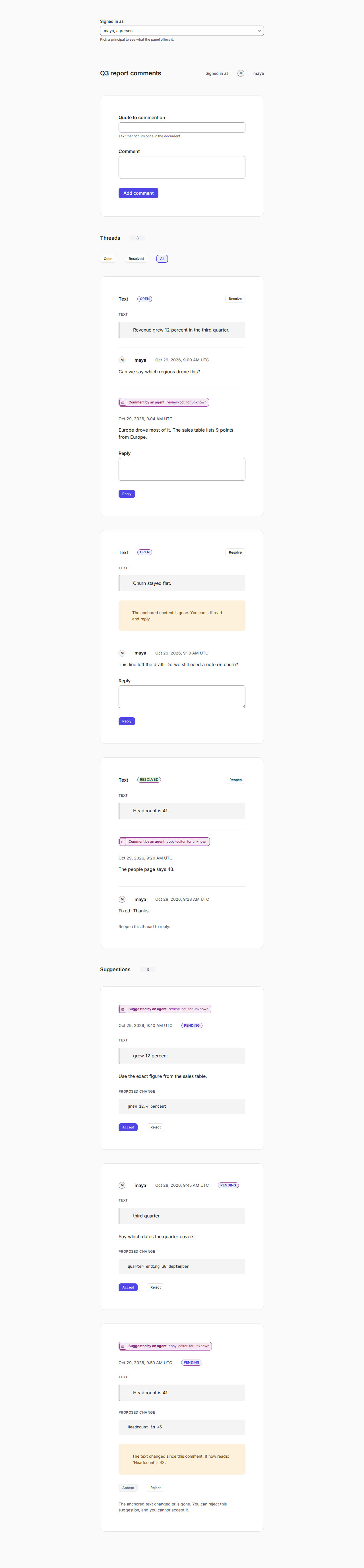
agentic-comments/ui is a threaded comments panel for a React page. It shows the thread list, the quote each thread
points at, a reply box, resolve and reopen, and an author mark on every message. A person shows a name. An agent
shows the AgentBadge of agentic-design, with the words "Comment by an agent". Each suggestion has Accept and
Reject buttons. React 19 and react-dom are peer dependencies. The package depends on agentic-design.
import { CommentsPanel, createClient } from "agentic-comments/ui";
import "agentic-design/styles.css";
import "agentic-comments/ui.css";

const client = createClient({ baseUrl: "https://comments.example.com", token });
<CommentsPanel client={client} docId="report-q3" />;
client is any object with the methods of PanelClient, so a host can pass its own. The panel reads who is signed
in from client.me(). It follows the product rule for suggestions: an agent never gets Accept or Reject for its own
suggestion. Through the Worker, an agent needs the comments:admin scope to decide any suggestion. With a client of your own, the comments:accept right is enough too. A person who holds
comments:write decides any suggestion. mayDecide(me, suggestion) is exported, so a host can use the same rule.
A hidden button is a help and not a lock: the Worker checks every call. The panel shows an error with its code, and
it never retries a call with other input. It needs a document whose text holds the quote, because a new thread
points at a quote. It meets WCAG 2.2 AA (axe runs on light, dark, and 390px) and its classes all start with agd-.
The demo page in ui/ runs the panel with no token on in-memory data, with a switch for the signed-in principal. Open
/#token=<bearer>&doc=<id> on a Worker that serves it, and it talks to that Worker. npm run test:ui drives it in
Chromium against wrangler dev.
Live demo
A demo Worker runs at https://agentic-comments-demo.hello-fd1.workers.dev. It is a staging site. Check it with
GET /health. Every /api/v1 route needs a bearer token, and the demo does not publish one, so a call
with no token gets 401. The data lives in a D1 database in the EU (weur), and the Worker sets the
region to eu. The panel demo page is at the root of the demo Worker.
To deploy your own copy, log in with wrangler login or set CLOUDFLARE_API_TOKEN, then:
npx wrangler d1 create agentic-comments-demo --location weur   # once. Put the id in wrangler.demo.jsonc.
npx wrangler secret put AGENTIC_COMMENTS_TOKENS --config wrangler.demo.jsonc   # the demo uses the static list. See HTTP API
npm run deploy:demo
wrangler.demo.jsonc sets no secret. Deploys run by hand, and no CI job holds a Cloudflare token.
Notifications
Notifications turns changes into events that your app can send to a notifier. It watches the data, so it
sees changes from other replicas too. It replays nothing from before you created it. A first load into an
empty document looks like new changes, so create the stream with muted: true and call unmute() after
that load.
import { Notifications } from "agentic-comments";

const notifications = new Notifications(comments, suggestions, { muted: true, onError: (error, source) => report(error, source) });
// ...load the document or connect the provider, then:
notifications.unmute();
const stop = notifications.subscribe(async (event) => {
  if (event.type === "mention") await notify(event.mention, event.threadId); // fetch the text with the ids
});
- Events:
thread.created,message.added,mention(one per handle),thread.resolved,thread.reopened,suggestion.created,suggestion.accepted,suggestion.rejected. - An event holds ids, the actor,
machineMade, the anchor type,source(localorremote), and a time. It never holds the text of a comment, a suggestion, or a change. Fetch that with the ids. - The same change has the same
idon every replica. So a notifier that must send once keeps the ids it has sent. Within one replica, an id is delivered at most once, and a listener that throws is not retried. A replica remembers its last 10,000 ids (seenLimit) and drops a repeat within that window. Two accepts at once give one id, and the actor can differ between replicas. Asuggestion.rejectedevent can be overturned: if another replica accepted at the same time, the merge ends as accepted, and asuggestion.acceptedevent follows. An id for a status change includes the clock time, so a clock coarser than the changes can merge two. - Use
sourceto decide where to send. If every replica runs a notifier, filter onlocal, or each replica sends its own copy of every remote change. - Events are delivered after the Yjs transaction that caused them has finished, so a listener can write to
the document. A listener that throws, or returns a rejected promise, cannot break a write or another
listener. The
error goes to
onError, or toerrors(). - Write a thread in one Yjs transaction, as
adddoes. A thread whose map arrives empty and gets its fields and messages in one later transaction is treated as created then. A thread built in more steps than that can make no event. - A peer that deletes a thread or a suggestion and adds it back under the same id makes a
createdevent again once the id has left theseenLimitwindow. - A change that arrives as a whole thread, with its replies and status inside, makes an event for each message and for a resolved status. A reopen inside such a thread makes none. A message past the thread's read limit makes no event.
Author kinds
| Kind | Meaning | Label |
|---|---|---|
human |
A person signed in. | person |
user_token |
A person, through a token an agent holds. | person via agent |
agent_of_human |
An agent that acts for a person. | agent |
agent_of_agent |
An agent that acts for another agent. | agent |
agent |
An agent with its own identity. | agent |
Limits
- The file store is for one machine. It is not a sync server. The Worker keeps each document as one D1 row and refuses a document past 600,000 bytes of state.
addchecks that a text anchor points into this document and matches its quote.- The library trusts the host to call
stamp()only for a principal it authenticated. - A reply to a resolved thread is refused on the replica that sees the resolve. A reply and a resolve made at once on two replicas both stay. The merged thread is resolved and holds the reply.
- Author and kind are only as trustworthy as every peer that can write the document. A peer can write any author straight into the Yjs data. The sync layer must decide who may write.
relocateandexistsnever touch a thread whose anchor is attached.existsruns for every thread on every read, so keep it fast.- A local reply stops at 1,000 messages. Replicas that reply at once can pass that. A read shows the first
2,000 valid messages.
skippedandproblems()report the rest. - If several processes clear one stale lock at the same moment, two writes can very rarely overlap. The
save check catches almost every such case. A symlink as the store path is followed. A filesystem with no
hard links makes
inituse a check and a rename, which can race. - The CLI trusts its caller: a process that can set
AGENTIC_COMMENTS_ASandAGENTIC_COMMENTS_SCOPEScan act as anyone. Give an agent the MCP server, where the operator fixes both. Do not give it a shell with the store file and the CLI. - Events come from the data and not from the calls, so a status change that two replicas make at once gives each replica its own event, and a thread that arrives whole gives events for its current state only.
- Every replica of a document must register the same custom anchor kinds.
- Export and erase work on one document. A person who wrote in many documents needs one call for each.
- A repeated message id hides every copy, unless every copy is an edit: then the read keeps one. A peer that appends a copy of a thread's only message makes the thread unreadable.
- The quoted text of a text anchor is not checked when a thread is read. A peer can store any text there.
textAnchorrefuses a quote whose JSON form passes 4,096 characters. Quotes with many newlines or quotation marks hit that before 2,000 characters. - The first visible message decides when a thread started, so a peer that inserts an older message at
the front moves the thread in
list(). - A read scans every stored entry. A peer that writes millions of junk entries slows every read.
- A body mentions anyone named as
@handle. Put@text in backticks to avoid that. Any two backticks in a body pair up, so a loose backtick can hide a real mention that sits between two of them. A scoped package name such as@scope/pkgis not a mention. - Erase does not touch a name that another person typed in their own message.
- Replicas that delete two messages of one thread at once can leave a thread with no message. Only a moderator
can delete it. A reply made on another replica at the same time as
deleteThreadis lost with the thread. - After you merge replicas, run
exportPerson. Whenunreadis not 0, a copy that the merge hid or a bad entry still holds the person's name: runerasePersonagain. An entry whose author is not valid cannot be tied to a person, so export and erase skip it. An edit or an erase makes no notification event, also when two replicas edit one message at once. A delete works on a resolved thread, and an edit does not. - Yjs drops the old text of a deleted or replaced message only when the document has garbage collection on (the default). A copy that you saved before an erase or delete still holds it.
- Mentions are stored in lowercase, with no leading
@. A handle holds up to 64 letters, digits, marks, and. _ -. A longer handle in a body is refused.
Run locally
git clone https://github.com/pooriaarab/agentic-comments
cd agentic-comments
npm install && npm run dev
You can also use bun install && bun run dev. The dev script calls npm, so npm must be installed. The scripts need macOS, Linux, or WSL. The dev script builds the package, then starts wrangler dev on http://localhost:8794. Wrangler keeps a local D1 database. The dev script turns off Wrangler telemetry. Set WRANGLER_SEND_METRICS=false when you run other wrangler commands.
curl -i http://localhost:8794/health # 200
npm run dev:smoke runs the same check by itself. It starts the dev server. It waits for /health to answer 200. It stops the server. CI runs it as the "dev smoke" step. To use another port, change 8794 in the dev and dev:smoke scripts.
Develop
git clone https://github.com/pooriaarab/agentic-comments
cd agentic-comments
npm ci
npm run ci:local   # build, typecheck, unit tests, then the browser tests (npx playwright install chromium once)
License
MIT.
Install Agentic Comments in Claude Desktop, Claude Code & Cursor
unyly install agentic-commentsInstalls into Claude Desktop, Claude Code, Cursor & VS Code — handles npx, uvx and build-from-source repos for you.
First time? Get the CLI: curl -fsSL https://unyly.org/install | sh
Or configure manually
Run in your terminal:
claude mcp add agentic-comments --env AGENTIC_COMMENTS_AS="" --env AGENTIC_COMMENTS_FILE="" -- npx -y agentic-commentsStep-by-step: how to install Agentic Comments
FAQ
Is Agentic Comments MCP free?
Yes, Agentic Comments MCP is free — one-click install via Unyly at no cost.
Does Agentic Comments need an API key?
Yes, it requires environment variables: AGENTIC_COMMENTS_AS, AGENTIC_COMMENTS_FILE. Unyly injects them into the config during install.
Is Agentic Comments hosted or self-hosted?
Self-hosted: the server runs locally on your machine via the install command above.
How do I install Agentic Comments in Claude Desktop, Claude Code or Cursor?
Open Agentic Comments on unyly.org, pick your client tab (Claude Desktop, Claude Code, Cursor) and press Install — the config is generated automatically, no JSON editing.
Related MCPs
GitHub
PRs, issues, code search, CI status
 by GitHub
Filesystem
Secure file operations with configurable access controls.
Memory
Knowledge graph-based persistent memory system.
Template MCP Server
A CLI tool to create a new Model Context Protocol server project with TypeScript support, dual transport options, and an extensible structure
 by mcpdotdirect
Server Sequential Thinking
MCP server for sequential thinking and problem solving
 by GitHub Actions

Unyly Deploy
Deploy sites and MCP servers to Unyly straight from your AI agent
 by Unyly
Amap Maps Mcp Server
MCP server for using the AMap Maps API
 by duxiaohui
PayMCP
Lightweight payments layer for MCP servers: turn tools into paid endpoints with a two-line decorator. [PyPI](https://pypi.org/project/paymcp/) · [npm](https://w
 by blustAI
Server For Power BI
Enables exploring Microsoft Fabric / Power BI workspaces and semantic models, and executing ad-hoc DAX queries.
 by Mitsubishi-Fuso
Gpt Image 2 Mcp
RunAPI GPT Image 2 MCP server for image generation: create tasks, poll results, and check pricing across 1 model from Claude Code, Codex, Cursor, and VS Code.
 by runapi-ai
Compare Agentic Comments with
Not sure what to pick?
Find your stack in 60 seconds
Author?
Embed badge for your README
Browse similar
All development MCPs